# Chromium DevTools docs
[goo.gle/chromium-devtools](http://goo.gle/chromium-devtools)
This directory contains [Chrome DevTools] project
documentation in [Gitiles-flavored Markdown]. It is automatically
[rendered by Gitiles].
[Chrome DevTools]: https://developer.chrome.com/docs/devtools/
[Gitiles-flavored Markdown]: https://gerrit.googlesource.com/gitiles/+/master/Documentation/markdown.md
[rendered by Gitiles]: https://chromium.googlesource.com/devtools/devtools-frontend/+/main/docs/
**If you add new documents, please also add a link to them in the [Document Index](#Document-Index)
below.**
[TOC]
## Work With Us
* See the [playbook](./playbook.md) for step-by-step instructions on how to
work with Chromium DevTools to implement your idea.
* See the [Ecosystem Guide](./ecosystem/README.md) if you are working on Web
development tools and services, and would like to learn more about
integration and extension points with Chromium DevTools.
## Document Index
### Design Documents
* See the shared [Design Documents](https://drive.google.com/drive/folders/1JbUthATfybvMQR3yAHC4J0P7n6oftYNq) folder in the Chromium drive.
### General Development
* [Get the Code](./get_the_code.md)
* [Contribution Guide](./contributing/README.md)
* [UX Style Guide](./styleguide/ux/README.md)
* [Testing Guide](../test/README.md)
* [Cookbook](./cookbook/README.md)
* [Visual logging in DevTools](../front_end/ui/visual_logging/README.md)
* [Style Guides](./styleguide/README.md)
### Architectural Documentation
* [Architecture of DevTools](architecture_of_devtools.md)
* [Chrome DevTools Protocol (CDP)](devtools-protocol.md)
* [Resource management in DevTools](resource_management.md)
* [UI Engineering](ui_engineering.md)
### Chromium
* [Chromium Docs](https://chromium.googlesource.com/chromium/src/+/main/docs/README.md)
* [V8 Documention](https://v8.dev/docs)
### Checklists
* [DevTools UI feature checklist](./checklist/ui.md)
* [DevTools support checklist for Blink Intents](./checklist/README.md)
* [DevTools support checklist for JavaScript features](./checklist/javascript.md)
* [DevTools support checklist for WebAssembly features](./checklist/webassembly.md)
### Policies
* [Chromium DevTools Console Policy](./policy/console-policy.md)
* [Chromium DevTools Slow-Close Policy](./policy/slow-close.md)
* [DevTools Page Zoom Accessibility Policy](./policy/gar-page-zoom-policy.md)
### Useful Commands
`git cl format --js`
Formats all code using clang-format.
`npm test`
Runs all tests on DevTools code.
## Creating Documentation
### Guidelines
* See the [Chromium Documentation Guidelines](https://chromium.googlesource.com/chromium/src/+/refs/heads/main/docs/documentation_guidelines.md)
and the
[Chromium Documentation Best Practices](https://chromium.googlesource.com/chromium/src/+/refs/heads/main/docs/documentation_best_practices.md).
* Markdown documents must follow the
[Markdown style guide](styleguide/markdown/markdown.md).
### Previewing changes
#### Locally using [md_browser](https://chromium.googlesource.com/chromium/src/+/refs/heads/main/tools/md_browser)
Assuming that `/path/to/src` contains a chromium checkout, you can run:
```bash
# in devtools-frontend checkout
/path/to/src/tools/md_browser/md_browser.py --directory $PWD
```
and preview the result by opening http://localhost:8080/docs/README.md in your browser. This is only an estimate. The **gitiles** view may differ.
#### Online with Gerrit's links to gitiles
1. Upload a patch to gerrit, or receive a review request.
e.g. https://chromium-review.googlesource.com/c/3362532
2. View a specific .md file.
e.g. https://chromium-review.googlesource.com/c/3362532/2/docs/README.md
3. You will see something like
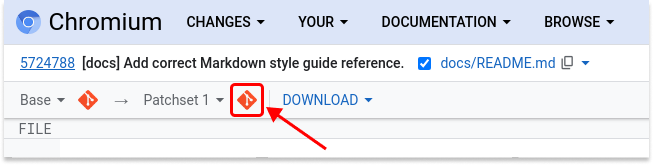
at the top left of the page. Click on the second
"[preview](https://chromium.googlesource.com/chromium/src/+/refs/changes/32/3362532/3/docs/README.md)"
link to open the preview for the current patch set.
This **gitiles** view is the authoritative view, exactly the same as will be
used when committed.