# Claude Auto-Commit
🤖 **AI-powered Git commit message generator using Claude Code SDK**
[](https://opensource.org/licenses/MIT)
[](https://github.com/0xkaz/claude-auto-commit/releases)
[](https://www.npmjs.com/package/claude-auto-commit)
[](https://github.com/0xkaz/claude-auto-commit/stargazers)
[](https://github.com/0xkaz/claude-auto-commit)
[](https://nodejs.org)
[](https://docs.anthropic.com/en/docs/claude-code)
**Language**: [日本語](../ja/README.md) | [中文](../zh/README.md)
Claude Auto-Commit is an open-source command-line tool that integrates AI-powered commit message generation into your Git workflow. By analyzing your code changes, it creates meaningful and contextual commit messages using Claude Code SDK with enhanced performance and reliability.
## 🌟 Transform Your Commit History
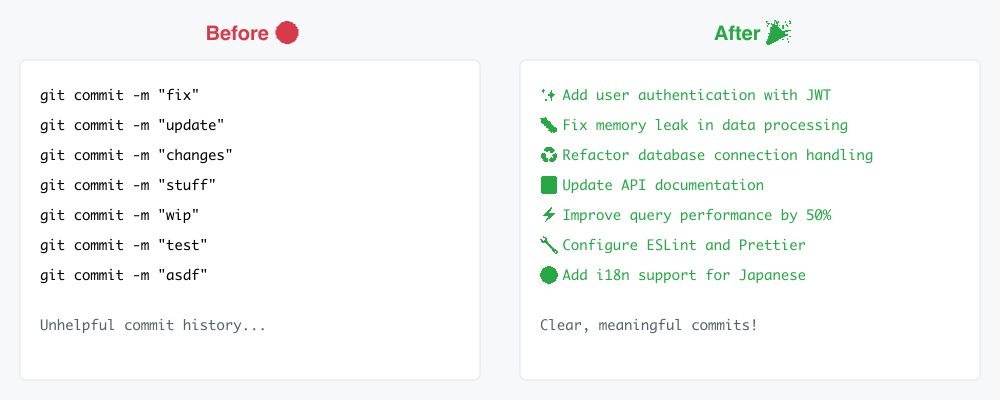
*Say goodbye to vague commit messages. Let Claude AI write meaningful commits that tell the story of your code.*
## 🚀 Quick Start
### Installation Options
**Method 1: One-liner installation (recommended)**
```bash
curl -fsSL https://raw.githubusercontent.com/0xkaz/claude-auto-commit/main/scripts/install.sh | bash
```
**Method 2: NPM global installation**
```bash
npm install -g claude-auto-commit
```
**Method 3: One-time execution (no installation)**
```bash
curl -fsSL https://raw.githubusercontent.com/0xkaz/claude-auto-commit/main/scripts/run-once.sh | bash
```
### Basic Usage
```bash
# Analyze changes and generate commit message
claude-auto-commit
# Japanese with emojis and conventional commits
claude-auto-commit -l ja -e -c
# Custom commit type with auto-push
claude-auto-commit -t feat --push
# Generate commit message and push
claude-auto-commit
# With custom options
claude-auto-commit -l en -e -t feat
```
## ✨ Features
- 🧠 **AI-Powered**: Generates intelligent commit messages using Claude CLI
- 🌍 **Multi-language**: Supports English, Japanese, Chinese, Arabic, Spanish, French
- 📝 **Conventional Commits**: Optional conventional commits format
- 🔄 **Auto-update**: Daily automatic updates (configurable)
- 🎯 **Smart Analysis**: Analyzes code changes, file types, and patterns
- ⚡ **Fast & Lightweight**: Optimized for daily development workflow
- 🛠️ **Highly Configurable**: Extensive customization options
## 📋 Requirements
- Git repository
- [Claude CLI](https://docs.anthropic.com/claude/cli) installed and configured
- Bash shell (macOS, Linux, WSL)
## 🎯 Examples
### Basic Usage
```bash
# Simple commit with auto-generated message
claude-auto-commit
# Custom branch and emoji
claude-auto-commit -b develop -e
# English with conventional commits
claude-auto-commit -l en -c -t feat
# Custom message, no push
claude-auto-commit -m "Custom commit message" -n
```
### Advanced Options
```bash
# Manual staging with verbose output
claude-auto-commit -s -v
# Custom prefix for hotfix
claude-auto-commit -p "[HOTFIX]" -t fix
# Update tool
claude-auto-commit --update
```
## 🔧 Installation Methods
### Method 1: One-liner (Recommended)
```bash
curl -fsSL https://claude-auto-commit.0xkaz.com/install.sh | bash
```
### Method 2: Manual Download
```bash
# Download for your platform
curl -L -o claude-auto-commit https://github.com/0xkaz/claude-auto-commit/releases/latest/download/claude-auto-commit-$(uname -s)-$(uname -m)
chmod +x claude-auto-commit
sudo mv claude-auto-commit /usr/local/bin/
```
### Method 3: NPX (Node.js users)
```bash
npx claude-auto-commit@latest
```
## ⚙️ Configuration
Create `~/.claude-auto-commit/config.yml`:
```yaml
auto_update:
enabled: true
frequency: daily # daily/weekly/manual/always
silent: false
defaults:
language: en
branch: main
emoji: false
conventional: false
git:
auto_stage: true
auto_push: true
```
## 📖 All Options
| Option | Description | Default |
|--------|-------------|---------|
| `-b, --branch ` | Target branch for push | `main` |
| `-l, --language ` | Language (en/ja/zh/ar/es/fr) | `en` |
| `-e, --emoji` | Use emojis | `false` |
| `-n, --no-push` | Don't push | `false` |
| `-s, --no-stage` | Manual staging | `false` |
| `-m, --message ` | Custom message | Claude generated |
| `-t, --type ` | Commit type | Auto-detected |
| `-c, --conventional` | Conventional Commits | `false` |
| `-p, --prefix ` | Prefix | None |
| `-v, --verbose` | Verbose output | `false` |
| `--update` | Update now | - |
| `--no-update` | Skip update this time | - |
| `--version` | Show version | - |
| `-h, --help` | Show help | - |
## 🌟 Key Features
### Intelligent Commit Message Generation
Claude AI analyzes code changes and considers:
- Types of files changed
- Number of lines added, modified, deleted
- Actual code differences
- Project context
### Multi-language Support
Generates messages appropriate for each language's programming community culture:
- **English**: Concise and standard expressions
- **Japanese**: Polite and detailed explanations
- **Chinese**: Technical and direct expressions
### Automatic Update System
- Daily automatic update checks
- Seamless background updates
- Automatic rollback on failure
## 🔄 Auto-Update System
Claude Auto-Commit features a sophisticated auto-update system:
### Default Behavior
- Checks for updates daily (configurable)
- Downloads and installs updates automatically
- Restarts with new version seamlessly
- No user intervention required
### Configuration Options
```yaml
auto_update:
enabled: true # Enable/disable auto-updates
frequency: daily # daily/weekly/manual/always
silent: false # Silent updates (no notifications)
```
### Manual Control
```bash
# Force update now
claude-auto-commit --update
# Skip update this time
claude-auto-commit --no-update
# Check current version
claude-auto-commit --version
```
## 🤝 Contributing
Contributions are welcome! Please read [CONTRIBUTING.md](../../CONTRIBUTING.md) for details.
## 📄 License
This project is licensed under the MIT License - see the [LICENSE](../../LICENSE) file for details.
## 🙏 Acknowledgments
- [Anthropic](https://anthropic.com) for Claude CLI
- [Conventional Commits](https://conventionalcommits.org) specification
- Open source community for inspiration
---
**Made with ❤️ for the developer community**
[Report Issues](https://github.com/0xkaz/claude-auto-commit/issues) | [Request Features](https://github.com/0xkaz/claude-auto-commit/issues/new?template=feature_request.md)