# cnf-qrcode
----------------------------
author: bugszhou | Email:bugszhou@outlook.com
description: generate qrcode,support svg base64 utf8
> ps:本库是基于`node-qrcode`核心库的基础上改造而来,输出`base64/文本格式/svg`格式的二维码,利用图片的优势解决机型的兼容性
## Installation
Inside your project folder do:
```shell
npm install --save cnf-qrcode
```
## Import
import `getSvgDataURL`:
通过解构的方式,仅仅引入`getSvgDataURL`单个方法
```javascript
import { getSvgDataURL } from 'cnf-qrcode';
```
or import all:
```javascript
import cnfQrcode from 'cnf-qrcode';
```
## API
Browser&Server&小程序:
- [toDataURL()](#todataurltext-options-cberror-url)
- [toString()](#tostringtext-options-cberror-string)
- [toBuffer()](#tobuffertext-options-cberror-buffer)
- [getSvgDataURL()](#getsvgdataurltext-options-cberror-url)
- [getSvg()](#getsvgtext-options-cberror-url)
### `toDataURL(text, [options], [cb(error, url)])`
Returns a Data URI containing a representation of the QR Code image.
生成`base64`等格式的二维码
#### `text`
Type: `String|Array`
Text to encode or a list of objects describing segments.
#### `options`
- ##### `type`
Type: `String`
Default: `image/png`
Data URI format.
Possible values are: `image/png`, `image/jpeg`, `image/webp`, `image/svg`.
- ##### `rendererOpts.quality`
Type: `Number`
Default: `0.92`
A Number between `0` and `1` indicating image quality if the requested type is `image/jpeg` or `image/webp`.
See [Options](#options) for other settings.
#### `cb`
Type: `Function`
Callback function called on finish.
#### Example
```javascript
var opts = {
errorCorrectionLevel: 'H',
type: 'image/jpeg',
rendererOpts: {
quality: 0.3
}
}
toDataURL('text', opts, function (err, url) {
if (err) throw err
console.log(url);
})
```
#### Result

### `toString(text, [options], [cb(error, string)])`
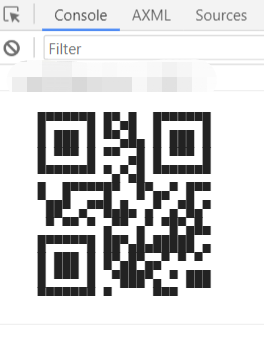
Returns a string representation of the QR Code.
#### `text`
Type: `String|Array`
Text to encode or a list of objects describing segments.
#### `options`
- ###### `type`
Type: `String`
Default: `utf8`
Output format.
Possible values are: `utf8`, and `svg`.
See [Options](#options) for other settings.
#### `cb`
Type: `Function`
Callback function called on finish.
#### Example
```javascript
toString('http://www.google.com', function (err, string) {
if (err) throw err
console.log(string)
})
```
#### Result
In devtools
### `toBuffer(text, [options], [cb(error, buffer)])`
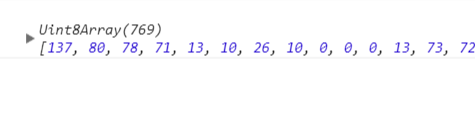
Returns a buffer representation of the QR Code.
#### `text`
Type: `String|Array`
Text to encode or a list of objects describing segments.
#### `options`
- ###### `type`
Type: `String`
Default: `utf8`
See [Options](#options) for other settings.
#### `cb`
Type: `Function`
Callback function called on finish.
#### Example
```javascript
toBuffer('http://www.google.com', function (err, buffer) {
if (err) throw err
console.log(buffer)
})
```
#### Result
### `getSvgDataURL(text, [options], [cb(error, url)])`
Returns a Svg Data URI containing a representation of the QR Code image.
生成`data:image/svg+xml;utf8,...`格式的二维码
#### `text`
Type: `String|Array`
Text to encode or a list of objects describing segments.
#### `options`
- ##### `rendererOpts.quality`
Type: `Number`
Default: `0.92`
A Number between `0` and `1` indicating image quality if the requested type is `image/jpeg` or `image/webp`.
See [Options](#options) for other settings.
#### `cb`
Type: `Function`
Callback function called on finish.
#### Example
```javascript
var opts = {
errorCorrectionLevel: 'L',
rendererOpts: {
quality: 0.3
}
}
getSvgDataURL('text', opts, function (err, url) {
if (err) throw err
console.log(url);
})
```
#### Result

### `getSvg(text, [options], [cb(error, url)])`
Returns a Svg a representation of the QR Code image.
生成``格式的二维码
#### `text`
Type: `String|Array`
Text to encode or a list of objects describing segments.
#### `options`
- ##### `rendererOpts.quality`
Type: `Number`
Default: `0.92`
A Number between `0` and `1` indicating image quality if the requested type is `image/jpeg` or `image/webp`.
See [Options](#options) for other settings.
#### `cb`
Type: `Function`
Callback function called on finish.
#### Example
```javascript
var opts = {
errorCorrectionLevel: 'L',
rendererOpts: {
quality: 0.3
}
}
getSvg('text', opts, function (err, url) {
if (err) throw err
console.log(url);
})
```
#### Result

## Options
### QR Code options
#### `version`
Type: `Number`
QR Code version. If not specified the more suitable value will be calculated.
#### `errorCorrectionLevel`
Type: `String`
Default: `M`
Error correction level.
Possible values are `low, medium, quartile, high` or `L, M, Q, H`.
#### `maskPattern`
Type: `Number`
Mask pattern used to mask the symbol.
Possible values are `0`, `1`, `2`, `3`, `4`, `5`, `6`, `7`.
If not specified the more suitable value will be calculated.
#### `toSJISFunc`
Type: `Function`
Helper function used internally to convert a kanji to its Shift JIS value.
Provide this function if you need support for Kanji mode.
### Renderers options
#### `margin`
Type: `Number`
Default: `4`
Define how much wide the quiet zone should be.
#### `scale`
Type: `Number`
Default: `4`
Scale factor. A value of `1` means 1px per modules (black dots).
#### `width`
Type: `Number`
Forces a specific width for the output image.
If width is too small to contain the qr symbol, this option will be ignored.
Takes precedence over `scale`.
#### `color.dark`
Type: `String`
二维码条纹颜色(qrcode line color)
Default: `#000000`
Color of dark module. Value must be in hex format (RGBA).
Note: dark color should always be darker than `color.light`.
#### `color.light`
Type: `String`
二维码背景色(qrcode background)
Default: `#ffffff`
Color of light module. Value must be in hex format (RGBA).