
# coc-snippets
Snippets solution for [coc.nvim](https://github.com/neoclide/coc.nvim)
[](https://github.com/neoclide/coc-snippets/actions/workflows/ci.yml)
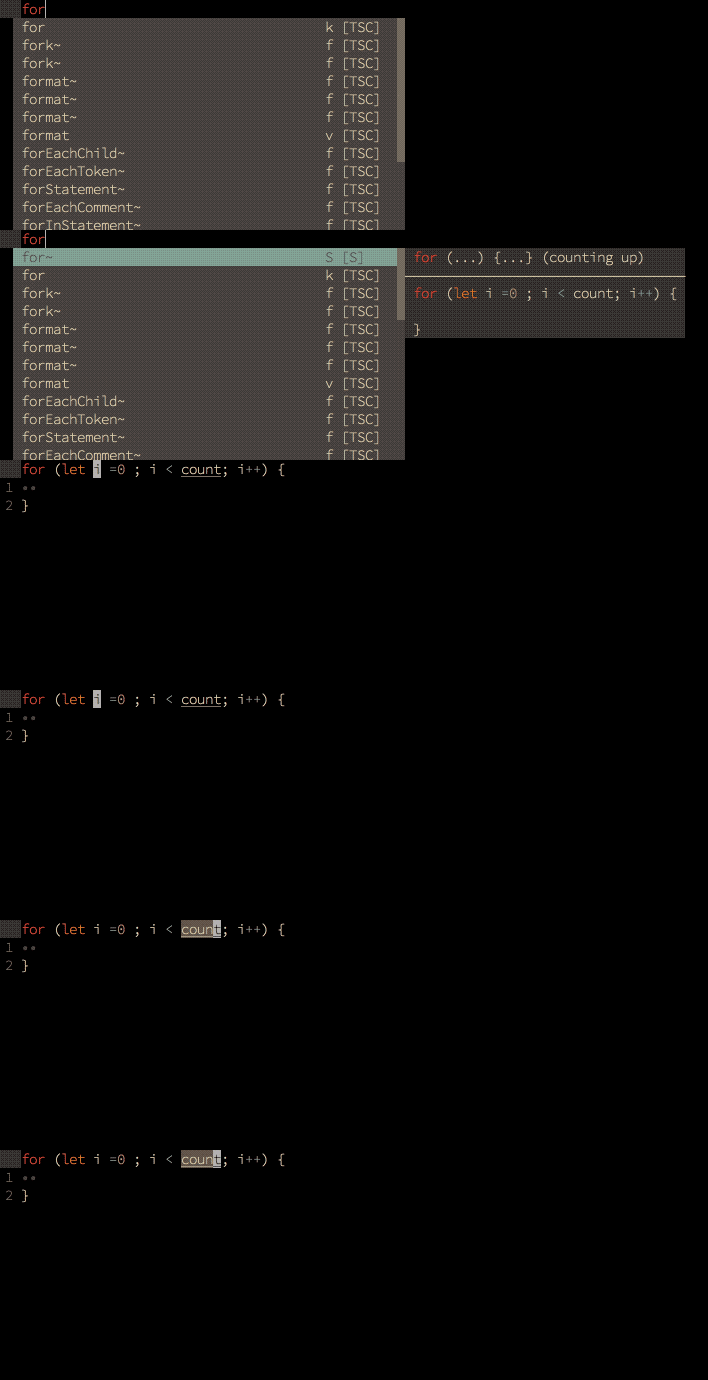
_Snippet preview requires [neovim 0.4 or latest vim8](https://github.com/neoclide/coc.nvim/wiki/F.A.Q#how-to-make-preview-window-shown-aside-with-pum)_
It's capable of:
- Load UltiSnips snippets.
- Load snipmate snippets.
- Load VSCode snippets from coc.nvim extensions.
- Load VSCode snippets from custom directories.
- Load VSCode snippets from `${workspaceFolder}/.vscode`.
- Load UltiSnips snippets from configured folder.
- Load massCode snippets from running massCode application (disabled by default).
- Create massCode snippets through the `snippets.editMassCodeSnippets` command.
- Provide snippets as completion items.
- Provide expand and expandOrJump keymaps for snippet.
- Provide snippets list for edit snippet.
- Provide `snippets.editSnippets` command for edit user snippets of current filetype.
**Note:** some features of ultisnips and snipmate format snippets not supported,
checkout [Ultisnips features](#ultisnips-features).
## Why?
- Use same keys for jump placeholder.
- Nested snippet support.
- Always async, never slows you down.
- Preview snippet context in float window/popup.
- Improved match for complete items with TextEdit support.
- Edit snippets of current buffer by `:CocList snippets`.
## Python support
Ultisnips provider needs pythonx support on (neo)vim, to check the feature exists,
try:
```vim
:echo has('pythonx')
```
On neovim, run command:
```vim
:checkhealth
```
If it is not installed, run:
```shell
pip install pynvim
```
and make sure you have Python 3 provider for neovim installed.
On vim8, run command:
```vim
:pyx print(1)
```
in your vim, if it throws, it means your vim is not compiled with python support
or the python dynamic lib required by vim is missing(or broken).
**Note:** some python code may require python feature that not supported by the
python interpreter used by vim, error will throw on that case.
~Error will be shown when `pythonx` with (neo)vim can't work, fix `pythonx`
support or disable ultisnips support by add `"snippets.ultisnips.enable": false`
in your configuration file.~
## Install
In your vim/neovim, run command:
```
:CocInstall coc-snippets
```
## Examples
```vim
" Use for trigger snippet expand.
imap (coc-snippets-expand)
" Use for select text for visual placeholder of snippet.
vmap (coc-snippets-select)
" Use for jump to next placeholder, it's default of coc.nvim
let g:coc_snippet_next = ''
" Use for jump to previous placeholder, it's default of coc.nvim
let g:coc_snippet_prev = ''
" Use for both expand and jump (make expand higher priority.)
imap (coc-snippets-expand-jump)
" Use x for convert visual selected code to snippet
xmap x (coc-convert-snippet)
```
Make `` used for trigger completion, completion confirm, snippet expand and jump like VSCode.
**Note** from coc.nvim 0.0.82, functions starts with `coc#pum` should be used for
custom completion of coc.nvim.
```vim
inoremap
\ coc#pum#visible() ? coc#_select_confirm() :
\ coc#expandableOrJumpable() ? "\=coc#rpc#request('doKeymap', ['snippets-expand-jump',''])\" :
\ CheckBackspace() ? "\" :
\ coc#refresh()
function! CheckBackspace() abort
let col = col('.') - 1
return !col || getline('.')[col - 1] =~# '\s'
endfunction
let g:coc_snippet_next = ''
```
## Ultisnips features
Some ultisnips features are **not** supported:
- [x] Position check of trigger option, including `b`, `w` and `i`.
- [x] Execute vim, python and shell code in snippet.
- [x] `extends`, `priority` and `clearsnippets` command in snippet file.
- [x] Visual placeholder.
- [x] Placeholder and variable transform.
- [x] Expression snippet.
- [x] Automatic trigger snippet.
- [x] Context snippets.
- [x] Support loading snipmate snippets.
- [x] Replacement String, (:h UltiSnips-replacement-string), requires latest coc.nvim.
- [x] Update python code block after change of placeholder.
- [ ] Execute shell code with custom shabang (will not support).
- [x] Option `m`, trim all whitespaces from right side of snippet lines.
- [x] Reformat snippet options, including `t`, `s`.
- [x] All snippet actions including `pre_expand`, `post_expand` and `jump` (can't support).
- [x] `snip.expand_anon()` and other properties with UltiSnips actions.
**Note**: `snip.expand_anon` expand the snippet in async manner by use timer
when used with `pre_expand` and `post_expand` action, which means the state is
lost in your python script (should only happens on some rare cases).
**Note**: python regex in snippet are converted to javascript regex, however,
some regex patterns can't be supported by javascript, including
`(?x)` `(?s)` `\Z` `(?(id/name)yes-pattern|no-pattern)`.
## Functions
- `coc#expandable()` return `1` when can do snippet expand.
- `coc#jumpable()` return `1` when snippet activated and can jump to next placeholder.
- `coc#expandableOrJumpable()` return `1` when can do snippet expand or can jump
to next placeholder.
## Key-mappings
**Note** you can't use `noremap` with `` key-mappings.
- `(coc-convert-snippet)` Create new snippet with current selected text,
visual mode only.
- `(coc-snippets-expand)` Expand snippet with current inserted text,
insert mode only.
- `(coc-snippets-expand-async)` None block variant of
`(coc-snippets-expand)`.
- `(coc-snippets-expand-jump)` Expand snippet or jump to next placeholder
of current snippet when possible, insert mode only.
- `(coc-snippets-expand-jump-async)` None block variant of
`(coc-snippets-expand-jump)`.
- `(coc-snippets-select)` Remove selected text and save to
`g:coc_selected_text` which will replace `$VISUAL` on next snippet expand.
## Commands
- Use `:CocList snippets` to open snippets list used by current buffer, the last
used snippet item would be preselected.
- Use `:CocCommand snippets.openSnippetFiles` to choose and open a snippet file
that used by current document.
- Use `:CocCommand snippets.editSnippets` to edit user's ultisnips snippets of
current document filetype.
- Use `:CocCommand snippets.openOutput` to open output channel of snippets.
- Use `:CocCommand snippets.addFiletypes` to add additional filetypes of current
buffer.
Use `b:coc_snippets_filetypes` to add additional filetypes on buffer create.
## Options
- `snippets.priority`: Completion source priority of snippets. Default: `90`
- `snippets.editSnippetsCommand`: Open command used for snippets.editSnippets command, use coc.preferences.jumpCommand by default. Default: `""`
- `snippets.trace`: Trace level of snippets channel, used for textmate snippets only. Default: `"error"`
Valid options: ["error","verbose"]
- `snippets.excludePatterns`: List of minimatch patterns for filepath to exclude, support expand homedir and environment variables. Default: `[]`
- `snippets.loadFromExtensions`: Enable load snippets from extensions. Default: `true`
- `snippets.textmateSnippetsRoots`: List of directories that contains textmate/VSCode snippets to load. Default: `[]`
- `snippets.loadVSCodeProjectSnippets`: Load code snippets in folder ${workspaceFolder}/.vscode Default: `true`
- `snippets.extends`: Configure filetypes to inherit with, ex: {"cpp": ["c"], "javascriptreact": ["javascript"]} Default: `{}`
- `snippets.userSnippetsDirectory`: Directory that contains custom user ultisnips snippets, use ultisnips in extension root of coc.nvim by default. Default: `""`
- `snippets.shortcut`: Shortcut in completion menu. Default: `"S"`
- `snippets.triggerCharacters`: Trigger characters for trigger snippets completion. Default: `[]`
- `snippets.disableSyntaxes`: Disable snippets completion when syntax name matches one of disabled syntaxes. Default: `[]`
- `snippets.execContext`: Execute a snippet's context (if it exists) to check if the snippet should be shown in completion menu Default: `false`
- `snippets.autoTrigger`: Enable trigger auto trigger snippet after type character. Default: `true`
- `snippets.ultisnips.enable`: Enable load snippets from ultisnips folders. Default: `true`
- `snippets.ultisnips.pythonPrompt`: Show prompt for user when python not supported on vim. Default: `true`
- `snippets.ultisnips.trace`: Trace verbose snippet information. Default: `false`
- `snippets.ultisnips.directories`: Directories that searched for ultisnips snippet files, could be directory as subfolder in $runtimepath or absolute paths. Default: `["UltiSnips"]`
- `snippets.massCode.enable`: Enable load snippets from MassCode. Default: `false`
- `snippets.massCode.host`: Http host of MassCode. Default: `"localhost"`
- `snippets.massCode.port`: Http port of MassCode. Default: `3033`
- `snippets.massCode.trace`: Trace verbose snippet information. Default: `false`
- `snippets.snipmate.enable`: Load snipmate snippets from snippets directory in runtimepath. Default: `true`
- `snippets.snipmate.trace`: Trace verbose snippet information. Default: `false`
- `snippets.snipmate.author`: Author name used for g:snips_author Default: `""`
## F.A.Q
**Q:** How to add snippet filetypes on buffer create?
**A:** Use autocmd like: `autocmd BufRead *.md let b:coc_snippets_filetypes = ['tex']`
**Q:** How to trigger snippets completion when type special characters?
**A:** Use configuration like: `"snippets.triggerCharacters": ["'"]`. Completion
input only contains word characters, so a snippet with a non-word prefix such as
`///` shows up only after the trigger characters match its prefix, for example:
```json
{
"snippets.triggerCharacters": ["/"]
}
```
Alternatively, expand such snippets directly with the `snippets-expand` keymap,
which does not require the completion menu.
**Q:** How to check if a snippet successfully loaded?
**A:** Use command `:CocCommand workspace.showOutput snippets`
**Q:** How to get debug output from snippets?
**A:** Enable tracing with `snippets.ultisnips.trace: true`,
`snippets.snipmate.trace: true`, `snippets.massCode.trace: true` or
`snippets.trace: "verbose"` (textmate snippets), then open the snippets output
channel with `:CocCommand snippets.openOutput`. Exceptions thrown in UltiSnips
python interpolation are always caught and appended to the channel with the
stack trace. To log custom info from interpolation code without throwing, write
to a file from the python code, e.g.:
```python
open('/tmp/ultisnips.log', 'a').write('debug info\n')
```
**Q:** Some ultisnips snippet not works as expected.
**A:** Reformat after change of placeholder feature can't be supported for now,
and some regex pattern can't be converted to javascript regex pattern, so the
snippet can be failed to load.
**Q:** Where to get snippets?
**A:** One solution is install [honza/vim-snippets](https://github.com/honza/vim-snippets) which is widely used.
To create snippets yourself:
- For Ultisnips, create `${filetype}.snippets` in `"snippets.ultisnips.directories"`
- For snipmate snippets, create `${filetype}.snippets` in `snippets` folder
under your vim's `runtimepath`.
- For VSCode snippets, create `${filetype}.json` in your `"snippets.textmateSnippetsRoots"`.
**Q:** Get error message `ModuleNotFoundError: No module named 'vimsnippets'`
**A:** Make sure [honza/vim-snippets](https://github.com/honza/vim-snippets) in
your vim's `&runtimepath`.
**Q:** Do I need to install [Ultisnips](https://github.com/SirVer/ultisnips).
**A:** No! This extension is designed to work with or without Ultisnips, you can
still install Ultisnips, but this extension would not run any code or read
configuration from it.
**Q:** How to check jumpable or expandable at current position.
**A:** Use functions provided by coc.nvim: `coc#expandable()` `coc#jumpable()` and `coc#expandableOrJumpable()`.
**Q:** How could I add custom UltiSnips snippets.
**A:** You can create snippet files in folder: `$VIMCONFIG/coc/ultisnips`, use
command `:CocCommand snippets.editSnippets` to open user snippet of current
filetype.
## Supporting
If you like this extension, consider supporting me on Patreon or PayPal:

 ## License
MIT
## License
MIT