
A customizable progress bar plugin for Webpack

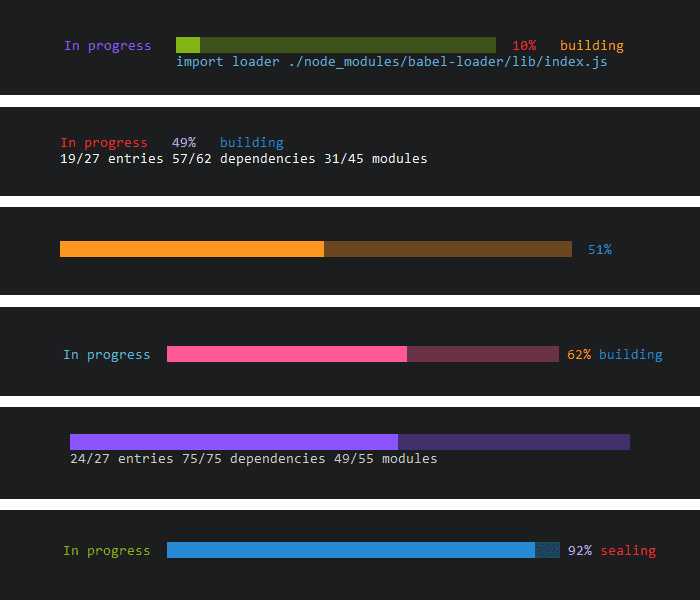
## Features
- No dependencies
- Show **only the elements you want**
- Modify **color** for whole bar or for each element separately
- Modify **size** of the progress bar up to the maximum size available on the line
- Modify **characters** of the bar (complete and incomplete)
- **Hide cursor** during progression
- Play the default **notification sound** when compilation is complete. Very useful
in watch mode. *Currently, this feature is only available for Windows 10 users.*
## Installation
```
npm install -D colored-progress-bar-webpack-plugin
```
```
yarn add -D colored-progress-bar-webpack-plugin
```
## Usage
Include the following in your Webpack config.
```javascript
const ColoredProgressBar = require('colored-progress-bar-webpack-plugin');
plugins: [
new ColoredProgressBar()
]
```
## Elements
The progress bar is made up of 5 elements on 2 lines.
### First row
- **Status** : compilation status
- **Bar** : the bar itself
- **Percent** : percentage of progression
- **Message** : summary of the action the compiler performs
### Second row
- **Detail** : action that the compiler performs
## Options
### Elements
Define the elements to display *(boolean)*
- `showStatus`
- `showBar`
- `showPercent`
- `showMessage`
- `showDetail`
### Colors
Color of the entire progress bar *(string)*
- `colorAll` *if you set the color for the whole bar, it will override the elements colors*
Color of each item separately *(string)*
- `colorStatus`
- `colorBar`
- `colorPercent`
- `colorMessage`
- `colorDetail`
*Accepts the following values:*
- `black`
- `red`
- `green`
- `yellow`
- `blue`
- `magenta`
- `cyan`
- `darkGray`
- `lightGray`
- `lightRed`
- `lightGreen`
- `lightYellow`
- `lightBlue`
- `lightMagenta`
- `lightCyan`
- `white`
### Width
Number of characters of the progress bar *(number)*
- `width` *if this exceeds the maximum size available on the line, this value will be automatically reduced*
### Characters
Define the characters used to represent the completed and uncompleted portion of the bar *(string)*
- `completeChar`
- `incompleteChar`
### Detail alignment
Define if the detail text should be aligned with the bar *(boolean)*
- `alignDetailOnBar`
### Cursor
Define if the cursor should be hidden during compilation *(boolean)*
- `hideCursor`
### Notification sound
Define if the default notification sound is played when compilation is complete *(boolean)*
- `notification` *only available for Windows 10 users*
### Default values
```javascript
new ColoredProgressBar({
showStatus: true,
showBar: true,
showPercent: true,
showMessage: true,
showDetail: true,
colorAll: null,
colorStatus: 'green',
colorBar: 'lightCyan',
colorPercent: 'blue',
colorMessage: 'lightYellow',
colorDetail: 'lightMagenta',
width: 100,
completeChar: '█',
incompleteChar: '░',
alignDetailOnBar: true,
hideCursor: true,
notification: false,
})
```
## License
MIT