 ## colorParsley()
### A lightweight but versatile color parsing utility with no dependencies
[Current Version:](./docs/versionHistory.md) **0.1.8**
**NEW in 0.1.8: colorToHex and colorToRGB now round by default, and input strings using CSS color() have output array values multiplied by 255 for consistency with all other arrays..**
**NEW in 0.1.7: output array will now *always* have an alpha value, with the default as 1 for inputs that lack an alpha. "Failed" parsings will return an alpha of 0.**
ColoR PaRsLeY is a spin off of the SAPC/APCA project. It is a lightweight but powerful tool for parsing color values out of various string types. It supports HEX, RGB INT, HTML & CSS Named Colors, and a variety of additional color models.
ColoR PaRsLeY returns a simple four element array of RGBA INT for HEX or RGB INT inputs, but longer arrays are available for the specialty category.
## QuickStart
_NPM Install:_ ` npm i colorparsley `
### *Usage:*
"colorParsley()" send it a string, it returns an rgba INT array:
```javascript
let textColor = colorParsley('#111111');
let backgroundColor = colorParsley('rgb(123,23,233,1.0)');
console.log(textColor); // [17,17,17,1,true,'sRGB']
console.log(backgroundColor); // [123,23,233,1,true,'sRGB']
// STRUCTURE
returnedArray = [R,G,B,A,isValidBool,colorspaceString]
```
The following are the available input types for colorParsley(). **All are automatically recognized:**
### INPUT as STRINGS:
- **No Alpha**
- ` '#abc' ` or ` 'abc' ` (interpreted as ` 'aabbcc' `)
- ` '#abcdef' ` or ` 'abcdef' ` (hash is ignored)
- ` 'rgb(123, 45, 67)' ` or ` '123,45,67' `
- ` 'aquamarine' ` or ` 'magenta' ` (full CSS4 named colors list)
- ` 'color(srgb 0.765 0.89 0.556)' `
- **With Alpha**
- ` '#abcf' ` or ` 'abcf' ` (interpreted as ` 'aabbccff' `)
- ` '#123456ff' ` or ` '123456ff' ` (hash is ignored)
- ` 'rgba(123, 45, 67, 1.0)' `
- ` 'color(srgb 0.765 0.89 0.556 / 1)' `
- **Greyscale Shorthand**
- ` '#ab' ` or ` 'ab' ` (interpreted as if` 'ababab' `)
- ` '123,' `(interpreted as if` 'rgb(123, 123, 123)' `)
- ` '87%' `(interpreted as if ` 'rgb(87%, 87%, 87%)' = [221.85,221.85,221.85]`)
### NEW:
- CSS 4 compatible changes:
- INTs changed to NUMBER (i.e. 123 can now be 123.9586)
- Added support for `color(srgb 0.765 0.89 0.556 / 1)`
- HSL and HWB now!
- `hsl(310,40%,60%, 1)` (alpha optional)
- NEW export utilities for hex and rgb strings
- `colorToHex(colorParsley('rgb(170,187,204)'))` returns `abc`
- `colorToRGB(colorParsley('abc'))` returns `rgb(170,187,204)`
- Better error handling—now errors return [0,0,0,'',false,'<error message>']
- Send it an object containing {r: g: b:} or {red: green: blue:}
- Send it a simple array [r,g,b,a]
- Greyscale shortcuts!
- For HEX, just two digits: a7 means `#a7a7a7`
- For INT, 1-3 digits followed by a comma: 123, means `rgb(123,123,123)`
- For PCT, 1-3 digits followed by a `%`: 87% means `rgb(87%,87%,87%)`
- and is output as ` [221.85,221.85,221.85,'',...] `
- "More better" regex validations and input type steering
- Each RGB value must be 0.0-255.0. Alpha is 0.0-1 or 0% to 100%
- Alpha values with percent symbol are converted to 0.0-1.0
- RGB Color values in percent are converted to 0.0-255.0
- regex parsing for lch, hsv, luv, etc.
- first 3-5 characters defines the color type
- minimal verification and maximum flexibility for different color space and color model types.
- Supports INT, float, and percentage with % symbol.
- All values with percent symbol are converted to 0.0-1.0
- NOTE: at this time, these are not processed into an rgba array and
- other than percentage, values are left as is, and
- the color type is returned as the sixth element in the array
### Sending as a NUMBER:
- **As hex**
- ` 0xabcdef `
- **As integer**
- ` 11259375 `
No alpha parsing for _numbers_
### RETURNS
- All hex and rgb() inputs return a 6 element rgba NUMBER array
- `[255,255,255,1,true,'sRGB']`
- A value input with a percentage symbol % is divided by 100.0
- Values are assumed to be 8bit unless a decimal point is found.
- The "isValid" boolean is the 5th element in the return array.
- The 6th array element is colorspace or model (i.e. hsl) (default sRGB)
- `[255,255,255,1,true,'sRGB']`
### Future
Passthrough values to be added to the array to be returned.
- An optional 7th array element is the gamma or TRC (default sRGB or per table)
- `[322,0.7,0.5,1,'hsv',2.2]`
- An optional 8th array element is the bitdepth (default 8bit per channel)
- `[0.95,1.1,0.76,1,'RGB','1.0','32.0f','D65']`
-
- An optional 9th array element is the whitepoint (default D65)
- `[123,123,123,1,'ProPhoto','1.8','D50']`
Thoughts? Discuss at the repo!
-----
## COMPANION CODE SNIPPET
The following code snippet is useful for auto-enter entry fields where you want instant response. This function cleans up entry keys as needed — adjust the keys to allow for your interface.
Here the function just calls colorParsley(), but of course add whatever calls you need.
```javascript
// Entry Key Cleanup for better UX with auto-enter
function entryKeys(colorString,e) {
if (
(
(e.which >= 48 && e.which <= 57 && event.shiftKey == false) || // 0-9
(e.which >= 65 && e.which <= 90) || // a-z
(e.which >= 96 && e.which <= 105) // num keypad
) ||
e.which === 13 || // enter
e.which === 9 || // tab key
e.which === 188 || // comma key
e.which === 194 || // comma num keypad key
//e.which === 8 || // backspace
//e.which === 17 || // ctrl
//e.which === 46 || // delete
//(e.which >= 91 && e.which <= 93) || // OS key
(e.which === 48 && event.shiftKey == true) // close parenthesis
) {
let myNewColor = colorParsley(colorString);
showMeTheColor(myNewColor); // the function to do on entry.
}
}
```
Then in your input field, use ` onkeyup =` (or other appropriate event)
```HTML
```
### The NEW CoLoR PaRsLeY REGEX:
## colorParsley()
### A lightweight but versatile color parsing utility with no dependencies
[Current Version:](./docs/versionHistory.md) **0.1.8**
**NEW in 0.1.8: colorToHex and colorToRGB now round by default, and input strings using CSS color() have output array values multiplied by 255 for consistency with all other arrays..**
**NEW in 0.1.7: output array will now *always* have an alpha value, with the default as 1 for inputs that lack an alpha. "Failed" parsings will return an alpha of 0.**
ColoR PaRsLeY is a spin off of the SAPC/APCA project. It is a lightweight but powerful tool for parsing color values out of various string types. It supports HEX, RGB INT, HTML & CSS Named Colors, and a variety of additional color models.
ColoR PaRsLeY returns a simple four element array of RGBA INT for HEX or RGB INT inputs, but longer arrays are available for the specialty category.
## QuickStart
_NPM Install:_ ` npm i colorparsley `
### *Usage:*
"colorParsley()" send it a string, it returns an rgba INT array:
```javascript
let textColor = colorParsley('#111111');
let backgroundColor = colorParsley('rgb(123,23,233,1.0)');
console.log(textColor); // [17,17,17,1,true,'sRGB']
console.log(backgroundColor); // [123,23,233,1,true,'sRGB']
// STRUCTURE
returnedArray = [R,G,B,A,isValidBool,colorspaceString]
```
The following are the available input types for colorParsley(). **All are automatically recognized:**
### INPUT as STRINGS:
- **No Alpha**
- ` '#abc' ` or ` 'abc' ` (interpreted as ` 'aabbcc' `)
- ` '#abcdef' ` or ` 'abcdef' ` (hash is ignored)
- ` 'rgb(123, 45, 67)' ` or ` '123,45,67' `
- ` 'aquamarine' ` or ` 'magenta' ` (full CSS4 named colors list)
- ` 'color(srgb 0.765 0.89 0.556)' `
- **With Alpha**
- ` '#abcf' ` or ` 'abcf' ` (interpreted as ` 'aabbccff' `)
- ` '#123456ff' ` or ` '123456ff' ` (hash is ignored)
- ` 'rgba(123, 45, 67, 1.0)' `
- ` 'color(srgb 0.765 0.89 0.556 / 1)' `
- **Greyscale Shorthand**
- ` '#ab' ` or ` 'ab' ` (interpreted as if` 'ababab' `)
- ` '123,' `(interpreted as if` 'rgb(123, 123, 123)' `)
- ` '87%' `(interpreted as if ` 'rgb(87%, 87%, 87%)' = [221.85,221.85,221.85]`)
### NEW:
- CSS 4 compatible changes:
- INTs changed to NUMBER (i.e. 123 can now be 123.9586)
- Added support for `color(srgb 0.765 0.89 0.556 / 1)`
- HSL and HWB now!
- `hsl(310,40%,60%, 1)` (alpha optional)
- NEW export utilities for hex and rgb strings
- `colorToHex(colorParsley('rgb(170,187,204)'))` returns `abc`
- `colorToRGB(colorParsley('abc'))` returns `rgb(170,187,204)`
- Better error handling—now errors return [0,0,0,'',false,'<error message>']
- Send it an object containing {r: g: b:} or {red: green: blue:}
- Send it a simple array [r,g,b,a]
- Greyscale shortcuts!
- For HEX, just two digits: a7 means `#a7a7a7`
- For INT, 1-3 digits followed by a comma: 123, means `rgb(123,123,123)`
- For PCT, 1-3 digits followed by a `%`: 87% means `rgb(87%,87%,87%)`
- and is output as ` [221.85,221.85,221.85,'',...] `
- "More better" regex validations and input type steering
- Each RGB value must be 0.0-255.0. Alpha is 0.0-1 or 0% to 100%
- Alpha values with percent symbol are converted to 0.0-1.0
- RGB Color values in percent are converted to 0.0-255.0
- regex parsing for lch, hsv, luv, etc.
- first 3-5 characters defines the color type
- minimal verification and maximum flexibility for different color space and color model types.
- Supports INT, float, and percentage with % symbol.
- All values with percent symbol are converted to 0.0-1.0
- NOTE: at this time, these are not processed into an rgba array and
- other than percentage, values are left as is, and
- the color type is returned as the sixth element in the array
### Sending as a NUMBER:
- **As hex**
- ` 0xabcdef `
- **As integer**
- ` 11259375 `
No alpha parsing for _numbers_
### RETURNS
- All hex and rgb() inputs return a 6 element rgba NUMBER array
- `[255,255,255,1,true,'sRGB']`
- A value input with a percentage symbol % is divided by 100.0
- Values are assumed to be 8bit unless a decimal point is found.
- The "isValid" boolean is the 5th element in the return array.
- The 6th array element is colorspace or model (i.e. hsl) (default sRGB)
- `[255,255,255,1,true,'sRGB']`
### Future
Passthrough values to be added to the array to be returned.
- An optional 7th array element is the gamma or TRC (default sRGB or per table)
- `[322,0.7,0.5,1,'hsv',2.2]`
- An optional 8th array element is the bitdepth (default 8bit per channel)
- `[0.95,1.1,0.76,1,'RGB','1.0','32.0f','D65']`
-
- An optional 9th array element is the whitepoint (default D65)
- `[123,123,123,1,'ProPhoto','1.8','D50']`
Thoughts? Discuss at the repo!
-----
## COMPANION CODE SNIPPET
The following code snippet is useful for auto-enter entry fields where you want instant response. This function cleans up entry keys as needed — adjust the keys to allow for your interface.
Here the function just calls colorParsley(), but of course add whatever calls you need.
```javascript
// Entry Key Cleanup for better UX with auto-enter
function entryKeys(colorString,e) {
if (
(
(e.which >= 48 && e.which <= 57 && event.shiftKey == false) || // 0-9
(e.which >= 65 && e.which <= 90) || // a-z
(e.which >= 96 && e.which <= 105) // num keypad
) ||
e.which === 13 || // enter
e.which === 9 || // tab key
e.which === 188 || // comma key
e.which === 194 || // comma num keypad key
//e.which === 8 || // backspace
//e.which === 17 || // ctrl
//e.which === 46 || // delete
//(e.which >= 91 && e.which <= 93) || // OS key
(e.which === 48 && event.shiftKey == true) // close parenthesis
) {
let myNewColor = colorParsley(colorString);
showMeTheColor(myNewColor); // the function to do on entry.
}
}
```
Then in your input field, use ` onkeyup =` (or other appropriate event)
```HTML
```
### The NEW CoLoR PaRsLeY REGEX:
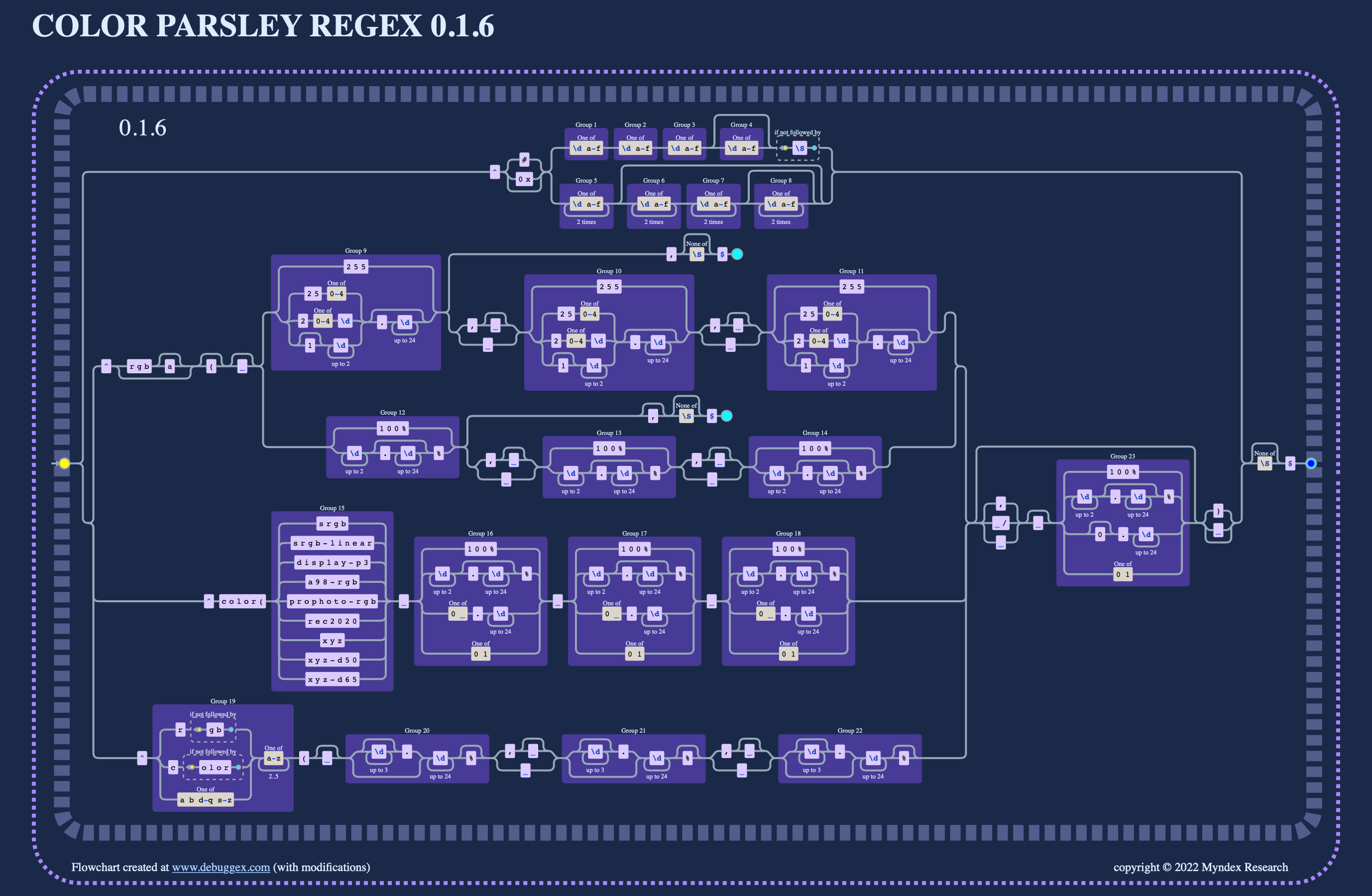 Regex flow chart svg created at https://www.debuggex.com/
### Reference code from CSS
```javascript
//* // hslToRgb() hwbToRgb() from CSS shown here only as a reference
///// ƒ hslToRgb() ///////////////////////////////////////////////////
//// Unused, built into the string parser, here for reference
function hslToRgb (hue, sat, light) { // CSS4 reference implementation
hue = hue % 360;
if (hue < 0) { hue += 360; }
sat /= 100.0;
light /= 100.0;
function f(n) {
let k = (n + hue/30) % 12;
let a = sat * Math.min(light, 1 - light);
return light - a * Math.max(-1, Math.min(k - 3, 9 - k, 1));
}
return [f(0), f(8), f(4)]; // returns 0.0 - 1.0
};
///// ƒ hwbToRgb() ///////////////////////////////////////////////////
//// Unused, built into the string parser, here for reference
function hwbToRgb(hue, white, black) { // CSS4 reference implementation
white /= 100.0;
black /= 100.0;
if (white + black >= 1) {
let gray = white / (white + black);
return [gray, gray, gray];
}
let rgb = hslToRgb(hue, 100.0, 50.0);
for (let i = 0; i < 3; i++) {
rgb[i] *= (1 - white - black);
rgb[i] += white;
}
return rgb; // returns 0.0 - 1.0
};
// */
```
Regex flow chart svg created at https://www.debuggex.com/
### Reference code from CSS
```javascript
//* // hslToRgb() hwbToRgb() from CSS shown here only as a reference
///// ƒ hslToRgb() ///////////////////////////////////////////////////
//// Unused, built into the string parser, here for reference
function hslToRgb (hue, sat, light) { // CSS4 reference implementation
hue = hue % 360;
if (hue < 0) { hue += 360; }
sat /= 100.0;
light /= 100.0;
function f(n) {
let k = (n + hue/30) % 12;
let a = sat * Math.min(light, 1 - light);
return light - a * Math.max(-1, Math.min(k - 3, 9 - k, 1));
}
return [f(0), f(8), f(4)]; // returns 0.0 - 1.0
};
///// ƒ hwbToRgb() ///////////////////////////////////////////////////
//// Unused, built into the string parser, here for reference
function hwbToRgb(hue, white, black) { // CSS4 reference implementation
white /= 100.0;
black /= 100.0;
if (white + black >= 1) {
let gray = white / (white + black);
return [gray, gray, gray];
}
let rgb = hslToRgb(hue, 100.0, 50.0);
for (let i = 0; i < 3; i++) {
rgb[i] *= (1 - white - black);
rgb[i] += white;
}
return rgb; // returns 0.0 - 1.0
};
// */
```