# Inspector Grouping Attributes
**Organize your inspector without writing custom editors.**
Unity Helpers provides powerful grouping attributes that create boxed sections and collapsible foldouts with zero boilerplate. These attributes rival commercial tools like Odin Inspector while offering unique features like auto-inclusion.
---
## Table of Contents
- [WGroup & WGroupEnd](#wgroup--wgroupend)
- [Common Features](#common-features)
- [Configuration](#configuration)
- [Best Practices](#best-practices)
- [Examples](#examples)
---
## WGroup & WGroupEnd
Creates boxed inspector sections with optional collapsible headers and automatic field inclusion.
> ⚠️ **Important:** `[WGroupEnd]` must be placed on the **last field you want included** in the group. The field with `[WGroupEnd]` IS included in the group, and then the group closes for subsequent fields.
### Basic Usage
```csharp
using UnityEngine;
using WallstopStudios.UnityHelpers.Core.Attributes;
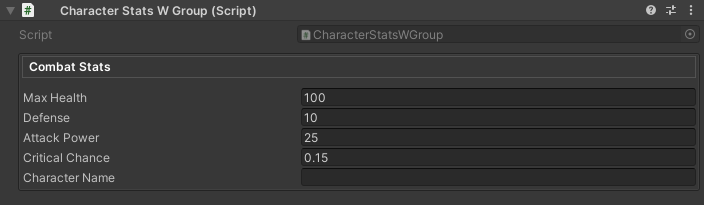
public class CharacterStatsWGroup : MonoBehaviour
{
// Simple box with 4 fields
[WGroup("combat", "Combat Stats")]
public float maxHealth = 100f;
public float defense = 10f;
public float attackPower = 25f;
[WGroupEnd("combat")] // criticalChance IS included, then group closes
public float criticalChance = 0.15f;
public string characterName; // Not in group (comes after WGroupEnd)
}
```
### Parameters
```csharp
[WGroup(
string groupName, // Required: Unique identifier
string displayName = null, // Optional: Header text (defaults to groupName)
int autoIncludeCount = UseGlobalAutoInclude, // Auto-include N fields (or use global setting)
bool collapsible = false, // Enable foldout behavior
bool startCollapsed = false, // Initial collapsed state
bool hideHeader = false, // Draw body without header bar
string parentGroup = null // Optional: Nest inside another group
)]
```
> 💡 Use the optional `CollapseBehavior` named argument (or `startCollapsed: true`) to override the project-wide default configured under **Project Settings ▸ Wallstop Studios ▸ Unity Helpers ▸ Start WGroups Collapsed**. Example:
>
> ```csharp
> [WGroup(
> "advanced",
> collapsible: true,
> CollapseBehavior = WGroupAttribute.WGroupCollapseBehavior.ForceExpanded
> )]
> ```
`CollapseBehavior` options:
- `UseProjectSetting` (default) – defers to the Unity Helpers project setting.
- `ForceExpanded` – always starts expanded.
- `ForceCollapsed` – always starts collapsed (equivalent to `startCollapsed: true`).
---
### Auto-Inclusion Modes
#### 1. Explicit Count
```csharp
[WGroup("items", "Inventory", autoIncludeCount: 3)]
public GameObject weapon; // Field 1: in group
public GameObject armor; // Field 2: in group (auto-included)
[WGroupEnd("items")] // accessory IS included (field 3), then group closes
public GameObject accessory; // Field 3: in group (last field)
public int gold; // NOT in group (comes after WGroupEnd)
```
#### 2. Infinite Auto-Include
```csharp
[WGroup("settings", "Settings", autoIncludeCount: WGroupAttribute.InfiniteAutoInclude)]
public bool enableSound; // In group
public bool enableMusic; // In group (auto-included)
public float volume; // In group (auto-included)
// ... 20 more fields ... // All auto-included
[WGroupEnd("settings")] // lastField IS included, then group closes
public bool lastField; // In group (last field)
public int outsideGroup; // NOT in group (comes after WGroupEnd)
```
#### 3. Global Default
```csharp
// Uses WGroupAutoIncludeRowCount from ProjectSettings/UnityHelpersSettings.asset (default: 4)
[WGroup("stats", "Stats")] // autoIncludeCount defaults to UseGlobalAutoInclude
public int strength; // Field 1: in group
public int intelligence; // Field 2: in group (auto-included)
public int agility; // Field 3: in group (auto-included)
[WGroupEnd("stats")] // luck IS included (field 4), then group closes
public int luck; // Field 4: in group (last field)
```
---
### Collapsible Groups
```csharp
using UnityEngine;
using WallstopStudios.UnityHelpers.Core.Attributes;
public class WGroupEndExample : MonoBehaviour
{
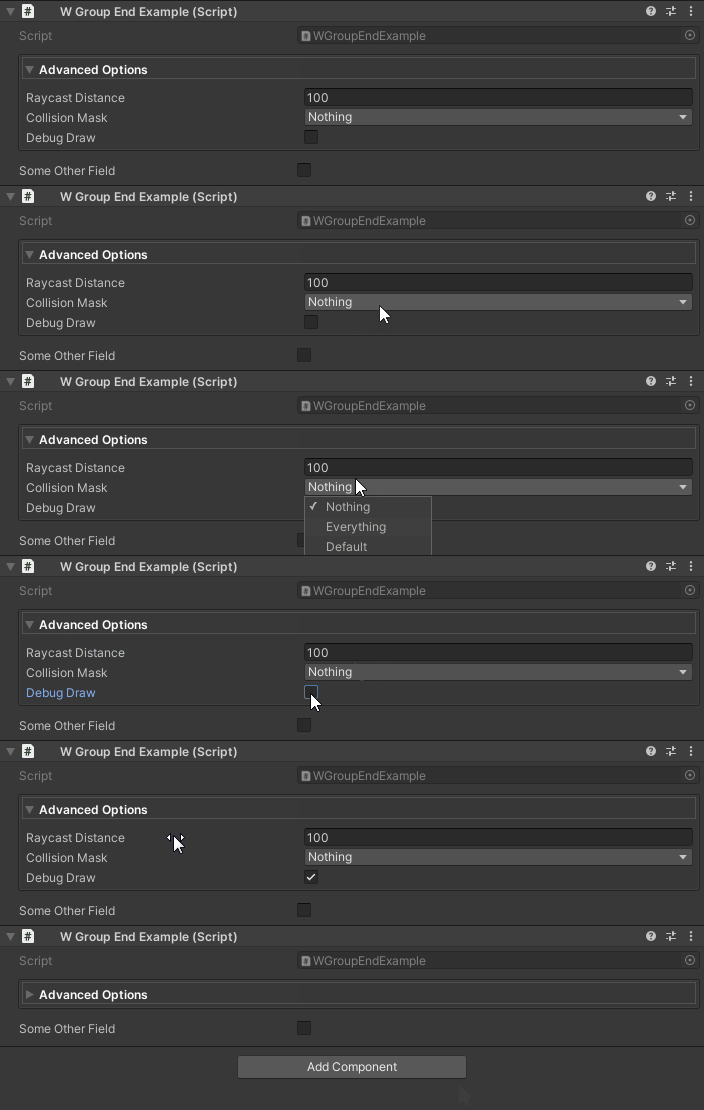
[WGroup("advanced", "Advanced Options", collapsible: true, startCollapsed: true)]
public float raycastDistance = 100f; // In group
public LayerMask collisionMask; // In group (auto-included)
[WGroupEnd("advanced")] // debugDraw IS included, then group closes
public bool debugDraw; // In group (last field)
public bool someOtherField; // NOT in group (comes after WGroupEnd)
}
```
**Animation Settings:**
- Speed controlled by `UnityHelpersSettings.WGroupFoldoutSpeed` (default: 2.0, range: 2.0-12.0)
- Enable/disable via `UnityHelpersSettings.WGroupFoldoutTweenEnabled` (default: enabled)
Configure in **Project Settings → Unity Helpers** or see [Inspector Settings](./inspector-settings.md#wgroup-settings) for details.
---
### Hiding Headers
```csharp
using UnityEngine;
using WallstopStudios.UnityHelpers.Core.Attributes;
public class HealthExample : MonoBehaviour
{
[WGroup("stealth", "", hideHeader: true)]
public float opacity = 1f; // In group
[WGroupEnd("stealth")] // isVisible IS included, then group closes
public bool isVisible = true; // In group (last field)
}
```

**Use Cases:**
- Visual separation without labels
- Nested grouping styles
- Minimalist inspector layouts
---
### Nested Groups
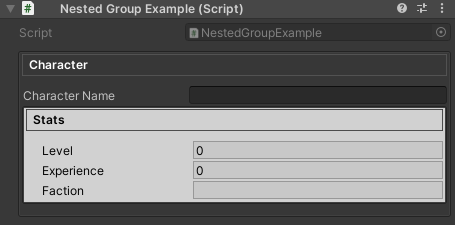
Use the `parentGroup` parameter to nest one group inside another. Nested groups render visually inside their parent's box, with accumulated indentation and padding.
```csharp
using UnityEngine;
using WallstopStudios.UnityHelpers.Core.Attributes;
public class NestedGroupExample : MonoBehaviour
{
[WGroup("outer", "Character")]
public string characterName; // In outer group
[WGroup("inner", "Stats", parentGroup: "outer")]
public int level; // In inner group (nested in outer)
public int experience; // In inner group (auto-included)
[WGroupEnd("inner")] // faction IS included in BOTH groups
[WGroupEnd("outer")] // Then both groups close
public string faction; // In inner AND outer groups (last field)
}
```
**How Nesting Works:**
1. Declare the parent group first with `[WGroup("outer", ...)]`
2. Declare child group with `parentGroup: "outer"` parameter
3. Child groups are rendered recursively inside parent content areas
4. Indentation and padding accumulate for each nesting level
5. Each group maintains its own foldout state when collapsible
**Multiple Nesting Levels:**
```csharp
[WGroup("level1", "Level 1")]
public string field1; // In level1 only
[WGroup("level2", "Level 2", parentGroup: "level1")]
public string field2; // In level2 (nested in level1)
[WGroup("level3", "Level 3", parentGroup: "level2")]
public string field3; // In level3 (nested in level2 → level1)
[WGroupEnd("level3")] // field4 IS included in all three groups
[WGroupEnd("level2")] // Then all groups close in order
[WGroupEnd("level1")]
public string field4; // In level3, level2, AND level1 (last field)
```
**Sibling Nested Groups:**
```csharp
[WGroup("parent", "Parent")]
public string parentField; // In parent group
[WGroup("child1", "Child 1", parentGroup: "parent")]
public string child1Field; // In child1 (nested in parent)
[WGroupEnd("child1")] // child2Field starts NEW group, so closes child1 first
[WGroup("child2", "Child 2", parentGroup: "parent")]
public string child2Field; // In child2 (nested in parent)
[WGroupEnd("child2")] // afterParent IS included in child2 AND parent
[WGroupEnd("parent")] // Then both groups close
public string afterParent; // In child2 AND parent groups (last field)
```
**Important Notes:**
- Parent group must be declared before or on the same property as the child
- Circular references are detected and logged as warnings; affected groups are treated as top-level
- If `parentGroup` references a non-existent group, the child is rendered as a top-level group
---
### WGroupEnd Variants
> ⚠️ **Key Point:** `[WGroupEnd]` must always be attached to a field. The field with `[WGroupEnd]` IS included in the group (via auto-include), and then the group closes.
#### 1. End Specific Group
```csharp
[WGroup("combat", "Combat Stats")]
public int health; // In group
public int defense; // In group (auto-included)
[WGroupEnd("combat")] // stamina IS included, then "combat" closes
public int stamina; // In group (last field)
public int unrelatedField; // NOT in group
```
#### 2. End Multiple Groups
When closing nested groups, stack multiple `[WGroupEnd]` attributes on the last field:
```csharp
[WGroup("outer", "Outer")]
public int outerField; // In outer
[WGroup("inner", "Inner", parentGroup: "outer")]
public int innerField; // In inner (nested in outer)
[WGroupEnd("inner")] // lastField IS included in both groups
[WGroupEnd("outer")] // Then both groups close
public int lastField; // In inner AND outer (last field)
```
#### 3. Close All Active Groups
Omit the group name to close all currently active auto-include groups:
```csharp
[WGroup("settings", autoIncludeCount: WGroupAttribute.InfiniteAutoInclude)]
public bool enableSound; // In group
public float volume; // In group (auto-included)
[WGroupEnd] // lastSetting IS included, then ALL groups close
public bool lastSetting; // In group (last field)
public int outsideAllGroups; // NOT in any group
```
---
## Common Features
### Auto-Include Constants
```csharp
public class WGroupAttribute
{
public const int InfiniteAutoInclude = -1; // Include until WGroupEnd
public const int UseGlobalAutoInclude = -2; // Default: use project setting
}
```
### Shared Group Names
```csharp
using UnityEngine;
using WallstopStudios.UnityHelpers.Core.Attributes;
public class WGroupOutOfOrderExample : MonoBehaviour
{
[WGroup("settings", "Game Settings", autoIncludeCount: 1)]
public float masterVolume;
public float musicVolume;
public int numChannels;
// Later in the same script...
[WGroup("settings", autoIncludeCount: 1)] // Reuses "Game Settings" header, included in original group
public float sfxVolume;
[WGroupEnd("settings")]
public bool enableSound;
}
```
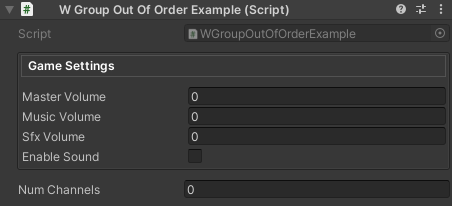
**Note:** Multiple `[WGroup]` attributes with the same `groupName` merge into a single group instance. This allows for logical grouping of related fields that may not be contiguous in code.
---
## Configuration
### Global Settings
All grouping attributes respect project-wide settings defined in `UnityHelpersSettings`:
**Location:** `ProjectSettings/UnityHelpersSettings.asset`
**Settings:**
- `WGroupAutoIncludeRowCount` (default: 4) - Default fields to auto-include
- `WGroupStartCollapsed` (default: true) - Whether collapsible groups start collapsed
- `WGroupFoldoutTweenEnabled` (default: true) - Enable expand/collapse animations
- `WGroupFoldoutSpeed` (default: 2.0, range: 2-12) - Animation speed

---
## Best Practices
### 1. Consistent Naming
```csharp
// ✅ GOOD: Clear, descriptive group names
[WGroup("combat", "Combat Stats")]
[WGroup("movement", "Movement Settings")]
[WGroup("visuals", "Visual Effects")]
// ❌ BAD: Vague or inconsistent
[WGroup("group1", "Stuff")]
[WGroup("misc", "Things")]
```
### 2. Auto-Inclusion Strategy
```csharp
// ✅ GOOD: Explicit count for small groups
[WGroup("position", "Position", autoIncludeCount: 3)]
public Vector3 position; // Field 1: in group
public Quaternion rotation; // Field 2: in group (auto-included)
[WGroupEnd("position")] // scale IS included (field 3), then group closes
public Vector3 scale; // Field 3: in group (last field)
// ✅ GOOD: Infinite for dynamic/long lists
[WGroup("inventory", "Items", autoIncludeCount: WGroupAttribute.InfiniteAutoInclude)]
public List weapons; // In group
public List consumables; // In group (auto-included)
// ... many more fields ... // All auto-included
[WGroupEnd("inventory")] // lastItem IS included, then group closes
public int lastItem; // In group (last field)
// ❌ BAD: Infinite without WGroupEnd (includes everything below!)
[WGroup("bad", autoIncludeCount: WGroupAttribute.InfiniteAutoInclude)]
public int field1;
public int field2;
// Oops, forgot [WGroupEnd]!
public string unrelatedField; // Also included!
```
### 3. Collapsible vs. Always-Open
```csharp
// ✅ GOOD: Always-visible for frequently accessed data
[WGroup("core", "Core Stats", collapsible: false)]
public float health; // In group
[WGroupEnd("core")] // energy IS included, then group closes
public float energy; // In group (last field)
// ✅ GOOD: Collapsible for optional/advanced features
[WGroup("advanced", "Advanced", collapsible: true, startCollapsed: true)]
public float debugParameter; // In group
[WGroupEnd("advanced")] // experimentalFeature IS included, then closes
public bool experimentalFeature; // In group (last field)
// ❌ BAD: Everything collapsible (hides important data)
[WGroup("important", "Critical Settings", collapsible: true, startCollapsed: true, autoIncludeCount: 0)]
public float maxHealth; // Why hide this?
```
---
## Examples
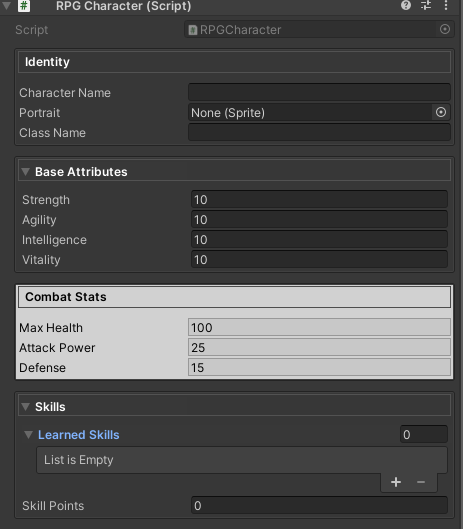
### Example 1: RPG Character Stats
```csharp
using System.Collections.Generic;
using UnityEngine;
using WallstopStudios.UnityHelpers.Core.Attributes;
public class RPGCharacter : MonoBehaviour
{
[WGroup("identity", "Identity")]
public string characterName; // In identity group
public Sprite portrait; // In identity group (auto-included)
public string className; // In identity group (auto-included)
[WGroupEnd("identity")] // strength IS included, then identity closes
[WGroup("attributes", "Base Attributes", collapsible: true)]
public int strength = 10; // In identity (last) AND starts attributes
public int agility = 10; // In attributes (auto-included)
public int intelligence = 10; // In attributes (auto-included)
public int vitality = 10; // In attributes (auto-included)
[WGroupEnd("attributes")] // maxHealth IS included, then attributes closes
[WGroup("combat", "Combat Stats")]
public float maxHealth = 100f; // In attributes (last) AND starts combat
public float attackPower = 25f; // In combat (auto-included)
public float defense = 15f; // In combat (auto-included)
[WGroupEnd("combat")] // learnedSkills IS included, then combat closes
[WGroup("skills", "Skills", collapsible: true, startCollapsed: true)]
public List learnedSkills = new(); // In combat (last) AND starts skills
[WGroupEnd("skills")] // skillPoints IS included, then skills closes
public int skillPoints = 0; // In skills (last field)
}
```
---
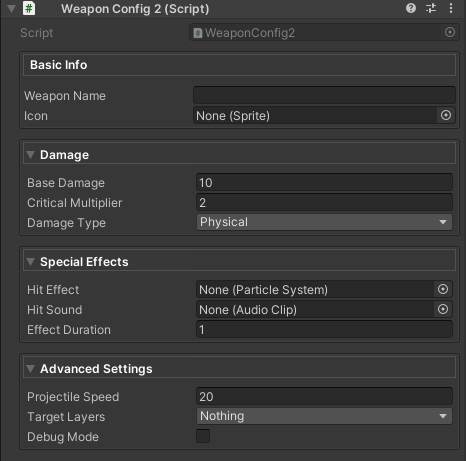
### Example 2: Weapon Configuration
```csharp
using UnityEngine;
using WallstopStudios.UnityHelpers.Core.Attributes;
public enum DamageType
{
Physical,
Magic,
}
public class WeaponConfig2 : MonoBehaviour
{
[WGroup("basic", "Basic Info", autoIncludeCount: 2)]
public string weaponName; // Field 1: in basic group
[WGroupEnd("basic")] // icon IS included (field 2), then closes
public Sprite icon; // Field 2: in basic (last field)
[WGroup("damage", "Damage", collapsible: true)]
public float baseDamage = 10f; // In damage group
public float criticalMultiplier = 2f; // In damage (auto-included)
[WGroupEnd("damage")] // damageType IS included, then closes
public DamageType damageType; // In damage (last field)
[WGroup("effects", "Special Effects", collapsible: true, startCollapsed: true)]
public ParticleSystem hitEffect; // In effects group
public AudioClip hitSound; // In effects (auto-included)
[WGroupEnd("effects")] // effectDuration IS included, then closes
public float effectDuration = 1f; // In effects (last field)
[WGroup("advanced", "Advanced Settings", collapsible: true, startCollapsed: true)]
public float projectileSpeed = 20f; // In advanced group
public LayerMask targetLayers; // In advanced (auto-included)
[WGroupEnd("advanced")] // debugMode IS included, then closes
public bool debugMode = false; // In advanced (last field)
}
```
---
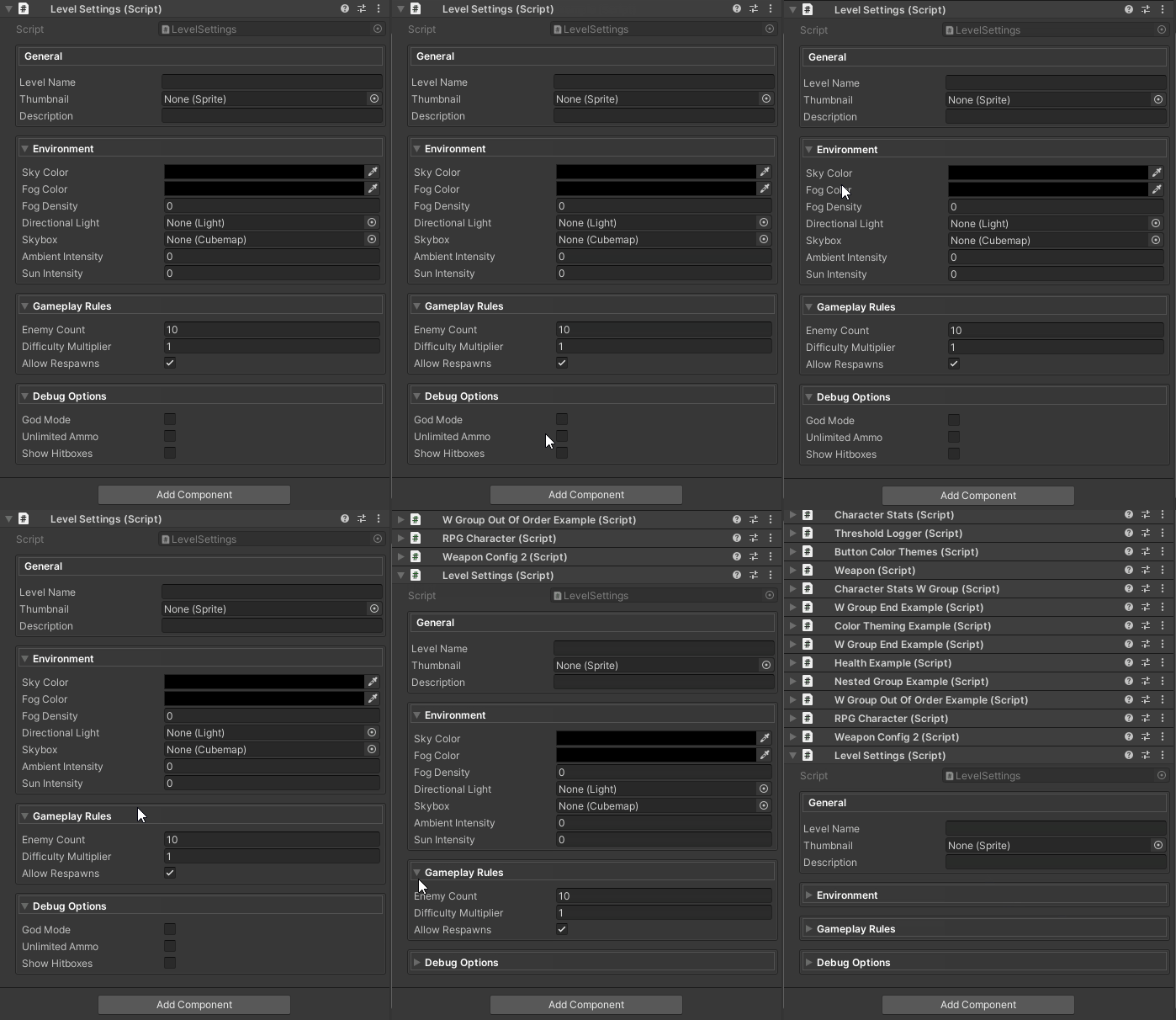
### Example 3: Dynamic Form with Many Fields
```csharp
using UnityEngine;
using WallstopStudios.UnityHelpers.Core.Attributes;
public class LevelSettings : MonoBehaviour
{
[WGroup("general", "General", autoIncludeCount: 3)]
public string levelName; // Field 1: in general group
public Sprite thumbnail; // Field 2: in general (auto-included)
[WGroupEnd("general")] // description IS included (field 3), then closes
public string description; // Field 3: in general (last field)
[WGroup(
"environment",
"Environment",
collapsible: true,
startCollapsed: true,
autoIncludeCount: WGroupAttribute.InfiniteAutoInclude
)]
public Color skyColor; // In environment group
public Color fogColor; // In environment (auto-included)
public float fogDensity; // In environment (auto-included)
public Light directionalLight; // In environment (auto-included)
public Cubemap skybox; // In environment (auto-included)
public float ambientIntensity; // In environment (auto-included)
[WGroupEnd("environment")] // sunIntensity IS included, then closes
public float sunIntensity; // In environment (last field)
[WGroup("gameplay", "Gameplay Rules", collapsible: true, startCollapsed: false)]
public int enemyCount = 10; // In gameplay group
public float difficultyMultiplier = 1f; // In gameplay (auto-included)
[WGroupEnd("gameplay")] // allowRespawns IS included, then closes
public bool allowRespawns = true; // In gameplay (last field)
[WGroup("debug", "Debug Options", collapsible: true, startCollapsed: true)]
public bool godMode = false; // In debug group
public bool unlimitedAmmo = false; // In debug (auto-included)
[WGroupEnd("debug")] // showHitboxes IS included, then closes
public bool showHitboxes = false; // In debug (last field)
}
```
---
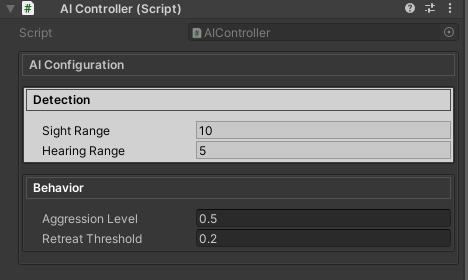
### Example 4: Nested Configuration
```csharp
using UnityEngine;
using WallstopStudios.UnityHelpers.Core.Attributes;
public class AIController : MonoBehaviour
{
[WGroup("outer", "AI Configuration")]
[WGroup("detection", "Detection", parentGroup: "outer")]
public float sightRange = 10f; // In detection (nested in outer)
[WGroupEnd("detection")] // hearingRange IS included, then detection closes
public float hearingRange = 5f; // In detection (last) AND outer (auto-included)
[WGroup("behavior", "Behavior", parentGroup: "outer")]
public float aggressionLevel = 0.5f; // In behavior (nested in outer)
[WGroupEnd("behavior")] // retreatThreshold IS included in both
[WGroupEnd("outer")] // Then both groups close
public float retreatThreshold = 0.2f; // In behavior (last) AND outer (last)
}
```
---
## Troubleshooting
### Group Not Appearing
**Problem:** Fields not showing in a group
**Solutions:**
1. Check `autoIncludeCount` - make sure it includes all desired fields
2. Verify `WGroupEnd` placement - the field WITH `WGroupEnd` IS included, fields AFTER are excluded
3. Ensure group names match between `WGroup` and `WGroupEnd`
```csharp
// ❌ WRONG: Count too low (only 2 fields included, but intelligence has WGroupEnd)
[WGroup("stats", autoIncludeCount: 2)]
public int strength; // Field 1: in group
public int agility; // Field 2: in group (auto-included)
[WGroupEnd("stats")] // intelligence would be field 3, but count is only 2!
public int intelligence; // NOT included - auto-include budget exhausted before WGroupEnd
// ✅ CORRECT: Increase count to include the WGroupEnd field
[WGroup("stats", autoIncludeCount: 3)]
public int strength; // Field 1: in group
public int agility; // Field 2: in group (auto-included)
[WGroupEnd("stats")] // intelligence IS included (field 3), then group closes
public int intelligence; // Field 3: in group (last field)
```
---
### Animation Not Working
**Problem:** Groups don't animate when collapsed/expanded
**Solutions:**
1. Check `UnityHelpersSettings.WGroupFoldoutTweenEnabled` is `true`
2. Ensure `collapsible: true` is set for WGroup
3. Verify `WGroupFoldoutSpeed` isn't set too low (minimum is 2.0)
4. Open **Project Settings → Unity Helpers** to review settings
---
## Compatibility
WGroup operates at the inspector level, so existing property drawers and custom inspectors continue to work. Groups appear in the order of their first declaration, and multi-object editing remains fully supported.
---
## See Also
- **[Inspector Overview](./inspector-overview.md)** - Complete inspector features overview
- **[Inspector Buttons](./inspector-button.md)** - WButton for method invocation
- **[Inspector Settings](./inspector-settings.md)** - Configuration reference
- **[Editor Tools Guide](../editor-tools/editor-tools-guide.md)** - Other editor utilities
---
**Next Steps:**
- Try grouping your existing scripts with `[WGroup]`
- Explore `[WButton]` to add method buttons to your groups