      
# cordova-plugin-in-app-updates
Cordova Android plugin for checking for updates and auto updating app with Google Play Store In-App updates API.
# Platforms
- Android
- Browser (filler platform)
# Features
- AndroidX ready (plugin version 2.x.x)
- Check for updates
- Install flexible updates
- Install immediate updates
- Customize snackbar message and button for Flexible updates
- Customize snackbar button color for Flexible updates
# Installation
## Plugin Versions
| Plugin version | Cordova >= | Cordova Android | AndroidX | targetSdkVersion |
| --- | --- | --- | --- | --- |
| 1.0.6 | 9.0.0 | 8.0.0 | No | 29 |
| 2.0.5 | 10.0.0 | 9.0.0 | Yes | 30/31 |
| 2.1.0 | 10.0.0 | 11.0.0 | Yes | 32 |
| 2.2.0 | 10.0.0 | 12.0.0 | Yes | 33 |
### Install latest version from NPM
```bash
cordova plugin add cordova-plugin-in-app-updates
```
### Install latest version from master
```bash
cordova plugin add https://github.com/andreszs/cordova-plugin-in-app-updates
```
# Methods
## getUpdateAvailability
Invokes the AppUpdateManager and return one of the [updateAvailability](https://developer.android.com/reference/com/google/android/play/core/install/model/UpdateAvailability.html) codes as string.
```javascript
cordova.plugins.InAppUpdate.getUpdateAvailability(successCallback, errorCallback)
```
### Return values
- **UPDATE_AVAILABLE**
- **UPDATE_NOT_AVAILABLE**
- **DEVELOPER_TRIGGERED_UPDATE_IN_PROGRESS**
- **UNKNOWN**
:information_source: Browser platform does nothing and always returns **UPDATE_NOT_AVAILABLE**
When this method returns **UPDATE_AVAILABLE**, your app is ready to use the following methods to prompt the user for update.
### Example
```javascript
var onSuccess = function (strSuccess) {
console.log(strSuccess);
};
var onFailure = function (strError) {
console.warn(strError);
};
cordova.plugins.InAppUpdate.getUpdateAvailability(onSuccess, onFailure);
```
## updateFlexible
Starts a [flexible update](https://developer.android.com/guide/playcore/in-app-updates/kotlin-java#flexible "flexible update") process and prompts the user with a dialog to download the new version now or when Wi-Fi is available.
```javascript
cordova.plugins.InAppUpdate.updateFlexible(successCallback, errorCallback)
```
:warning: The **successCallback** from this method can be triggered repeatedly according to its status.
### Return values
- **UPDATE_NOT_AVAILABLE**: No updates available in Play Store.
- **DEVELOPER_TRIGGERED_UPDATE_IN_PROGRESS**: Either flexible or immadiate update is in progress.
- **UPDATE_PROMPT**: The user has been presented with the Play Store dialog to download or ignore the flexible update.
- **RESULT_OK**: User accepted to download flexible update.
- **RESULT_CANCELED**: User declined the flexible update dialog or update was aborted while in progress.
- **RESULT_IN_APP_UPDATE_FAILED**: Something went wrong with the update dialog response.
- **ACTIVITY_RESULT_UNKNOWN**: Unknown result code returned by the dialog.
- **DOWNLOADING**: An update is currently being downloaded in the background.
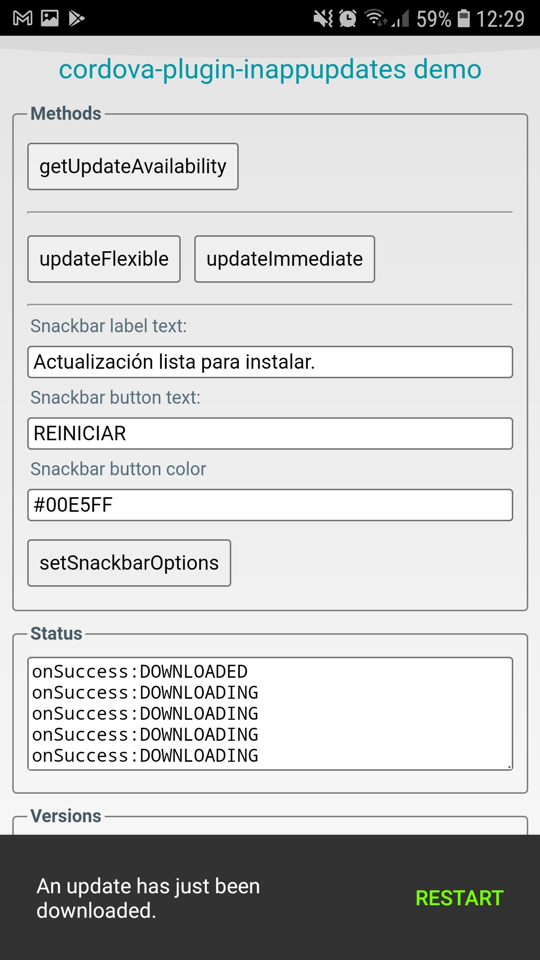
- **DOWNLOADED**: The update was downloaded and the snackbar with RESTART button has been shown.
:information_source: Browser platform does nothing and always returns **UPDATE_NOT_AVAILABLE**
### Example
```javascript
var onSuccess = function (strSuccess) {
console.log(strSuccess);
};
var onFailure = function (strError) {
console.warn(strError);
};
cordova.plugins.InAppUpdate.updateFlexible(onSuccess, onFailure);
```
:warning: Make sure to call **getUpdateAvailability** as often as needed to ensure there are no **flexible** updates downloaded pending install, as they will consume storage space until installed.
## updateImmediate
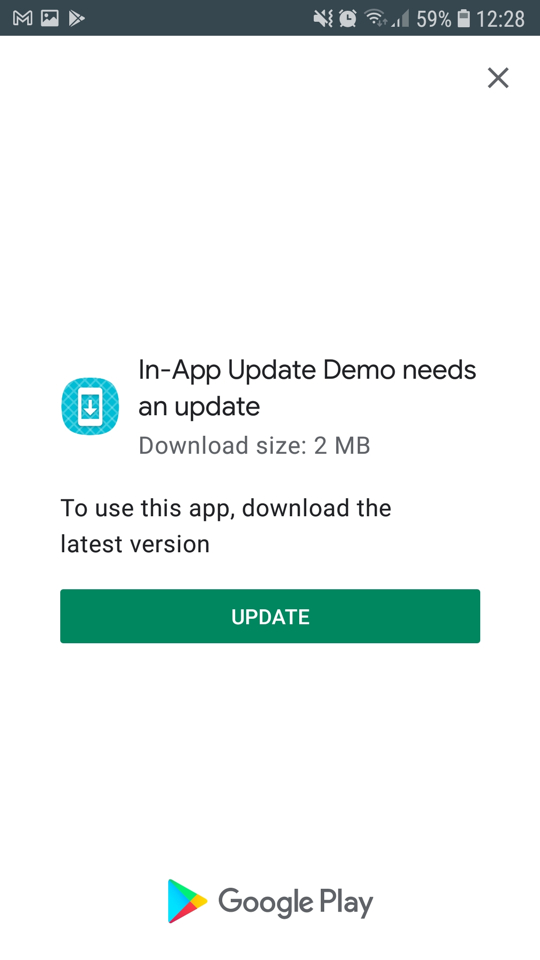
Starts an [immediate update](https://developer.android.com/guide/playcore/in-app-updates/kotlin-java#immediate "immediate update") process and prompts the user with a fullscreen dialog to download now or when Wi-Fi is available. The update is downloaded and installed in the foreground, preventing the user from interacting with your app until the installation succeeds and the app is automatically restarted.
```javascript
cordova.plugins.InAppUpdate.updateImmediate(successCallback, errorCallback)
```
:warning: The **successCallback** from this method can be triggered repeatedly according to its status.
### Return values
- **UPDATE_NOT_AVAILABLE**: No updates available in Play Store.
- **DEVELOPER_TRIGGERED_UPDATE_IN_PROGRESS**: Either flexible or immadiate update is in progress.
- **RESULT_OK**: User accepted to download immediate update.
- **RESULT_CANCELED**: User declined the immediate update dialog.
- **RESULT_IN_APP_UPDATE_FAILED**: Something went wrong with the update dialog response.
- **ACTIVITY_RESULT_UNKNOWN**: Unknown result code returned by the dialog.
- **DOWNLOADING**: An update is currently being downloaded in the foreground.
- **DOWNLOADED**: The update was downloaded and will be installed immediately.
:information_source: Browser platform does nothing and always returns **UPDATE_NOT_AVAILABLE**
### Example
```javascript
var onSuccess = function (strSuccess) {
console.log(strSuccess);
};
var onFailure = function (strError) {
console.warn(strError);
};
cordova.plugins.InAppUpdate.updateImmediate(onSuccess, onFailure);
```
## setSnackbarOptions
Sets the label and the button text for the snackbar shown after downloading a flexible update. You are free to call this method at any time. You can also call it again to show different snackbar messages after the snackbar was shown.
```javascript
cordova.plugins.InAppUpdate.setSnackbarOptions(successCallback, errorCallback, snackbarText, snackbarButton, snackbarButtonColor)
```
:information_source: Browser platform does nothing and always returns **SUCCESS**
### Example
```javascript
var onSuccess = function (strSuccess) {
console.log(strSuccess);
};
var onFailure = function (strError) {
console.warn(strError);
};
var snackbarText = "An update has just been downloaded.";
var snackbarButton = "RESTART";
var snackbarButtonColor = "#76FF03";
cordova.plugins.InAppUpdate.setSnackbarOptions(onSuccess, onFailure, snackbarText, snackbarButton, snackbarButtonColor);
```
### Snackbar default values
If this method is not called, default messages in English will be shown as follows.
- **snackbarText** = "An update has just been downloaded."
- **snackbarButton** = "RESTART"
- **snackbarText** = "#76FF03"
### Return values
- **onSuccess** = "SUCCESS"
- **onFail** = *Internal error description.*
# Plugin demo app
- [Compiled APK and reference](https://www.andreszsogon.com/cordova-in-app-update-plugin-demo-app/) including testing procedure instructions
- [Latest demo app version in Play Store](https://play.google.com/store/apps/details?id=com.andreszs.inappupdate.demo)
- [Source code for www folder](https://github.com/andreszs/cordova-plugin-demos)


 # Changelog
### 2.2.0
- Optimized for android-compileSdkVersion 33
- Minimum cordova-android version set to 12
- Updated androidx.appcompat:appcompat to 1.6.1
- Updated com.google.android.material:material to 1.8.0
### 2.1.0
- Optimized for android-compileSdkVersion 32
- Minimum cordova-android version set to 11
- Replaced com.google.android.play:core with the standalone [Play In-App Updates Library](https://developer.android.com/reference/com/google/android/play/core/release-notes-in_app_updates "Play In-App Updates Library") 2.1.0
- Updated androidx.appcompat:appcompat to 1.5.1
- Updated com.google.android.material:material to 1.3.0
- Removed the `edit-config` rule that was setting `android:theme="@style/Theme.AppCompat.NoActionBar"`
- Tested on Android 5.1, 8.1, 10.
### 2.0.5
- Optimized for android-compileSdkVersion 30
- Updated androidx.appcompat:appcompat to 1.3.0
- Updated com.google.android.play:core to 1.8.0
- Updated com.google.android.material:material to 1.2.0
# Changelog
### 2.2.0
- Optimized for android-compileSdkVersion 33
- Minimum cordova-android version set to 12
- Updated androidx.appcompat:appcompat to 1.6.1
- Updated com.google.android.material:material to 1.8.0
### 2.1.0
- Optimized for android-compileSdkVersion 32
- Minimum cordova-android version set to 11
- Replaced com.google.android.play:core with the standalone [Play In-App Updates Library](https://developer.android.com/reference/com/google/android/play/core/release-notes-in_app_updates "Play In-App Updates Library") 2.1.0
- Updated androidx.appcompat:appcompat to 1.5.1
- Updated com.google.android.material:material to 1.3.0
- Removed the `edit-config` rule that was setting `android:theme="@style/Theme.AppCompat.NoActionBar"`
- Tested on Android 5.1, 8.1, 10.
### 2.0.5
- Optimized for android-compileSdkVersion 30
- Updated androidx.appcompat:appcompat to 1.3.0
- Updated com.google.android.play:core to 1.8.0
- Updated com.google.android.material:material to 1.2.0