# Crann: Effortless State Synchronization for Web Extensions

`npm i crann`
## Table of Contents
- [Core Features](#core-features)
- [Quick Start](#quick-start)
- [Configuration](#configuration)
- [Store API (Service Worker)](#store-api-service-worker)
- [Agent API (Content Scripts, Popup, etc.)](#agent-api)
- [React Integration](#react-integration)
- [RPC Actions](#rpc-actions)
- [State Persistence](#state-persistence)
- [Migration from v1](#migration-from-v1)
## Core Features
- **Minimal size** (< 5kb gzipped)
- **Multi-context sync** - Content Scripts, Service Worker, Devtools, Sidepanels, Popup
- **No message boilerplate** - Eliminates `chrome.runtime.sendMessage` / `onMessage`
- **Reactive updates** - Subscribe to state changes
- **Persistence** - Optional local or session storage
- **Full TypeScript** - Complete type inference from config
- **React hooks** - First-class React integration via `crann/react`
- **RPC Actions** - Execute logic in the service worker from any context
## Quick Start
### 1. Define Your Config
```typescript
// config.ts
import { createConfig, Persist } from "crann";
export const config = createConfig({
name: "myExtension", // Required: unique store name
version: 1, // Optional: for migrations
// Define your state
isEnabled: { default: false },
count: { default: 0, persist: Persist.Local },
// Define actions (RPC)
actions: {
increment: {
handler: async (ctx, amount: number = 1) => {
return { count: ctx.state.count + amount };
},
},
},
});
```
### 2. Initialize the Store (Service Worker)
```typescript
// service-worker.ts
import { createStore } from "crann";
import { config } from "./config";
const store = createStore(config);
store.subscribe((state, changes) => {
console.log("State changed:", changes);
});
```
### 3. Connect from Any Context
```typescript
// popup.ts or content-script.ts
import { connectStore } from "crann";
import { config } from "./config";
const agent = connectStore(config);
agent.onReady(() => {
console.log("Connected! Current state:", agent.getState());
// Update state
agent.setState({ isEnabled: true });
// Call actions
agent.actions.increment(5);
});
```
### 4. Use with React
```typescript
// hooks.ts
import { createCrannHooks } from "crann/react";
import { config } from "./config";
export const { useCrannState, useCrannActions, useCrannReady } =
createCrannHooks(config);
// Counter.tsx
function Counter() {
const count = useCrannState((s) => s.count);
const { increment } = useCrannActions();
const isReady = useCrannReady();
if (!isReady) return Loading...
;
return ;
}
```
## Configuration
The `createConfig` function defines your store schema:
```typescript
import { createConfig, Scope, Persist } from "crann";
const config = createConfig({
// Required: unique identifier for this store
name: "myStore",
// Optional: version number for migrations (default: 1)
version: 1,
// State definitions
count: { default: 0 },
// With persistence
theme: {
default: "light" as "light" | "dark",
persist: Persist.Local, // Persist.Local | Persist.Session | Persist.None
},
// Agent-scoped state (each tab/frame gets its own copy)
selectedElement: {
default: null as HTMLElement | null,
scope: Scope.Agent, // Scope.Shared (default) | Scope.Agent
},
// Actions (RPC handlers)
actions: {
doSomething: {
handler: async (ctx, arg1: string, arg2: number) => {
// ctx.state - current state
// ctx.setState - update state
// ctx.agentId - calling agent's ID
return { result: "value" };
},
validate: (arg1, arg2) => {
if (!arg1) throw new Error("arg1 required");
},
},
},
});
```
## Store API (Service Worker)
The Store runs in the service worker and manages all state:
```typescript
import { createStore } from "crann";
const store = createStore(config, {
debug: true, // Enable debug logging
});
// Get current state
const state = store.getState();
// Update state
await store.setState({ count: 5 });
// Get agent-scoped state for a specific agent
const agentState = store.getAgentState(agentId);
// Subscribe to all state changes
const unsubscribe = store.subscribe((state, changes, agentInfo) => {
console.log("Changed:", changes);
});
// Listen for agent connections
store.onAgentConnect((agent) => {
console.log(`Agent ${agent.id} connected from tab ${agent.tabId}`);
});
store.onAgentDisconnect((agent) => {
console.log(`Agent ${agent.id} disconnected`);
});
// Get all connected agents
const agents = store.getAgents();
const contentScripts = store.getAgents({ context: "contentscript" });
// Clear all state to defaults
await store.clear();
// Destroy the store (cleanup)
store.destroy();
// Or clear persisted data on destroy:
store.destroy({ clearPersisted: true });
```
## Agent API
Agents connect to the store from content scripts, popups, and other contexts:
```typescript
import { connectStore } from "crann";
const agent = connectStore(config, {
debug: true,
});
// Wait for connection to be ready
agent.onReady(() => {
console.log("Connected!");
});
// Or use the promise
await agent.ready();
// Get current state
const state = agent.getState();
// Update state
await agent.setState({ count: 10 });
// Subscribe to changes
const unsubscribe = agent.subscribe((changes, state) => {
console.log("State changed:", changes);
});
// Call actions (RPC)
const result = await agent.actions.doSomething("arg1", 42);
// Get agent info
const info = agent.getInfo();
// { id, tabId, frameId, context }
// Handle disconnect/reconnect
agent.onDisconnect(() => console.log("Disconnected"));
agent.onReconnect(() => console.log("Reconnected"));
// Clean up
agent.disconnect();
```
## React Integration
Import from `crann/react` for React hooks:
```typescript
import { createCrannHooks } from "crann/react";
import { config } from "./config";
// Create hooks bound to your config
export const {
useCrannState,
useCrannActions,
useCrannReady,
useAgent,
CrannProvider,
} = createCrannHooks(config);
```
### useCrannState
Two patterns for reading state:
```typescript
// Selector pattern - returns selected value
const count = useCrannState((s) => s.count);
const theme = useCrannState((s) => s.settings.theme);
// Key pattern - returns [value, setValue] tuple
const [count, setCount] = useCrannState("count");
setCount(10); // Updates state
```
### useCrannActions
Returns typed actions with stable references (won't cause re-renders):
```typescript
const { increment, fetchData } = useCrannActions();
// Actions are async
await increment(5);
const result = await fetchData("https://api.example.com");
```
> **Important: Event Handler Usage**
>
> When using actions as event handlers, always wrap them in an arrow function:
>
> ```tsx
> // ✓ Correct
>
>
> // ✗ Incorrect - will fail silently
>
> ```
>
> Why? When you pass `increment` directly, React calls it with a `MouseEvent` as the first argument. DOM events are not serializable and cannot be sent through Chrome's messaging API, causing the action to fail silently.
>
> In development mode, Crann will log a warning if it detects an event being passed to an action.
### useCrannReady
Check connection status:
```typescript
const isReady = useCrannReady();
if (!isReady) {
return ;
}
```
### CrannProvider (Optional)
For testing or dependency injection:
```typescript
// In tests
const mockAgent = createMockAgent();
render(
);
```
## RPC Actions
Actions execute in the service worker but can be called from any context:
```typescript
// In config
const config = createConfig({
name: "myStore",
count: { default: 0 },
actions: {
increment: {
handler: async (ctx, amount: number = 1) => {
const newCount = ctx.state.count + amount;
// Option 1: Return state updates
return { count: newCount };
// Option 2: Use ctx.setState
// await ctx.setState({ count: newCount });
// return { success: true };
},
},
fetchUser: {
handler: async (ctx, userId: string) => {
// Runs in service worker - can make network requests
const response = await fetch(`/api/users/${userId}`);
const user = await response.json();
return { user };
},
validate: (userId) => {
if (!userId) throw new Error("userId required");
},
},
},
});
// From any context (popup, content script, etc.)
const agent = connectStore(config);
await agent.ready();
const result = await agent.actions.increment(5);
console.log(result.count); // 5
const { user } = await agent.actions.fetchUser("123");
console.log(user.name);
```
### ActionContext
Action handlers receive a context object:
```typescript
interface ActionContext {
state: TState; // Current state snapshot
setState: (partial: Partial) => Promise; // Update state
agentId: string; // Calling agent's ID
agentLocation: BrowserLocation; // Tab/frame info
}
```
## State Persistence
Control how state is persisted:
```typescript
import { createConfig, Persist } from "crann";
const config = createConfig({
name: "myStore",
// No persistence (default) - resets on service worker restart
volatile: { default: null },
// Local storage - persists across browser sessions
preferences: {
default: { theme: "light" },
persist: Persist.Local,
},
// Session storage - persists until browser closes
sessionData: {
default: {},
persist: Persist.Session,
},
});
```
### Storage Keys
Crann uses structured storage keys: `crann:{name}:v{version}:{key}`
This prevents collisions and enables clean migrations.
## Migration from v1
### Key Changes
| v1 | v2 |
| ------------------------- | ------------------------- |
| `create()` | `createStore()` |
| `connect()` | `connectStore()` |
| `Partition.Instance` | `Scope.Agent` |
| `Partition.Service` | `Scope.Shared` |
| `crann.set()` | `store.setState()` |
| `crann.get()` | `store.getState()` |
| `callAction("name", arg)` | `agent.actions.name(arg)` |
| Config object literal | `createConfig()` |
### Migration Steps
1. **Update config to use `createConfig()`:**
```typescript
// Before (v1)
const crann = create({
count: { default: 0 },
});
// After (v2)
const config = createConfig({
name: "myStore", // Required in v2
count: { default: 0 },
});
const store = createStore(config);
```
2. **Update terminology:**
```typescript
// Before (v1)
partition: Partition.Instance;
// After (v2)
scope: Scope.Agent;
```
3. **Update React hooks:**
```typescript
// Before (v1)
import { useCrann } from "crann";
const { get, set, callAction } = useCrann();
// After (v2)
import { createCrannHooks } from "crann/react";
const { useCrannState, useCrannActions } = createCrannHooks(config);
```
4. **Update action calls:**
```typescript
// Before (v1)
await callAction("increment", 5);
// After (v2)
await agent.actions.increment(5);
```
## Why Crann?
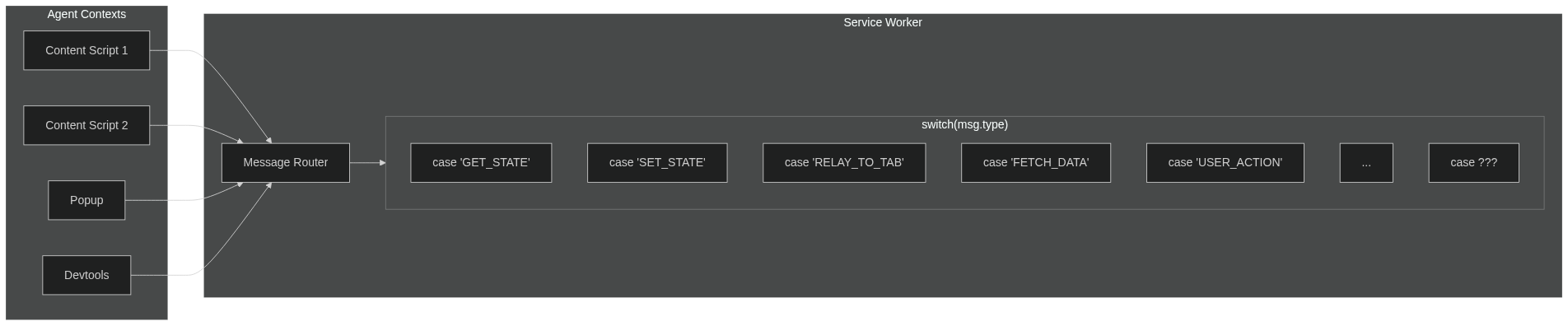
Browser extensions have multiple isolated contexts (content scripts, popup, devtools, sidepanel) that need to share state. The traditional approach using `sendMessage`/`onMessage` forces a painful pattern:
[](https://mermaid.live/edit#pako:eNp9k2tvmzAUhv-KZSlikyjCEBLgwyJK2FapbSJwVbVhihi4BDXYyJi2WZT_PodcmtvmT4f3PK998DlewpRlBLqw01kWtBAuWCpiRkqiuEDJEv6qrFadTkxf5uw9nSVcgNswpkCuuvmd86SaAS8nVNSTGLYB8BkV5EPUMfy1AdfLj9CkTUggSnlRCYCO0sZp2jhIj0eTMaua6kAa4smQvAnG5vVWJTSL6Ulp0aMsKyL8rUgJeGT8lfCjsrKCk1QUjAJ8_amGowcchNJ5R-o6yQkIWSNOnJ_RwWE32P8pbfV7IdLZl7LONbGoyNcj47-PbS8CSX-a1AQoPwI8jbCHA-XM7xt7KvoPZe6pMLj1nqZ4NMXe9QWwuwe_B_IXpkMPexcwa489REE49Xx8M7q_wPUkp2naeeJ-t8FgMDjKtr07aaIcGXB19W3bjZ1mnGnj0Zk0xGfSJm7lTZ-gCkvCy6TI5PAv11AM28GPoSvD9ejHMKYrySWNYNGCptAVvCEq5KzJZ9B9Sea1_GqqLBFkWCRyCsq9WiX0mbFyZ5Gf0F3CD-gamqMjByHLNsyurfdtU4UL6CK9r3Wdfh_pes80bKuPVir80-6ga47joC6ykWEaXcswbRXmfF339iwub41wnzVUQLdnWSokWSEYv9u87PaBr_4CI3YYvA)
**The problem with `sendMessage` / `onMessage`:**
- Agents can't message each other directly—everything routes through the service worker
- Your service worker becomes a message router with growing `switch/case` statements
- Every new feature means more message types, more handlers, more coupling
- Manual async handling (`return true` in Chrome, different in Firefox)
- Hand-rolled TypeScript types that may or may not stay in sync
**With Crann:**
- Define your state and actions in one place
- Agents sync automatically through the central store
- Full TypeScript inference—no manual type definitions
- No message routing, no relay logic, no `return true`
- Focus on your features, not the plumbing
---
**License:** ISC
**Repository:** [github.com/moclei/crann](https://github.com/moclei/crann)