# ctrace
Well-formatted and improved trace system calls and signals (when the debugger does not help).

 ## Why?
Awesome tools ```strace``` and ```dtruss``` have only one drawback: too much information which is hard to understand without additional sources of information and various configuration options. ```ctrace``` resolves it.
```ctrace``` are indispensable in the following cases
- Debugging complex performance issues or not identified unhandled errors and exceptions in own code or someone else's code
- Learning OS kernel
## Let's try it!
What do you think how difficult it is to display a hint for using CLI utility, let us say NPM?
```
> ctrace -c "npm --help"
```
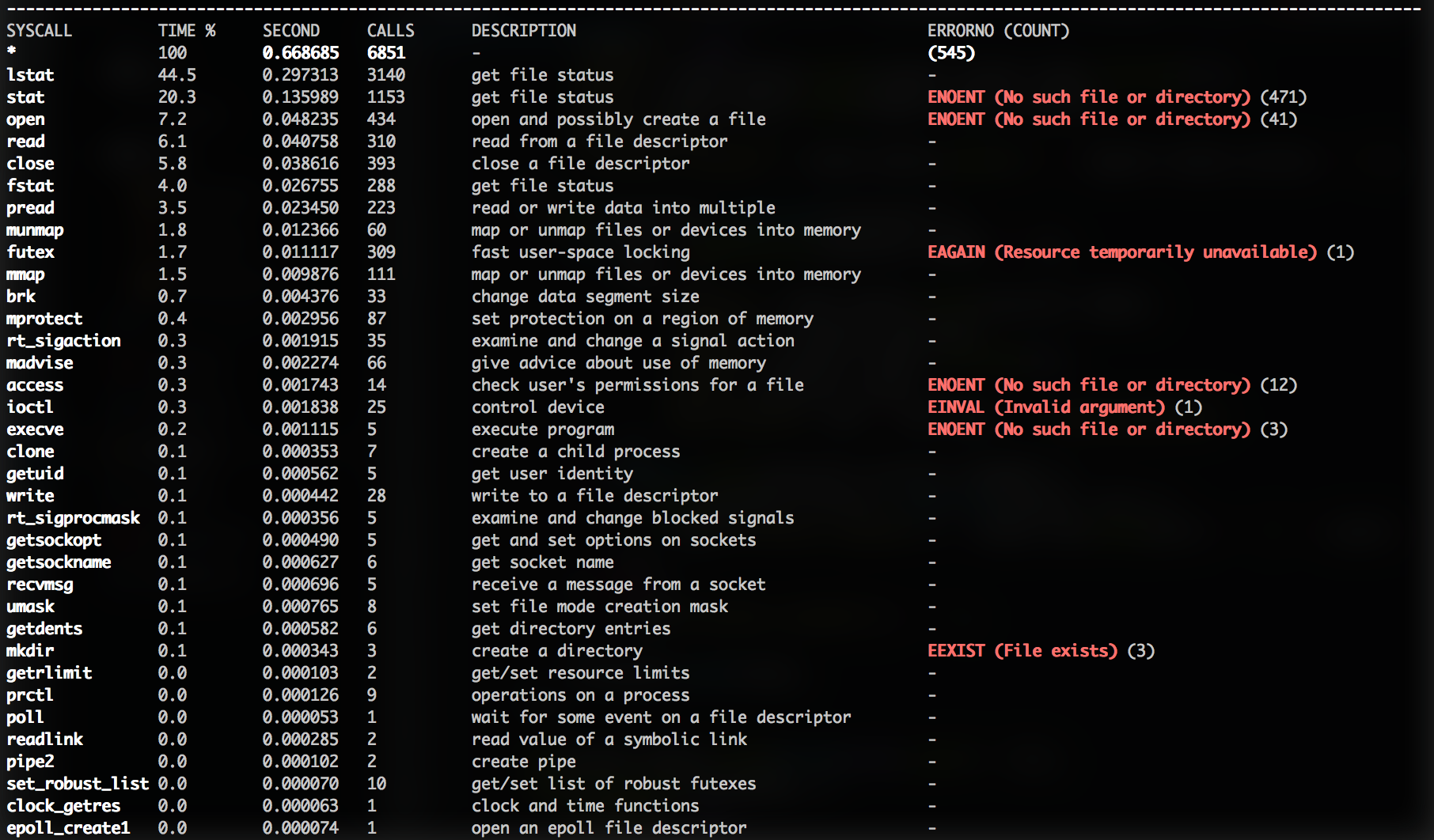
What we see?! What NPM does to simply display help?
- over 6800 system calls elapsed over 650 msec!
- 7 child processes :open_mouth:
- aims to open over 400 files
**Сlearly there is something to improve!** :muscle:
## Why?
Awesome tools ```strace``` and ```dtruss``` have only one drawback: too much information which is hard to understand without additional sources of information and various configuration options. ```ctrace``` resolves it.
```ctrace``` are indispensable in the following cases
- Debugging complex performance issues or not identified unhandled errors and exceptions in own code or someone else's code
- Learning OS kernel
## Let's try it!
What do you think how difficult it is to display a hint for using CLI utility, let us say NPM?
```
> ctrace -c "npm --help"
```
What we see?! What NPM does to simply display help?
- over 6800 system calls elapsed over 650 msec!
- 7 child processes :open_mouth:
- aims to open over 400 files
**Сlearly there is something to improve!** :muscle:
 ## Features
- Supported platforms: OSx (dtruss), Linux (strace)
- Trace command or attach to process (with forks following)
- Syscall details in output (number, description, synonyms, is it platform specific syscall)
## Features
- Supported platforms: OSx (dtruss), Linux (strace)
- Trace command or attach to process (with forks following)
- Syscall details in output (number, description, synonyms, is it platform specific syscall)
``` pread (preadv), 534 -- read or write data into multiple ```
- Resolving errno in syscall result
```Err#22 -> EINVAL : Invalid argument``` (only OSx)
- Prints by default only syscall with errors, with ```-v``` prints all output
- Filter output with syscall list ``` -f "lstat,open" ```
## Installation
```sh
$> npm install -g ctrace
```
```
$> ctrace --help
Usage: ctrace [options]
ctrace - well-formatted and improved trace system calls and signals
Options:
-h, --help output usage information
-V, --version output the version number
-p, --pid [pid] process id to trace
-c, --cmd [cmd] command to trace
-f, --filter [syscall,] trace syscall only from list
-v, --verbose print all syscalls (by default only with errors)
Examples:
$ ctrace -p 2312 -v
$ ctrace -c "ping google.com"
```
## Troubleshooting
### OSx : Dtrace cannot control executables signed with restricted entitlements
As you may know Apple released their new OS X revision 10.11 this year with a great security feature built-in: System Integrity Protection. In a nutshell, this mechanism protects any system data and important filesystem components (like /System or /usr) from being modified by user; even if they are root. SIP also disables any use of code-injection and debugging techniques for third-party software, so some of your favorite hacks may not work anymore.
...
#### Completely disable SIP
Although not recommended by Apple, you can entirely disable System Integrity Protection on you Mac. Here's how:
Boot your Mac into Recovery Mode: reboot it and hold cmd+R until a progress bar appears.
Choose the language and go to Utilities menu. Choose Terminal there.
Enter this command to disable System Integrity Protection:
```
$> csrutil disable
```
It will ask you to reboot — do so and you're free from SIP!
http://internals.exposed/blog/dtrace-vs-sip.html#fnref1