# Writing XML report compatible with Devops Sharepro



##
Enhances your Cypress test suite with the cypress-xray-junit-reporter a specialized custom reporter designed to seamlessly generating comprehensive XRay-compatible JUnit-style XML reports, complete with embedded screenshots on test failures, facilitating a thorough analysis of test execution.
This tailor-made reporter not only aligns with the best practices outlined in XRAY's guide on ["Taking advantage of JUnit XML reports"](https://docs.getxray.app/display/XRAY/Taking+advantage+of+JUnit+XML+reports) but also leverages Cypress's ["Custom reporter"](https://docs.cypress.io/guides/tooling/reporters#Custom-reporter) capabilities.
XML cypress custom reporter based on Mocha to be compatible with:
- [XRAY | Native Test Management for Jira](https://www.getxray.app/)
- [CYPRESS V10+ | Testing framework](https://www.cypress.io/)
**This plugin will also add support for two new cypress features:**
- deleteVideoOnPassed (delete the videos of passed specs)
- betterRetries (logs cypress errors on retries)
See [here](https://www.npmjs.com/package/cypress-xray-junit-reporter#extra-features) for more information
## Video reporter execution
https://github.com/alecmestroni/cypress-xray-junit-reporter/assets/62354989/4e8b1067-59bd-48ef-9f1a-183cfb049864
## Identified Issue
Cypress presently lacks support for transmitting variables to the reporter when using the Electron browser.
This results in the impaired functionality of the "attachScreenshot" feature within this specific context. It is highly recommended to utilize alternative browsers for an optimal experience.
## Install
```shell
$ npm install cypress-xray-junit-reporter --save-dev
```
or as a global module
```shell
$ npm install -g cypress-xray-junit-reporter
```
## XRAY Mode
With this custom report will be easy for you to connect your tests with your JIRA test issue, creating test execution report compatible with XRAY.
### 1. Naming the output file
By default if a file test-report.xml already exists it will be overwritten.
The use of placeholders enables support of parallel execution of multiple test,`cypress-xray-junit-reporter` will write test results in separate files.
The mochaFile option can contain placeholders, e.g. `./path_to_your/test-results.[hash].xml`.
In addition to `[hash]`, these can also be used:
| placeholder | output |
| ------------------- | ---------------------------------------------------------------------------------------- |
| `[testsuitesTitle]` | will be replaced by the `testsuitesTitle` setting |
| `[rootSuiteTitle]` | will be replaced by the `rootSuiteTitle` setting |
| `[suiteFilename]` | will be replaced by the filename of the spec file, auto remove .cy.js from the file name |
| `[suiteName]` | will be replaced by the name the first test suite |
| `[hash]` | will be replaced by MD5 hash of test results XML. |
### 2. Cypress configuration
#### 2.1 Inside `cypress.config.js`
This example shows how to install the plugin for e2e testing type. Read Cypress configuration docs for further info.
```javascript
const { defineConfig } = require('cypress')
module.exports = defineConfig({
deleteVideoOnPassed: true,
betterRetries: true,
reporter: 'cypress-xray-junit-reporter',
reporterOptions: {
mochaFile: './report/[suiteName].xml',
useFullSuiteTitle: false,
jenkinsMode: true,
xrayMode: true, // if JiraKey are set correctly inside the test the XML report will contain the JiraKey value
attachScreenshot: true, // if a test fails, the screenshot will be attached to the XML report and imported into xray
},
e2e: {
setupNodeEvents(on, config) {
require('cypress-xray-junit-reporter/plugin')(on, config, {}) // also needed
return config
},
},
})
```
#### 2.2 Inside `cypress/support/e2e.js`
At the top of your support file (usually cypress/support/e2e.js for e2e testing type):
```javascript
import 'cypress-xray-junit-reporter/support'
```
### 3. Setting up your jiraKeys
`cypress/e2e/myFirstTest.cy.js`
```javascript
describe('My First Test', () => {
it('Does not do much!', { jiraKey: 'CALC-1234' }, () => {
expect(true).to.equal(true)
})
})
```
### 4. Run the test
```shell
npx cypress run
```
### 5. Enjoy the generated test-execution report
Report file generated at '/cypress/results'.
`my-test-output-828a1c4885dc687b1a19e11e24b9437e.xml`
```xml
```
As you can see the property has been added and now could be read correctly by XRAY.
```xml
```
Now just upload the report to XRAY and the card in Jira will be updated automatically
## Other Options
### Attach screenshot on failure
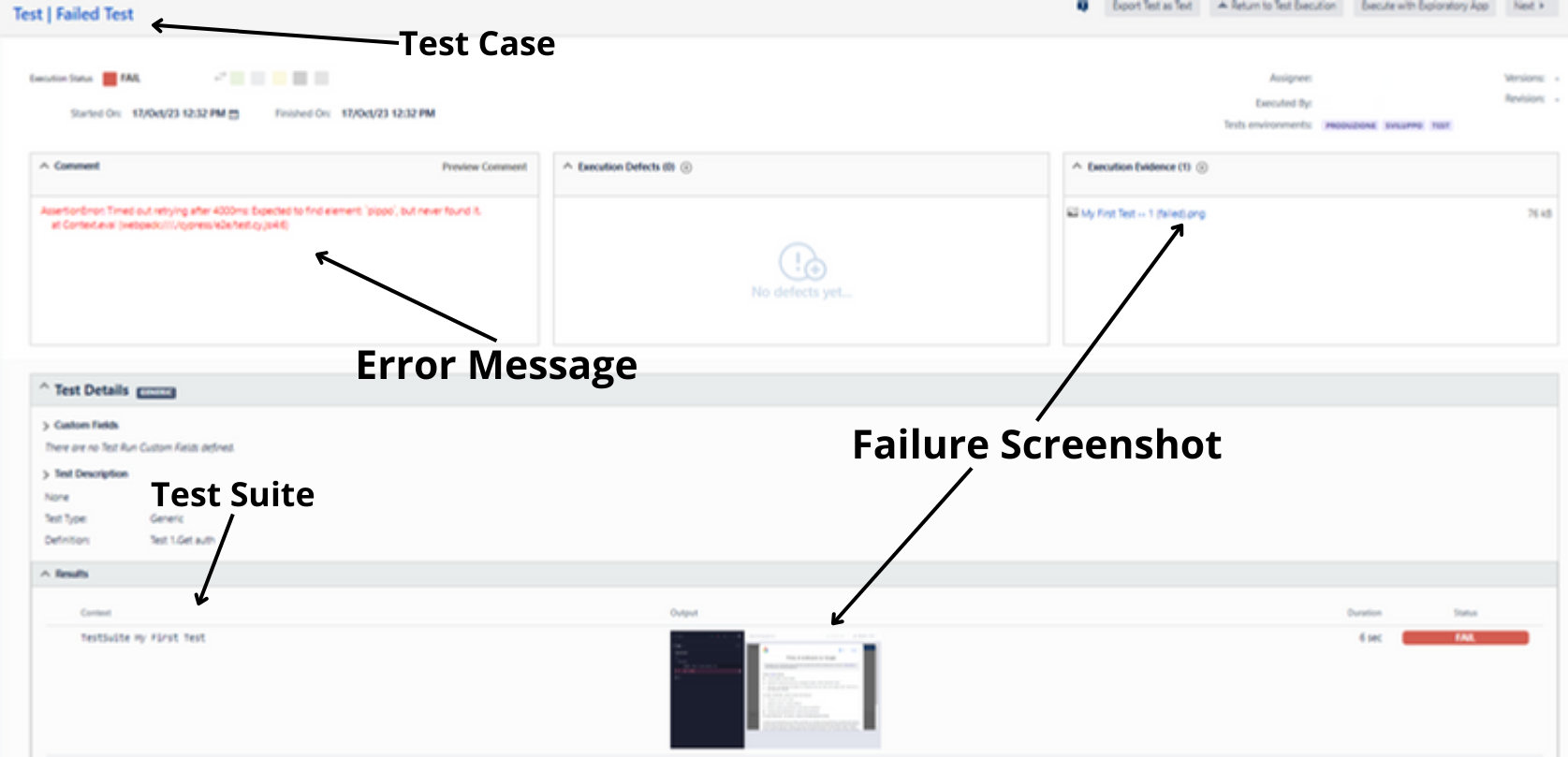
If you want to **attach the screenshot** of the failed testCase into the XML, you can use the `attachScreenshot` reporter option.
The screenshot will be automatically converted into base64 and attached to the XML report.
```xml
- base64Here
```
The testRun will include the screenshot as following:
### Switch classname and name
If you want to **switch classname and name** of the generated testCase XML entries, you can use the `testCaseSwitchClassnameAndName` reporter option.
Here is an example of the XML output when using the `testCaseSwitchClassnameAndName` option:
| value | XML output |
| ----------------- | --------------------------------------------------------------------------------------- |
| `false` (default) | `` |
| `true` | `` |
You can also configure the `testsuites.name` attribute by setting `reporterOptions.testsuitesTitle` and the root suite's `name` attribute by setting `reporterOptions.rootSuiteTitle`.
## Main reporterOptions list
| Configuration Option | Default Value | Description |
| -------------------- | ------------------ | -------------------------------------------------------------------------------------------- |
| `mochaFile` | `test-results.xml` | Specifies the file name for the report, compatible with placeholders (see the next section). |
| `xrayMode` | `true` | When enabled, includes the `jiraKey` property in the XML report in XRAY format. |
| `attachScreenshot` | `false` | When enabled, embeds test failure screenshots in the XML report in XRAY format. |
| `shortenLogMode` | `false` | When enabled, condenses logs to essential information only. |
## Extra reporterOptions list (Advanced options)
| Configuration Option | Default Value | Description |
| -------------------------------- | --------------- | ---------------------------------------------------------------------------------------------------- |
| `testCaseSwitchClassnameAndName` | `false` | When enabled, switches the order of name and classname values. |
| `testsuitesTitle` | `"Mocha Tests"` | Customizes the name for the XML `testsuites` tag, serving as a placeholder for `mochaFile` names. |
| `rootSuiteTitle` | `"Root Suite"` | Customizes the name for the XML `rootsuites` tag, serving as a placeholder for `mochaFile` names. |
| `useFullSuiteTitle` | `false` | If `true`, displays nested suite titles with the entire suite lineage. |
| `outputs` | `false` | If `true`, includes console output and console error output in the XML report. |
| `toConsole` | `false` | If `true`, logs the produced XML to the console. |
| `jenkinsMode` | `false` | When enabled, generates XML for improved display in Jenkins. |
| `jenkinsClassnamePrefix` | `undefined` | Adds a prefix to a classname when running in `jenkinsMode`. |
| `suiteTitleSeparatedBy` | ` ` (space) | Specifies the character used to separate nested suite titles (defaults to ' ', '.' in Jenkins mode). |
## Logged Results
### Successful configuration
**Description**
All test cases are executed without any skips or pending status. Additionally, each test case is appropriately configured with the correct Jira key.
**Cypress result:**
```
────────────────────────────────────────────────────────────────────────────────────────────────────
Running: myFirstTest.cy.js (1 of 1)
testSuite 1
testSuite 2
√ testCase 2.1
√ testCase 2.2
testSuite 3
√ testCase 3.1
√ testCase 3.2
4 passing (475ms)
────────────────────────────────────────────────────────────────────────────────────────────────────
```
**shortenLogMode disabled**
```
====================================================================================================
Cypress Xray Junit Reporter | Creating XML report
-------------------------------------------------
⏳ XrayMode Enabled -> Retrieving suites information from Root Suite...
〰 Founded one testsuite(s), keep scraping..
〰 Analyzing testsuite: testSuite 1
🔍 Looking for testsuite or testcase...
〰 Founded two testsuite(s), keep scraping..
〰 Analyzing testsuite: testSuite 2
🔍 Looking for testsuite or testcase...
〰 Properly analyzed testcase: testCase 2.1
〰 Properly analyzed testcase: testCase 2.2
✔ Successfully analyzed two testcase(s)
〰 End of testsuite: testSuite 2
〰 Analyzing 3rd testsuite: testSuite 3
🔍 Looking for testsuite or testcase...
〰 Properly analyzed testcase: testCase 3.1
〰 Properly analyzed testcase: testCase 3.2
✔ Successfully analyzed two testcase(s)
〰 End of testsuite: testSuite 3
〰 End of testsuite: testSuite 1
------------------------------------
All suites has been parsed correctly!
====================================================================================================
```
**shortenLogMode enabled**
```
====================================================================================================
Cypress Xray Junit Reporter | Creating XML report
-------------------------------------------------
⏳ XrayMode Enabled -> Retrieving suites information from Root Suite...
------------------------------------
All suites has been parsed correctly!
====================================================================================================
```
### Missing jiraKeys
**Description**
Jira keys are missing in testCase 1.2 & testCase 1.3.
**Cypress result:**
```
────────────────────────────────────────────────────────────────────────────────────────────────────
Running: myFirstTest.cy.js (1 of 1)
testSuite 1
√ testCase 1.1
√ testCase 1.2
√ testCase 1.3
3 passing (185ms)
────────────────────────────────────────────────────────────────────────────────────────────────────
```
**shortenLogMode disabled**
```
====================================================================================================
Cypress Xray Junit Reporter | Creating XML report
-------------------------------------------------
⏳ XrayMode Enabled -> Retrieving suites information from Root Suite...
〰 Founded one testsuite(s), keep scraping..
〰 Analyzing testsuite: testSuite 1
🔍 Looking for testsuite or testcase...
〰 Properly analyzed testcase: testCase 1.1
〰 Properly analyzed testcase: testCase 2.1
⚠️ Missing jira key in testcase: testCase 1.3
〰 Skipping 3rd testcase: testCase 1.3
✔ Successfully analyzed three testcase(s)
❗ Missing jira key in at least one testcase
〰 End of testsuite: testSuite 1
------------------------------------
All suites has been parsed correctly!
====================================================================================================
```
**shortenLogMode enabled**
```
====================================================================================================
Cypress Xray Junit Reporter | Creating XML report
-------------------------------------------------
⏳ XrayMode Enabled -> Retrieving suites information from Root Suite...
⚠️ Missing jira key in testcase: testCase 1.3
‼ Missing jira key in at least one testcase
‼ Skipping testcases:
- testCase 1.3
------------------------------------
All suites have been parsed correctly!
====================================================================================================
```
### Skipped or Pending tests
**Description**
Skipping or Pending tests will be skipped
**Cypress result:**
```
────────────────────────────────────────────────────────────────────────────────────────────────────
Running: myFirstTest.cy.js (1 of 1)
testSuite 1
√ testCase 1.1
- testCase 1.2
- testCase 1.3
1 passing (398ms)
2 pending
────────────────────────────────────────────────────────────────────────────────────────────────────
```
**shortenLogMode disabled**
```
====================================================================================================
Cypress Xray Junit Reporter | Creating XML report
-------------------------------------------------
⏳ XrayMode Enabled -> Retrieving suites information from Root Suite...
〰 Founded one testsuite(s), keep scraping..
〰 Analyzing testsuite: testSuite 1
🔍 Looking for testsuite or testcase...
〰 Properly analyzed testcase: testCase 1.1
〰 Skipping testcase: testCase 1.2
〰 Skipping testcase: testCase 1.3
✔ Successfully analyzed three testcase(s)
〰 End of testsuite: testSuite 1
------------------------------------
All suites has been parsed correctly!
====================================================================================================
```
**shortenLogMode enabled**
```
====================================================================================================
Cypress Xray Junit Reporter | Creating XML report
-------------------------------------------------
⏳ XrayMode Enabled -> Retrieving suites information from Root Suite...
‼ Skipping testcases:
- testCase 1.2,
- testCase 1.3
------------------------------------
All suites has been parsed correctly!
====================================================================================================
```
### Module dependencies error
**Description**
Try reinstall the latest version of the library
```
────────────────────────────────────────────────────────────────────────────────────────────────────
Running: myFirstTest.cy.js (1 of 1)
"cypress-xray-junit-reporter" reporter not found
Reporter not found! cypress-xray-junit-reporter
testSuite 1
√ testCase 1.1
1 passing (142ms)
====================================================================================================
```
## Extra Features
Set them as other cypress options inside the `cypress.config.js`:
```javascript
const { defineConfig } = require('cypress')
module.exports = defineConfig({
deleteVideoOnPassed: true,
betterRetries: true,
})
```
### deleteVideoOnPass
Deletes the videos of passed specs
```
====================================================================================================
Test-Run "myFirstTest": SUCCESS!
Deleting video output
====================================================================================================
```
### betterRetries
Cypress doesn't automatically logs **retries errors** but log only the last one.
In some cases you need to know the error on each attempt because it can change.
**Before betterRetries:**
```
────────────────────────────────────────────────────────────────────────────────────────────────────
Running: myFirstTest.cy.js (1 of 1)
testSuite 1
1) testCase 1.1
0 passing (1s)
1 failing
1) testSuite 1
testCase 1.1:
AssertionError: expected true to equal false
at Context.eval (webpack://plain-iqpfe-cypresstest/./cypress/e2e/tests/myFirstTest.cy.js:6:18)
====================================================================================================
```
**After betterRetries:**
```
────────────────────────────────────────────────────────────────────────────────────────────────────
Running: myFirstTest.cy.js (1 of 1)
testSuite 1
(Attempt 1 of 3) testCase 1.1
AssertionError: expected true to equal false
(Attempt 2 of 3) testCase 1.1
AssertionError: expected true to equal false
1) testCase 1.1
(Attempt 3 of 3) testCase 1.1
0 passing (1s)
1 failing
1) testSuite 1
testCase 1.1:
AssertionError: expected true to equal false
at Context.eval (webpack://plain-iqpfe-cypresstest/./cypress/e2e/tests/myFirstTest.cy.js:6:18)
====================================================================================================
```
## THE JOB IS DONE!
Happy testing to everyone!
ALEC-JS
🙌 Donate to support my work & further development! 🙌