# d3-geo-scale-bar
d3-geo-scale-bar is a JavaScript library and [D3.js](https://d3js.org/) plugin that makes it easy to add scale bars to maps created with [d3-geo](https://github.com/d3/d3-geo).
## Installing
If you use NPM, `npm install d3-geo-scale-bar`. Otherwise, download the [latest release](https://github.com/HarryStevens/d3-geo-scale-bar/raw/master/build/d3-geo-scale-bar.zip). AMD, CommonJS, and vanilla environments are supported. In vanilla, a d3 global is exported:
```html
```
[Try d3-geo-scale-bar in your browser](https://observablehq.com/@harrystevens/introducing-d3-geo-scale-bar).
## API Reference
* [Introduction](#introduction)
* [Basic configuration](#basic-configuration)
* [Positioning](#positioning)
* [Sizing](#sizing)
* [Styling](#styling)
* [Zooming](#zooming)
### Introduction
Scale bars help readers understand the geographic extent of maps. A scale bar's [default design](https://bl.ocks.org/HarryStevens/8c8d3a489aa1372e14b8084f94b32464) references the classic checkered design:
[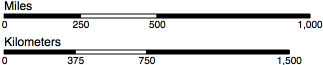 ](https://bl.ocks.org/HarryStevens/8c8d3a489aa1372e14b8084f94b32464)
By tweaking the scale bar's configuration and CSS, you can produce [several different scale bar designs](https://observablehq.com/@harrystevens/introducing-d3-geo-scale-bar#styling).
A scale bar consists of a [path element](https://www.w3.org/TR/SVG/paths.html#PathElement) of class "domain", followed by four [g elements](https://www.w3.org/TR/SVG/struct.html#Groups) of class "tick" representing each of the scale bar's ticks. Each tick has a [line element](https://www.w3.org/TR/SVG/shapes.html#LineElement) to draw the tick line, a [text element](https://www.w3.org/TR/SVG/text.html#TextElement) for the tick label, and a [rect element](https://www.w3.org/TR/SVG/shapes.html#RectElement) of alternating black and white fill. There is also another text element of class "label" sitting above the bar that denotes the units.
# d3.geoScaleBar() · [Source](https://github.com/HarryStevens/d3-geo-scale-bar/blob/master/src/geoScaleBar.js), [Example](https://observablehq.com/@harrystevens/introducing-d3-geo-scale-bar)
Constructs a new scale bar generator with the default settings.
# scaleBar(context) · [Source](https://github.com/HarryStevens/d3-geo-scale-bar/blob/master/src/geoScaleBar.js), [Example](https://observablehq.com/@harrystevens/introducing-d3-geo-scale-bar#basicUsage)
Renders the scale bar to the given context, which may be either a [selection](https://github.com/d3/d3-selection) of an SVG [g element](https://www.w3.org/TR/SVG/struct.html#Groups) or a corresponding [transition](https://observablehq.com/@harrystevens/introducing-d3-geo-scale-bar#transitions). Configure the scale bar with [scaleBar.projection](#scaleBar_projection) and [scaleBar.extent](#scaleBar_fitSize) before rendering. Generally, you will use this with selection.[call](https://github.com/d3/d3-selection#selection_call):
```js
const scaleBar = d3.geoScaleBar()
.projection(projection)
.size([width, height]);
svg.append("g").call(scaleBar);
```
### Basic configuration
# scaleBar.extent([extent]) · [Source](https://github.com/HarryStevens/d3-geo-scale-bar/blob/master/src/geoScaleBar.js), [Example](https://observablehq.com/@harrystevens/introducing-d3-geo-scale-bar#scaleBar)
If extent is specified, sets the extent of the scale bar generator to the specified bounds and returns the scale bar. The extent is specified as an array [[x0, y0], [x1, y1]], where x0 is the left side of the extent, y0 is the top, x1 is the right, and y1 is the bottom. If extent is not specified, returns the current extent which defaults to null. An extent is required to render a scale bar.
# scaleBar.projection([projection]) · [Source](https://github.com/HarryStevens/d3-geo-scale-bar/blob/master/src/geoScaleBar.js), [Example](https://observablehq.com/@harrystevens/introducing-d3-geo-scale-bar#scaleBar)
If projection is specified, sets the [projection](https://github.com/d3/d3-geo#projections) and returns the scale bar. If projection is not specified, returns the current projection. A projection is required to render a scale bar.
# scaleBar.size([size]) · [Source](https://github.com/HarryStevens/d3-geo-scale-bar/blob/master/src/geoScaleBar.js), [Example](https://observablehq.com/@harrystevens/introducing-d3-geo-scale-bar#scaleBar)
An alias for [scaleBar.extent](#scaleBar_extent) where the minimum x and y of the extent are ⟨0,0⟩. Equivalent to:
```js
scaleBar.extent([[0, 0], size]);
```
### Positioning
# scaleBar.left([left]) · [Source](https://github.com/HarryStevens/d3-geo-scale-bar/blob/master/src/geoScaleBar.js), [Example](https://observablehq.com/@harrystevens/introducing-d3-geo-scale-bar#scaleBarPositioned)
If left is specified, sets the left position to the specified value which must be in the range [0, 1], where 0 is the leftmost side of the scale bar's extent and 1 is the rightmost, and returns the scale bar. If left is not specified, returns the current left position which defaults to 0.
# scaleBar.top([top]) · [Source](https://github.com/HarryStevens/d3-geo-scale-bar/blob/master/src/geoScaleBar.js), [Example](https://observablehq.com/@harrystevens/introducing-d3-geo-scale-bar#scaleBarPositioned)
If top is specified, sets the top position to the specified value which must be in the range [0, 1], where 0 is the top-most side of the scale bar's extent and 1 is the bottom-most, and returns the scale bar. If top is not specified, returns the current top position which defaults to 0.
### Sizing
# scaleBar.distance([distance]) · [Source](https://github.com/HarryStevens/d3-geo-scale-bar/blob/master/src/geoScaleBar.js), [Example](https://observablehq.com/@harrystevens/introducing-d3-geo-scale-bar#scaleBarWapo)
If distance is specifed, sets the maximum distance of the scale bar and returns the scale bar. [Defaults](https://github.com/HarryStevens/d3-geo-scale-bar/blob/master/src/geoScaleBar.js) to the smallest exponent of 10, 10x2, 10x4 or 10x5 that will render the bar at least 80 pixels wide. If distance is not specified, returns the current maximum distance of the scale bar.
# scaleBar.radius([radius]) · [Source](https://github.com/HarryStevens/d3-geo-scale-bar/blob/master/src/geoScaleBar.js), [Example](https://observablehq.com/@harrystevens/introducing-d3-geo-scale-bar#scaleBarMoon)
If radius is specifed, sets the radius of the sphere on which the scale bar is placed and returns the scale bar. Defaults to 6371.0088, [the mean radius of Earth in kilometers](https://en.wikipedia.org/wiki/Earth_radius#Mean_radius). If you set [units](#scaleBar_units) to d3.[geoScaleMiles](#geoScaleMiles), the radius will also update to 3958.7613, [the mean radius of Earth in miles](https://en.wikipedia.org/wiki/Earth_radius#Mean_radius). You can set the *radius* to any number you like, useful for [mapping planets other than Earth](https://observablehq.com/@harrystevens/introducing-d3-geo-scale-bar#spaceBars). If radius is not specified, returns the current radius.
# scaleBar.units([units]) · [Source](https://github.com/HarryStevens/d3-geo-scale-bar/blob/master/src/geoScaleBar.js), [Example](https://observablehq.com/@harrystevens/introducing-d3-geo-scale-bar#scaleBarWapo)
If units is specifed, sets the [radius](#scaleBar_radius) of the scale bar to the corresponding units and returns the scale bar. Defaults to [d3.geoScaleKilometers](https://github.com/HarryStevens/d3-geo-scale-bar#geoScaleKilometers), which sets the label to "Kilometers" and the radius to 6371.0088, [the mean radius of Earth in kilometers](https://en.wikipedia.org/wiki/Earth_radius#Mean_radius). Note that the Earth's radius varies depending upon latitude, so if extremely high precision matters, you can [perform your own calculation of the radius](https://web.archive.org/web/20200118181437/https://rechneronline.de/earth-radius/) and pass the output to scaleBar.[radius](#scaleBar_radius).
If units is not specified, returns a string representing the current unit, e.g. "kilometers". The capitalized version of this string will be used for the [label](#scaleBar_label) if no label is specified.
# d3.geoScaleFeet · [Source](https://github.com/HarryStevens/d3-geo-scale-bar/blob/master/src/units/feet.js)
When passed to scaleBar.[units](#scaleBar_units), sets the [radius](scaleBar_radius) to 20902259.664, the mean radius of Earth in feet. The [label](#scaleBar_label) will be set to "Feet" if no label is specified.
# d3.geoScaleKilometers · [Source](https://github.com/HarryStevens/d3-geo-scale-bar/blob/master/src/units/kilometers.js)
When passed to scaleBar.[units](#scaleBar_units), sets the [radius](scaleBar_radius) to 6371.0088, the mean radius of Earth in kilometers. The [label](#scaleBar_label) will be set to "Kilometers" if no label is specified. This is the default setting.
# d3.geoScaleMeters · [Source](https://github.com/HarryStevens/d3-geo-scale-bar/blob/master/src/units/meters.js)
When passed to scaleBar.[units](#scaleBar_units), sets the [radius](scaleBar_radius) to 6371008.8, the mean radius of Earth in meters. The [label](#scaleBar_label) will be set to "Meters" if no label is specified.
# d3.geoScaleMiles · [Source](https://github.com/HarryStevens/d3-geo-scale-bar/blob/master/src/units/miles.js)
When passed to scaleBar.[units](#scaleBar_units), sets the [radius](scaleBar_radius) to 3958.7613, the mean radius of Earth in miles. The [label](#scaleBar_label) will be set to "Miles" if no label is specified.
### Styling
# scaleBar.label([label]) · [Source](https://github.com/HarryStevens/d3-geo-scale-bar/blob/master/src/geoScaleBar.js), [Example](https://observablehq.com/@harrystevens/introducing-d3-geo-scale-bar#scaleBarWapo)
If a label string is specified, sets the text in the scale bar's label to the specified string and returns the scale bar. Defaults to the capitalized unit, e.g. "Kilometers". If label is specified as null, removes the label. If label is not specified, returns the current label.
# scaleBar.labelAnchor([anchor]) · [Source](https://github.com/HarryStevens/d3-geo-scale-bar/blob/master/src/geoScaleBar.js), [Example](https://observablehq.com/@harrystevens/introducing-d3-geo-scale-bar#scaleBarWapo)
If an anchor string is specified, aligns the scale bar's label such that it is either at the "start" of the scale bar, the "middle" of the scale bar, or the "end" of the scale bar, and returns the scale bar. Defaults to "start". If an anchor string is not specified, returns the current anchor.
# scaleBar.orient([orientation]) · [Source](https://github.com/HarryStevens/d3-geo-scale-bar/blob/master/src/geoScaleBar.js), [Example](https://observablehq.com/@harrystevens/introducing-d3-geo-scale-bar#scaleBarTop)
If an orientation is specified, styles the bar according to the specified orientation and returns the scale bar. If an orientation is not specified, returns the current orientation as a string, either "top" or "bottom". Defaults to [d3.geoScaleBottom](#geoScaleBottom).
# d3.geoScaleBottom · [Source](https://github.com/HarryStevens/d3-geo-scale-bar/blob/master/src/orient/bottom.js)
When passed to scaleBar.[orient](#scaleBar_orient), orients the scale bar so that the label is on the top and the ticks are on bottom. This is the default orientation.
```js
scaleBar.orient(d3.geoScaleBottom);
```
# d3.geoScaleTop · [Source](https://github.com/HarryStevens/d3-geo-scale-bar/blob/master/src/orient/top.js)
When passed to scaleBar.[orient](#scaleBar_orient), orients the scale bar so that the label is on the bottom and the ticks are on top.
```js
scaleBar.orient(d3.geoScaleTop);
```
# scaleBar.tickFormat([formatter]) · [Source](https://github.com/HarryStevens/d3-geo-scale-bar/blob/master/src/geoScaleBar.js), [Example](https://observablehq.com/@harrystevens/introducing-d3-geo-scale-bar#scaleBarPositioned)
If a formatter function is specified, each tick value is passed through the formatter before being displayed. Defaults to (d, i, e) => Math.round(d), where d is the tick number, i is the tick index, and e is an array of all tick data. If a formatter is not specified, returns the current formatter.
# scaleBar.tickPadding([padding]) · [Source](https://github.com/HarryStevens/d3-geo-scale-bar/blob/master/src/geoScaleBar.js), [Example](https://observablehq.com/@harrystevens/introducing-d3-geo-scale-bar#scaleBarTop)
If padding is specified, sets the padding to the specified value in pixels and returns the scale bar. If padding is not specified, returns the current padding which defaults to 2 pixels.
# scaleBar.tickSize([size]) · [Source](https://github.com/HarryStevens/d3-geo-scale-bar/blob/master/src/geoScaleBar.js), [Example](https://observablehq.com/@harrystevens/introducing-d3-geo-scale-bar#scaleBarWapo)
If a size number is specified, sets the vertical tick size of the scale bar in pixels and returns the scale bar. Defaults to 4. If size is not specified, returns the current tick size of the scale bar.
# scaleBar.tickValues([values]) · [Source](https://github.com/HarryStevens/d3-geo-scale-bar/blob/master/src/geoScaleBar.js), [Example](https://observablehq.com/@harrystevens/introducing-d3-geo-scale-bar#scaleBarBottom)
If a values array is specified, sets the tick values to the specified values in the array rather than using the scale bar’s automatic tick generator, and returns the scale bar. Defaults to [0, kilometers / 4, kilometers / 2, kilometers]. Passing null removes the values and their associated ticks from the scale bar. If values is not specified, returns the current tick values.
### Zooming
# scaleBar.zoomClamp([clamp]) · [Source](https://github.com/HarryStevens/d3-geo-scale-bar/blob/master/src/geoScaleBar.js), [Example](https://observablehq.com/@harrystevens/introducing-d3-geo-scale-bar#zooming)
If a boolean clamp is specified, sets the scale bar's zooming behavior and returns the scale bar. If clamp is true, the scale bar's width will remain constant as the [zoom factor](#scaleBar_zoomFactor) changes. If clamp is false, the scale bar's width will change with the zoom factor, but the distance represented by the scale bar will remain constant unless the bar becomes too small or too large. If clamp is not specified, returns the current clamp behavior, which defaults to true.
# scaleBar.zoomFactor([k]) · [Source](https://github.com/HarryStevens/d3-geo-scale-bar/blob/master/src/geoScaleBar.js), [Example](https://observablehq.com/@harrystevens/introducing-d3-geo-scale-bar#zooming)
If k is specified, zooms the scale bar by the k [scale factor](https://github.com/d3/d3-zoom#zoomTransform) and returns the scale bar. This will commonly [be used](https://observablehq.com/@harrystevens/introducing-d3-geo-scale-bar#zooming) in conjunction with [d3-zoom](https://github.com/d3/d3-zoom):
```js
const zoom = d3.zoom()
.on("zoom", _ => {
const t = d3.event.transform;
g.attr("transform", t);
scaleBar.zoomFactor(t.k); // Zoom the scale bar by the k scale factor.
scaleBarSelection.call(scaleBar);
});
svg.call(zoom);
```
If k is not specified, returns the current zoom factor.
](https://bl.ocks.org/HarryStevens/8c8d3a489aa1372e14b8084f94b32464)
By tweaking the scale bar's configuration and CSS, you can produce [several different scale bar designs](https://observablehq.com/@harrystevens/introducing-d3-geo-scale-bar#styling).
A scale bar consists of a [path element](https://www.w3.org/TR/SVG/paths.html#PathElement) of class "domain", followed by four [g elements](https://www.w3.org/TR/SVG/struct.html#Groups) of class "tick" representing each of the scale bar's ticks. Each tick has a [line element](https://www.w3.org/TR/SVG/shapes.html#LineElement) to draw the tick line, a [text element](https://www.w3.org/TR/SVG/text.html#TextElement) for the tick label, and a [rect element](https://www.w3.org/TR/SVG/shapes.html#RectElement) of alternating black and white fill. There is also another text element of class "label" sitting above the bar that denotes the units.
# d3.geoScaleBar() · [Source](https://github.com/HarryStevens/d3-geo-scale-bar/blob/master/src/geoScaleBar.js), [Example](https://observablehq.com/@harrystevens/introducing-d3-geo-scale-bar)
Constructs a new scale bar generator with the default settings.
# scaleBar(context) · [Source](https://github.com/HarryStevens/d3-geo-scale-bar/blob/master/src/geoScaleBar.js), [Example](https://observablehq.com/@harrystevens/introducing-d3-geo-scale-bar#basicUsage)
Renders the scale bar to the given context, which may be either a [selection](https://github.com/d3/d3-selection) of an SVG [g element](https://www.w3.org/TR/SVG/struct.html#Groups) or a corresponding [transition](https://observablehq.com/@harrystevens/introducing-d3-geo-scale-bar#transitions). Configure the scale bar with [scaleBar.projection](#scaleBar_projection) and [scaleBar.extent](#scaleBar_fitSize) before rendering. Generally, you will use this with selection.[call](https://github.com/d3/d3-selection#selection_call):
```js
const scaleBar = d3.geoScaleBar()
.projection(projection)
.size([width, height]);
svg.append("g").call(scaleBar);
```
### Basic configuration
# scaleBar.extent([extent]) · [Source](https://github.com/HarryStevens/d3-geo-scale-bar/blob/master/src/geoScaleBar.js), [Example](https://observablehq.com/@harrystevens/introducing-d3-geo-scale-bar#scaleBar)
If extent is specified, sets the extent of the scale bar generator to the specified bounds and returns the scale bar. The extent is specified as an array [[x0, y0], [x1, y1]], where x0 is the left side of the extent, y0 is the top, x1 is the right, and y1 is the bottom. If extent is not specified, returns the current extent which defaults to null. An extent is required to render a scale bar.
# scaleBar.projection([projection]) · [Source](https://github.com/HarryStevens/d3-geo-scale-bar/blob/master/src/geoScaleBar.js), [Example](https://observablehq.com/@harrystevens/introducing-d3-geo-scale-bar#scaleBar)
If projection is specified, sets the [projection](https://github.com/d3/d3-geo#projections) and returns the scale bar. If projection is not specified, returns the current projection. A projection is required to render a scale bar.
# scaleBar.size([size]) · [Source](https://github.com/HarryStevens/d3-geo-scale-bar/blob/master/src/geoScaleBar.js), [Example](https://observablehq.com/@harrystevens/introducing-d3-geo-scale-bar#scaleBar)
An alias for [scaleBar.extent](#scaleBar_extent) where the minimum x and y of the extent are ⟨0,0⟩. Equivalent to:
```js
scaleBar.extent([[0, 0], size]);
```
### Positioning
# scaleBar.left([left]) · [Source](https://github.com/HarryStevens/d3-geo-scale-bar/blob/master/src/geoScaleBar.js), [Example](https://observablehq.com/@harrystevens/introducing-d3-geo-scale-bar#scaleBarPositioned)
If left is specified, sets the left position to the specified value which must be in the range [0, 1], where 0 is the leftmost side of the scale bar's extent and 1 is the rightmost, and returns the scale bar. If left is not specified, returns the current left position which defaults to 0.
# scaleBar.top([top]) · [Source](https://github.com/HarryStevens/d3-geo-scale-bar/blob/master/src/geoScaleBar.js), [Example](https://observablehq.com/@harrystevens/introducing-d3-geo-scale-bar#scaleBarPositioned)
If top is specified, sets the top position to the specified value which must be in the range [0, 1], where 0 is the top-most side of the scale bar's extent and 1 is the bottom-most, and returns the scale bar. If top is not specified, returns the current top position which defaults to 0.
### Sizing
# scaleBar.distance([distance]) · [Source](https://github.com/HarryStevens/d3-geo-scale-bar/blob/master/src/geoScaleBar.js), [Example](https://observablehq.com/@harrystevens/introducing-d3-geo-scale-bar#scaleBarWapo)
If distance is specifed, sets the maximum distance of the scale bar and returns the scale bar. [Defaults](https://github.com/HarryStevens/d3-geo-scale-bar/blob/master/src/geoScaleBar.js) to the smallest exponent of 10, 10x2, 10x4 or 10x5 that will render the bar at least 80 pixels wide. If distance is not specified, returns the current maximum distance of the scale bar.
# scaleBar.radius([radius]) · [Source](https://github.com/HarryStevens/d3-geo-scale-bar/blob/master/src/geoScaleBar.js), [Example](https://observablehq.com/@harrystevens/introducing-d3-geo-scale-bar#scaleBarMoon)
If radius is specifed, sets the radius of the sphere on which the scale bar is placed and returns the scale bar. Defaults to 6371.0088, [the mean radius of Earth in kilometers](https://en.wikipedia.org/wiki/Earth_radius#Mean_radius). If you set [units](#scaleBar_units) to d3.[geoScaleMiles](#geoScaleMiles), the radius will also update to 3958.7613, [the mean radius of Earth in miles](https://en.wikipedia.org/wiki/Earth_radius#Mean_radius). You can set the *radius* to any number you like, useful for [mapping planets other than Earth](https://observablehq.com/@harrystevens/introducing-d3-geo-scale-bar#spaceBars). If radius is not specified, returns the current radius.
# scaleBar.units([units]) · [Source](https://github.com/HarryStevens/d3-geo-scale-bar/blob/master/src/geoScaleBar.js), [Example](https://observablehq.com/@harrystevens/introducing-d3-geo-scale-bar#scaleBarWapo)
If units is specifed, sets the [radius](#scaleBar_radius) of the scale bar to the corresponding units and returns the scale bar. Defaults to [d3.geoScaleKilometers](https://github.com/HarryStevens/d3-geo-scale-bar#geoScaleKilometers), which sets the label to "Kilometers" and the radius to 6371.0088, [the mean radius of Earth in kilometers](https://en.wikipedia.org/wiki/Earth_radius#Mean_radius). Note that the Earth's radius varies depending upon latitude, so if extremely high precision matters, you can [perform your own calculation of the radius](https://web.archive.org/web/20200118181437/https://rechneronline.de/earth-radius/) and pass the output to scaleBar.[radius](#scaleBar_radius).
If units is not specified, returns a string representing the current unit, e.g. "kilometers". The capitalized version of this string will be used for the [label](#scaleBar_label) if no label is specified.
# d3.geoScaleFeet · [Source](https://github.com/HarryStevens/d3-geo-scale-bar/blob/master/src/units/feet.js)
When passed to scaleBar.[units](#scaleBar_units), sets the [radius](scaleBar_radius) to 20902259.664, the mean radius of Earth in feet. The [label](#scaleBar_label) will be set to "Feet" if no label is specified.
# d3.geoScaleKilometers · [Source](https://github.com/HarryStevens/d3-geo-scale-bar/blob/master/src/units/kilometers.js)
When passed to scaleBar.[units](#scaleBar_units), sets the [radius](scaleBar_radius) to 6371.0088, the mean radius of Earth in kilometers. The [label](#scaleBar_label) will be set to "Kilometers" if no label is specified. This is the default setting.
# d3.geoScaleMeters · [Source](https://github.com/HarryStevens/d3-geo-scale-bar/blob/master/src/units/meters.js)
When passed to scaleBar.[units](#scaleBar_units), sets the [radius](scaleBar_radius) to 6371008.8, the mean radius of Earth in meters. The [label](#scaleBar_label) will be set to "Meters" if no label is specified.
# d3.geoScaleMiles · [Source](https://github.com/HarryStevens/d3-geo-scale-bar/blob/master/src/units/miles.js)
When passed to scaleBar.[units](#scaleBar_units), sets the [radius](scaleBar_radius) to 3958.7613, the mean radius of Earth in miles. The [label](#scaleBar_label) will be set to "Miles" if no label is specified.
### Styling
# scaleBar.label([label]) · [Source](https://github.com/HarryStevens/d3-geo-scale-bar/blob/master/src/geoScaleBar.js), [Example](https://observablehq.com/@harrystevens/introducing-d3-geo-scale-bar#scaleBarWapo)
If a label string is specified, sets the text in the scale bar's label to the specified string and returns the scale bar. Defaults to the capitalized unit, e.g. "Kilometers". If label is specified as null, removes the label. If label is not specified, returns the current label.
# scaleBar.labelAnchor([anchor]) · [Source](https://github.com/HarryStevens/d3-geo-scale-bar/blob/master/src/geoScaleBar.js), [Example](https://observablehq.com/@harrystevens/introducing-d3-geo-scale-bar#scaleBarWapo)
If an anchor string is specified, aligns the scale bar's label such that it is either at the "start" of the scale bar, the "middle" of the scale bar, or the "end" of the scale bar, and returns the scale bar. Defaults to "start". If an anchor string is not specified, returns the current anchor.
# scaleBar.orient([orientation]) · [Source](https://github.com/HarryStevens/d3-geo-scale-bar/blob/master/src/geoScaleBar.js), [Example](https://observablehq.com/@harrystevens/introducing-d3-geo-scale-bar#scaleBarTop)
If an orientation is specified, styles the bar according to the specified orientation and returns the scale bar. If an orientation is not specified, returns the current orientation as a string, either "top" or "bottom". Defaults to [d3.geoScaleBottom](#geoScaleBottom).
# d3.geoScaleBottom · [Source](https://github.com/HarryStevens/d3-geo-scale-bar/blob/master/src/orient/bottom.js)
When passed to scaleBar.[orient](#scaleBar_orient), orients the scale bar so that the label is on the top and the ticks are on bottom. This is the default orientation.
```js
scaleBar.orient(d3.geoScaleBottom);
```
# d3.geoScaleTop · [Source](https://github.com/HarryStevens/d3-geo-scale-bar/blob/master/src/orient/top.js)
When passed to scaleBar.[orient](#scaleBar_orient), orients the scale bar so that the label is on the bottom and the ticks are on top.
```js
scaleBar.orient(d3.geoScaleTop);
```
# scaleBar.tickFormat([formatter]) · [Source](https://github.com/HarryStevens/d3-geo-scale-bar/blob/master/src/geoScaleBar.js), [Example](https://observablehq.com/@harrystevens/introducing-d3-geo-scale-bar#scaleBarPositioned)
If a formatter function is specified, each tick value is passed through the formatter before being displayed. Defaults to (d, i, e) => Math.round(d), where d is the tick number, i is the tick index, and e is an array of all tick data. If a formatter is not specified, returns the current formatter.
# scaleBar.tickPadding([padding]) · [Source](https://github.com/HarryStevens/d3-geo-scale-bar/blob/master/src/geoScaleBar.js), [Example](https://observablehq.com/@harrystevens/introducing-d3-geo-scale-bar#scaleBarTop)
If padding is specified, sets the padding to the specified value in pixels and returns the scale bar. If padding is not specified, returns the current padding which defaults to 2 pixels.
# scaleBar.tickSize([size]) · [Source](https://github.com/HarryStevens/d3-geo-scale-bar/blob/master/src/geoScaleBar.js), [Example](https://observablehq.com/@harrystevens/introducing-d3-geo-scale-bar#scaleBarWapo)
If a size number is specified, sets the vertical tick size of the scale bar in pixels and returns the scale bar. Defaults to 4. If size is not specified, returns the current tick size of the scale bar.
# scaleBar.tickValues([values]) · [Source](https://github.com/HarryStevens/d3-geo-scale-bar/blob/master/src/geoScaleBar.js), [Example](https://observablehq.com/@harrystevens/introducing-d3-geo-scale-bar#scaleBarBottom)
If a values array is specified, sets the tick values to the specified values in the array rather than using the scale bar’s automatic tick generator, and returns the scale bar. Defaults to [0, kilometers / 4, kilometers / 2, kilometers]. Passing null removes the values and their associated ticks from the scale bar. If values is not specified, returns the current tick values.
### Zooming
# scaleBar.zoomClamp([clamp]) · [Source](https://github.com/HarryStevens/d3-geo-scale-bar/blob/master/src/geoScaleBar.js), [Example](https://observablehq.com/@harrystevens/introducing-d3-geo-scale-bar#zooming)
If a boolean clamp is specified, sets the scale bar's zooming behavior and returns the scale bar. If clamp is true, the scale bar's width will remain constant as the [zoom factor](#scaleBar_zoomFactor) changes. If clamp is false, the scale bar's width will change with the zoom factor, but the distance represented by the scale bar will remain constant unless the bar becomes too small or too large. If clamp is not specified, returns the current clamp behavior, which defaults to true.
# scaleBar.zoomFactor([k]) · [Source](https://github.com/HarryStevens/d3-geo-scale-bar/blob/master/src/geoScaleBar.js), [Example](https://observablehq.com/@harrystevens/introducing-d3-geo-scale-bar#zooming)
If k is specified, zooms the scale bar by the k [scale factor](https://github.com/d3/d3-zoom#zoomTransform) and returns the scale bar. This will commonly [be used](https://observablehq.com/@harrystevens/introducing-d3-geo-scale-bar#zooming) in conjunction with [d3-zoom](https://github.com/d3/d3-zoom):
```js
const zoom = d3.zoom()
.on("zoom", _ => {
const t = d3.event.transform;
g.attr("transform", t);
scaleBar.zoomFactor(t.k); // Zoom the scale bar by the k scale factor.
scaleBarSelection.call(scaleBar);
});
svg.call(zoom);
```
If k is not specified, returns the current zoom factor.