# d3-RadarChart
RadarChart using d3. React component also included.
Features
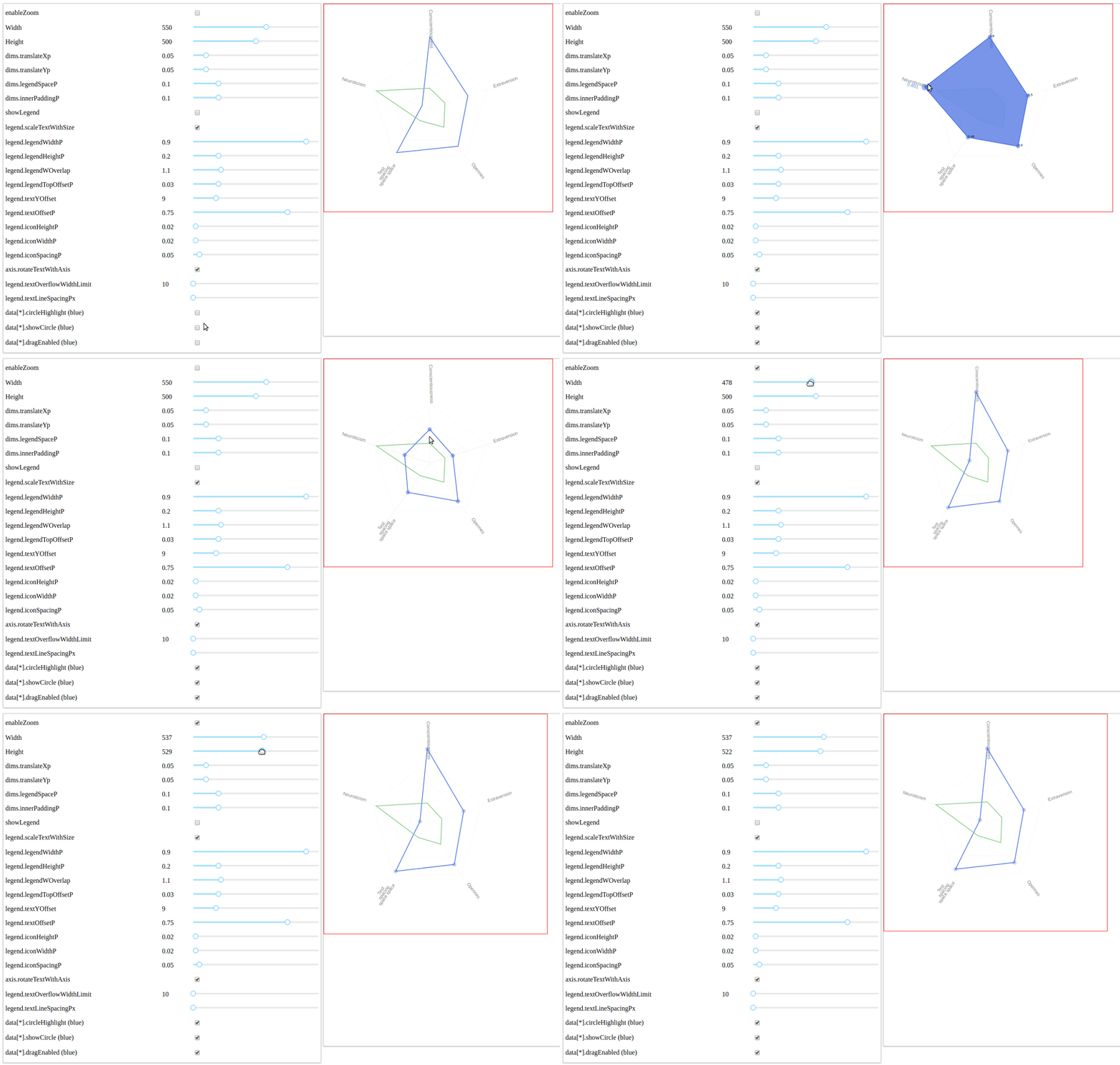
- Zoomable
- Specify size in options
- Interactive legend
- Draggable circles
- Scroll on axis to change values
- Many customisable options
## Table of Contents
* [Screenshot](#Screenshot)
* [Live Demo](#live-demo)
* [Install](#install)
* [Usage](#usage)
* [Options](#options)
* [Contribute](#contribute)
* [Related](#related)
* [Changelog](#changelog)
* [License](#license)
* [Attributions](#Attributions)
## Screenshot
## Live Demo
Test the demo https://mmihira.github.io/d3-radarchart
Run the demo ``` yarn run demo ```. Open localhost:1234 in browser
## Install
- use npm
```sh
npm i -S d3-radarchart
```
- use yarn
```sh
yarn add d3-radarchart
```
- CDN
For example :
https://unpkg.com/d3-radarchart@2.0.0/dist/index.min.js
## Usage
### Minimum configuration
``` javascript
import React from 'react';
import ReactDOM from 'react-dom';
import { ReactRadarChart } from 'd3-radarchart';
const axisConfig = [
{label: 'Conscientiousness', axisId: "con_1", axisValueMax: 4, axisValueMin: 2},
{label: 'Neuroticism', axisId: "neu_2", axisValueMax: 1, axisValueMin: 0},
{label: 'Test spacign space space', axisId: "spac_3", axisValueMax: 1, axisValueMin: 0},
{label: 'Opennes', axisId: "open_2", axisValueMax: 1, axisValueMin: 0},
{label: 'Extraversion', axisId: "extra_3", axisValueMax: 1, axisValueMin: 0}
];
const data = [
{
label: 'Normie',
seriesId: 'nor_1',
dragEnabled: true,
showCircle: true,
circleHighlight: true,
fill: 'royalblue',
data: [
{axis: "con_1", value: 3.8},
{axis: "neu_2", value: 0.1},
{axis: "spac_3", value: 0.7},
{axis: "open_2", value: 0.6},
{axis: "extra_3", value: 0.5}
]
},
{
label: 'Pepe',
seriesId: 'pep_1',
dragEnabled: true,
showCircle: false,
circleHighlight: true,
data: [
{axis: "con_1", value: 2.5},
{axis: "neu_2", value: 0.7},
{axis: "spac_3", value: 0.2},
{axis: "open_2", value: 0.3},
{axis: "extra_3", value: 0.2}
]
},
]
const options = {
chartRootName: 'example',
data,
dims: {
width: 550,
height: 500,
},
showLegend: true,
rootElementId: 'chart',
axisConfig
};
const rootNode = document.querySelector('#root');
rootNode && ReactDOM.render(
,
rootNode);
```
## Options
Try the demo to see how some options change the chart in real-time.
#### `enableZoom: Bool; default = true`
Control whether zoom is enabled or not
##### `zoomProps.scaleExtent.minZoom: Float; default = 1`
The minimum zoom (How much can be zoomed out)
##### `zoomProps.scaleExtent.maxZoom: Float; default = 12`
The maximum zoom (How much can be zoomed in)
#### `data: Array[Objects]; default = []`
The data to display in the radar chart. Should be an array of Series objects.
See series parameters for a list of parameters available.
Example format :
```
[
{
label: 'Normie',
seriesId: 'norm',
dragEnabled: false,
showCircle: true,
data: [
{axis: "con_1", value: 3.8},
{axis: "neu_2", value: 0.1},
{axis: "spac_3", value: 0.7},
{axis: "open_2", value: 0.6},
{axis: "extra_3", value: 0.5}
]
},
{
label: 'Pepe',
seriesId: 'pep',
dragEnabled: true,
showCircle: true,
circleHighlight: true,
data: [
{axis: "con_1", value: 3.8},
{axis: "neu_2", value: 0.2},
{axis: "spac_3", value: 0.7},
{axis: "open_2", value: 0.8},
{axis: "extra_3", value: 0.5}
]
},
];
```
#### `dims: Object`
The dimensions of the chart. Unless fine tuning is required
only the width and height need to be set. The rest should produce
a nice result with different sizes.
##### `dims.width: Float; default = 500`
The outer width of the chart + legend.
##### `dims.height: Float; default = 500`
The outer height of the chart + legend.
##### `dims.translateXp: Float; default = 0.05`
Fraction of outer width which the svg chart element is offset in the x-direction.
##### `dims.translateYp: Float; default = 0.05`
Fraction of outer height which the svg chart element is offset in the y-direction.
##### `dims.legendSpaceP: Float; default = 0.1`
Fraction of the outer width which the legend is alocated. I.e, 0.1 will mean 10% of
the width will be allocated to the legend.
##### `dims.innerPaddingP: Float; default = 0.1`
In addition to the offset the radar chart is further offest by padding equal to outer
height * dims.innerPaddingP
#### `legend: Object`
Set options for the chart legend. The legend is designed to
scale with the height and width of the chart.
##### `legend.interactive: Bool; default = true`
Whether the chart is interactive or not. I.E hover over a legend item highlights the area
associated.
##### `legend.legendWidthP: Float, default = 0.9`
The legend inner width = dims.width * dims.legendSpaceP * legend.legendWidthP
##### `legend.legendHeightP: Float, default = 0.2`
The legend inner height = dims.heigt * legend.legendHeightP
##### `legend.legendWOverlap: Float, default = 1.1`
Offset the legend by a fraction of the legend width. Adjust this value if you
don't want to squash the chart but want the legend to overlap into the chart space.
##### `legend.legendTopOffsetP: Float, default = 0.030`
Fraction dims.height which the Legend is offset from the top
##### `legend.textYOffset: Float, default = 9`
The offset in pixels the legend label text is offset from the top of the chart
##### `legend.textOffsetP: Float, default = 0.75`
The offset of the label text from the right :
```offset = width - (legendW * (1 + legendWOverlap)) * textOffsetP)```
##### `legend.iconHeightP: Float, default = 0.020`
The height of the label square as a fraction of the chart height
##### `legend.iconWidthP: Float, default = 0.020`
The width of the label square as a fraction of the chart width
##### `legend.iconSpacingP: 0.05: Float, default = 0.05`
The spacing between legend square icon as a fraction of the height
##### `legend.title: String, default = 'Test title'`
The legend title
##### `legend.scaleTextWithSize: Bool, default = true`
Scale the legend text with the size of the chart.
##### `legend.titleScale: Function, default = null`
Provide a custom title scale with size. If null is supplied the following
scaling function is used :
```
legendOpts.titleScale = d3.scaleLinear()
.domain([100, 1200])
.range([5, 20])
```
##### `legend.labelScale: Function, default = null`
```
legendOpts.labelScale = d3.scaleLinear()
.domain([100, 1200])
.range([5, 15]);
```
##### `legend.titleProperties.fontSize: Integer, default = 12`
The fontSize for the legend title. Ignore if the legend labels scale with size.
##### `legend.titleProperties.fill: String, default = '#404040'`
The legend title color
##### `legend.titleProperties.font-family: String, default = 'sans-serif'`
Legend title font family
##### `legend.titleProperties.fontScaleMin: Float, default = 5`
Legend title minimum font scale. As the minimum when legend font size scales with chart height.
##### `legend.titleProperties.fontScaleMax: Float, default = 20`
Legend title minimum font scale. As the minimum when legend font size scales with chart height.
##### `legend.labelTextProperties.font-sze: String, default = 11`
The fontSize for the legend labels. Ignore if the legend labels scale with size.
##### `legend.labelTextProperties.fill: String, default = '#737373'`
##### `showLegend: Bool, default = true`
Show the legend or not
##### `levels.levelsFractions: Array, default = [0.25, 0.5, 0.75]`
The percentage levels at which to show circular segments
#### `axis`
Setup the axis with options
##### `axis.config: Array, default = []`
The axis configuration array. The axisValueMax and axisValueMin only
need to be specified if the chart is not using a global maximum.
````
{axisId: "Conscientiousness", axisValueMax: 4, axisValueMin: 2},
{axisId: "Neuroticism", axisValueMax: 1, axisValueMin: 0},
{axisId: "test spacing two three", axisValueMax: 1, axisValueMin: 0},
{axisId: "Openness", axisValueMax: 1, axisValueMin: 0},
{axisId: "Extraversion", axisValueMax: 1, axisValueMin: 0}
````
##### `axis.useGlobalMax: Bool, default = false`
Use a global maximum or not. A global maximum means that all axis have
maxValue = axis.maxValue and a minimum equal to 0.
##### `axis.maxValue: Float, default = 0.6`
The global maxValue for the chart used if axis.useGlobalMax is true
#### .... TODO: Complete Documentation
## Contribute
If you have a feature request, please add it as an issue or make a pull request.
## Related
There's many radar chart libs which google will find for you. This one is based of the following :
(http://bl.ocks.org/nbremer/6506614)
## Attributions
The author would like to thank the University Of Melbourne for funding this work and allowing the efforts
to be released as open source.
## License
Copyright [2018] [Mihira Wanninayake]
Licensed under the Apache License, Version 2.0 (the "License");
you may not use this file except in compliance with the License.
You may obtain a copy of the License at
http://www.apache.org/licenses/LICENSE-2.0
Unless required by applicable law or agreed to in writing, software
distributed under the License is distributed on an "AS IS" BASIS,
WITHOUT WARRANTIES OR CONDITIONS OF ANY KIND, either express or implied.
See the License for the specific language governing permissions and
limitations under the License.