## About
A module for the automatic import of files from a directory and its subdirectories (sync and async).
The imported modules can be used either from the returned object or in the callback function.
---
## Installation
```bash
npm install directory-import
```
After installation, you can use the module in your project:
```js
const { directoryImport } = require('directory-import');
const importedModules = directoryImport('./path/to/directory');
// Outputs an object with imported modules
// For example: { modulePath1: module1, modulePath2: module2, ... }
console.log(importedModules);
```
or:
```ts
import { directoryImport } from 'directory-import';
const importedModules = directoryImport('./path/to/directory');
// Outputs an object with imported modules
// For example: { modulePath1: module1, modulePath2: module2, ... }
console.log(importedModules);
```
---
## Simple usage
Here's a simple example of how to use the library and how it works under the hood:
```javascript
const { directoryImport } = require('directory-import');
const importedModules = directoryImport('./sample-directory');
console.info(importedModules);
```
 ### [Path to directory from the GIF above][pathToDirectoryFromGif]
### Invoking a callback on each file
This can be handy when, for instance, you need to perform a specific action based on the imported file.
```javascript
const { directoryImport } = require('directory-import');
directoryImport('./sample-directory', (moduleName, modulePath, moduleData) => {
console.info({ moduleName, modulePath, moduleData });
});
```
### [Path to directory from the GIF above][pathToDirectoryFromGif]
### Invoking a callback on each file
This can be handy when, for instance, you need to perform a specific action based on the imported file.
```javascript
const { directoryImport } = require('directory-import');
directoryImport('./sample-directory', (moduleName, modulePath, moduleData) => {
console.info({ moduleName, modulePath, moduleData });
});
```
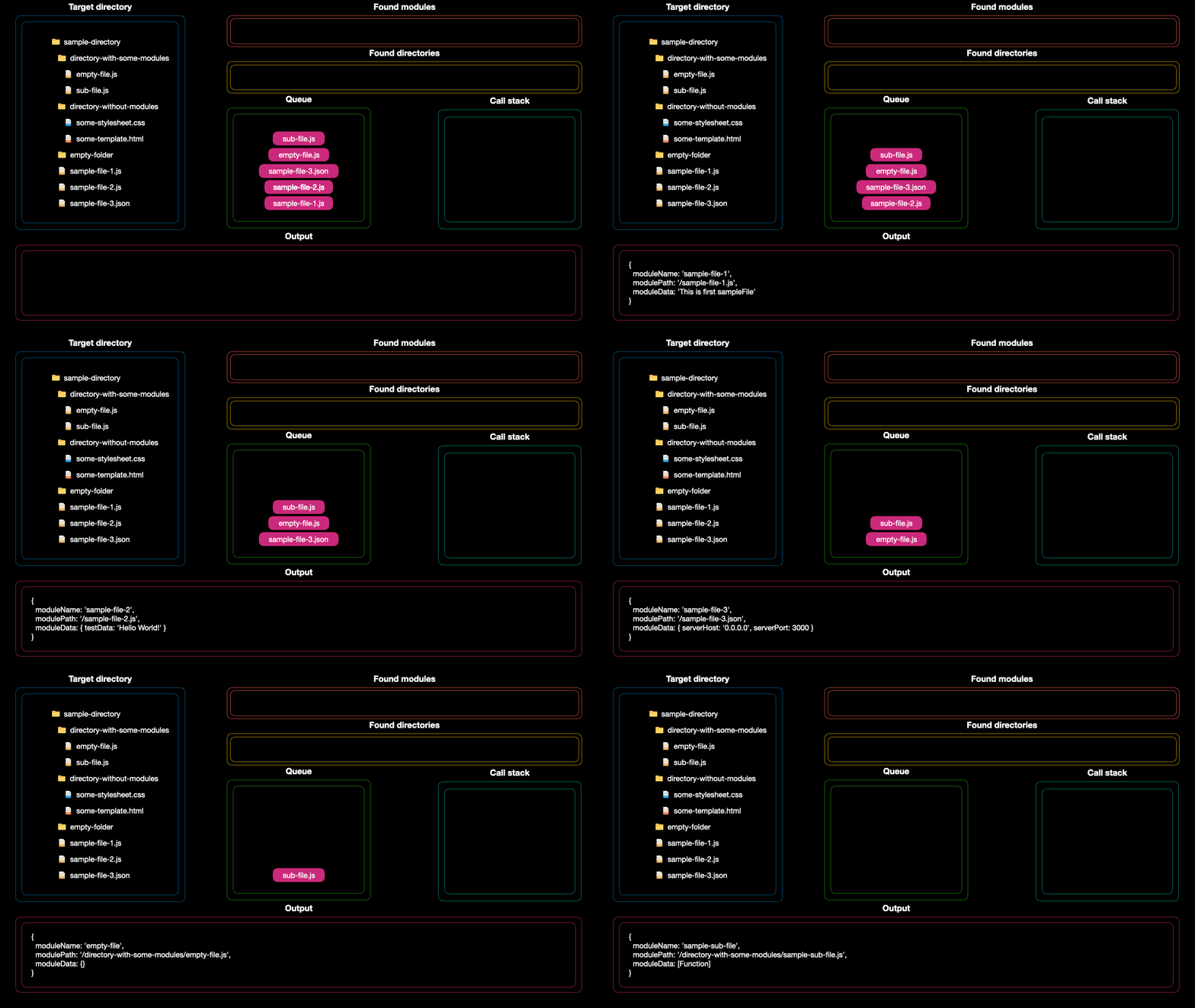 ### {Function} Callback properties:
| Property | Type | Description |
| -------- | ------ | -------------------------------------------------------------- |
| name | String | Module name based on the filename |
| path | String | Relative module path |
| data | String | Exported data from the module. (Ex: "module.exports = 'test'") |
| index | Number | Index of the imported module |
### {Object} Options properties:
| Property | Type | Description |
| --------------------- | ------- | --------------------------------------------------------------- |
| includeSubdirectories | Boolean | If true, the module will import files from subdirectories |
| targetDirectoryPath | String | The path to the directory from which modules are to be imported |
| importPattern | RegExp | RegExp pattern to filter files |
| importMode | String | The import mode. Can be 'sync' or 'async' |
| limit | Number | Limit the number of imported modules |
| forceReload | Boolean | If true, reload modules disabling require cache |
[back to top](#top)
---
### More examples:
Minimum code needed for use:
```js
const { directoryImport } = require('directory-import');
// Synchronously imports all modules in the same directory from which the code was called
directoryImport();
```
Asynchronously import files from the specified directory:
```js
const { directoryImport } = require('directory-import');
const result = directoryImport('./path/to/directory', 'async');
// Promise { }
console.log(result);
```
Put the result in a variable and invoke a callback on each file:
```js
const { directoryImport } = require('directory-import');
const importedModules = directoryImport('./path/to/directory', (moduleName, modulePath, moduleData) => {
// {
// moduleName: 'sample-file-1',
// modulePath: '/sample-file-1.js',
// moduleData: 'This is first sampleFile'
// }
// ...
console.info({ moduleName, modulePath, moduleData });
});
// {
// '/sample-file-1.js': 'This is first sampleFile',
// ...
// }
console.info(importedModules);
```
[back to top](#top)
---
### Overloads:
```js
const { directoryImport } = require('directory-import');
/**
* Import modules from the current directory synchronously
* @returns {Object} An object containing all imported modules.
*/
const importedModules = directoryImport();
// {
// '/sample-file-1.js': 'This is first sampleFile',
// ...
// }
console.log(importedModules);
```
```js
const { directoryImport } = require('directory-import');
/**
* Import modules from the current directory synchronously and call the provided callback for each imported module.
* @param {Function} callback - The callback function to call for each imported module.
* @returns {Object} An object containing all imported modules.
*/
directoryImport((moduleName, modulePath, moduleData) => {
// {
// moduleName: 'sample-file-1',
// modulePath: '/sample-file-1.js',
// moduleData: 'This is first sampleFile'
// }
// ...
console.info({ moduleName, modulePath, moduleData });
});
```
```js
const { directoryImport } = require('directory-import');
/**
* Import modules from the specified directory synchronously
* @param {String} directoryPath - The path to the directory from which you want to import modules.
* @returns {Object} An object containing all imported modules.
*/
const importedModules = directoryImport('./path/to/directory');
// {
// '/sample-file-1.js': 'This is first sampleFile',
// ...
// }
console.log(importedModules);
```
```js
const { directoryImport } = require('directory-import');
/**
* Import modules from the specified directory synchronously and call the provided callback for each imported module.
* @param {String} directoryPath - The path to the directory from which you want to import modules.
* @param {Function} callback - The callback function to call for each imported module.
* @returns {Object} An object containing all imported modules.
*/
directoryImport('./path/to/directory', (moduleName, modulePath, moduleData) => {
// {
// moduleName: 'sample-file-1',
// modulePath: '/sample-file-1.js',
// moduleData: 'This is first sampleFile'
// }
// ...
console.info({ moduleName, modulePath, moduleData });
});
```
```js
const { directoryImport } = require('directory-import');
/**
* Import all modules from the specified directory synchronously or asynchronously.
* @param {string} targetDirectoryPath - The path to the directory to import modules from.
* @param {'sync'|'async'} mode - The import mode. Can be 'sync' or 'async'.
* @returns {Object} An object containing all imported modules.
*/
const importModules = directoryImport('./path/to/directory', 'sync');
// {
// '/sample-file-1.js': 'This is first sampleFile',
// ...
// }
console.log(importedModules);
```
```js
const { directoryImport } = require('directory-import');
/**
* Import all modules from the specified directory synchronously or asynchronously and call the provided callback for each imported module.
* @param {string} targetDirectoryPath - The path to the directory to import modules from.
* @param {'sync'|'async'} mode - The import mode. Can be 'sync' or 'async'.
* @param {Function} callback - The callback function to call for each imported module.
* @returns {Object} An object containing all imported modules.
*/
directoryImport('./path/to/directory', 'sync', (moduleName, modulePath, moduleData) => {
// {
// moduleName: 'sample-file-1',
// modulePath: '/sample-file-1.js',
// moduleData: 'This is first sampleFile'
// }
// ...
console.info({ moduleName, modulePath, moduleData });
});
```
```js
const { directoryImport } = require('directory-import');
const options = {
includeSubdirectories: true,
targetDirectoryPath: './path/to/directory',
importPattern: /\.js/,
importMode: 'sync',
limit: 2,
};
/**
* Import all modules from the specified directory
* @param {Object} targetDirectoryPath - options - The options object.
* @returns {Object} An object containing all imported modules.
*/
const importModules = directoryImport(options);
// {
// '/sample-file-1.js': 'This is first sampleFile',
// ...
// }
console.log(importedModules);
```
```js
const { directoryImport } = require('directory-import');
const options = {
includeSubdirectories: true,
targetDirectoryPath: './path/to/directory',
importPattern: /\.js/,
importMode: 'sync',
limit: 2,
};
/**
* Import all modules from the specified directory and call the provided callback for each imported module.
* @param {Object} targetDirectoryPath - options - The options object.
* @param {Function} callback - The callback function to call for each imported module.
* @returns {Object} An object containing all imported modules.
*/
directoryImport(options, (moduleName, modulePath, moduleData) => {
// {
// moduleName: 'sample-file-1',
// modulePath: '/sample-file-1.js',
// moduleData: 'This is first sampleFile'
// }
// ...
console.info({ moduleName, modulePath, moduleData });
});
```
[back to top](#top)
---
## Change Log
### [3.3.2] - 2024-12-25
#### Added
- Add forceReload option.
### [3.3.1] - 2024-03-27
#### Fixed
- Now module can work with windows operating system!
- Enhance path handling and regular expressions for robustness
### [3.2.1] - 2024-01-25
#### Fixed
- Fixed a problem where the callerFilePath option was not working as expected for node.js versions greater than 20.
### [3.1.1] - 2023-11-17
#### Added
- .mjs files are supported now.
#### Fixed
- options.callerFilePath now returns the correct path to the file from which the function was called.
- Declaration files are no longer imported.
- Other minor fixes.
### [3.0.0] - 2023-07-29
#### Added
- Added tests to increase code reliability and stability.
- Implemented function overloads for enhanced flexibility and usage
- Backward compatibility with older versions has been ensured to ease user migration.
#### Changed
- The entire project code has been rewritten in TypeScript for readabilit, reliability, and ease of maintenance.
#### Fixed
- All known bugs identified in the previous version have been fixed.
#### Removed
- All third-party dependencies have been removed to reduce the package size and increase performance.
---
## Contribution
Contributions to `directory-import` are always welcome. Here is how you can contribute to the project:
1. **Report issues** - Report about a bug or suggest a new feature [here][gitIssues].
2. **Submit Pull Requests** - If you fixed a bug or developed a new feature, you can submit a PR. Please follow these guidelines while preparing your code:
- Ensure that your code properly complies with the standard TS conventions.
- Make sure to add comments in your code.
- Add a description explaining what changes you have made in your PR.
Before making a PR, please make sure your changes are consistent with the project's coding style and all tests are passing.
3. **Improve the Documentation** - You can enhance the README or the wiki page by adding more explanations, fixing typos, adding examples, etc.
Please note that your contributions should follow the guidelines described in the [Code of Conduct][CODE_OF_CONDUCT].
Thank you for your interest in contributing to the `directory-import`!
[back to top](#top)
---
### Help
- If you have any questions or need help, feel free to join our [Discord server][discordServer].
- If you find a bug, or you have any suggestions? please create an issue on [GitHub issues][gitIssues].
- If you want to help with the development of the project, you can create a pull request on [GitHub pull requests][gitPullRequests].
- If you like the project, you can put a star on [GitHub][gitProject].
- For more details, please refer to the [Code of Conduct][CODE_OF_CONDUCT].
[back to top](#top)
[pathToDirectoryFromGif]: https://github.com/KiiDii/directory-import/tree/master/sample-directory
[discordServer]: https://discord.gg/ADFYZtJ
[gitProject]: https://github.com/ANIname/directory-import
[gitIssues]: https://github.com/ANIname/directory-import/issues
[gitPullRequests]: https://github.com/ANIname/directory-import/pulls
[CODE_OF_CONDUCT]: https://github.com/ANIname/directory-import/blob/master/CODE_OF_CONDUCT.md
### {Function} Callback properties:
| Property | Type | Description |
| -------- | ------ | -------------------------------------------------------------- |
| name | String | Module name based on the filename |
| path | String | Relative module path |
| data | String | Exported data from the module. (Ex: "module.exports = 'test'") |
| index | Number | Index of the imported module |
### {Object} Options properties:
| Property | Type | Description |
| --------------------- | ------- | --------------------------------------------------------------- |
| includeSubdirectories | Boolean | If true, the module will import files from subdirectories |
| targetDirectoryPath | String | The path to the directory from which modules are to be imported |
| importPattern | RegExp | RegExp pattern to filter files |
| importMode | String | The import mode. Can be 'sync' or 'async' |
| limit | Number | Limit the number of imported modules |
| forceReload | Boolean | If true, reload modules disabling require cache |
[back to top](#top)
---
### More examples:
Minimum code needed for use:
```js
const { directoryImport } = require('directory-import');
// Synchronously imports all modules in the same directory from which the code was called
directoryImport();
```
Asynchronously import files from the specified directory:
```js
const { directoryImport } = require('directory-import');
const result = directoryImport('./path/to/directory', 'async');
// Promise { }
console.log(result);
```
Put the result in a variable and invoke a callback on each file:
```js
const { directoryImport } = require('directory-import');
const importedModules = directoryImport('./path/to/directory', (moduleName, modulePath, moduleData) => {
// {
// moduleName: 'sample-file-1',
// modulePath: '/sample-file-1.js',
// moduleData: 'This is first sampleFile'
// }
// ...
console.info({ moduleName, modulePath, moduleData });
});
// {
// '/sample-file-1.js': 'This is first sampleFile',
// ...
// }
console.info(importedModules);
```
[back to top](#top)
---
### Overloads:
```js
const { directoryImport } = require('directory-import');
/**
* Import modules from the current directory synchronously
* @returns {Object} An object containing all imported modules.
*/
const importedModules = directoryImport();
// {
// '/sample-file-1.js': 'This is first sampleFile',
// ...
// }
console.log(importedModules);
```
```js
const { directoryImport } = require('directory-import');
/**
* Import modules from the current directory synchronously and call the provided callback for each imported module.
* @param {Function} callback - The callback function to call for each imported module.
* @returns {Object} An object containing all imported modules.
*/
directoryImport((moduleName, modulePath, moduleData) => {
// {
// moduleName: 'sample-file-1',
// modulePath: '/sample-file-1.js',
// moduleData: 'This is first sampleFile'
// }
// ...
console.info({ moduleName, modulePath, moduleData });
});
```
```js
const { directoryImport } = require('directory-import');
/**
* Import modules from the specified directory synchronously
* @param {String} directoryPath - The path to the directory from which you want to import modules.
* @returns {Object} An object containing all imported modules.
*/
const importedModules = directoryImport('./path/to/directory');
// {
// '/sample-file-1.js': 'This is first sampleFile',
// ...
// }
console.log(importedModules);
```
```js
const { directoryImport } = require('directory-import');
/**
* Import modules from the specified directory synchronously and call the provided callback for each imported module.
* @param {String} directoryPath - The path to the directory from which you want to import modules.
* @param {Function} callback - The callback function to call for each imported module.
* @returns {Object} An object containing all imported modules.
*/
directoryImport('./path/to/directory', (moduleName, modulePath, moduleData) => {
// {
// moduleName: 'sample-file-1',
// modulePath: '/sample-file-1.js',
// moduleData: 'This is first sampleFile'
// }
// ...
console.info({ moduleName, modulePath, moduleData });
});
```
```js
const { directoryImport } = require('directory-import');
/**
* Import all modules from the specified directory synchronously or asynchronously.
* @param {string} targetDirectoryPath - The path to the directory to import modules from.
* @param {'sync'|'async'} mode - The import mode. Can be 'sync' or 'async'.
* @returns {Object} An object containing all imported modules.
*/
const importModules = directoryImport('./path/to/directory', 'sync');
// {
// '/sample-file-1.js': 'This is first sampleFile',
// ...
// }
console.log(importedModules);
```
```js
const { directoryImport } = require('directory-import');
/**
* Import all modules from the specified directory synchronously or asynchronously and call the provided callback for each imported module.
* @param {string} targetDirectoryPath - The path to the directory to import modules from.
* @param {'sync'|'async'} mode - The import mode. Can be 'sync' or 'async'.
* @param {Function} callback - The callback function to call for each imported module.
* @returns {Object} An object containing all imported modules.
*/
directoryImport('./path/to/directory', 'sync', (moduleName, modulePath, moduleData) => {
// {
// moduleName: 'sample-file-1',
// modulePath: '/sample-file-1.js',
// moduleData: 'This is first sampleFile'
// }
// ...
console.info({ moduleName, modulePath, moduleData });
});
```
```js
const { directoryImport } = require('directory-import');
const options = {
includeSubdirectories: true,
targetDirectoryPath: './path/to/directory',
importPattern: /\.js/,
importMode: 'sync',
limit: 2,
};
/**
* Import all modules from the specified directory
* @param {Object} targetDirectoryPath - options - The options object.
* @returns {Object} An object containing all imported modules.
*/
const importModules = directoryImport(options);
// {
// '/sample-file-1.js': 'This is first sampleFile',
// ...
// }
console.log(importedModules);
```
```js
const { directoryImport } = require('directory-import');
const options = {
includeSubdirectories: true,
targetDirectoryPath: './path/to/directory',
importPattern: /\.js/,
importMode: 'sync',
limit: 2,
};
/**
* Import all modules from the specified directory and call the provided callback for each imported module.
* @param {Object} targetDirectoryPath - options - The options object.
* @param {Function} callback - The callback function to call for each imported module.
* @returns {Object} An object containing all imported modules.
*/
directoryImport(options, (moduleName, modulePath, moduleData) => {
// {
// moduleName: 'sample-file-1',
// modulePath: '/sample-file-1.js',
// moduleData: 'This is first sampleFile'
// }
// ...
console.info({ moduleName, modulePath, moduleData });
});
```
[back to top](#top)
---
## Change Log
### [3.3.2] - 2024-12-25
#### Added
- Add forceReload option.
### [3.3.1] - 2024-03-27
#### Fixed
- Now module can work with windows operating system!
- Enhance path handling and regular expressions for robustness
### [3.2.1] - 2024-01-25
#### Fixed
- Fixed a problem where the callerFilePath option was not working as expected for node.js versions greater than 20.
### [3.1.1] - 2023-11-17
#### Added
- .mjs files are supported now.
#### Fixed
- options.callerFilePath now returns the correct path to the file from which the function was called.
- Declaration files are no longer imported.
- Other minor fixes.
### [3.0.0] - 2023-07-29
#### Added
- Added tests to increase code reliability and stability.
- Implemented function overloads for enhanced flexibility and usage
- Backward compatibility with older versions has been ensured to ease user migration.
#### Changed
- The entire project code has been rewritten in TypeScript for readabilit, reliability, and ease of maintenance.
#### Fixed
- All known bugs identified in the previous version have been fixed.
#### Removed
- All third-party dependencies have been removed to reduce the package size and increase performance.
---
## Contribution
Contributions to `directory-import` are always welcome. Here is how you can contribute to the project:
1. **Report issues** - Report about a bug or suggest a new feature [here][gitIssues].
2. **Submit Pull Requests** - If you fixed a bug or developed a new feature, you can submit a PR. Please follow these guidelines while preparing your code:
- Ensure that your code properly complies with the standard TS conventions.
- Make sure to add comments in your code.
- Add a description explaining what changes you have made in your PR.
Before making a PR, please make sure your changes are consistent with the project's coding style and all tests are passing.
3. **Improve the Documentation** - You can enhance the README or the wiki page by adding more explanations, fixing typos, adding examples, etc.
Please note that your contributions should follow the guidelines described in the [Code of Conduct][CODE_OF_CONDUCT].
Thank you for your interest in contributing to the `directory-import`!
[back to top](#top)
---
### Help
- If you have any questions or need help, feel free to join our [Discord server][discordServer].
- If you find a bug, or you have any suggestions? please create an issue on [GitHub issues][gitIssues].
- If you want to help with the development of the project, you can create a pull request on [GitHub pull requests][gitPullRequests].
- If you like the project, you can put a star on [GitHub][gitProject].
- For more details, please refer to the [Code of Conduct][CODE_OF_CONDUCT].
[back to top](#top)
[pathToDirectoryFromGif]: https://github.com/KiiDii/directory-import/tree/master/sample-directory
[discordServer]: https://discord.gg/ADFYZtJ
[gitProject]: https://github.com/ANIname/directory-import
[gitIssues]: https://github.com/ANIname/directory-import/issues
[gitPullRequests]: https://github.com/ANIname/directory-import/pulls
[CODE_OF_CONDUCT]: https://github.com/ANIname/directory-import/blob/master/CODE_OF_CONDUCT.md









 ### [Path to directory from the GIF above][pathToDirectoryFromGif]
### Invoking a callback on each file
This can be handy when, for instance, you need to perform a specific action based on the imported file.
```javascript
const { directoryImport } = require('directory-import');
directoryImport('./sample-directory', (moduleName, modulePath, moduleData) => {
console.info({ moduleName, modulePath, moduleData });
});
```
### [Path to directory from the GIF above][pathToDirectoryFromGif]
### Invoking a callback on each file
This can be handy when, for instance, you need to perform a specific action based on the imported file.
```javascript
const { directoryImport } = require('directory-import');
directoryImport('./sample-directory', (moduleName, modulePath, moduleData) => {
console.info({ moduleName, modulePath, moduleData });
});
```
 ### {Function} Callback properties:
| Property | Type | Description |
| -------- | ------ | -------------------------------------------------------------- |
| name | String | Module name based on the filename |
| path | String | Relative module path |
| data | String | Exported data from the module. (Ex: "module.exports = 'test'") |
| index | Number | Index of the imported module |
### {Object} Options properties:
| Property | Type | Description |
| --------------------- | ------- | --------------------------------------------------------------- |
| includeSubdirectories | Boolean | If true, the module will import files from subdirectories |
| targetDirectoryPath | String | The path to the directory from which modules are to be imported |
| importPattern | RegExp | RegExp pattern to filter files |
| importMode | String | The import mode. Can be 'sync' or 'async' |
| limit | Number | Limit the number of imported modules |
| forceReload | Boolean | If true, reload modules disabling require cache |
[back to top](#top)
---
### More examples:
Minimum code needed for use:
```js
const { directoryImport } = require('directory-import');
// Synchronously imports all modules in the same directory from which the code was called
directoryImport();
```
Asynchronously import files from the specified directory:
```js
const { directoryImport } = require('directory-import');
const result = directoryImport('./path/to/directory', 'async');
// Promise {
### {Function} Callback properties:
| Property | Type | Description |
| -------- | ------ | -------------------------------------------------------------- |
| name | String | Module name based on the filename |
| path | String | Relative module path |
| data | String | Exported data from the module. (Ex: "module.exports = 'test'") |
| index | Number | Index of the imported module |
### {Object} Options properties:
| Property | Type | Description |
| --------------------- | ------- | --------------------------------------------------------------- |
| includeSubdirectories | Boolean | If true, the module will import files from subdirectories |
| targetDirectoryPath | String | The path to the directory from which modules are to be imported |
| importPattern | RegExp | RegExp pattern to filter files |
| importMode | String | The import mode. Can be 'sync' or 'async' |
| limit | Number | Limit the number of imported modules |
| forceReload | Boolean | If true, reload modules disabling require cache |
[back to top](#top)
---
### More examples:
Minimum code needed for use:
```js
const { directoryImport } = require('directory-import');
// Synchronously imports all modules in the same directory from which the code was called
directoryImport();
```
Asynchronously import files from the specified directory:
```js
const { directoryImport } = require('directory-import');
const result = directoryImport('./path/to/directory', 'async');
// Promise {