


Simple way to display data as a tree structure.
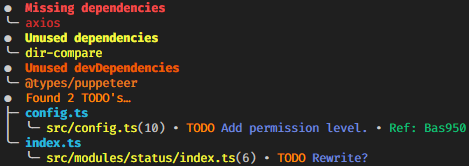
_Screenshot taken from [DevScript](https://www.npmjs.com/package/ts-devscript) to be used as an example._
## Compatability
You are able to pass strings that are colored using [Chalk](https://www.npmjs.com/package/chalk).
## Installation
```bash
# global
npm i -g displayastree
# npm
npm i displayastree
# yarn
yarn add displayastree
```
## Usage
### Tree with inner sections:
```TypeScript
import { Tree, Branch } from "displayastree";
//* Chalk is not needed but is just used in this example.
import chalk from "chalk";
//* Make the main tree.
const tree = new Tree(chalk.hex("#FF8C00")("Found 2 TODO's"));
//* Make branches.
const branchOne = new Branch(chalk.cyan("config.ts")).addBranch([chalk.yellow("src/config.ts")]);
const branchTwo = new Branch(chalk.cyan("index.ts")).addBranch([chalk.yellow("src/modules/status/index.ts")]);
//* Add the branches to the main tree and log
tree.addBranch([branchOne, branchTwo]).log();
```
Will log:

### Tree without inner sections:
```TypeScript
new Tree("A test").addBranch(["a", "b", "c"]).log();
```
Will log:

## Options
Simply include the options while creating the Tree instance.
```Typescript
const tree = new Tree("Tree Name", { headChar: "* " });
```
| Options | Type | Description | Default |
| -------- | ------ | --------------------------------------------------------------- | ------- |
| headChar | string | String of the character that the tree will start with. | `● ` |
| treeChar | string | String of the character that the tree will split with. | `├─ ` |
| lineChar | string | String of the character that the tree will display at overlaps. | `│ ` |
| lastChar | string | String of the character that the tree will end with. | `╰─ ` |
**Note**: treeChar, lineChar, and lastChar must have the same length.