# dsh-prompt-optimizer
English | [中文](README.zh.md)
[](LICENSE)
[](package.json)
[](https://www.npmjs.com/package/dsh-prompt-optimizer)
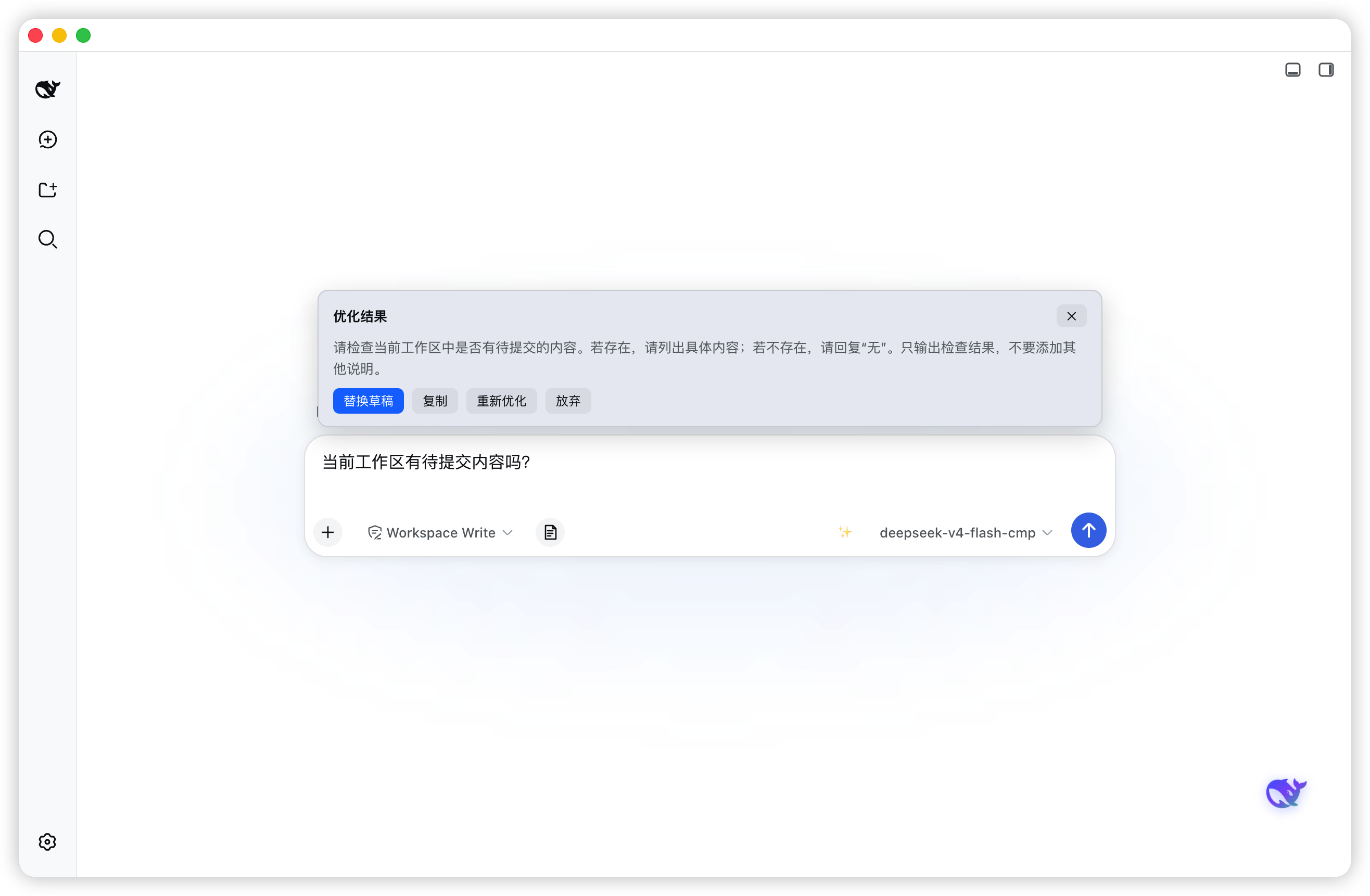
One-click prompt polishing for the DSH composer: select nothing, just type a draft and press **✨** (or `Alt+O`) — the plugin rewrites it into a clearer, better-structured prompt. **Zero-config by default**: it follows the current session's model through the harness host services, so no API key is needed. A self-configured OpenAI-compatible endpoint is supported as an alternative.
## Features
- **One-click optimize** — a ✨ button on the composer's right; `Alt+O` while the composer is focused does the same
- **True streaming preview** — real SSE over the harness `webServer`: every `text-delta` from `llm.stream` is pushed immediately and rendered token by token; **reasoning is streamed first**, so you watch the model think while it works
- **Zero-config default** — reuses the current session/agent default model (host `agentDefaultModel` + `llm` services), no API key required
- **Custom endpoint mode** — uncheck "follow session model" and plug in any OpenAI-compatible `/chat/completions` endpoint (base URL + key + model)
- **Action row on completion** — replace the draft in place, copy, re-optimize, or dismiss
- **Bilingual UI** — follows the DSH language (中文 / English) live, no reload
- **Self-hosted config** — settings persist in `~/.dsh/prompt-optimizer-config.json` via a loopback RPC channel, independent of the host settings registry
- **Dark-mode ready** — all colors follow DSH theme variables; fixed brand blue + white text in deep-night mode
- **Local-only credentials** — the API key (custom mode only) lives in the local config file and goes only to the endpoint you configured
## Screenshots
## Requirements
- [DSH](https://github.com/deepseek-ai/deepseek-harness) with a `web` or `desktop` profile
- Node.js `^22.19.0` or `>=24.0.0` (only needed to build from source)
- [pnpm](https://pnpm.io) is recommended when installing into a profile
## Install
> The bundle entry (`id: prompt-optimizer`) is self-declared by this package's `cordis.patch.yml` —
> no manual patch file is needed.
### From npm
```sh
dsh plugin --profile desktop add dsh-prompt-optimizer
```
For a web profile, use `--profile web`. Restart DSH (quit fully and reopen), then a ✨ button appears to the right of the composer.
### From source (development)
```sh
git clone https://github.com/winditer/dsh-prompt-optimizer.git && cd dsh-prompt-optimizer
npm install
npm run build # produces dist/client.js
dsh plugin --profile desktop add . # links the workspace into the profile by package name
```
Or install by hand: in the target profile's `package.json` (e.g. `~/.dsh/profiles/desktop/package.json`):
```jsonc
{
"dependencies": {
"dsh-prompt-optimizer": "link:/absolute/path/to/dsh-prompt-optimizer"
// ...
},
"dsh": {
"profile": {
"bundles": [ /* ... */, "dsh-prompt-optimizer" ]
}
}
}
```
then `pnpm install` inside the profile directory and restart DSH.
### Uninstall
Remove `dsh-prompt-optimizer` from the profile's `dependencies` and `dsh.profile.bundles`, clean up the installed package, and delete the config file `~/.dsh/prompt-optimizer-config.json` if you no longer need it.
## Usage
- Type a draft in the composer, click **✨** (or `Alt+O`) — the preview card appears over the composer
- While optimizing: reasoning text scrolls in secondary color first, then the polished prompt streams in token by token
- When done: **替换草稿** writes the result into the composer in place · **复制** copies it · **重新优化** re-runs · **放弃** dismisses
- The preview belongs to the session where you started it: switching sessions hides it, switching back restores it
## Configuration
Open **设置 → 通用设置 → Prompt 优化**:
| Setting | Default | Meaning |
| --- | --- | --- |
| 使用当前会话模型 | on | Follow the session/agent default model (zero-config). Off: enable the fields below |
| 接口地址 (base URL) | `https://api.deepseek.com` | Any OpenAI-compatible `/chat/completions` endpoint |
| API Key | — | Your key for the custom route (ignored in follow mode) |
| 模型名 | `deepseek-v4-flash` | Model name (ignored in follow mode) |
Settings are saved in `~/.dsh/prompt-optimizer-config.json` (same directory as other DSH config; removed with the plugin).
> Custom endpoints must support CORS and SSE streaming (official DeepSeek, OneAPI-style gateways work).
## Architecture
Two halves, one package:
- **Host half** — `lib/index.js`. Persists config over a loopback RPC channel (`/dsh-prompt-optimizer`, `get`/`set`), and registers an HTTP JSON API at `/dsh-prompt-optimizer/api` through the harness `webServer` service. Runs the session-default optimization via `llm.stream`; background streams live in an in-memory `Map` cleared on unload.
- **Client half** — `src/*.ts`, bundled to `dist/client.js` (esbuild, wrapped in `__ModuleLoader__.load({ id: "dsh-prompt-optimizer", … })`; the id **must** equal the installed package name). Renders into the `conversation.input.right` button, `conversation.input.overlay` preview card and `settings.general.item` row; talks to the host with `fetch` POSTs.
### Host API
All endpoints are `POST /dsh-prompt-optimizer/api/`; every response is `{ ok: true, value }` or `{ ok: false, error }`.
| Method | Body | Returns |
| --- | --- | --- |
| `sessionModel` | `{}` | `{ provider, model, reasoningEffort? }` — the session's default model |
| `optimize.stream` | `{ provider, model, text, system?, reasoningEffort? }` | `text/event-stream` — `event: reasoning` frames first, then `event: delta` per token, `event: done` at the end |
| `optimize.start` | `{ provider, model, text, system?, reasoningEffort? }` | `{ taskId }` — background accumulation (fallback path) |
| `optimize.poll` | `{ taskId }` | `{ done, text, error? }` — accumulated text while streaming |
| `optimize.abort` | `{ taskId }` | `{ ok }` |
Protocol details: only `POST` is accepted (405 otherwise); the body is JSON with a 1 MB cap; unknown methods return 404.
## Security notes
- **Default route sends no credentials** — it reuses the harness's configured provider.
- The **custom-mode API key stays local** (`~/.dsh/prompt-optimizer-config.json`), and only goes to the endpoint you configured.
- Optimizations appear only in the preview card; the polished text reaches a session only if you press **替换草稿**.
## Development
```sh
npm run build # esbuild: src/index.ts → dist/client.js (__ModuleLoader__ bundle)
npm test # node runner over tests/entry.ts (state machines, channels, SSE parser)
```
### Project layout
```
src/index.ts Client entry — slot wiring, RPC/config glue, host probes
src/OptimizeButton.tsx / PreviewCard.tsx / SettingsRow.tsx
src/optimizer.ts Config defaults, system prompts, OpenAI-compatible fetch/SSE client
src/session-optimizer.ts Host channel: sessionModel + SSE stream + fallback poll
src/preview-state.ts Preview card state machine (pure reducer)
src/preview-bus.ts Module-level event bus shared by button / card / orchestration
lib/index.js Host half — config persistence + HTTP JSON API (makeHandler + createApiRoute)
dist/client.js Built client bundle (__ModuleLoader__ format, load id = dsh-prompt-optimizer)
cordis.patch.yml Bundle entry declaration (insert: { id: prompt-optimizer, name: dsh-prompt-optimizer })
scripts/build.mjs Build script (esbuild + bundle wrapper)
tests/entry.ts Unit + integration tests (61)
assets/ Screenshot
```
### Gotchas (learned the hard way)
- **Bundle id must equal the package name** — `arrive()` throws `bundle loaded without registering ` otherwise. `scripts/build.mjs` hardcodes the correct id.
- **Profile bundles don't get the cordis `timer` service** — use plain browser `setInterval`/`setTimeout` (disposed in React effect cleanup), exactly like the sibling `dsh-elf` bundle.
- **Do not use `session.create/fork` for generation** — a background session never executes (the renderer's fabricated ids are silently rejected, forked sub-sessions don't trigger the model), which manifested as "optimizing forever". Drive the model from the host half via `llm.stream` instead.
- **Do not run the streaming protocol over `connection.rpc.call`** — on desktop the renderer's rpc.call hangs on the *second* call within one flow (verified: `sessionModel` ok, next call never arrives). Host channels go over HTTP (`webServer`).
- **Prefer `link:` over `file:`** when installing a workspace copy — `file:` copies files, so edits/rebuilds go stale.
- **Client changes go live on page refresh; host changes require a full DSH restart.**
- **A broken build script silently keeps the old bundle** — `npm run build` must print `✓ Built`; if it only prints a Node version banner, the script is failing (a past regression left a stale `dist/client.js` that looked "current").
- **Fresh publishes can trip the profile's `minimumReleaseAge` policy** — if the profile enforces pnpm's release-age supply-chain check, a version published less than ~24 h ago fails `dsh plugin … add ` with `ERR_PNPM_MINIMUM_RELEASE_AGE_VIOLATION`. Add the exact `name@version` to `minimumReleaseAgeExclude` in the profile's `pnpm-workspace.yaml` (and keep the entry current when you release a new version):
```yaml
minimumReleaseAgeExclude:
- dsh-prompt-optimizer@2.0.0
```
## License
[MIT](LICENSE)