[](https://travis-ci.org/maykinmedia/dual-listbox)
[](https://coveralls.io/github/maykinmedia/dual-listbox?branch=master)
[](https://codeclimate.com/github/maykinmedia/dual-listbox)
[](https://lintly.com/gh/maykinmedia/dual-listbox/)
[](https://github.com/maykinmedia/dual-listbox)
[](https://snyk.io/test/github/maykinmedia/dual-listbox)
[](https://bettercodehub.com/)
[](https://nodei.co/npm/dual-listbox/)
# Changes
> Solves the duplicate option rendering problem, as mentioned in this issue https://github.com/maykinmedia/dual-listbox/issues/63
# Dual Listbox
> Make your multi select pretty and easy to use with only javascript. No other frameworks/libraries required.
[Try the demo](https://maykinmedia.github.io/dual-listbox/)
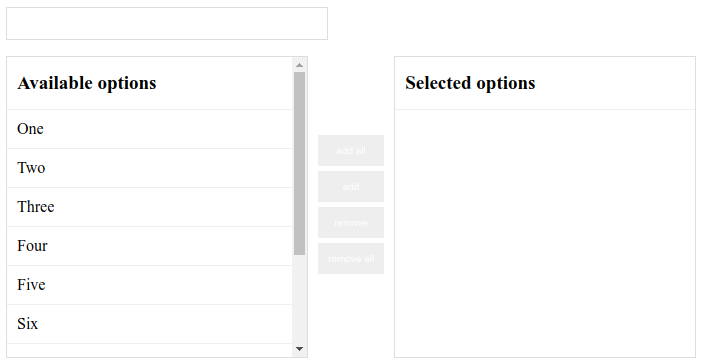
Styling. (From the stylesheet that can be found in the dist folder)
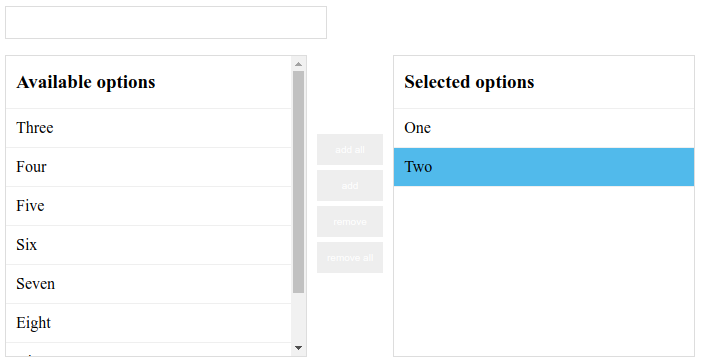
with selected options and one option highlighted.
## Install
Install with [npm](https://www.npmjs.com/)
```sh
$ npm i dual-listbox --save
```
CDN
```html
```
## Usage
```javascript
let dualListbox = new DualListbox("select"); // Selects the first selectbox on the page.
let dualListbox = new DualListbox(".select"); // Selects the first element with the class 'select'
let dualListbox = new DualListbox("#select"); // Selects the first element with the id 'select'
let select = document.querySelector("#select");
let dualListbox = new DualListbox(select); // Add a HTMLElement
```
You can also pass some options to the DualListbox
```javascript
let dualListbox = new DualListbox("#select", {
addEvent: function (value) {
// Should use the event listeners
console.log(value);
},
removeEvent: function (value) {
// Should use the event listeners
console.log(value);
},
availableTitle: "Different title",
selectedTitle: "Different title",
addButtonText: ">",
removeButtonText: "<",
addAllButtonText: ">>",
removeAllButtonText: "<<",
sortable: true,
upButtonText: "ᐱ",
downButtonText: "ᐯ",
draggable: true,
options: [
{ text: "Option 1", value: "OPTION1" },
{ text: "Option 2", value: "OPTION2" },
{ text: "Selected option", value: "OPTION3", selected: true },
],
});
dualListbox.addEventListener("added", function (event) {
console.log(event);
console.log(event.addedElement);
});
dualListbox.addEventListener("removed", function (event) {
console.log(event);
console.log(event.removedElement);
});
```
Try it online on [JSFiddle](https://jsfiddle.net/pn2zcwre/3/).
## Exposed elements
All the elements should be exposed. This way it should be possible to add custom attributes to the element of choice.
```javascript
let dualListbox = new DualListbox("#select");
// Access the buttons:
dualListbox.add_button.setAttribute("a", "a");
dualListbox.add_all_button.setAttribute("a", "a");
dualListbox.remove_button.setAttribute("a", "a");
dualListbox.remove_all_button.setAttribute("a", "a");
// Access the search field:
dualListbox.search_left.classList.add("some_class");
dualListbox.search_right.classList.add("some_class");
// Access the list containers:
dualListbox.selectedList.setAttribute("a", "a");
dualListbox.availableList.setAttribute("a", "a");
```
## Contributing
Pull requests and stars are always welcome. For bugs and feature requests, [please create an issue](https://github.com/maykinmedia/dual-listbox/issues).
## Author
**Maykin Media**
- [maykinmedia.nl](https://www.maykinmedia.nl/)
- [github/maykinmedia](https://github.com/maykinmedia)
- [twitter/maykinmedia](http://twitter.com/maykinmedia)
## License
Copyright © 2019 [Maykin Media](https://www.maykinmedia.nl/)
Licensed under the MIT license.