# easeljs-react
[](https://badge.fury.io/js/easeljs-react)
React/EaselJS bindings with React Reconciler
## Description
easeljs-react is a JavaScript library for drawing complex canvas graphics using React.
It provides declarative and reactive bindings to the EaselJS Framework.
This project is partially forked from [react-konva](https://github.com/lavrton/react-konva) project and re-designed for EaselJS.
## Install
```
npm install easeljs-react
```
or
```
yarn add easeljs-react
```
## Requirement
Currently easeljs-react depends on [react-reconciler](https://github.com/facebook/react/tree/master/packages/react-reconciler) that is used in React Fiber. So dependencies below are required.
- react ^16.8.2
- react-dom ^16.8.2
- react-reconciler ^0.18.0
## Usage
```JavaScript
import React from "react";
import {
StageComponent, BitmapComponent, ContainerComponent, ShapeComponent, TextComponent
} from "easeljs-react";
import Graphics = createjs.Graphics;
import Stage = createjs.Stage;
import Container = createjs.Container;
class CanvasComponent extends React.Component {
stage;
textContainer;
constructor(props) {
super(props);
state = {
image: null,
bitmapX: 100,
bitmapY: 100,
graphics: new Graphics(),
text: "hello world!"
};
// Note: make reference setters and event handlers idendified.
// avoid passing anonymous function props to Component.
this.onMouseDown = ev => this.handleMouseDown(ev);
this.onPressUp = ev => this.handlePressUp(ev);
this.setStageRef = n => this.stage = n.stage;
this.setTextContainerRef = n => this.textContainer = n;
}
handleMouseDown(ev) {
console.log(`down: ${ev.stageX},${ev.stageY}`);
}
handlePressUp(ev) {
console.log(`up: ${ev.stageX},${ev.stageY}`);
}
componentDidMount() {
const image = new Image();
image.src = "/img/logo.png";
image.onload = () => {
this.setState({image});
}
}
render() {
return (
)
}
}
```
## Demo
```
yarn install && yarn start && open http://localhost:5000
```
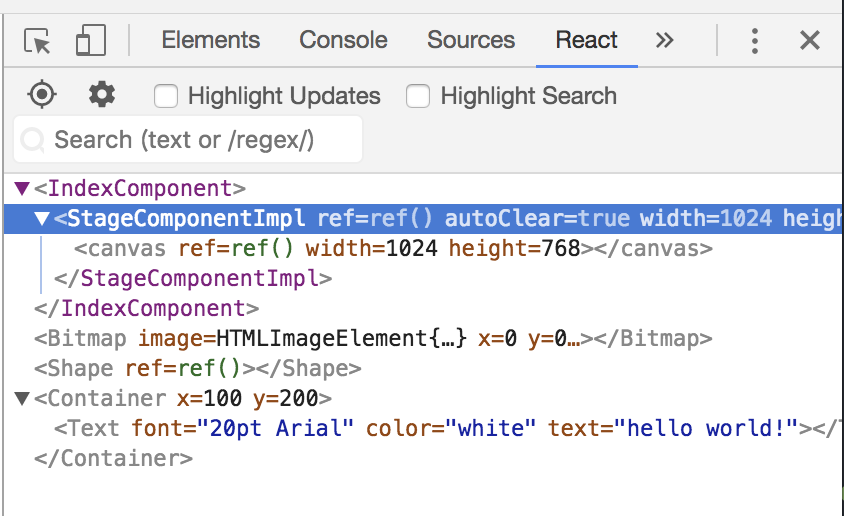
## React Dev Tools
You can see EaselJS component tree in your [React Developer Tools](https://chrome.google.com/webstore/detail/react-developer-tools/fmkadmapgofadopljbjfkapdkoienihi)
## Components
EaselJS Classes that inherits from `DisplayObject` are virtually bound on React Components. Naming conventions are as follows:
- Stage -> StageComponent
- Container -> ContainerComponent
- Shape -> ShapeComponent
- ...
When using components in your `jsx` or `tsx` source code, you must import it.
```js
import {StageComponent} from "easeljs-react"
```
In module resolution phase, bound components and easeljs's objects (`xxxComponent` and `xxx`) are recognized as different. But actually all components except `StageComponent` are identical to easeljs object.
So you can use bound components as easeljs object:
```js
class CanvasComponent extends React.Component {
stage;
shape;
setStageRef = n => this.stage = n.stage;
setShapeRef = n => this.shape = n;
render() {
}
}
```
### Component Reference in TypeScript
Unfortunatelly, direct reference between bound components and easeljs object doesn't work in TypeScript. This comes from type definition for React.Comopnent. `ref` property for React.Component is defined as `Component|Element` so that code below cannnot be resolved.
So just call `getPublicInstance()` method for getting reference to easeljs object:
```tsx
class CanvasComponent extends React.Component {
stage: Stage;
shape: Shape;
setStageRef = n => this.stage = n.stage;
setShapeRef = n => this.shape = n.getPublicInstance();
render() {
}
}
```
## Contribution
PR Welcome!
There are still no code convention or rules.
Feel free to open issues and create pull-request.
### Be Typed!
We are using TypeScript as primary development language. codes under `src` directory are active source code and `lib` are generated codes for publishing, keep it untouch.
## Licence
[MIT](https://github.com/tcnksm/tool/blob/master/LICENCE)
## Author
[keroxp](https://github.com/keroxp)