Chapter 9. O’Reilly Atlas API
O’Reilly Atlas comes with a API that can be used to perform most of the tasks that can be triggered via the UI. This makes it possible to build external services on top of the platform.
Authentication
To use the API, you will need to obtain an API token from the Atlas UI. You can then use this token as a parameter when accessing the API. All routes in Atlas requires an auth_token, and will return a 404 if none is provided.
curl https://atlas.oreilly.com/api?auth_token=abcdefg1234567
This token can be revoked via the Atlas UI.
Builds
Create
POST /api/builds
Create a new build for a specific GitHub project. This will only succeed if the authenticated user is allowed to clone the repository from GitHub, and the project has an atlas.json file with at least a list of files to build in order.
Input Parameters
project: Full name of the GitHub repo to build (e.g. runemadsen/Hello-World)
formats: Comma-separated list of formats to build. Possible options are pdf, epub, mobi, html and atlas.
branch: Name of the branch to build. If this is not specified, master will be used. This is useful for building older versions, or managing multiple concurrent versions of a project.
pingback_url: A valid URL for the API to ping when a build succeeds or fails. This method is prefered over manually pinging the build_url for updates. Note that the pingback_url will be called once per format. If you’re building your project as pdf and epub, the pingback_url will be called twice.
A successful response does not mean that the build finished. You will need to either provide a pingback_url or manually check the build_url to know when each of the formats in the build succeeded. There are 4 different states that a build format can return.
A queued response means that the build is waiting in the queue to be performed.
Response: Queued
{
  "build_url" : "https://atlas.oreilly.com/api/builds/1",
  "status" : [
    {
      "format" : "pdf",
      "status" : "queued"
    }
  ]
}
A working response means that the build is currently being performed.
Response: Working
{
  "build_url" : "https://atlas.oreilly.com/api/builds/1",
  "status" : [
    {
      "format" : "pdf",
      "status" : "working"
    }
  ]
}
A completed response means that the build successfully completed. You can then grab the file from the download_url. Note that the build files will be deleted a week after the build succeeds. If you want to persist the build files longer than that, you will need to do download the files and upload them to a persistent file storage. If the build succeeded with warning, you can read those warnings in the message property.
Response: Completed
{
  "build_url" : "https://atlas.oreilly.com/api/builds/1",
  "status" : [
    {
      "format" : "pdf",
      "status" : "completed",
      "download_url" : "http//www.something.com/something.pdf",
      "message" : "a potential warning"
    }
  ]
}
A failed response means that the build failed. Details about the error message is in the message property of the response.
Response: Failed
{
  "build_url" : "https://atlas.oreilly.com/api/builds/1",
  "status" : [
    {
      "format" : "pdf",
      "status" : "failed",
      "message" : "This is an error message"
    }
  ]
}
Atlas API Ruby Gem
Gem to interact with the O’Reilly Media Atlas API.
Installing
Install this gem by running:
$ gem install atlas-api
Command Line Script
You can build a specific project by calling the `atlas build` command line:
$ atlas build ATLAS_TOKEN PROJECT FORMATS BRANCH
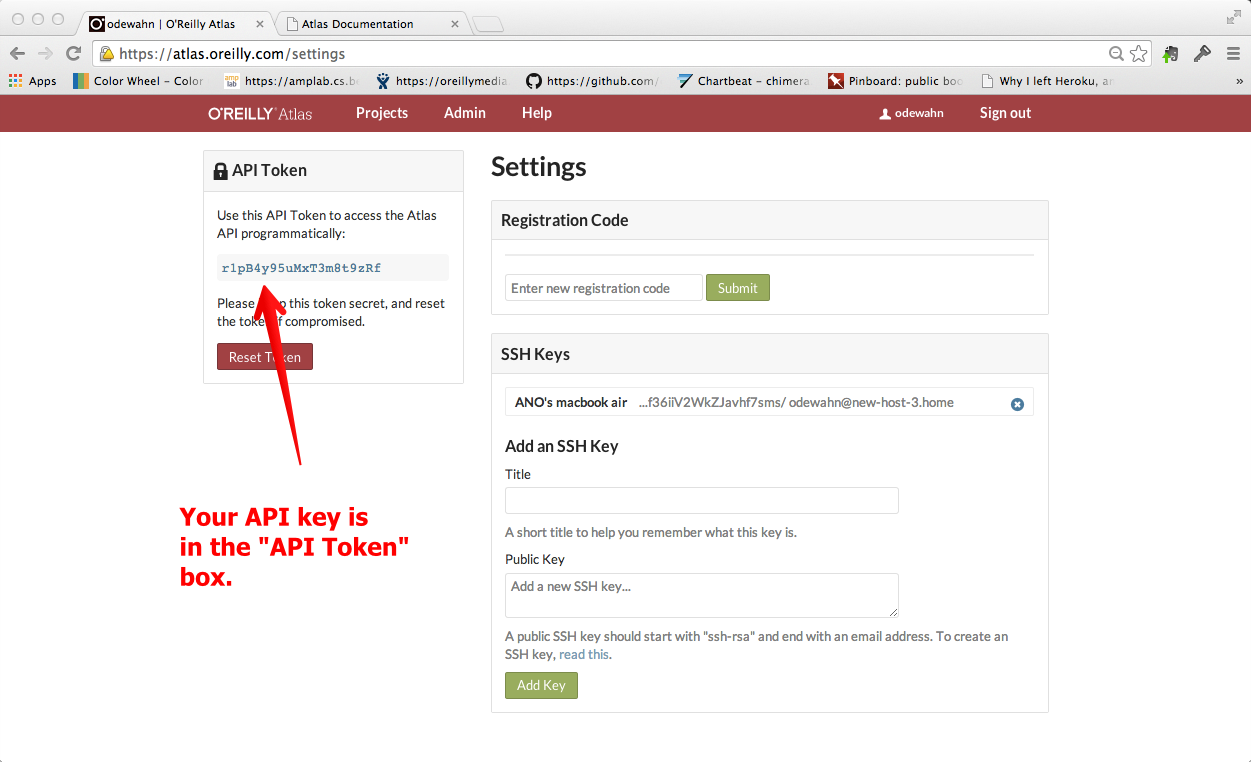
Where to find your API Key
You can find your API key in the “Settings” screen, which you access by clicking your username in the main header.
A real world example of this would look something like this:
$ atlas build abcdefg oreillymedia/atlas_book_skeleton pdf,epub,html master