` beside it for the color box:
```html
```
Using the same syntax, the widget can also be instanciated on a `
` or a `
` tag to show inline. In that case the generated HTML is the full palette.
## Theming
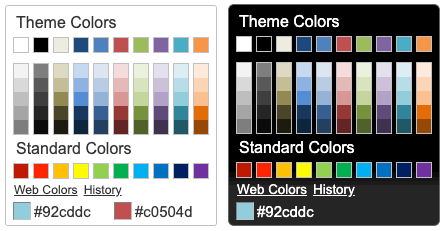
evol-colorpicker is as easily themeable as any jQuery UI widget, using one of the [jQuery UI themes](http://jqueryui.com/themeroller/#themeGallery) or your own custom theme made with [Themeroller](http://jqueryui.com/themeroller/).
## Options
evol-colorpicker provides several options to customize its behaviour:
### color (String)
Used to set the color value.
```javascript
$("#mycolor").colorpicker({
color: "#ffffff",
});
```
Defaults to _null_.
### defaultPalette (String)
Used to set the default color palette. Possible values are "theme" or "web".
```javascript
$("#mycolor").colorpicker({
defaultPalette: "web",
});
```
Defaults to _theme_.
### displayIndicator (Boolean)
Used to show color value on hover and click inside the palette.
```javascript
$("#mycolor").colorpicker({
displayIndicator: false,
});
```
Defaults to _true_.
### hideButton (Boolean)
When binding the colorpicker to a textbox, a colored button will be added to the right of the textbox unless hideButton is set to true.
This option doens't have any effect if the colorpicker is bound to a DIV.
```javascript
$("#mycolor").colorpicker({
hideButton: true,
});
```
Defaults to _false_.
### history (Boolean)
Used to track selection history (shared among all instances of the colorpicker). The history keeps the last 28 colors selections.
```javascript
$("#mycolor").colorpicker({
history: false,
});
```
Defaults to _true_.
### initialHistory (Array strings)
Used to provide a color selection history. Colors are provided as strings of hexadecimal color values.
```javascript
$("#mycolor").colorpicker({
initialHistory: ["#ff0000", "#00ff00", "#0000ff"],
});
```
Defaults to _null_.
### showOn (String)
Have the colorpicker appear automatically when the field receives focus ("focus"), appear only when a button is clicked ("button"), or appear when either event takes place ("both").
This option only takes effect when the color picker is instanciated on a textbox.
```javascript
$("#mycolor").colorpicker({
showOn: "button",
});
```
Defaults to _"both"_.
### strings (String)
Used to translate the widget. It is a coma separated list of all labels used in the UI.
```javascript
$("#mycolor").colorpicker({
strings:
"Couleurs de themes,Couleurs de base,Plus de couleurs,Moins de couleurs,Palette,Historique,Pas encore d'historique.",
});
```
Defaults to _"Theme Colors,Standard Colors,Web Colors,Theme Colors,Back to Palette,History,No history yet."_.
### transparentColor (Boolean)
Allow for selection of the "transparent color". The hexadecimal value for the transparent color is "#0000ffff".
```javascript
$("#mycolor").colorpicker({
transparentColor: true,
});
```
Defaults to _false_.
## Methods
### clear()
Clears the color value (and close the popup palette if opened).
```javascript
$("#mycolor").colorpicker("clear");
```
### enable()
Get the currently selected color value (returned as a string).
```javascript
$("#mycolor").colorpicker("enable");
```
### disable()
Get the currently selected color value (returned as a string).
```javascript
$("#mycolor").colorpicker("disable");
```
### isDisabled()
Get the currently selected color value (returned as a string).
```javascript
$("#mycolor").colorpicker("isDisabled");
```
### val([color])
Get or set the currently selected color value (as a string, ie. "#d0d0d0").
```javascript
var colorValue = $("#mycolor").colorpicker("val");
$("#mycolor").colorpicker("val", "#d0d0d0");
```
### showPalette()
Show the palette (when using the widget as a popup).
```javascript
$("#mycolor").colorpicker("showPalette");
```
### hidePalette()
Hide the palette (when using the widget as a popup).
```javascript
$("#mycolor").colorpicker("hidePalette");
```
## Events
### change.color
This event is triggered when a color is selected.
```javascript
$("#mycolor").on("change.color", function (event, color) {
$("#title").css("background-color", color);
});
```
### mouseover.color
This event is triggered when the mouse moves over a color box on the palette.
```javascript
$("#mycolor").on("mouseover.color", function (event, color) {
$("#title").css("background-color", color);
});
```
## License
Copyright (c) 2024 [Olivier Giulieri](https://evoluteur.github.io/).
**evol-colorpicker** is released under the [MIT license](http://github.com/evoluteur/colorpicker/raw/master/LICENSE.md).