# PDF Preview plugin for FilePond
[](https://github.com/Adri-Glez/filepond-plugin-pdf-preview/blob/master/LICENSE)
[](https://www.npmjs.com/package/filepond-plugin-pdf-preview)
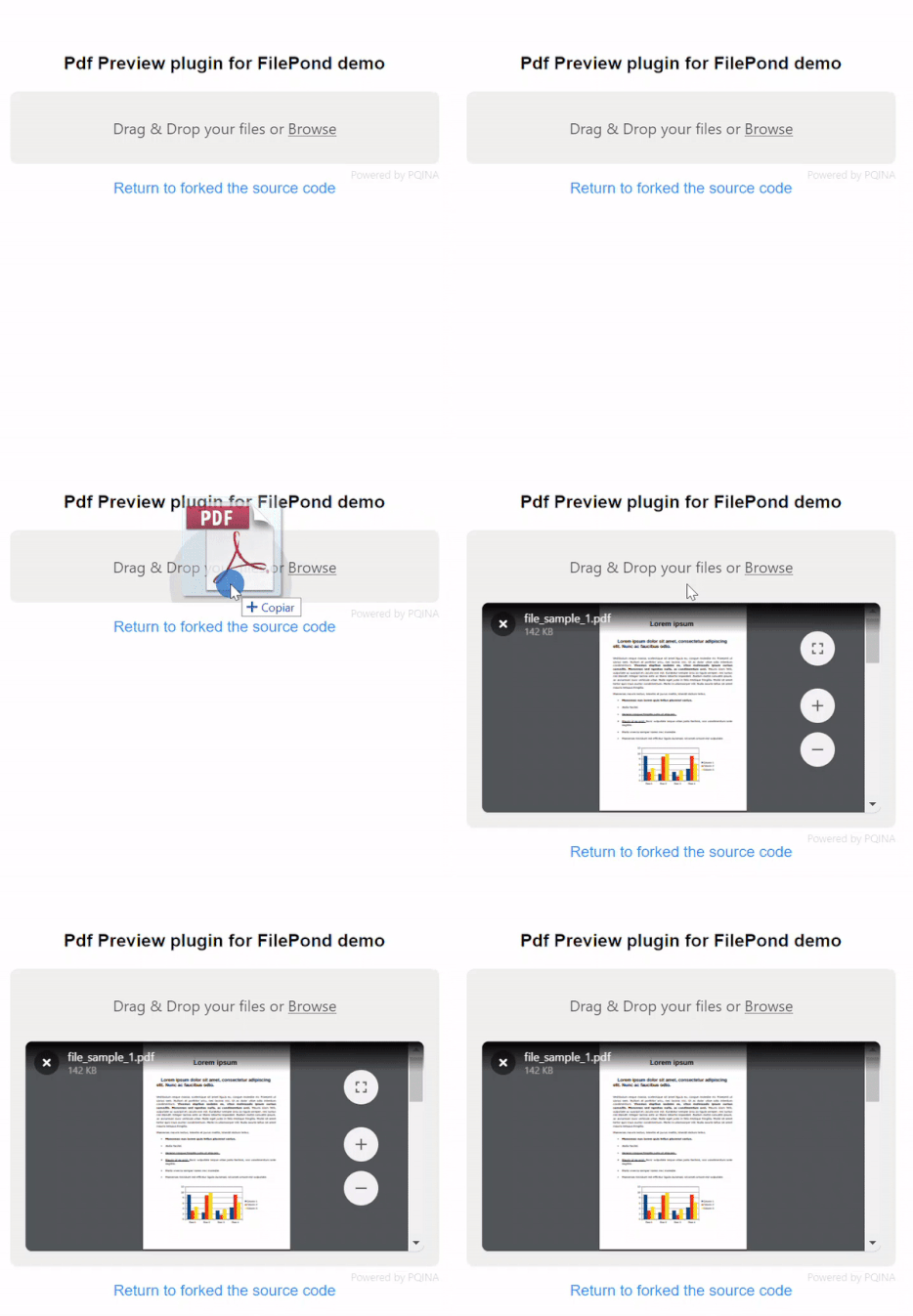
The PDF Preview plugin is an Extenxion of FilePond that will render a small preview when the uploaded file is of type PDF. It will use the browser native renderer.
## Quick Start
Install using npm:
```bash
npm install filepond-plugin-pdf-preview
```
Or install using Yarn:
```bash
yarn add filepond-plugin-pdf-preview
```
Or using a CDN refernce:
```js
https://unpkg.com/filepond-plugin-pdf-preview/dist/filepond-plugin-pdf-preview.min.js
```
Then import in your project:
```js
import * as FilePond from "filepond";
import FilePondPluginPdfPreview from "filepond-plugin-pdf-preview";
```
Or reference it by CDN
```html
```
Register the plugin:
```js
FilePond.registerPlugin(FilePondPluginPdfPreview);
```
Create a new FilePond instance as normal.
```js
const pond = FilePond.create({
name: "filepond",
});
// Add it to the DOM
document.body.appendChild(pond.element);
```
The preview will become active when uploading a PDF file.
## Change the defaults
If you want you can change the defaults for this plugin
in the javascript
```js
pond.setOptions({
allowPdfPreview: true,
pdfPreviewHeight: 320,
pdfComponentExtraParams: 'toolbar=0&view=fit&page=1'
});
```
or in the html with the 'data-' atributes in the html tag
```html
```
## Default styles
Be sure to include this lib's styles, by importing the minified css.
```js
import "filepond-plugin-pdf-preview/dist/filepond-plugin-pdf-preview.min.css";
```
or by CDN
```html
```
## Demo
[View the demo](https://Adri-Glez.github.io/filepond-plugin-pdf-preview/)
 ## Quick Start
Install using npm:
```bash
npm install filepond-plugin-pdf-preview
```
Or install using Yarn:
```bash
yarn add filepond-plugin-pdf-preview
```
Or using a CDN refernce:
```js
https://unpkg.com/filepond-plugin-pdf-preview/dist/filepond-plugin-pdf-preview.min.js
```
Then import in your project:
```js
import * as FilePond from "filepond";
import FilePondPluginPdfPreview from "filepond-plugin-pdf-preview";
```
Or reference it by CDN
```html
```
Register the plugin:
```js
FilePond.registerPlugin(FilePondPluginPdfPreview);
```
Create a new FilePond instance as normal.
```js
const pond = FilePond.create({
name: "filepond",
});
// Add it to the DOM
document.body.appendChild(pond.element);
```
The preview will become active when uploading a PDF file.
## Change the defaults
If you want you can change the defaults for this plugin
in the javascript
```js
pond.setOptions({
allowPdfPreview: true,
pdfPreviewHeight: 320,
pdfComponentExtraParams: 'toolbar=0&view=fit&page=1'
});
```
or in the html with the 'data-' atributes in the html tag
```html
```
## Default styles
Be sure to include this lib's styles, by importing the minified css.
```js
import "filepond-plugin-pdf-preview/dist/filepond-plugin-pdf-preview.min.css";
```
or by CDN
```html
```
## Demo
[View the demo](https://Adri-Glez.github.io/filepond-plugin-pdf-preview/)
## Quick Start
Install using npm:
```bash
npm install filepond-plugin-pdf-preview
```
Or install using Yarn:
```bash
yarn add filepond-plugin-pdf-preview
```
Or using a CDN refernce:
```js
https://unpkg.com/filepond-plugin-pdf-preview/dist/filepond-plugin-pdf-preview.min.js
```
Then import in your project:
```js
import * as FilePond from "filepond";
import FilePondPluginPdfPreview from "filepond-plugin-pdf-preview";
```
Or reference it by CDN
```html
```
Register the plugin:
```js
FilePond.registerPlugin(FilePondPluginPdfPreview);
```
Create a new FilePond instance as normal.
```js
const pond = FilePond.create({
name: "filepond",
});
// Add it to the DOM
document.body.appendChild(pond.element);
```
The preview will become active when uploading a PDF file.
## Change the defaults
If you want you can change the defaults for this plugin
in the javascript
```js
pond.setOptions({
allowPdfPreview: true,
pdfPreviewHeight: 320,
pdfComponentExtraParams: 'toolbar=0&view=fit&page=1'
});
```
or in the html with the 'data-' atributes in the html tag
```html
```
## Default styles
Be sure to include this lib's styles, by importing the minified css.
```js
import "filepond-plugin-pdf-preview/dist/filepond-plugin-pdf-preview.min.css";
```
or by CDN
```html
```
## Demo
[View the demo](https://Adri-Glez.github.io/filepond-plugin-pdf-preview/)