🎛 flopflip - Feature Toggling 🎚
flip or flop a feature in LaunchDarkly with real-time updates through a redux store.

Toggle features in LaunchDarkly with their state being maintained in a redux state slice being accessible through a set of Higher-Order Components in React (via recompose).
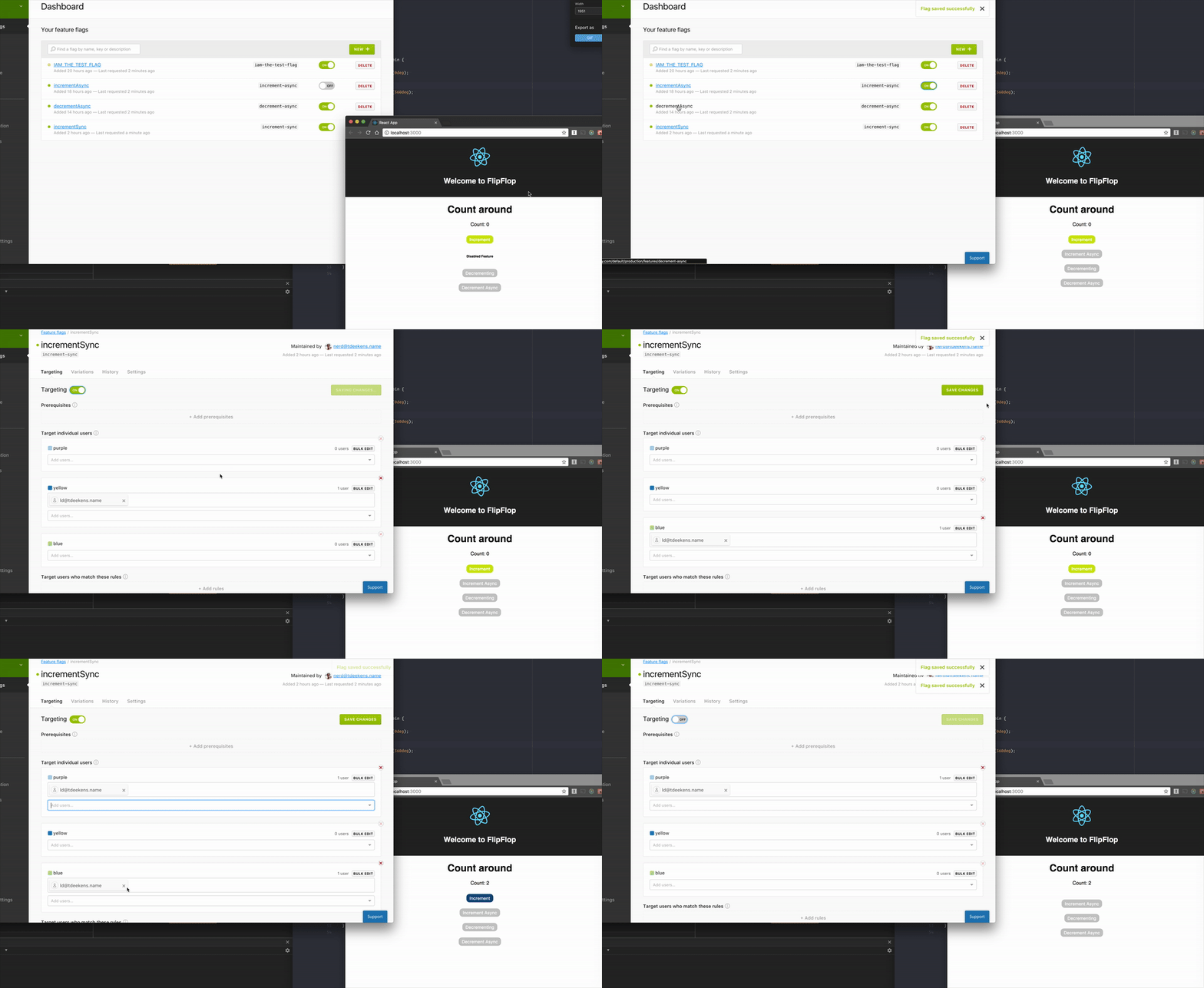
Want to see a demo?
### Status
[](https://travis-ci.org/tdeekens/flopflip) 💎 []() 💎 []()
## Installation
`yarn add flopflip` or `npm i flopflip --save`
## Demo
A minimal [demo](/demo) exists and can adjusted to point to a [custom](https://github.com/tdeekens/flopflip/blob/master/demo/src/App.js#L108) LaunchDarkly account. You would have to create feature toggles according to the existing [flags](https://github.com/tdeekens/flopflip/blob/master/demo/src/flags.js) too.
Then simply run:
1. From the repositories root: `yarn build:watch`
2. From `/demo`: first `yarn` and then `yarn start`
A browser window should open and the network tab should show feature flags being loaded from LaunchDarkly.
## Documentation
Flopflip allows you to manage feature flags through [LaunchDarkly](https://launchdarkly.com/) within an application written using React and Redux.
### API & exports
The `modules/index.js` exports:
- `createFlopFlipEnhancer` a redux store enhancer to configure LaunchDarkly and add feature toggle state to your redux store
- `ConfigureFlopFlip` a component to configure LaunchDarkly (alternative to the store enhancer)
- `reducer` and `STATE_SLICE` a reducer and the state slice for the feature toggle state
- `withFeatureToggle` a Higher-Order Component (HoC) to conditionally render components depending on feature toggle state
- `injectFeatureToggles` a HoC to inject requested feature toggles from existing feature toggles onto the `props` of a component
- `FeatureToggled` a component conditionally rendering its `children` based on the status of a passed feature flag
#### `createFlopFlipEnhancer`
Requires arguments of `clientSideId:string`, `user:object`.
- The `clientSideId` is your LaunchDarkly ID.
- The `user` object needs at least a `key` attribute. An anonymous `key` will be generated using `uuid4` when nothing is specified. The user object can contain additional data.
#### `reducer` & `STATE_SLICE`
The flopflop reducer should be wired up with a `combineReducers` within your application in coordination with the `STATE_SLICE` which is used internally too to manage the location of the feature toggle states.
In context this configuration could look like:
```js
import { createStore, compose, applyMiddleware } from 'redux';
import {
createFlopFlipEnhancer,
flopflipReducer,
// We refer to this state slice in the `injectFeatureToggles`
// HoC and currently do not support a custom state slice.
FLOPFLIP_STATE_SLICE
} from 'flopflip';
// Maintained somewhere within your application
import user from './user';
import appReducer from './reducer';
const store = createStore(
combineReducers({
appReducer,
[FLOPFLIP_STATE_SLICE]: featureToggleReducer,
}),
initialState,
compose(
applyMiddleware(...),
createFlopFlipEnhancer(
// NOTE:
// This clientId is not secret to you and can be found
// within your settings on LaunchDarkly.
window.application.env.LD_CLIENT_ID,
user
)
)
)
```
Whenever setup is not preferred via the store enhance the same can be achieved using the `ConfigureFlopFlip` component.
It takes the `props`:
- The `clientSideId` is your LaunchDarkly ID.
- The `user` object needs at least a `key` attribute. An anonymous `key` will be generated using `uuid4` when nothing is specified. The user object can contain additional data.
```js
import { createStore, compose, applyMiddleware } from 'redux';
import {
ConfigureFlopFlip,
flopflipReducer,
FLOPFLIP_STATE_SLICE
} from 'flopflip';
// Maintained somewhere within your application
import user from './user';
import appReducer from './reducer';
const store = createStore(
combineReducers({
appReducer,
[FLOPFLIP_STATE_SLICE]: featureToggleReducer,
}),
initialState,
compose(
applyMiddleware(...),
)
)
// Somewhere where your is rendered
```
#### `FeatureToggled`
The component renders its `children` depending on the state of a given feature flag. It also allows passing an optional `untoggledComponent` which will be rendered whenever the feature is disabled instead of `null`.
```js
import React, { Component } from 'react';
import { FeatureToggled } from 'flopflip';
import flagsNames from './feature-flags';
export default (
At least there is a fallback!}
>
I might be gone or there!
);
```
#### `withFeatureToggle`
A HoC to conditionally render a component based on a feature toggle's state. It accepts the feature toggle name and an optional component to be rendered in case the feature is disabled.
Without a component rendered in place of the `ComponentToBeToggled`:
```js
import { withFeatureToggle } from 'flopflip';
import flagsNames from './feature-flags';
const ComponentToBeToggled = () => I might be gone or there!
;
export default withFeatureToggle(flagsNames.THE_FEATURE_TOGGLE)(
ComponentToBeToggled
);
```
With a component rendered in place of the `ComponentToBeToggled`:
```js
import { withFeatureToggle } from 'flopflip';
import flagsNames from './feature-flags';
const ComponentToBeToggled = () => I might be gone or there!
;
const ComponentToBeRenderedInstead = () =>
At least there is a fallback!
;
export default withFeatureToggle(flagsNames.THE_FEATURE_TOGGLE)(
ComponentToBeToggled,
ComponentToBeRenderedInstead
);
```
#### `injectFeatureToggles`
This HoC matches feature toggles given against configured ones and injects the matching result. `withFeatureToggle` uses this to conditionally render a component.
```js
import { injectFeatureToggles } from 'flopflip';
import flagsNames from './feature-flags';
const Component = props => {
if (props.featureToggles[flagsNames.TOGGLE_A])
return Something to render!
;
else if (props.featureToggles[flagsNames.TOGGLE_B])
return Something else to render!
;
return Something different to render!
;
};
export default injectFeatureToggles([flagsNames.TOGGLE_A, flagsNames.TOGGLE_B])(
Component
);
```
The feature flags will be available as `props` within the component allowing some custom decisions based on their value.
### Module formats
`Flopflip` is built as a UMD module using [`rollup`](https://github.com/tdeekens/flopflip/blob/master/rollup.config.js). The distribution version is not added to `git` but created as a `preversion` [script](https://github.com/tdeekens/flopflip/blob/master/package.json).
- ...ESM just import the `dist/flopflip.es.js` within your app.
- ...it's a transpiled version accessible via the `pkg.module`
- ...CommonJS use the `dist/flopflip.umd.js`
- ...AMD use the `dist/flopflip.umd.js`
- ...`` link it to `dist/flopflip.umd.js` or `dist/flopflip.umd.min.js`
All build files are part of the npm distribution using the [`files`](https://github.com/tdeekens/flopflip/blob/master/package.json) array to keep install time short.
Also feel free to use [unpkg.com](https://unpkg.com/flopflip@latest/dist/flopflip.umd.min.js) as a CDN to the [dist](https://unpkg.com/flopflip@latest/dist/) files.