# format-to-json
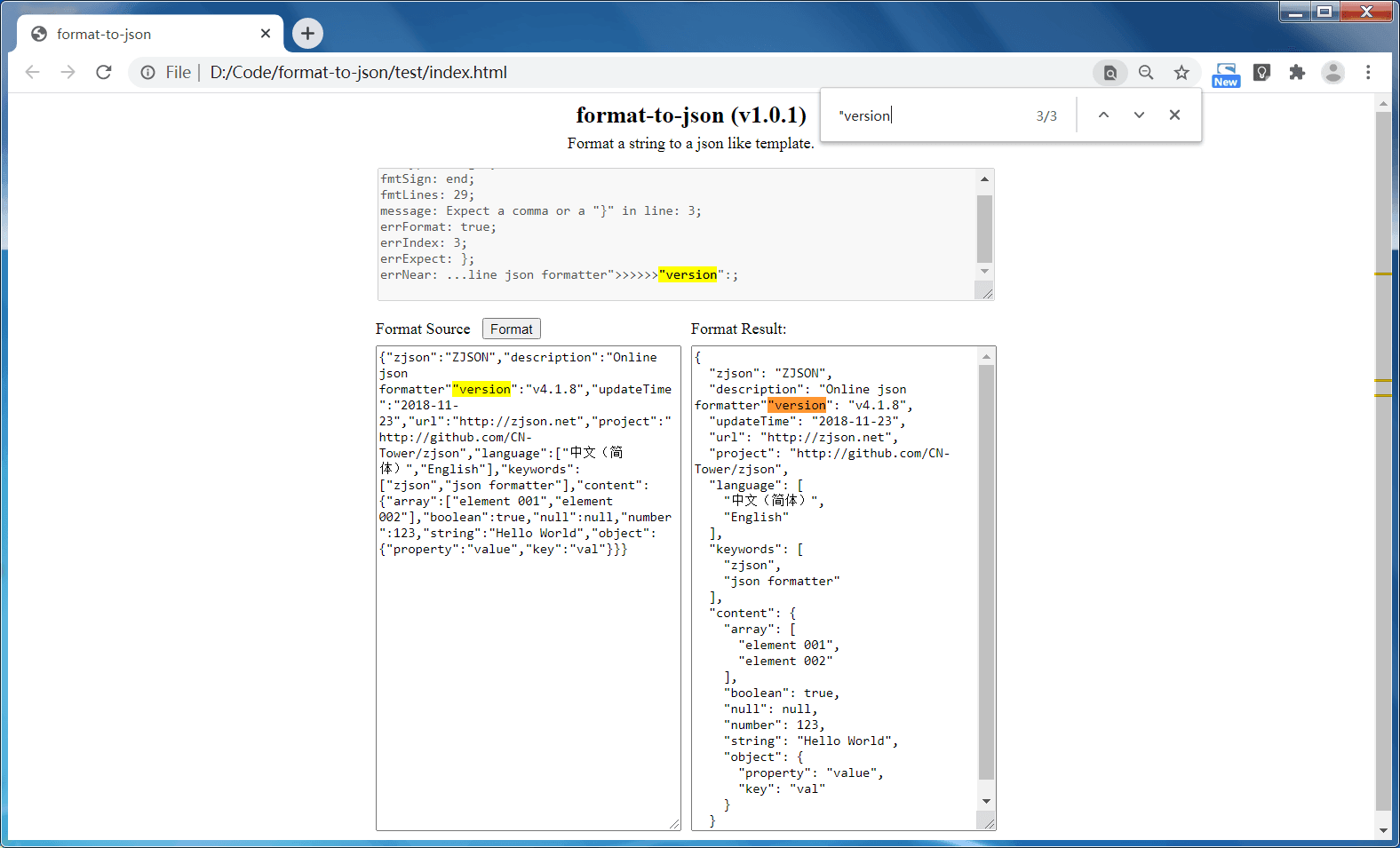
Playground: https://unpkg.com/format-to-json@3.0.3/index.html
[](https://www.npmjs.com/package/format-to-json)
[](https://github.com/CN-Tower/format-to-json/blob/master/LICENSE)
> Format string to a json like template
- [Usages](#Usages)
- [In html](#in-html)
- [In javascript](#in-javascript)
- [Interface](#Interface)
- [fmt2json](#mehtod-fmt2json)
- [FormatOptions](#interface-formatoptions)
- [FormatResult](#interface-formatresult)
- [Terminal](#Terminal)
## Usages
### In html
```html
```
### In javascript
Run: `npm install format-to-json --save`;
```javascript
const fmt2json = require('format-to-json');
const source =
'{"zjson":"ZJSON","description":"Online json formatter","version":"v4.1.8","updateTime":"2018-11-23","url":"http://zjson.net","project":"http://github.com/CN-Tower/zjson","language":["中文(简体)","English"],"keywords":["zjson","json formatter"],"content":{"array":["element 001","element 002"],"boolean":true,"null":null,"number":123,"string":"Hello World","object":{"property":"value","key":"val"}}}';
const fmtInfo = fmt2json(source, { withDetails: true });
console.log(fmtInfo.result);
```
Output:
```js
{
result: '{\r\n' +
' "zjson": "ZJSON",\r\n' +
' "description": "Online json formatter",\r\n' +
' "version": "v4.1.8",\r\n' +
' "updateTime": "2018-11-23",\r\n' +
' "url": "http://zjson.net",\r\n' +
' "project": "http://github.com/CN-Tower/zjson",\r\n' +
' "language": [\r\n' +
' "中文(简体)",\r\n' +
' "English"\r\n' +
' ],\r\n' +
' "keywords": [\r\n' +
' "zjson",\r\n' +
' "json formatter"\r\n' +
' ],\r\n' +
' "content": {\r\n' +
' "array": [\r\n' +
' "element 001",\r\n' +
' "element 002"\r\n' +
' ],\r\n' +
' "boolean": true,\r\n' +
' "null": null,\r\n' +
' "number": 123,\r\n' +
' "string": "Hello World",\r\n' +
' "object": {\r\n' +
' "property": "value",\r\n' +
' "key": "val"\r\n' +
' }\r\n' +
' }',
fmtType: 'danger',
fmtSign: 'end',
fmtLines: 29,
fmtTime: 1.0678750276565552,
message: 'Expect a comma or a "}" in line: 29',
errFormat: true,
errIndex: 29,
errNear: '...": "val"\\n }\\n }>>>>>>',
errExpect: '}'
}
```
## Interface
#### [Mehtod] fmt2json
```typescript
declare function fmt2json(source: string, options?: FormatOptions): string;
declare function fmt2json(source: string, options: FormatOptions & { withDetails: true }): FormatResult;
```
#### [Interface] FormatOptions
```typescript
interface FormatOptions {
indent?: number; // Integer, Large then 0, default: 2
expand?: boolean; // Default: true
strict?: boolean; // Default: false
escape?: boolean; // Default: false
unscape?: boolean; // Default: false
keyQtMark?: "'" | '"' | ''; // Default: "\""
valQtMark?: "'" | '"'; // Default: "\""
}
```
#### [Interface] FormatResult
```typescript
interface FormatResult {
result: string;
fmtType: 'info' | 'success' | 'warning' | 'danger';
fmtSign: 'ost' | 'col' | 'val' | 'end' | 'war' | 'scc' | 'err';
fmtLines: number;
fmtTime: number;
message: string;
errFormat: boolean;
errIndex: number;
errNear: string;
errExpect: string;
}
```
## Terminal
Run: `npm install -g format-to-json`
Run: `fmt2json -h`
```terminal
Usage: fmt2json [options]
Options:
-V, --version output the version number
-v, --version output the version number
-i, --indent Indnet number.
-q, --qtMark Quotation mark, one of ['""', "''", '"', "'"] (default: "\"\"")
-c, --collapse Collapse the formatted results.
-e, --escape Escape the formatted results.
-u, --unescape Unescape source before format.
-s, --strict Strict mode.
-d, --details Return with formatted details info.
-h, --help output usage information
```
Run: `fmt2json -i 4 -q "'" -d`
```terminal
√ Input a string to foramt: · [{name: "Tom", age: 28, gender: "male"}]
==================================================================
[23:10:11] format-to-json(3.0.3)
------------------------------------------------------------------
[
{
name: 'Tom',
age: 28,
gender: 'male'
}
]
------------------------------------------------------------------
{
fmtType: 'success',
fmtSign: 'scc',
fmtLines: 8,
fmtTime: 0.6254580020904541,
message: 'Success formated 8 lines!',
errFormat: false,
errIndex: NaN,
errNear: ''
errExpect: '',
}
==================================================================
```