# gatsby-remark-prismjs-add-title
Adds a code title to code snippets
## Install
```bash
npm install gatsby-remark-prismjs-add-title --save-dev
```
## How to use
### settings
in your `gatsby-config.js`
```js
plugins: [
{
resolve: 'gatsby-transformer-remark',
options: {
plugins: [
{
resolve: 'gatsby-remark-prismjs-title',
options: {
className: 'your-custom-class-name'
}
} // IMPORTANT: this must be ahead of other plugins that use code blocks
]
}
}
]
```
### Include CSS
The title tag is set to the `gatsby-code-title` class.
Set the style according to the style set in the code.
The following is an example of using `okaidia` for` prism.js` style.
```css
.gatsby-code-title {
display: block;
position: relative;
background: #272822;
width: 100%;
top: 10px;
border-top-left-radius: 0.3em;
border-top-right-radius: 0.3em;
}
.gatsby-code-title span {
display: inline;
position: relative;
font-family: Consolas, Monaco, "Andale Mono", "Ubuntu Mono", monospace;
color: #eee;
background: #777;
border-top-left-radius: 0.3em;
border-bottom-right-radius: 0.3em;
padding: 3px;
top: 1px;
}
```
### Usage in Markdown
in your Markdown content
``````
```js:title=example-file.js
alert('how cool is this!');
```js
``````
This plug-in analyzes Markdown AST and converts it into the following structure.
``````
example-file.js
```js
alert('how cool is this');
```
``````
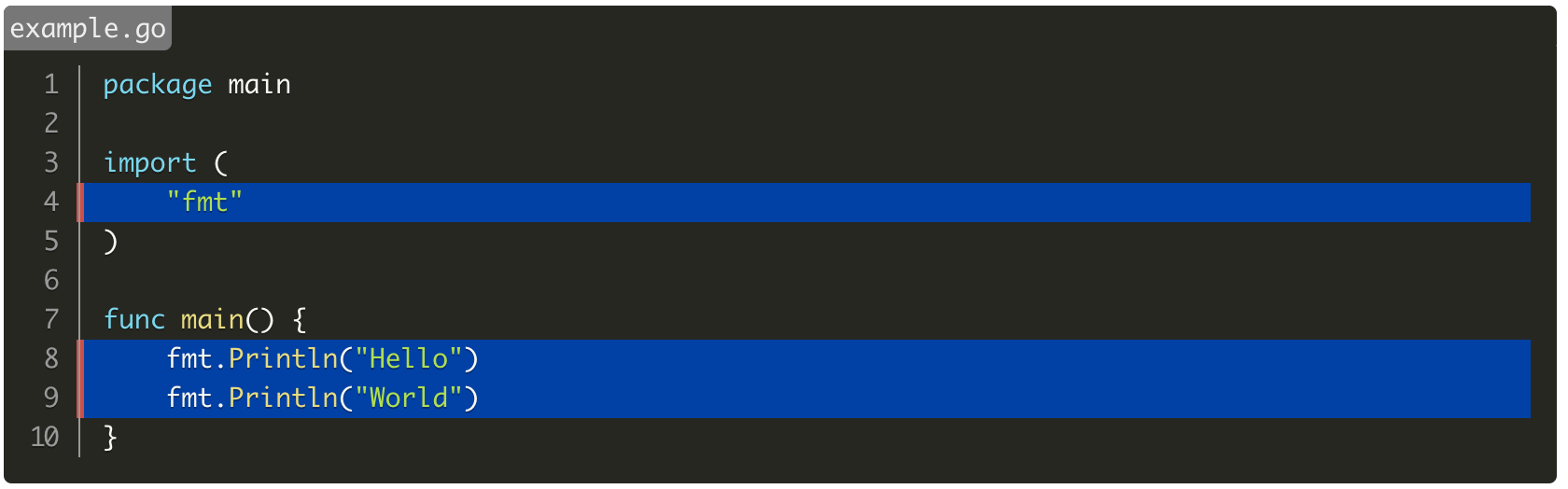
It can be used in combination with `gatsby-remark-prismjs` highlighting and line number display.
``````
```go{numberLines: true}{4,8-9}:title=example.go
package main
import (
"fmt"
)
func main() {
fmt.Println("Hello")
fmt.Println("World")
}
```
``````
## Difference from gatsby-remark-code-titles
It can be used simultaneously with `gatsby-remark-prismjs` Line Highlight.
Also, enclose the title with the `span` tag.
- `gatsby-remark-code-titles`
`title
`
- This Plugin
`title
`