# generator-express-no-stress
  [](https://www.codacy.com/app/cdimascio/generator-express-no-stress?utm_source=github.com&utm_medium=referral&utm_content=cdimascio/generator-express-no-stress&utm_campaign=Badge_Grade) [](https://gitter.im/cdimascio-oss/community) 
Create awesome [Express.js](http://www.expressjs.com) applications with best of breed tech including ES.next via [Babel.js](https://babeljs.io/), structured logging with [Pino](https://github.com/pinojs/pino), API validation and interactive documentation using an [OpenAPI 3](https://swagger.io/specification/) or [Swagger 2](https://swagger.io/specification/v2/) spec, environment based config with [dotenv](https://github.com/motdotla/dotenv), and linting with [ESLint](http://eslint.org/).
[](https://GitHub.com/cdimascio/generator-express-no-stress/stargazers/) [](https://twitter.com/intent/tweet?text=Check%20out%20express-no-stress%20by%20%40CarmineDiMascio%20https%3A%2F%2Fgithub.com%2Fcdimascio%2Fgenerator-express-no-stress%20%F0%9F%91%8D)

generator-express-no-stress gets you up and running in seconds. It's ridiculously easy to configure. Heck, just take the defaults. Start it. Write code.
This generator scaffolds a fully functioning REST API server, complete with interactive documentation, API request and response validation, structured logging, environment driven config, and more. Simply run the generator and smile :-D
[Here's what you get!](#what-you-get)
## Install
_Requires Node 8 or greater_
```shell
npm install -g yo generator-express-no-stress
```
- See [here](#usage-cli) for use with Yarn and/or Docker
- See [here](#faqs) for Node 6 support
## Scaffold
```shell
yo express-no-stress myapp
cd myapp
```
## Run
Run in _development mode_:
```shell
npm run dev
```
Package and run in _production mode_
```shell
npm run compile
npm start
```
## Test
```shell
npm test
```
## Debug
Run one of the following, then attach your favorite inspector e.g. [VSCode](#debug-in-vscode):
```shell
# debug the server
npm run dev:debug
# debug the tests
npm run test:debug
```
## Try it!
- Interactive API doc at [http://localhost:3000/api-explorer](http://localhost:3000/api-explorer)
- Landing page at [http://localhost:3000](http://localhost:3000)
---
## Usage: CLI
```shell
yo express-no-stress [appname] [--yarn] [--docker]
```
| Option | default | Description |
| ---------- | ------- | -------------------------------------------------------------------------- |
| `appname` | myapp | The application folder |
| `--yarn` | - | Use the [`yarn`](https://yarnpkg.com) package manager, instead of `npm` |
| `--docker` | | Install [Docker](https://www.docker.com/) artifacts including a Dockerfile |
## Usage: Project
The sections below describe all usage options available once the project is generated/scaffolded.
### npm targets
| Target | Description |
| -------------------- | ------------------------------------------------------------------------ |
| `npm run dev` | Run in _development_ mode |
| `npm run dev:debug` | Debug in _development_ mode |
| `npm run test` | Run tests |
| `npm run test:debug` | Debug tests |
| `npm run lint` | View a listing of all errors discovered by the linter |
| `npm run lint:fix` | Fix all errors discovered by the linter |
| `npm run compile` | Transpile source code for production use |
| `npm start` | Run the in _production_ mode. \*Requires running `npm run compile` first |
### Debug in VSCode
Add these [contents](https://github.com/cdimascio/generator-express-no-stress/blob/next/assets/.vscode/launch.json) to your `.vscode/launch.json` file
### Debug in WebStorm
1. Start debug in _development_ mode via `npm run dev:debug`
2. From the "Run" menu, select "Debug"
3. Select "Edit Configurations..."
4. From the list of Templates on the left side of the dialog, select "Attach to Node.js/Chrome"
5. Press the "Debug" button to attach the WebStorm debugger
### Deploy to the Cloud
e.g. CloudFoundry
```
cf push myapp
```
### Use Yarn
```
# scaffold
yo express-no-stress myapp --yarn
cd myapp
# run in development mode
yarn run dev
# run in production mode
yarn run compile
yarn start
# test
yarn test
```
---
## What you get!
- [Express.js](http://www.expressjs.com) - Fast, unopinionated
, minimalist web framework for Node.js
- [Babel.js](https://babeljs.io/) - Use new syntax, right now without waiting for support
- [Pino](https://github.com/pinojs/pino) - Extremely fast node.js logger, inspired by Bunyan. It also includes a shell utility to pretty-print its log files
- [dotenv](https://github.com/motdotla/dotenv) - Loads environment variables from .env for nodejs projects
- [ESLint](http://eslint.org/) - a pluggable linting utility for JavaScript and JSX
Choose from the following ESLint lint rules:
- [Airbnb](https://github.com/airbnb/javascript) - A mostly reasonable approach to JavaScript
- [Prettier](https://github.com/prettier/prettier) - Prettier is an opinionated code formatter
- [Swagger](http://swagger.io/) - is a simple yet powerful representation of your RESTful API
- [SwaggerUI](http://swagger.io/) - dynamically generate beautiful documentation and sandbox from a Swagger-compliant API
### API Validation
Simply describe your APIs with Swagger and automagically get for free:
- Interactive documentation
- API request validation
- API response validation (OpenAPI 3 only. Disabled by default)
- To enable set `OPENAPI_ENABLE_RESPONSE_VALIDATION=true` in `.env`
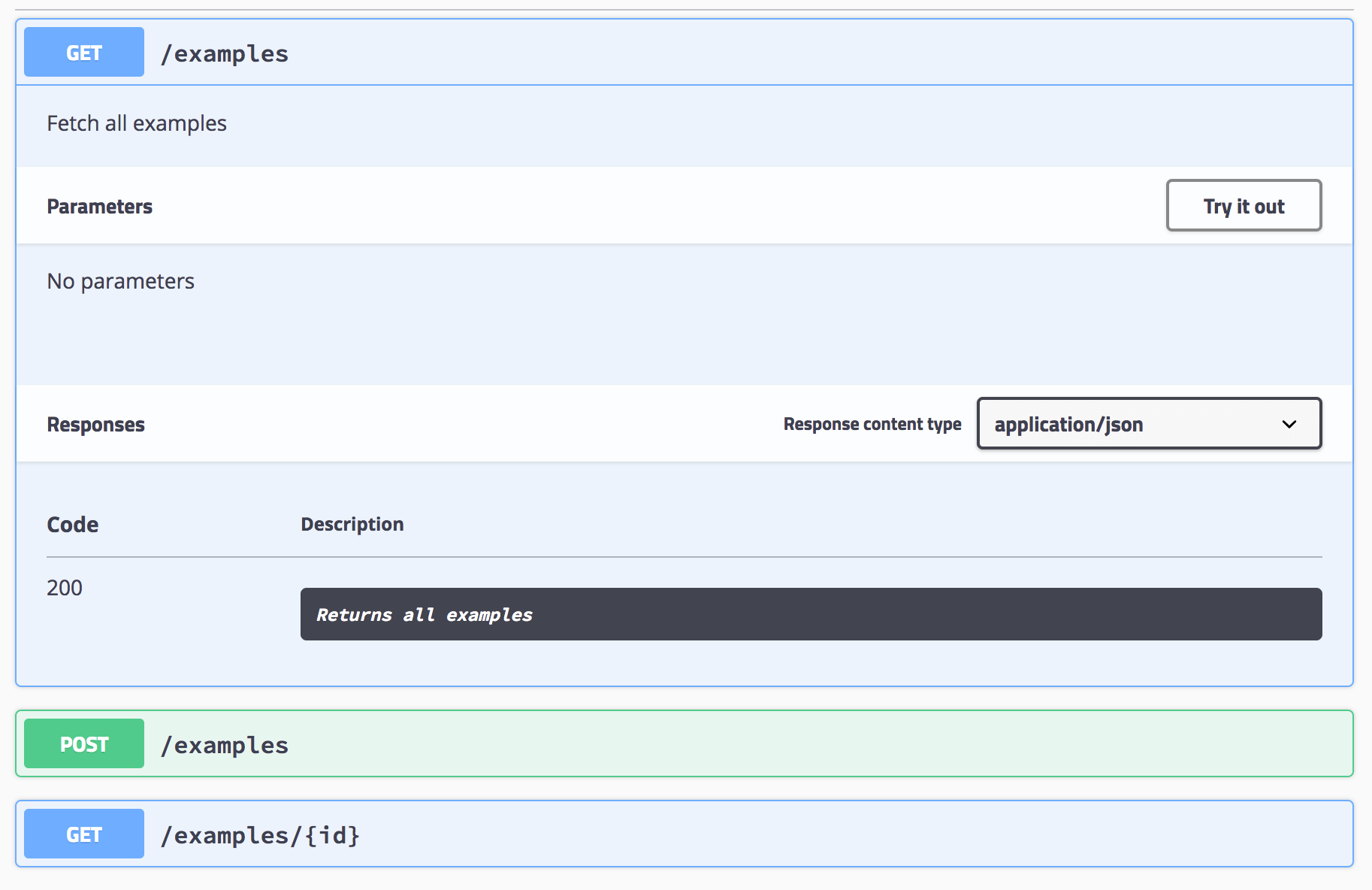
#### Interactive API Doc
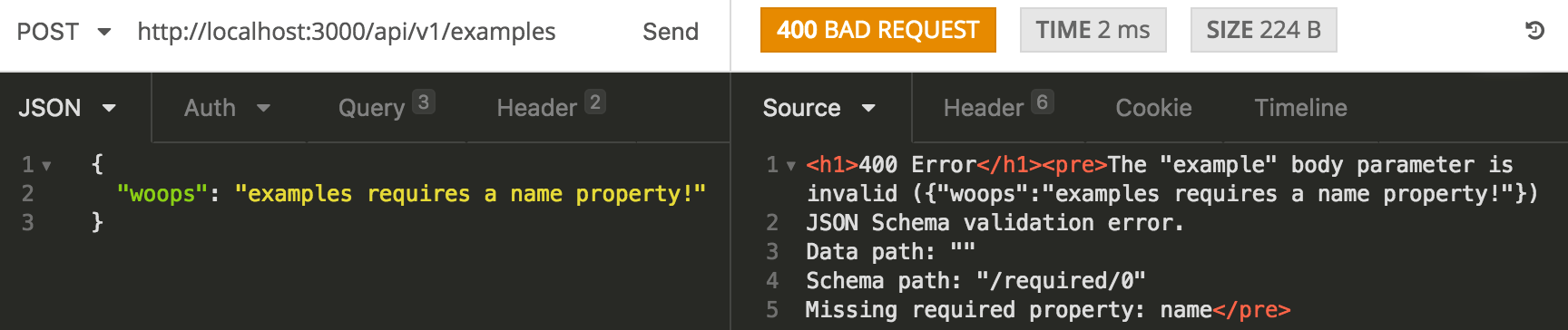
#### API Validation!
Oops! I the API caller forgot to pass a `name` field, no stress, we've got this!
### Structured Logging
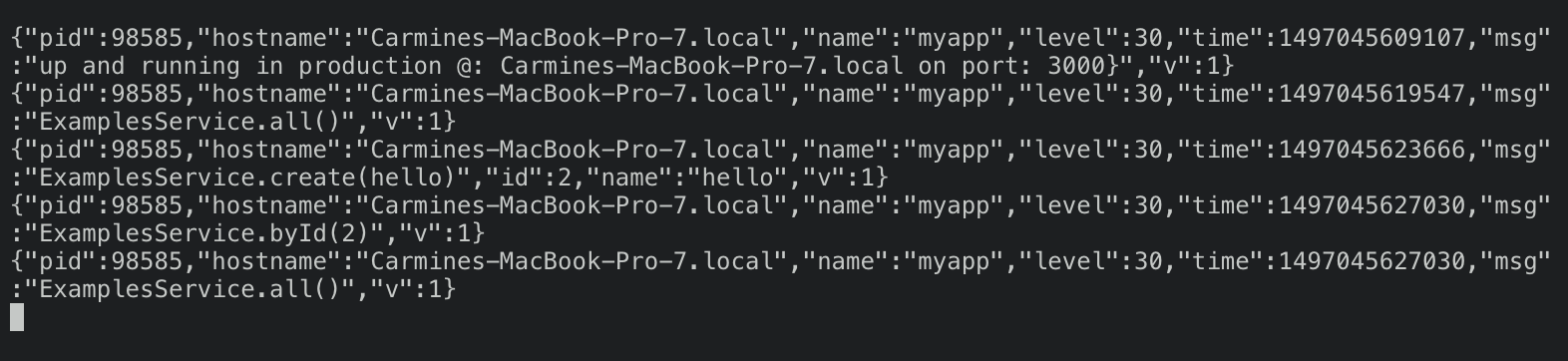
Structured logging out of the box!
#### raw
#### pretty
Structured logging pretty printed by default - great for dev!

### API Validation Example
Simply describe your APIs with Swagger and automatically get:
- API request validation
- Interactive documentation
### example
#### Swagger API spec
```yaml
swagger: '2.0'
info:
version: 1.0.0
title: myapp
description: My cool app
basePath: /api/v1
tags:
- name: Examples
description: Simple example endpoints
- name: Specification
description: The swagger API specification
consumes:
- application/json
produces:
- application/json
definitions:
ExampleBody:
type: object
title: example
required:
- name
properties:
name:
type: string
example: no_stress
paths:
/examples:
get:
tags:
- Examples
description: Fetch all examples
responses:
200:
description: Returns all examples
post:
tags:
- Examples
description: Create a new example
parameters:
- name: example
in: body
description: an example
required: true
schema:
$ref: '#/definitions/ExampleBody'
responses:
200:
description: Returns all examples
/examples/{id}:
get:
tags:
- Examples
parameters:
- name: id
in: path
required: true
description: The id of the example to retrieve
type: integer
responses:
200:
description: Return the example with the specified id
404:
description: Example not found
/spec:
get:
tags:
- Specification
responses:
200:
description: Return the API specification
```
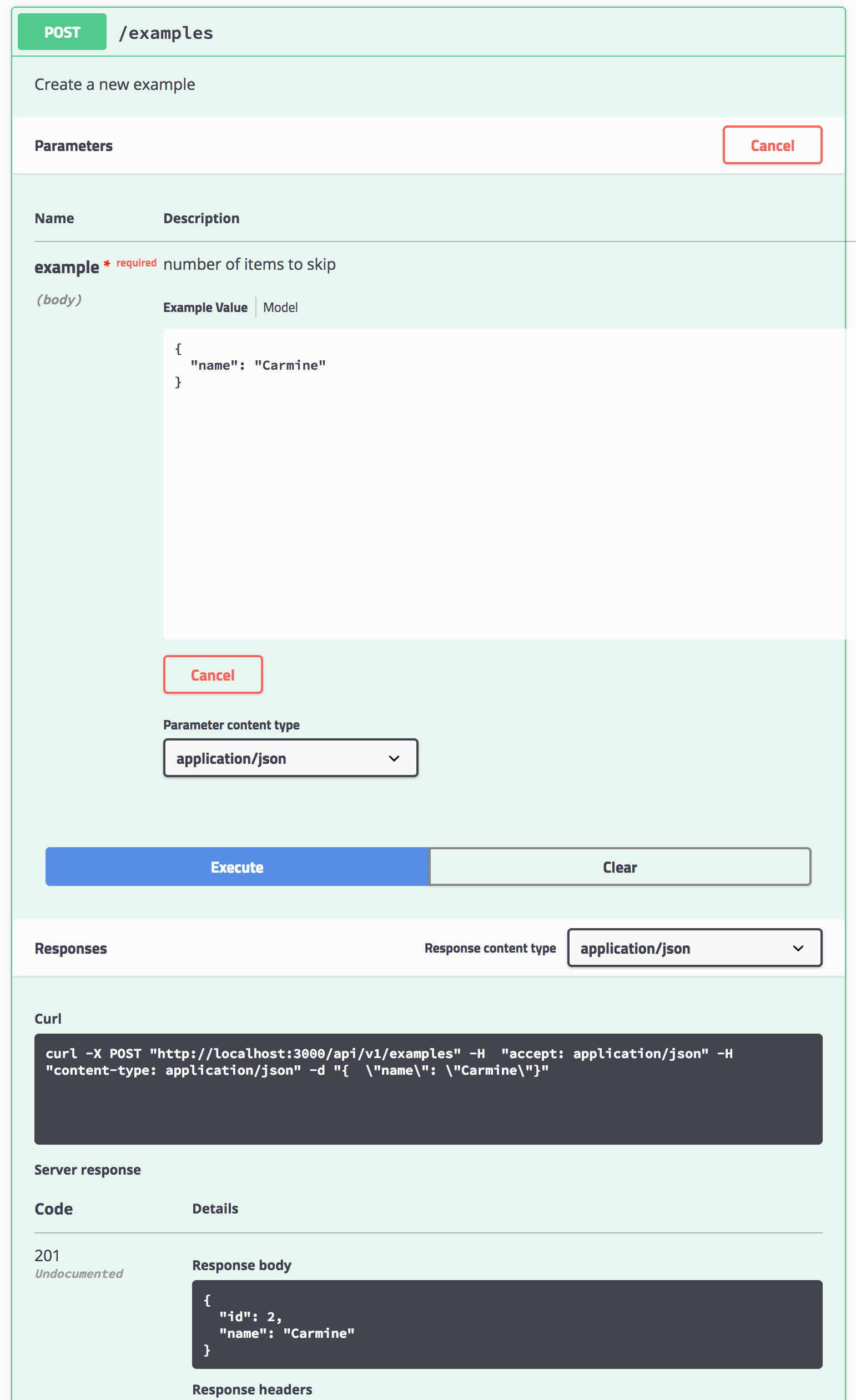
#### Invoke a POST request via the Interactive doc
### Linting
express-no-stress uses [ESLint](http://eslint.org/) and provides two choices, Airbnb or Prettier.
To add your own ESLint customizations, edit`.eslintrc.json`.
Note that the Airbnb variant provides a slightly modified Airbnb [base](https://github.com/airbnb/javascript/tree/master/packages/eslint-config-airbnb-base) configuration.
## FAQs
**Q**: What about Node.js 6.x?
**A**:`generator-express-no-stress` now uses Babel 7. Babel 7 tooling requires Node.js 8 or greater. To use `generator-express-no-stress` with Node.js 6, install version 3.5.4.
```shell
npm install -g yo generator-express-no-stress@3.5.4
```
## License
[MIT](LICENSE)
