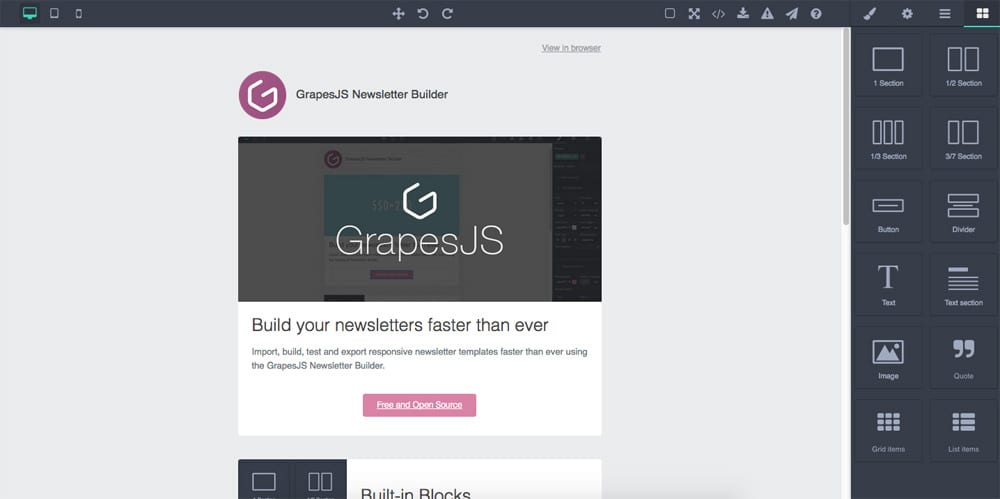
# GrapesJS Preset Newsletter
This preset configures GrapesJS to be used as a Newsletter Builder with some unique features and blocks composed specifically for being rendered correctly inside all major email clients.
[Demo](http://grapesjs.com/demo-newsletter-editor.html)
> The demo might include external plugins, you can check the full demo code [here](https://github.com/grapesjs/grapesjs/blob/gh-pages/demo-newsletter-editor.html).
## Summary
* Plugin name: **`grapesjs-preset-newsletter`**
* Commands
* `gjs-get-inlined-html` Get html with inlined CSS
* `gjs-open-import-template` Opens a modal for the import
* `gjs-toggle-images` Enable/Disable images
* Blocks
* `sect100` A section with 1 100% cell inside
* `sect50` A section with 2 50% cells inside
* `sect30` A section with 3 33.3333% cells inside
* `sect37` A section with 2 cells inside: 30% and 70%
* `button` Simple button
* `divider` Divider block
* `text` Simple text component
* `text-sect` A block with 2 text components, respectively for the heading and paragraph
* `image` Simple image component
* `quote` Text component for quotes
* `grid-items` Block of 2 components in row
* `list-items` List of 2 components
## Options
| Option | Description | Default |
| - | - | - |
| `blocks` | Which blocks to add | `All available blocks` |
|`block`| Add custom block options, based on block id|`(blockId) => ({})`|
|`cmdOpenImport`| Import command id |`gjs-open-import-template`|
|`cmdTglImages`| Toggle images command id |`gjs-toggle-images`|
|`cmdInlineHtml`| Get inlined HTML command id |`gjs-get-inlined-html`|
|`modalTitleImport`| Title for the import modal |`Import template`|
|`modalTitleExport`| Title for the export modal |`Export template`|
|`modalLabelExport`| Label for the export modal |`''`|
|`modalLabelImport`| Label for the import modal |`''`|
|`modalBtnImport`| Label for the import button |`Import`|
|`importPlaceholder`| Template as a placeholder inside import modal |`''`|
|`inlineCss`| If `true`, inlines CSS on export |`true`|
|`updateStyleManager`| Update Style Manager with more reliable style properties to use for newsletters |`true`|
|`showStylesOnChange`| Show the Style Manager on component change |`true`|
|`showBlocksOnLoad`| Show the Block Manager on load |`true`|
|`codeViewerTheme`| Code viewer theme |`hopscotch`|
|`juiceOpts`| Custom options for the `juice` HTML inliner |`{}`|
|`textCleanCanvas`| Confirm text before clearing the canvas |`Are you sure you want to clear the canvas?`|
|`useCustomTheme`| Load custom preset theme |`true`|
|`cellStyle`| Default style used inside blocks `td`s |`{ padding: 0, margin: 0, 'vertical-align': 'top' }`|
|`tableStyle`| Default style used for blocks tables |`{ height: '150px', margin: '0 auto 10px auto', padding: '5px 5px 5px 5px', width: '100%' }`|
## Download
* CDN
* `https://unpkg.com/grapesjs-preset-newsletter`
* NPM
* `npm i grapesjs-preset-newsletter`
* GIT
* `git clone https://github.com/grapesjs/preset-newsletter.git`
## Usage
Directly in the browser
```html
```
Modern javascript
```js
import grapesjs from 'grapesjs';
import plugin from 'grapesjs-preset-newsletter';
const editor = grapesjs.init({
container : '#gjs',
// ...
plugins: [plugin],
pluginsOpts: {
[plugin]: { /* options */ }
}
// or
plugins: [
editor => plugin(editor, { /* options */ }),
],
});
```
## Development
Clone the repository
```sh
$ git clone https://github.com/grapesjs/preset-newsletter.git
$ cd preset-newsletter
```
Install it
```sh
$ npm i
```
Start the dev server
```sh
$ npm start
```
Build before the commit. This will also increase the patch level version of the package
```sh
$ npm run build
```
## License
BSD 3-Clause