
<img src="https://cdn.jsdelivr.net/gh/D-Sketon/hexo-theme-reimu@main/_screenshot/Reimu_dark.png"/>
<div align = center>
  <h1>hexo-theme-reimu</h1>
  <img alt="NPM License" src="https://img.shields.io/npm/l/hexo-theme-reimu">
  <img alt="NPM Version" src="https://img.shields.io/npm/v/hexo-theme-reimu">
  <img alt="GitHub Repo stars" src="https://img.shields.io/github/stars/D-Sketon/hexo-theme-reimu">
  <img src="https://wakatime.com/badge/user/a6ea8444-9e83-48bb-9744-09a19ac07114/project/fe59c195-6633-4ee8-89c0-e1b24fa1fff4.svg" alt="wakatime">
  <p align="center">
  💘 Hakurei Reimu 💘
  </p>

[Demo](https://d-sketon.github.io)

[简体中文](https://github.com/D-Sketon/hexo-theme-reimu/blob/main/README.md) | English
</div>

---

> [!WARNING]
> Versions below v1.0.0 have been deprecated. Please upgrade to version v1.0.0 or above as soon as possible.

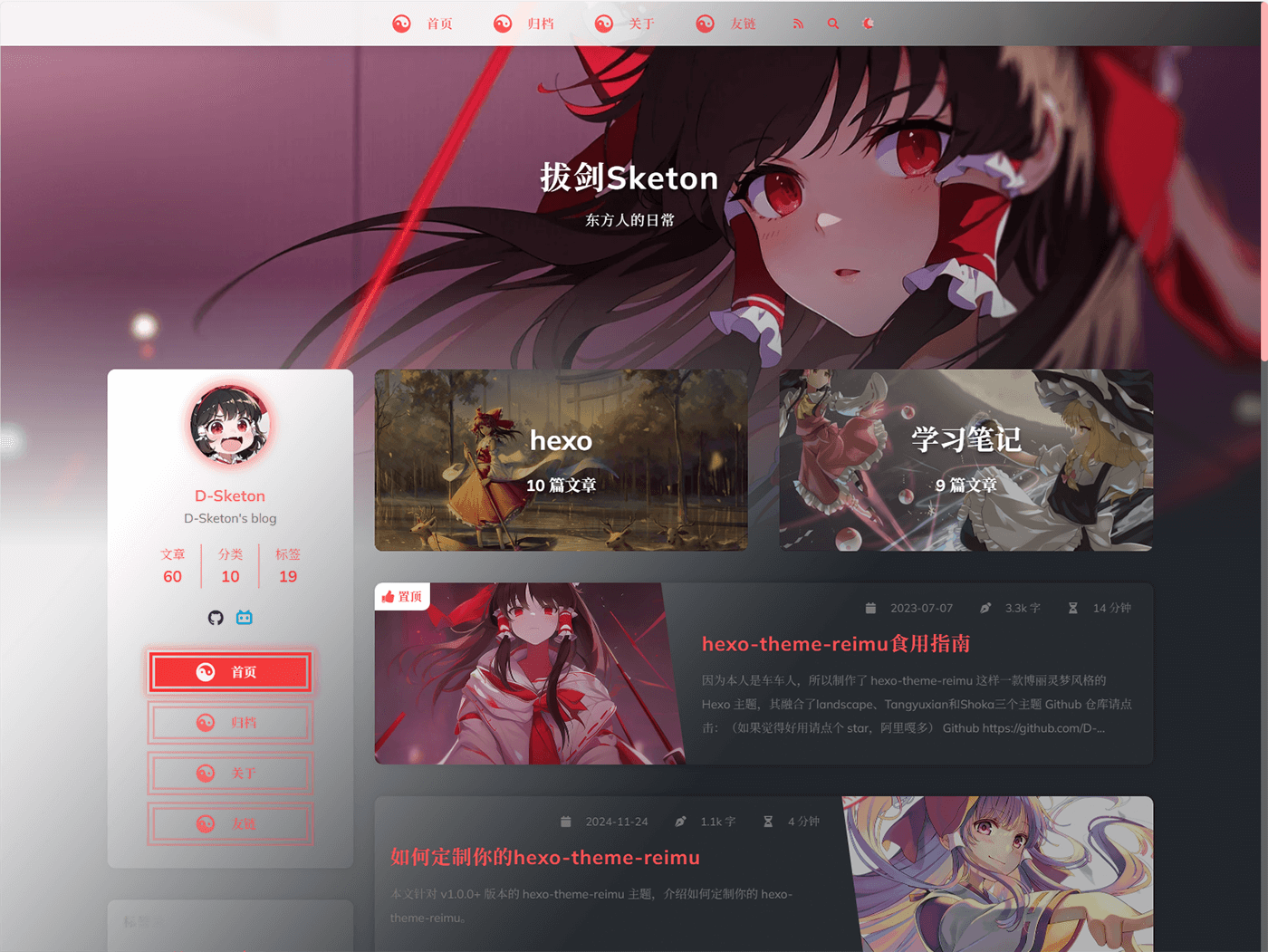
A Hakurei Reimu style Hexo theme.  
A combination of [landscape](https://github.com/hexojs/hexo-theme-landscape)、[Tangyuxian](https://github.com/tangyuxian/hexo-theme-tangyuxian) and [Shoka](https://github.com/amehime/hexo-theme-shoka) themes.

|framework|repository|version|stars|
|-|-|-|-|
|[Hexo](https://hexo.io/)|[hexo-theme-reimu](https://github.com/D-Sketon/hexo-theme-reimu)|<img alt="version" src="https://img.shields.io/badge/dynamic/json?url=https%3A%2F%2Fgithub.com%2FD-Sketon%2Fhexo-theme-reimu%2Fraw%2Fmain%2Fpackage.json&query=%24.version&label=version">|<img alt="GitHub Repo stars" src="https://img.shields.io/github/stars/D-Sketon/hexo-theme-reimu">|
|[Astro](https://astro.build)|[astro-theme-reimu](https://github.com/D-Sketon/astro-theme-reimu)|<img alt="version" src="https://img.shields.io/badge/dynamic/json?url=https%3A%2F%2Fgithub.com%2FD-Sketon%2Fastro-theme-reimu%2Fraw%2Fmain%2Fpackage.json&query=%24.version&label=version">|<img alt="GitHub Repo stars" src="https://img.shields.io/github/stars/D-Sketon/astro-theme-reimu">|
|[Hugo](https://gohugo.io)|[hugo-theme-reimu](https://github.com/D-Sketon/hugo-theme-reimu)|<img alt="version" src="https://img.shields.io/badge/dynamic/json?url=https%3A%2F%2Fgithub.com%2FD-Sketon%2Fhugo-theme-reimu%2Fraw%2Fmain%2Fpackage.json&query=%24.version&label=version">|<img alt="GitHub Repo stars" src="https://img.shields.io/github/stars/D-Sketon/hugo-theme-reimu">|

**ISSUE and PR Welcome!**

## Features

### Basic Functions
- ✨ Full blog functionality
- 🔄 Compatible with Hexo6+
- 📱 Responsive layout
- 🌙 Dark mode support
- 🅰️ i18n support

### Code & Math
- 🖥️ Code highlighting and copying
- ➗ KaTeX / MathJax3 math formula support
- 📊 Mermaid flowchart support

### Search & Comments
- 🔍 Algolia search integration
- 🔍 Local search integration
- 💬 Multiple comment systems support:
  - Valine
  - Waline
  - Twikoo
  - Gitalk
  - Giscus

### Statistics & Analytics
- 📊 Article reading statistics (Valine / Waline)
- 👥 Visitor statistics (Busuanzi)

### Media & Interactive Features
- 🎵 Music player support:
  - Aplayer
  - Meting
- 🖼️ Lazy loading for images
- ⚡ Loading animations
- 🖱️ Mouse effects:
  - Animation effects
  - Reimu cursor style
- 👾 Live2D / Live2D-widgets integration

### Navigation & Structure
- 📑 Table of Contents (TOC)
- 🔄 PJAX support
- 🔧 ServiceWorker implementation
- 📰 RSS feed

### Design & Customization
- 🎨 Icon support:
  - Iconfont
  - FontAwesome
- 🔗 Custom tag plugins for:
  - Internal links
  - External links
  - Friend links
  - Heatmap
- 🎨 Dynamic theme color adaptation
- 🎨 Custom Containers
- ©️ Article copyright declaration
- 🌐 Custom CDN source configuration
- 📜 Custom Font Family
- 🎨 Share card functionality

## Installation

> For beginners, you can directly use [reimu-template](https://github.com/D-Sketon/reimu-template). It comes pre-installed with hexo, hexo-theme-reimu and other functional packages. You only need to clone the repository, install dependencies, and modify the configuration to get a basic blog!

Using npm

```bash
npm install hexo-theme-reimu --save
```

Or clone this repository directly to the `/themes` folder and rename it to `reimu`

```bash
git clone https://github.com/D-Sketon/hexo-theme-reimu.git
```

And modify the theme in `_config.yml`

```yaml
# Extensions
## Plugins: https://hexo.io/plugins/
## Themes: https://hexo.io/themes/
theme: reimu
```

## Usage

<details>
<summary>Basic structure</summary>

### Basic structure

To ensure correct display, please refer to `_example` and create `_data`, `about`, and `friend` folders in `source` (Note: This is the `source` folder in your blog's root directory, not the one in the theme!)

#### \_data

- The `avatar` folder stores the author's avatar, default named `avatar.webp`. You can configure it in the inner `_config.yml` as follows:

```yaml
avatar: "avatar.webp" # By default, it looks for the avatar in the avatar folder. Do not include the path, or it will result in a 404 error
```

- The `covers` folder stores article cover images
- The `covers.yml` stores article cover URLs

#### about

`index.md` serves as the **About** page

#### friend

`index.md` serves as the **Friends** page. Fill in friend link information in `_data.yml` to display corresponding friend cards on the page

</details>
<details>
<summary>Cover Images, Banner and Favicon</summary>

### Cover Images, Banner, and Favicon

#### Cover Images

The cover image display logic is as follows:

- If the article's Front matter contains a cover URL, both the article header image and homepage thumbnail will display this URL

```yaml
---
title: Hello World
cover: https://example.com
---
```

- If the article's Front matter contains cover: `false`, no header image will be displayed for that article (the homepage will still show a random image)

```yaml
---
title: Hello World
cover: false
---
```

- If the article's Front matter contains cover: `rgb(xxx,xxx,xxx)`, the article's header image will be a gradient of that solid color (the homepage will still show a random image)

```yaml
---
title: Hello World
cover: rgb(255,117,117)
---
```

- Otherwise, it will search for images in the `covers` folder and `covers.yml` and randomly select one
- If none of the above files exist, it will display the default banner image

#### banner

The banner image is stored at `themes/reimu/source/images/banner.webp`, and can be modified in the inner `_config.yml`:

```yaml
banner: "/images/banner.webp"
```

#### favicon

The favicon is stored at `themes/reimu/source/images/favicon.ico`, and can be modified in the inner `_config.yml`:

```yaml
favicon: "/images/favicon.ico"
```

#### Pinned Posts

Add `sticky: true` to the article's Front-matter to pin it:

```yaml
---
title: Hello World
sticky: true
---
```

</details>
<details>
<summary>Code Blocks</summary>

### Code Blocks

To ensure proper display of code blocks, make sure your outer `_config.yml` has the following configuration:  
(Hexo <7.0.0)

```yaml
highlight:
  enable: true
  wrap: true
  hljs: false
prismjs:
  enable: false
```

(Hexo >=7.0.0)

```yaml
syntax_highlighter: highlight.js
highlight:
  wrap: true
  hljs: false
```

Code blocks also provide a code copying feature - click the copy button in the top right corner of the code block to copy the code. You can configure the copy functionality in the inner `_config.yml`.  

`success` is the prompt shown when copying is successful, `fail` is shown when copying fails. Additionally, you can configure copyright notices - when the copied text exceeds `count` characters, the copyright notice will be added after the copied content.

```yaml
clipboard:
  success: 
    en: Copy successfully (*^▽^*)
    zh-CN: 复制成功 (*^▽^*)
    zh-TW: 複製成功 (*^▽^*)
    ja: コピー成功 (*^▽^*)
  fail: 
    en: Copy failed (ﾟ⊿ﾟ)ﾂ
    zh-CN: 复制失败 (ﾟ⊿ﾟ)ﾂ
    zh-TW: 複製失敗 (ﾟ⊿ﾟ)ﾂ
    ja: コピー失敗 (ﾟ⊿ﾟ)ﾂ
  copyright:
    enable: false
    count: 50 # Add copyright notice when character count exceeds this number
    license_type: by-nc-sa # https://creativecommons.org/licenses
```

v1.1.0 added configuration to control the default expansion state of code blocks. `expand` can be set to `true`, `false`, or a number - the number indicates that code blocks will be collapsed by default when the number of lines exceeds this value.

```yaml
code_block:
  expand: true # true | false | number
```

</details>
<details>
<summary>Site comments</summary>

### Site comments

> Site comments can be individually controlled for each article using `comments` in the Front matter.  
> When `comments` is `false`, comments won't be displayed. When it's `true` or not specified, the display will be determined by the `_config.yml` configuration.

> Support for multiple comment systems simultaneously after version 1.7.0+

Global comment system configuration:

```yaml
comment:
  title: Say something! # Title of the comment box  
  default: waline # Default comment system used when multiple are enabled
```

If using [Valine](https://valine.js.org/)  
Please refer to their official documentation to complete the `LeanCloud` configuration, then set `valine.enable` to `true` in the inner `_config.yml` and fill in your `appId` and `appKey`

```yaml
valine:
  enable: true
  appId: "your appId"
  appKey: "your appKey"
```

If using [Waline](https://waline.js.org/)  
Please refer to their [official documentation](https://waline.js.org/guide/get-started/) to complete the `LeanCloud` configuration, then set `waline.enable` to `true` in the inner `_config.yml` and fill in your `serverURL`

```yaml
waline:
  enable: true
  serverURL: "your server url"
  locale: {} # https://waline.js.org/guide/features/i18n.html#%E8%87%AA%E5%AE%9A%E4%B9%89%E8%AF%AD%E8%A8%80
  emoji:
    - https://unpkg.com/@waline/emojis@1.2.0/weibo
    - https://unpkg.com/@waline/emojis@1.2.0/alus
    - https://unpkg.com/@waline/emojis@1.2.0/bilibili
    - https://unpkg.com/@waline/emojis@1.2.0/qq
    - https://unpkg.com/@waline/emojis@1.2.0/tieba
    - https://unpkg.com/@waline/emojis@1.2.0/tw-emoji
  meta:
    - nick
    - mail
    - link
  requiredMeta:
    - nick
    - mail
  wordLimit: 0
  pageSize: 10
  pageview: true
```

If using [twikoo](https://twikoo.js.org)  
Please refer to their [official documentation](https://twikoo.js.org/quick-start.html) to complete Tencent Cloud or Vercel deployment, then set `twikoo.enable` to `true` in the inner `_config.yml` and fill in your `envId`

```yml
twikoo:
  enable: true
  envId: # For Tencent Cloud environment, fill in envId; For Vercel environment, fill in the URL (https://xxx.vercel.app)
  region:
```

If using [giscus](https://giscus.app/)  
Please refer to the documentation to complete repository configuration, then set `giscus.enable` to `true` in the inner `_config.yml` and fill in the corresponding data

```yml
giscus:
  enable: true
  repo: "your repo"
  repoId: "your repoId"
  category: "your category"
  categoryId: "your categoryId"
  mapping: mapping
  strict: 0
  reactionsEnabled: 1
  emitMetadata: 0
  inputPosition: bottom
```

If using [gitalk](https://gitalk.github.io/)  
Please refer to their [official documentation](https://github.com/gitalk/gitalk?tab=readme-ov-file#usage) to complete repository configuration, then set `gitalk.enable` to `true` in the inner `_config.yml` and fill in the corresponding data

```yml
gitalk:
  enable: true
  clientID: "your application client ID"
  clientSecret: "your application client secret"
  repo: "your repo"
  owner: "repo owner"
  admin: "repo owner and collaborators"
  md5: false # Whether to use md5 to encrypt the path
```

</details>
<details>
<summary>Site search</summary>

### Site search

If choosing [Algolia](https://www.algolia.com/), please install [@reimujs/hexo-algoliasearch](https://github.com/D-Sketon/hexo-algoliasearch)

```bash
npm install @reimujs/hexo-algoliasearch --save
```

Then refer to its [README](https://github.com/D-Sketon/hexo-algoliasearch#readme) to complete the `Algolia` account configuration, and add the following configuration to the outer `_config.yml`

> Note: The search redirect link is a permanent link, so please ensure the `url` in the outer `_config.yml` is filled in correctly.

```yml
algolia:
  appId: "your applicationID"
  apiKey: "your apiKey"
  adminApiKey: "your adminApiKey"
  indexName: "your indexName"
  chunkSize: 5000
  fields:
    - content:strip:truncate,0,500
    - excerpt:strip
    - gallery
    - permalink
    - photos
    - slug
    - tags
    - title
```

In the inner `_config.yml`, set `algolia_search.enable` to `true`

```yaml
algolia_search:
  enable: true
```

> After version 1.5.0, the theme has built-in `hexo-generator-search`, so there is no need to install `hexo-generator-search` separately.

This theme comes with `hexo-generator-search` built-in. If you choose to use local search, please set `generator_search.enable` to `true` in the inner `_config.yml`. For other configurations, refer to [hexo-generator-search](https://github.com/wzpan/hexo-generator-search).

```yaml
generator_search:
  enable: true
  field: post
  content: true
```

</details>
<details>
<summary>Mathematical formulas</summary>

### Mathematical formulas

please install [@reimujs/hexo-renderer-markdown-it-plus](https://github.com/D-Sketon/hexo-renderer-markdown-it-plus)

```bash
npm uninstall hexo-renderer-marked --save
npm install @reimujs/hexo-renderer-markdown-it-plus --save
```

Mathematical formula support is disabled by default. To enable it, set `math.enable` to `true` in the inner `_config.yml`

> Note: Do not enable both KaTeX and MathJax3 simultaneously

#### KaTeX

For server-side rendering, set `math.katex.enable` to `true` in the inner `_config.yml`

```yaml
math:
  enable: true
  katex:
    enable: true
    autoRender: false
```

For client-side rendering, set both `math.katex.enable` and `autoRender` to `true` in the inner `_config.yml`

```yaml
math:
  enable: true
  katex:
    enable: true
    autoRender: true
```

Add the following configuration to the outer `_config.yml`

```yaml
markdown_it_plus:
  rawLaTeX: true
```

#### MathJax3

To use MathJax3, set `math.mathjax.enable` to `true` in the inner `_config.yml`

```yaml
math:
  enable: true
  mathjax:
    enable: true
    options: # MathJax3 Options
```

Add the following configuration to the outer `_config.yml`

```yaml
markdown_it_plus:
  rawLaTeX: true
```

</details>
<details>
<summary>Mermaid Diagrams</summary>

### Mermaid Diagrams

Please install [hexo-filter-mermaid-diagrams](https://github.com/webappdevelp/hexo-filter-mermaid-diagrams)

```bash
npm install hexo-filter-mermaid-diagrams --save
```

Set `mermaid.enable` to `true` in the inner `_config.yml`

```yaml
mermaid:
  enable: true
```

And add `mermaid: true` to the front-matter of any article where you want to use mermaid diagrams

```yaml
---
title: Hello World
mermaid: true
---
```

</details>
<details>
<summary>RSS</summary>

### RSS

Please install [hexo-generator-feed](https://github.com/hexojs/hexo-generator-feed)

```bash
npm install hexo-generator-feed --save
```

Refer to its [README](https://github.com/hexojs/hexo-generator-feed#readme) to complete the `feed` configuration in the outer `_config.yml`   

Then add the generated `xml` path to the inner `_config.yml`

```yaml
rss: atom.xml
```

</details>

<details>
<summary>i18n</summary>

### i18n

This theme provides four languages by default: `en`, `zh-CN`, `zh-TW`, and `ja`. You can switch the language by modifying the `language` in the outer `_config.yml`.

```yaml
language: zh-CN
```

> The following is an experimental feature and may contain bugs.

v1.4.0+ experimentally introduced `hexo-generator-i18n` and added multi-language switching functionality. You can configure `i18n` in the inner `_config.yml` to add custom languages. The configuration can be referenced from [hexo-generator-i18n](https://github.com/Jamling/hexo-generator-i18n):

```yaml
i18n:
  enable: false # false | true
  type: [page, post]
  generator: [archive, category, tag, index]
  languages: [zh-CN, en] # List of languages, the first one is the default language
```

For multilingual support in posts, you can add `lang` in the Front-matter to specify languages **other than the default language** (the default language does not need to be added).

```yaml
lang: en
```

The above will generate a page at `/en/:permalink`.

For multilingual support in pages, you can directly create a folder for the corresponding language in the `source` directory and place an `index.md` file inside it, such as `source/en/about/index.md`. This will generate a page at `/en/about`.

For more information, please refer to [How to add multi-language support to Hexo](https://d-sketon.github.io/en/20250223/hexo-theme-reimu-i18n/)

</details>

<details>
<summary>Icon</summary>

### Icon

By default, this theme uses its own provided iconfont (v0.1.3+)

```yml
icon_font: 4552607_0khxww3tj3q9
```

If you want to continue using fontawesome icons, set `icon_font` to `false`. This will use the corresponding fontawesome from the `vendor`

```yml
fontawesome:
  high_priority:
    - webcache|@fortawesome/fontawesome-free@6.5.1/css/regular.min.css
    - webcache|@fortawesome/fontawesome-free@6.5.1/css/solid.min.css
  low_priority:
    - webcache|@fortawesome/fontawesome-free@6.5.1/css/brands.min.css
    - webcache|@fortawesome/fontawesome-free@6.5.1/css/v5-font-face.min.css
    - webcache|@fortawesome/fontawesome-free@6.5.1/css/v4-font-face.min.css
```

</details>

<details>
<summary>Extended features</summary>

### Extended features

#### Dark Mode

The default setting is `auto`, which automatically switches based on the user's system settings. It can be set to `true` or `false` to change the default state.

```yaml
dark_mode:
  # true means that the dark mode is enabled by default
  # false means that the dark mode is disabled by default
  # auto means that the dark mode is automatically switched according to the system settings
  enable: auto # true | false | auto
```

#### Pace Progress Bar

Enabled by default

```yaml
pace:
  enable: true
```

#### Firework

Enabled by default

```yaml
firework:
  enable: true
```

For detailed configuration, please check [mouse-firework](https://github.com/D-Sketon/mouse-firework)

#### PJAX

Disabled by default

```yaml
pjax:
  enable: false
```

> PJAX was introduced in v0.0.10 for users who need SPA features like music players. After several iterations, it's mostly stable but may still cause issues like **script execution failures**, **script duplicate execution**, or **page rendering problems**. Please consider carefully!

> PJAX cannot be used with `relative_link: true`!

#### ServiceWorker

Disabled by default

```yaml
service_worker:
  enable: false
```

#### Live2D

Disabled by default

```yaml
live2d:
  enable: false
  position: left # left | right
```

#### Live2D Widgets

Disabled by default

```yaml
live2d_widgets:
  enable: false
  position: left # left | right
```

#### Reimu Cursor

Enabled by default

```yml
reimu_cursor:
  enable: true
  cursor:
    default: ../images/cursor/reimu-cursor-default.png
    pointer: ../images/cursor/reimu-cursor-pointer.png
    text: ../images/cursor/reimu-cursor-text.png
```

#### Responsive Banner (v0.2.0+)

Disabled by default. When enabled and provided with corresponding image sizes and media queries, it can improve mobile LCP performance

```yml
banner_srcset:
enable: false
srcset:
  - src: "/images/banner-600w.webp"
    media: "(max-width: 479px)"
  - src: "/images/banner-800w.webp"
    media: "(max-width: 799px)"
  - src: "/images/banner.webp"
    media: "(min-width: 800px)"
```

#### Article Copyright Notice (v0.2.0+)

Disabled by default

``` yml
article_copyright: 
  enable: false # Display copyright card?
  content:
    author: # true | false Show author in copyright card?
    link: # true | false Show link in copyright card?
    title: # true | false Show title in copyright card?
    date: # true | false Show creation date in copyright card?
    updated: # true | false Show update date in copyright card?
    license: # true | false Show license in copyright card?
    license_type: by-nc-sa # https://creativecommons.org/licenses
```

Additionally, this can be controlled through article front-matter, which takes precedence over global configuration

```yaml
---
copyright: true # Display copyright card?
---
```

#### Quicklink (v0.2.3+)

Disabled by default. When enabled, it preloads links while users stay on the page to improve user experience

```yaml
quicklink:
  enable: false
  timeout: 3000 # Preload timeout
  priority: true # Whether to prioritize loading the page
  ignores: [] # Ignore the specified link, supports strings only
```

#### Outdate Content Warning (v0.2.4+)

Disabled by default

```yaml
outdate:
  enable: false
  daysAgo: 180 # How many days old before an article is considered outdated
  message:
    en: This article was last updated on {time}. Please note that the content may no longer be applicable.
    zh-CN: 本文最后更新于 {time}，请注意文中内容可能已不适用。
    zh-TW: 本文最後更新於 {time}，請注意文中內容可能已不適用。
    ja: この記事は最終更新日：{time}。記載内容が現在有効でない可能性がありますのでご注意ください。
```

#### Sponsorship (v0.3.2+)

Disabled by default

```yaml
sponsor:
  enable: false # Display sponsorship QR code?
  tip: # Sponsorship prompt
    zh-CN: 请作者喝杯咖啡吧
    zh-TW: 請作者喝杯咖啡吧
    en: Buy me a coffee
    ja: コーヒーを買ってください
  icon:
    url: "../images/taichi.png" # Sponsorship icon, path relative to css/style.css, so need to go up one level to find images folder
    rotate: true # Rotate icon?
    mask: true # Use image as mask (only show PNG image outline)?
  qr:
    - name: Alipay # QR code name
      src: "/sponsor/alipay.jpg" # QR code path, please fill in yourself
```

Additionally, this can be controlled through article front-matter, which takes precedence over global configuration

```yaml
---
sponsor: true # Display sponsorship QR code?
---
```

#### Home Categories Card (v1.0.0+)

Disabled by default. When enabled, displays category cards on homepage as an alternative to widget categories

```yaml
home_categories:
  enable: false # Display home categories card?
  content:
    - categories: # Category name, format matches categories in front-matter, can be string (single-level) or array (multi-level)
      cover: # Card cover, uses random cover if not specified
    - categories:
      cover:
```

#### Music Player (v1.2.0+)

> It's recommended to enable Pjax first, otherwise the player may auto-pause

Uses Aplayer + Meting (optional), disabled by default

##### Pure Aplayer

Set `player.aplayer.enable` to `true` and configure `player.aplayer.options` according to [Aplayer Docs](https://aplayer.js.org/#/home?id=options)

```yaml
player:
  aplayer:
    enable: true
    options:
      audio: [] # audio list
      fixed:
      autoplay:
      loop:
      order:
      preload: 
      volume:
      mutex:
      listFolded:
      lrcType:
```

##### Aplayer + Meting

Set both `player.aplayer.enable` and `player.meting.enable` to `true`, configure `player.meting.options` according to [Meting Docs](https://github.com/metowolf/MetingJS?tab=readme-ov-file#option), `player.aplayer.options` is for Aplayer configuration

```yaml
player:
  aplayer:
    enable: true
    options:
      audio: [] # this option will be overwritten by meting
      fixed:
      autoplay:
      loop:
      order:
      preload: 
      volume:
      mutex:
      listFolded:
      lrcType:
  meting:
    enable: true
    meting_api: # custom api
    options:
      id: 
      server: 
      type: 
      auto:
```

#### Share Link / Card (v1.3.0+)

Disabled by default, currently supports `facebook`, `twitter`, `linkedin`, `reddit`, `weibo`, `qq`, `weixin`.

```yaml
share:
  # - facebook
  # - twitter
  # - linkedin
  # - reddit
  # - weibo
  # - qq
  # - weixin
```

For `weixin`, it generates a share card with QR code that can be saved locally and shared to WeChat Moments (Note: when the article cover has cross-origin issues, html-to-image cannot correctly generate cards with images!)

</details>

<details>
<summary>Built-in Card Tags</summary>

### Built-in Card Tags

#### friendLink - Friend Link Card

```yaml
{% friendsLink path %}
```

The first parameter `path` indicates the path to the friend links yaml file

#### postLinkCard - Internal Link Card

```yaml
{% postLinkCard slug [cover]|"auto" [escape] %}
```

The first parameter is the article's `slug`; the second parameter (optional) is the cover image displayed on the card, if set to `auto` it will automatically use the blog's `banner`; the third parameter (optional) indicates whether the article title should be escaped

> Slug generation algorithm: https://github.com/hexojs/hexo-util/blob/master/lib/slugize.ts
> In simple terms, it removes invisible characters from the article title and replaces special characters `\s~!@#$%^&*()\-_+=[]{}|\;:"'<>,.?/` with the separator `-`, merges consecutive separators and removes leading/trailing separators

#### externalLinkCard - External Link Card

```yaml
{% externalLinkCard title link [cover]|"auto" %}
```

The first parameter is the article title; the second parameter is the external link to the article; the third parameter (optional) is the cover image displayed on the card, if set to `auto` it will automatically use the default cover

#### Heat Map Card Article Heatmap (Experimental Feature in v1.7.0+)

```yaml
{% heatMapCard levelStandard %}
```

The first parameter is the level standard for the heatmap (graded based on the word count of the articles), with the default value being `"1000,5000,10000"`. 

</details>

<details>
<summary>Custom Containers</summary>

### Custom Containers

This theme provides custom container functionality similar to Vitepress. Before using it, you need to install [@reimujs/hexo-renderer-markdown-it-plus](https://github.com/D-Sketon/hexo-renderer-markdown-it-plus) and set `markdown.container` to `true` in the inner `_config.yml`.

```yaml
markdown:
  container: true
```

Usage is as follows:

```markdown
::: info
This is an info box.
:::

::: tip
This is a tip.
:::

::: warning
This is a warning.
:::

::: danger
This is a dangerous warning.
:::

::: danger STOP
Danger zone, do not proceed
:::

::: details
This is a details block.
:::
```

</details>

<details>
<summary>Customize theme</summary>

The hexo-theme-reimu theme supports extensive customization. You can customize your theme by modifying `_config.yml`.

#### Dynamic Theme Color Adaptation (Experimental Feature in v1.7.0+)

Disabled by default. When enabled, it dynamically generates theme colors based on the dominant color of the article's banner image, following Google's Material You design guidelines.

```yml
material_theme:
  enable: false # true | false
```

> Note: When this feature is enabled, the `crossorigin="anonymous"` attribute will be added to the `img` element of the banner to fetch the dominant color of the image. Please ensure your image server supports cross-origin access or use a third-party image proxy.

#### Manual Customizing Theme Colors

The hexo-theme-reimu theme supports theme color customization through CSS variables. You can customize your theme colors by modifying CSS variables under the `:root` pseudo-class.

v1.8.0 added `internal_theme` configuration to customize theme colors. You can change the theme colors by modifying the `internal_theme` configuration in `params.yml`. The default theme colors are as follows:

```yaml
internal_theme:
  light:
    --red-0: '#ff0000'
    --red-1: '#ff5252'
    --red-2: '#ff7c7c'
    --red-3: '#ffafaf'
    --red-4: '#ffd0d0'
    --red-5: '#ffecec'
    --red-5-5: '#fff3f3'
    --red-6: '#fff7f7'
    --color-red-6-shadow: 'rgba(255, 78, 78, 0.6)'
    --color-red-3-shadow: 'rgba(255, 78, 78, 0.3)'

    --highlight-nav: '#e6e6e6'
    --highlight-scrollbar: '#d6d6d6'
    --highlight-background: '#f7f7f7'
    --highlight-current-line: '#dadada'
    --highlight-selection: '#e9e9e9'
    --highlight-foreground: '#4d4d4d'
    --highlight-comment: '#7d7d7d'
    --highlight-red: '#c8362b'
    --highlight-orange: '#b66014'
    --highlight-yellow: '#cb911d'
    --highlight-green: '#2ea52e'
    --highlight-aqua: '#479d9d'
    --highlight-blue: '#1973b8'
    --highlight-purple: '#7135ac'
  dark:
    --red-4: 'rgba(255, 208, 208, 0.5)'
    --red-5: 'rgba(255,228,228,0.15)'
    --red-5-5: 'rgba(255,236,236,0.05)'
    --red-6: 'rgba(255, 243, 243, 0.2)'

    --highlight-nav: '#2e353f'
    --highlight-scrollbar: '#454d59'
    --highlight-background: '#22272e'
    --highlight-current-line: '#393939'
    --highlight-selection: '#515151'
    --highlight-foreground: '#cccccc'
    --highlight-comment: '#999999'
    --highlight-red: '#f47067'
    --highlight-orange: '#f69d50'
    --highlight-yellow: '#ffcc66'
    --highlight-green: '#99cc99'
    --highlight-aqua: '#66cccc'
    --highlight-blue: '#54b6ff'
    --highlight-purple: '#dcbdfb'
```

#### Custom Fonts

You can define Google Fonts through the following configuration:

```yaml
# https://fonts.google.com/
font:
  enable: true # Enable Google Fonts
  article:
    - Mulish
    - Noto Serif SC
  code:
    # - Ubuntu Mono
    # - Source Code Pro
    # - JetBrains Mono
```

v1.1.0 added `local_font` configuration for defining local fonts, which has lower priority than Google Fonts:

```yaml
local_font:
  article:
    - "-apple-system"
    - PingFang SC
    - Microsoft YaHei
    - sans-serif
  code:
    - Menlo
    - Monaco
    - Consolas
    - monospace
```

v1.8.0 added `custom_font` configuration for defining custom fonts, which has the highest priority:

```yaml
custom_font:
  enable: true
  article:
    - css: https://fontsapi.zeoseven.com/292/main/result.css # font css
      name: LXGW WenKai # font css
  code:
```

#### Customizing Icons

v1.0.0 underwent significant refactoring and exposed many configurations for changing the original icons

##### Header / Sidebar Icons

The `menu` configuration structure changed in v1.0.0, allowing users to customize icons. When icon is empty, it defaults to the Taichi icon. You can fill in a hexadecimal number to customize the icon, supporting both FontAwesome and icon font.

```yaml
menu:
  - name: home
    url: /
    icon: # Defaults to Taichi icon when empty
  - name: archives
    url: /archives
    icon: f0c1 # You can fill in a hexadecimal number to customize the icon, supports FontAwesome and icon font
  - name: about
    url: /about
    icon:
  - name: friend
    url: /friend
    icon:
```

##### Footer / Back to Top / Sponsor Icons

v1.0.0 added `icon` configuration to `footer`, `top`, and `sponsor` configurations for customizing icons.

- `url` is the path to the icon, relative to `css/style.css`, so you need to go up one level to find the images folder.
- `rotate` determines whether to rotate the icon, defaults to `true`.
- `mask` determines whether to use the image as a mask (only showing PNG image outline), defaults to `true`.

```yaml
footer:
  icon:
    url: "../images/taichi.png"
    rotate: true
    mask: true

top:
  icon:
    url: "../images/taichi.png"
    rotate: true
    mask: true

sponsor:
  icon:
    url: "../images/taichi.png"
    rotate: true
    mask: true
```

##### Loading Icon

v1.0.0 added `icon` configuration to `preloader` for customizing the loading icon. When icon is empty, it defaults to using inline SVG (ensuring first-screen loading speed). You can enter a link to customize the loading icon.

It's not recommended to use oversized icons to avoid affecting loading speed.

```yaml
preloader:
  enable: true
  text: 少女祈祷中...
  icon: # if the icon is empty, the default svg is used, which is inlined to ensure the loading speed of the first screen. You can fill in a link to customize the loading icon, such as '/images/taichi.png'
```

##### Anchor Icon

v1.0.0 added `anchor_icon` configuration for customizing anchor icons, defaults to using the `#` icon. You can fill in a hexadecimal number to customize the icon, supporting both FontAwesome and icon font.

```yaml
anchor_icon: # if the icon is empty, the default # icon is used
```

##### Cursor Icon (v1.3.0+)

v1.3.0 added `reimu_cursor.cursor` configuration for customizing cursor icons. You can fill in a path relative to `css/style.css` to customize cursor icons.

```yaml
reimu_cursor:
  enable: true
  cursor:
    default: ../images/cursor/reimu-cursor-default.png
    pointer: ../images/cursor/reimu-cursor-pointer.png
    text: ../images/cursor/reimu-cursor-text.png
```

</details>
<details>
<summary>Vendor</summary>

### Vendor

`vendor` is used to store third-party resources such as fontawesome, iconfont, katex, mathjax, etc.

The `vendor` structure in hexo-theme-reimu is very flexible and supports the following formats:

- `:cdn|:package@:version/:file`: Uses CDN acceleration, for example `cdn_jsdelivr_gh|katex@0.13.11/dist/katex.min.css`. The `:cdn` can be configured in `vendor`. Currently includes the following CDN sources:
  ```yaml
  cdn_jsdelivr_gh: https://cdn.jsdelivr.net/gh/ # GitHub acceleration only
  cdn_jsdelivr_npm: https://cdn.jsdelivr.net/npm/ # NPM acceleration only
  fastly_jsdelivr_gh: https://fastly.jsdelivr.net/gh/ # GitHub acceleration only
  fastly_jsdelivr_npm: https://fastly.jsdelivr.net/npm/ # NPM acceleration only
  unpkg: https://unpkg.com/ # NPM acceleration only
  webcache: https://npm.webcache.cn/ # NPM acceleration only
  ```
  Users can switch CDN sources based on their network conditions.
- Starting with `https://`: Uses absolute links directly, such as `https://cdn.jsdelivr.net/npm/katex@0.13.11/dist/katex.min.css`
- Starting with `/`: Local resources. You can place resources in the `source` folder at the same level as `_posts`, then reference them using paths like `/katex.min.css`

Additionally, `vendor` supports SRI (Subresource Integrity) verification. You can use `SHA-384` in `vendor` to verify resource integrity, for example:

```yaml
js:
  clipboard: # Using SRI verification
    src: webcache|clipboard@2.0.11/dist/clipboard.min.js
    integrity: sha384-J08i8An/QeARD9ExYpvphB8BsyOj3Gh2TSh1aLINKO3L0cMSH2dN3E22zFoXEi0Q
  lazysizes: webcache|lazysizes@5.3.2/lazysizes.min.js # Without SRI verification
```

Both formats are supported. It's recommended to use SRI verification for external CDN resources to ensure resource integrity.
</details>

## Contributors

[![](https://contributors-img.web.app/image?repo=D-Sketon/hexo-theme-reimu)](https://github.com/D-Sketon/hexo-theme-reimu/graphs/contributors)

## License

MIT