
Intelligo AI chatbot framework






Intelligo is a AI Chatbot Framework for Node.js.
## Installation
[](https://nodei.co/npm/intelligo/)
## Documentation
You can find the Intelligo documentation [on the website](https://intelligo.js.org).
Check out the [Getting Started](https://intelligo.js.org/start) page for a quick overview.
You can improve it by sending pull requests to this repository.
## Related projects
| Project | Build Status | NPM version |
|-----------|--------------|---------------------------|
| [neuro](https://github.com/intelligo-systems/neuro.js) | [](https://ci.appveyor.com/project/tortuvshin/intelligo-cli) | [](https://www.npmjs.com/package/neuro) |
| [intelligo-generator](https://github.com/intelligo-systems/intelligo-generator) | [](https://ci.appveyor.com/project/tortuvshin/intelligo-cli) | [](https://www.npmjs.com/package/intelligo-cli) |
## Example
```js
import express from 'express';
import { MessengerBot } from 'intelligo';
const app = express();
const bot = new MessengerBot({
PAGE_ACCESS_TOKEN: 'PAGE_ACCESS_TOKEN',
VALIDATION_TOKEN: 'VALIDATION_TOKEN',
APP_SECRET: 'APP_SECRET',
app: app,
});
bot.initWebhook();
//Train the neural network with an array of training data.
bot.learn([
{ input: 'I feel great about the world!', output: 'happy' },
{ input: 'The world is a terrible place!', output: 'sad' },
]);
//Subscribe to messages sent by the user with the bot.on() method.
bot.on('message', (event) => {
const senderID = event.sender.id,
message = event.message;
if (message.text) {
const result = bot.answer(message.text);
bot.sendTextMessage(senderID, result);
}
});
app.set('port', process.env.PORT || 5000);
app.listen(app.get('port'), function() {
console.log('Server is running on port', app.get('port'));
});
```
### Training
Use `bot.learn()` to train the neural network with an array of training data. The network has to be trained with all the data in bulk in one call to `bot.learn()`. More training patterns will probably take longer to train, but will usually result in a network better at classifying new patterns.
Example using strings with inputs and outputs:
```js
bot.learn([
{ input: 'I feel great about the world!', output: 'happy' },
{ input: 'The world is a terrible place!', output: 'sad' },
]);
const result = bot.answer('I feel great about the world!'); // 'happy'
```
#### `bot.on('message', (event));`
Triggered when a message is sent to the bot.
```js
bot.on('message', (event) => {
if (message.text) {
const result = bot.answer(message.text);
bot.sendTextMessage(event.sender.id, event.message);
}
});
```
## Quick Start
The quickest way to get started with intelligo is to utilize the [`intelligo-generator`](https://github.com/intelligo-systems/intelligo-generator) to generate an bot as shown below:
Install the command line tool
```bash
$ npm install intelligo-cli -g
```
### Intelligo Generator basic usage
Generate the your messenger bot project:
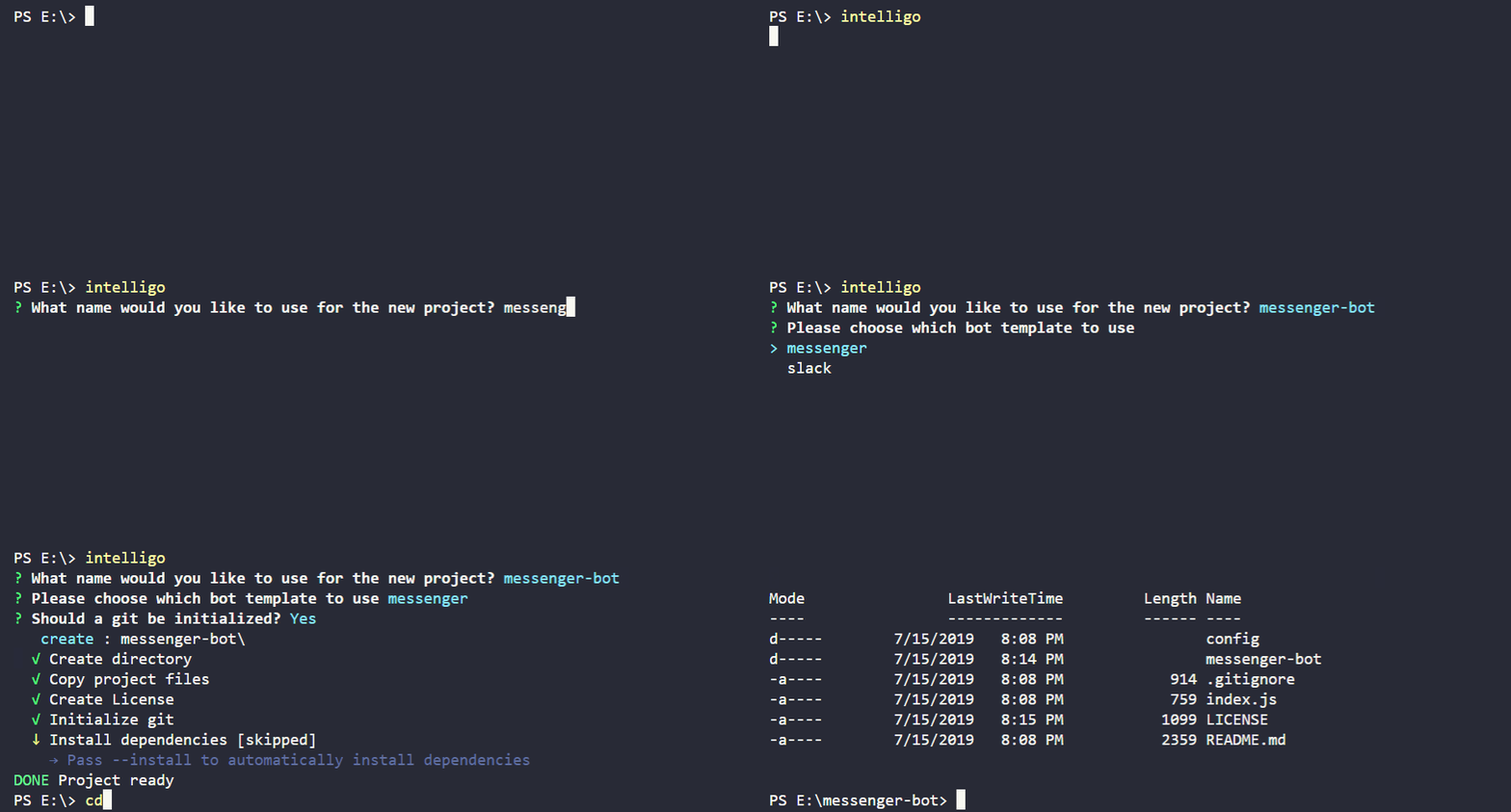
Set the values in `config/default.json` before running the bot. Using your Facebook Page's / App's `ACCESS_TOKEN`, `VERIFY_TOKEN` and `APP_SECRET`
- `ACCESS_TOKEN:` A page access token for your app, found under App -> Products -> Messenger -> Settings -> Token Generation
- `VERIFY_TOKEN:` A token that verifies your webhook is being called. Can be any value, but needs to match the value in App -> Products -> Webhooks -> Edit Subscription
- `APP_SECRET:` A app secret for your app, found under App -> Settings -> Basic -> App Secret -> Show
**Note:** If you don't know how to get these tokens, take a look at Facebook's [Quick Start Guide](https://developers.facebook.com/docs/messenger-platform/guides/quick-start) .
## Install dependencies:
```bash
$ npm install
```
## Run your bot
Start your bot app:
```bash
$ npm start
```
## Examples
Collection of examples for using Intelligo Framework.
- **Hello, world** The [hello world bot](https://github.com/intelligo-systems/intelligo/blob/master/samples/hello-bot) is a minimal Messenger bot.
- **Jisho bot** The [jisho bot](https://github.com/intelligo-systems/jisho-bot) Japanese-English dictionary Messenger bot using [www.jisho.org](https://jisho.org/) public API.
## Stay In Touch
- Blogging at [Medium](https://medium.com/intelligo-systems)
- Chatting on [Slack](https://slack.intelligo.systems/)
## Contributors
- 📥 Pull requests and 🌟 Stars are always welcome.
- You may contribute in several ways like creating new features, fixing bugs, improving documentation and examples
or translating any document here to your language. [Find more information in CONTRIBUTING.md](CONTRIBUTING.md).
Contributors
This project exists thanks to all the people who contribute.
 ## Supporting
If you'd like to join them, please consider:
## Supporting
If you'd like to join them, please consider:


 ## Backers
Thank you to all our backers! 🙏 [[Become a backer](https://opencollective.com/intelligo#backer)]
## Backers
Thank you to all our backers! 🙏 [[Become a backer](https://opencollective.com/intelligo#backer)]
 ## Sponsors
Support this project by becoming a sponsor. Your logo will show up here with a link to your website. [[Become a sponsor](https://opencollective.com/intelligo#sponsor)]
## Sponsors
Support this project by becoming a sponsor. Your logo will show up here with a link to your website. [[Become a sponsor](https://opencollective.com/intelligo#sponsor)]


 ## License
> Copyright (C) 2019 Intelligo Systems.
> Intelligo framework is open-sourced software licensed under the [MIT](https://opensource.org/licenses/MIT) license.
> (See the [LICENSE](https://github.com/intelligo-systems/intelligo/blob/master/LICENSE) file for the whole license text.)
## License
> Copyright (C) 2019 Intelligo Systems.
> Intelligo framework is open-sourced software licensed under the [MIT](https://opensource.org/licenses/MIT) license.
> (See the [LICENSE](https://github.com/intelligo-systems/intelligo/blob/master/LICENSE) file for the whole license text.)