# User Guide

## Notebooks
Since July 2022, ITK Viewer Bootstrap UI is the default UI for ITKWidgets-1.0. However, you can control the UI by passing the `ui` argument to the view function:

For the reference UI:
```
view(image, ui='reference')
```

For the material UI:
```
view(image, ui='mui')
```

For more information about ITKWidgets 1.0, please visit the [documentation website](https://itkwidgets.readthedocs.io/en/latest/index.html).

### Launch ITKWidgets 1.0 using Jupyter Notebook
Install
```
$ pip install 'itkwidgets[notebook]>=1.0a8'
```
and then use it in your notebook:
```
from itkwidgets import view
```

### Launch ITKWidgets 1.0 using Jupyter Lab
Install 
```
$ pip install 'itkwidgets[lab]>=1.0a8'
```
and then use it in your notebook:
```
from itkwidgets import view
```

### Launch ITKWidgets using Jupyter Lite

```
import piplite
await piplite.install("itkwidgets==1.0a8")
from itkwidgets import view
```

### Launch itkwidgets using Google Colab
Install and use it in your notebook:
```
import sys

!{sys.executable} -m pip install -q "itkwidgets>=1.0a8" imageio

from itkwidgets import view
```
Try the demo notebook [here](https://colab.research.google.com/github/InsightSoftwareConsortium/itkwidgets/blob/main/examples/Hello3DWorld.ipynb). 

## Using the Web App

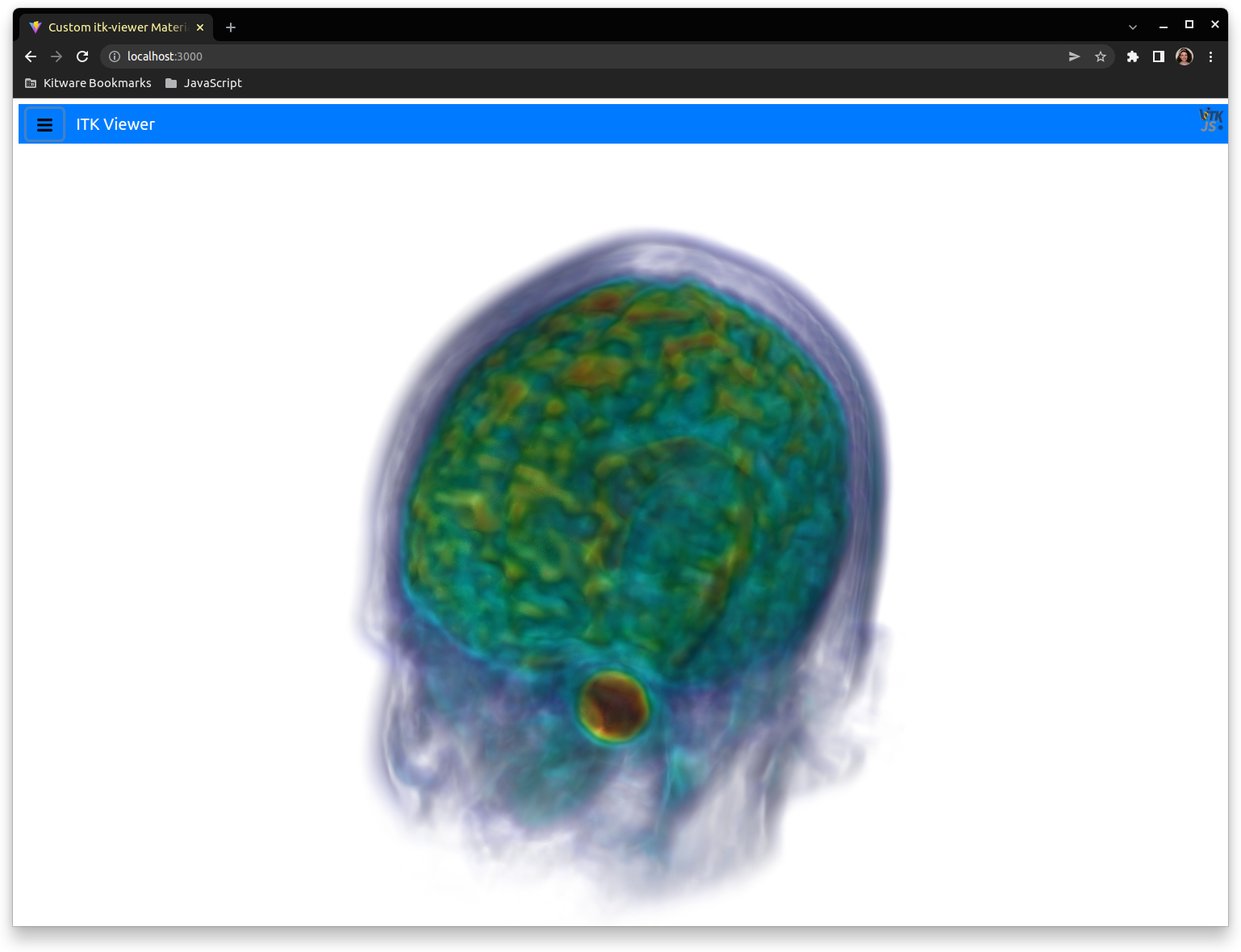
By default, the web app loads the files `./test-data/HeadMRVolume.nrrd` and `./test-data/HeadMRVolumeLabels.nrrd`. To visualize a different image, mesh, or point set file in your local system you can set the `image` and `labelImage` arguments in `index.html` to the desired URL.   
Below, there are some examples to test the behavior of the UI by changing `index.html`:  
![HeadMRVolume](HeadMRVolume-screenshot.png)

### Point Sets


<details>
  <summary>Click to expand!</summary>

```
<!DOCTYPE html>
<html lang="en">
  <head>
    <meta charset="UTF-8" />
    <link rel="icon" type="image/svg+xml" href="/src/favicon.svg" />
    <meta name="viewport" content="width=device-width, initial-scale=1.0" />
    <title>Custom itk-viewer Bootstrap UI Demo</title>
  </head>

  <body>
    <div
      class="content"
      style="
        position: absolute;
        width: 100vw;
        height: 100vh;
        top: 0;
        left: 0;
        overflow: hidden;
        background: black;
        margin: 0;
        padding: 0;
      "
    ></div>
    <script
      type="text/javascript"
      src="https://unpkg.com/@babel/polyfill@7.0.0/dist/polyfill.js"
    ></script>
    <script type="text/javascript" src="https://unpkg.com/vtk.js"></script>
    <script
      type="text/javascript"
      src="https://cdn.jsdelivr.net/npm/itk-vtk-viewer@14/dist/itkVtkViewer.js"
    ></script>
    <script>
      const container = document.querySelector('.content')
      const points = vtk({
        vtkClass: 'vtkPolyData',
        points: {
          vtkClass: 'vtkPoints',
          name: '_points',
          numberOfComponents: 3,
          dataType: 'Float32Array',
          size: 2,
          values: new Float32Array([
            -0.44442534, -1.1349318, 0.8388769, 2.0538256, -1.9028517,
            0.71276945
          ])
        },
        verts: {
          vtkClass: 'vtkCellArray',
          name: '_verts',
          numberOfComponents: 1,
          dataType: 'Uint32Array',
          size: 4,
          values: new Uint16Array([1, 0, 1, 1])
        }
      })

      const uiMachineOptions = {
        href: new URL(
          '/src/bootstrapUIMachineOptions.js',
          document.location.origin
        ).href
      }
      itkVtkViewer.createViewer(container, {
        pointSets: [points],
        rotate: false,
        config: { uiMachineOptions }
      })
    </script>
  </body>
</html>
```  
</details>


### IPFS Image
<details>
  <summary>Click to expand!</summary>
  

```
<!DOCTYPE html>
<html lang="en">

<head>
  <meta charset="UTF-8" />
  <link rel="icon" type="image/svg+xml" href="/src/favicon.svg" />
  <meta name="viewport" content="width=device-width, initial-scale=1.0" />
  <title>Custom itk-viewer Bootstrap UI Demo</title>
</head>

<body>
  <div class="content" style="
        position: absolute;
        width: 100vw;
        height: 100vh;
        top: 0;
        left: 0;
        overflow: hidden;
        background: black;
        margin: 0;
        padding: 0;
      "></div>
  <script type="text/javascript" src="https://cdn.jsdelivr.net/npm/itk-vtk-viewer@14/dist/itkVtkViewer.js"></script>
  <script>
    const container = document.querySelector('.content')
    const ipfsImage = new URL(
      './test-data/HeadMRVolume.nrrd',
      document.location.origin
    )

    const uiMachineOptions = {
      href: new URL(
        '/src/bootstrapUIMachineOptions.js',
        document.location.origin
      ).href
    }
    itkVtkViewer.createViewer(container, {
      image: ipfsImage,
      rotate: false,
      config: { uiMachineOptions }
    })
  </script>
</body>

</html>
```
</details>


### IPFS Image + Label
<details>
  <summary>Click to expand!</summary>

```
<!DOCTYPE html>
<html lang="en">

<head>
  <meta charset="UTF-8" />
  <link rel="icon" type="image/svg+xml" href="/src/favicon.svg" />
  <meta name="viewport" content="width=device-width, initial-scale=1.0" />
  <title>Custom itk-viewer Bootstrap UI Demo</title>
</head>

<body>
  <div class="content" style="
        position: absolute;
        width: 100vw;
        height: 100vh;
        top: 0;
        left: 0;
        overflow: hidden;
        background: black;
        margin: 0;
        padding: 0;
      "></div>
  <script type="text/javascript" src="https://cdn.jsdelivr.net/npm/itk-vtk-viewer@14/dist/itkVtkViewer.js"></script>
  <script>
    const container = document.querySelector('.content')
    const ipfsImage = new URL(
      './test-data/HeadMRVolume.nrrd',
      document.location.origin
    )
    const labelImage = new URL(
      './test-data/HeadMRVolumeLabels.nrrd',
      document.location.origin
    )

    const uiMachineOptions = {
      href: new URL(
        '/src/bootstrapUIMachineOptions.js',
        document.location.origin
      ).href
    }
    itkVtkViewer.createViewer(container, {
      image: ipfsImage,
      labelImage,
      rotate: false,
      config: { uiMachineOptions }
    })
  </script>
</body>

</html>
```
</details>

### 2D Image with multiple color channels
You can introduce an extra argument to the `itkVtkViewer.createViewer` function to indicate your data set is bidimensional:

<details>
  <summary>Click to expand!</summary>

```
<!DOCTYPE html>
<html lang="en">

<head>
  <meta charset="UTF-8" />
  <link rel="icon" type="image/svg+xml" href="/src/favicon.svg" />
  <meta name="viewport" content="width=device-width, initial-scale=1.0" />
  <title>Custom itk-viewer Bootstrap UI Demo</title>
</head>

<body>
  <div class="content" style="
        position: absolute;
        width: 100vw;
        height: 100vh;
        top: 0;
        left: 0;
        overflow: hidden;
        background: black;
        margin: 0;
        padding: 0;
      "></div>
  <script type="text/javascript" src="https://cdn.jsdelivr.net/npm/itk-vtk-viewer@14/dist/itkVtkViewer.js"></script>
  <script>
    const container = document.querySelector('.content')
    const ipfsImage = new URL(
      'http://localhost:8082/test-data/astronaut.zarr',
      document.location.origin
    )

    const uiMachineOptions = {
      href: new URL(
        '/src/bootstrapUIMachineOptions.js',
        document.location.origin
      ).href
    }
    itkVtkViewer.createViewer(container, {
      image: ipfsImage,
      rotate: false,
      config: { uiMachineOptions },
      use2D: true
    })
  </script>
</body>

</html>
```
</details>


### 3D Image with multiple color channels

<details>
  <summary>Click to expand!</summary>

```
<!DOCTYPE html>
<html lang="en">
  <head>
    <meta charset="UTF-8" />
    <link rel="icon" type="image/svg+xml" href="/src/favicon.svg" />
    <meta name="viewport" content="width=device-width, initial-scale=1.0" />
    <title>Custom itk-viewer Bootstrap UI Demo</title>
  </head>

  <body>
    <div
      class="content"
      style="
        position: absolute;
        width: 100vw;
        height: 100vh;
        top: 0;
        left: 0;
        overflow: hidden;
        background: black;
        margin: 0;
        padding: 0;
      "
    ></div>
    <script
      type="text/javascript"
      src="https://cdn.jsdelivr.net/npm/itk-vtk-viewer@14/dist/itkVtkViewer.js"
    ></script>
    <script>
      const container = document.querySelector('.content')
      const image = new URL(
        'http://localhost:8082/test-data/ome-ngff-prototypes/single_image/v0.4/tczyx.ome.zarr',
        document.location.origin
      )
      const uiMachineOptions = {
        href: new URL(
          '/src/bootstrapUIMachineOptions.js',
          document.location.origin
        ).href
      }
      itkVtkViewer.createViewer(container, {
        image,
        rotate: false,
        config: { uiMachineOptions }
      })
    </script>
  </body>
</html>

```
</details>

