# 京东小程序 CI 工具
## 概述
jd-miniprogram-ci 是为京东小程序开发者提供的工具包。开发者无需打开开发者工具,使用工具包即可完成小程序代码的上传、预览等操作。
## 秘钥
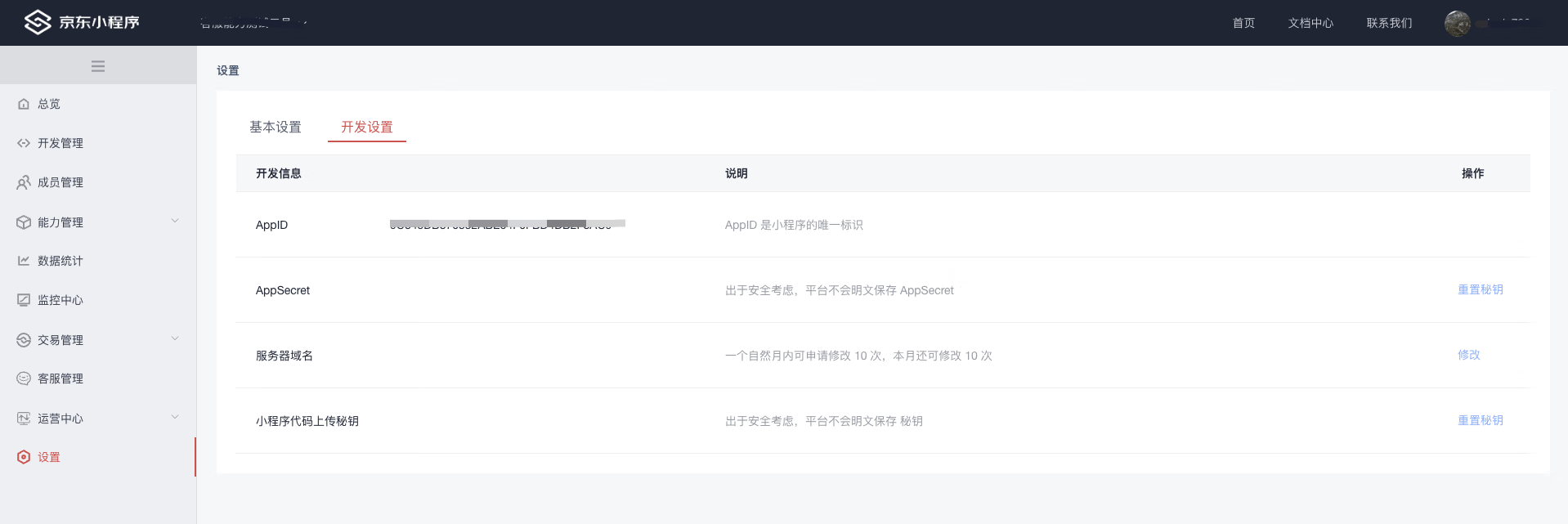
使用工具包之前,请访问“[京东小程序控制台](https://mp-console.jd.com/)—设置—开发设置—小程序代码上传秘钥”获取上传秘钥。
## 功能
1. 上传代码,对应小程序开发者工具的上传功能
2. 预览代码,对应小程序开发者工具的预览功能
3. 支持"node 脚本"和"命令行"调用方式
4. 跨平台,支持 Windows/Mac/Linux,可用于产品集成流水线部署
5. 支持代理配置和 CI 环境无代理访问
## 安装
```Shell
npm install jd-miniprogram-ci --save
```
## 代理配置
工具支持自动检测系统代理配置,同时也提供了灵活的环境变量配置选项:
### 环境变量配置
| 环境变量名 | 说明 | 示例 |
| ----------------------------- | ------------------------------ | -------------------------------- |
| `HTTP_PROXY` / `http_proxy` | HTTP 代理地址 | `http://proxy.company.com:8080` |
| `HTTPS_PROXY` / `https_proxy` | HTTPS 代理地址 | `https://proxy.company.com:8080` |
| `no_proxy_ci` | 无需代理的域名列表(逗号分隔) | `.jd.com` |
### 使用示例
#### 1. 设置代理(Linux/Mac)
```bash
export HTTP_PROXY=http://proxy.company.com:8080
export HTTPS_PROXY=https://proxy.company.com:8080
export no_proxy_ci=.jd.com
```
#### 2. 设置代理(Windows)
```cmd
set HTTP_PROXY=http://proxy.company.com:8080
set HTTPS_PROXY=https://proxy.company.com:8080
set no_proxy_ci=.jd.com
```
#### 3. 在 CI/CD 流水线中使用
```yaml
# GitHub Actions 示例
- name: Deploy Mini Program
run: npx jd-miniprogram-ci upload --privateKey ${{ secrets.PRIVATE_KEY }} --projectPath ./dist
env:
HTTP_PROXY: ${{ secrets.HTTP_PROXY }}
HTTPS_PROXY: ${{ secrets.HTTPS_PROXY }}
no_proxy_ci: .jd.com
```
### 自动代理检测
工具会自动检测系统代理配置,无需手动设置。如果系统已配置代理,工具会自动使用;如果需要通过`no_proxy_ci`排除特定域名,请按上述方式配置。
## 脚本调用
### 上传功能
```JavaScript
const { upload } = require('jd-miniprogram-ci')
upload({
privateKey: 'your private key',
projectPath: 'your project path',
uv: '1.0.0',
desc: '自定义描述信息',
qrcodeFormat: 'image',
ignores: ['node_modules/**/*'],
robot: 1,
})
```
#### 输入参数
| 参数名 | 类型 | 必填 | 说明 |
| ------------ | ----------------------- | ---- | --------------------------------------------------------------------------------------------------- |
| privateKey | string | 是 | 秘钥信息 |
| projectPath | string | 是 | 项目路径 |
| uv | string | 否 | 自定义版本号 |
| desc | string | 否 | 自定义备注 |
| qrcodeFormat | base64, image, terminal | 否 | 控制需要返回的二维码数据格式,默认值 image |
| ignores | string[] | 否 | 指定需要排除的规则。无需配置以“.”开头的隐藏文件,它们将默认被忽略,如“.git” |
| robot | number | 否 | 指定使用哪一个 ci 机器人,可选值:1 ~ 30 |
#### 输出
```JavaScript
interface UploadResult {
base64Data?: string // 二维码 base64数据
imgUrl?: string // 二维码URL
}
```
- qrcodeFormat 参数为 image 时,仅返回二维码 URL
- qrcodeFormat 参数为 terminal 时, 返回二维码 URL, 并在终端 terminal 中展示二维码。
- qrcodeFormat 参数为 base64 时, 返回二维码 URL & 图片 base64 格式数据。
### 预览功能
```JavaScript
const { preview } = require('jd-miniprogram-ci')
preview({
privateKey: 'your private key',
projectPath: 'your project path',
qrcodeFormat: 'terminal',
ignores: ['node_modules/**/*']
})
```
#### 输入参数
| 参数名 | 类型 | 必填 | 说明 |
| ------------ | ----------------------- | ---- | --------------------------------------------------------------------------------------------------- |
| privateKey | string | 是 | 秘钥信息 |
| projectPath | string | 是 | 项目路径 |
| qrcodeFormat | base64, image, terminal | 否 | 控制需要返回的二维码数据格式,默认值 image |
| ignores | string[] | 否 | 指定需要排除的规则。无需配置以“.”开头的隐藏文件,它们将默认被忽略,如“.git” |
#### 输出
```JavaScript
interface UploadResult {
base64Data?: string // 二维码 base64数据
imgUrl?: string // 二维码URL
}
```
- qrcodeFormat 参数为 image 时,仅返回二维码 URL
- qrcodeFormat 参数为 terminal 时, 返回二维码 URL, 并在终端 terminal 中展示二维码。
- qrcodeFormat 参数为 base64 时, 返回二维码 URL & 图片 base64 格式数据。
## 命令行调用
### 上传功能
```Shell
jd-miniprogram-ci upload --privateKey your_private_key --projectPath your/project/path --uv '1.0.0' --desc '自定义备注' --ignores patternA --ignores patternB --robot 1
```
> **注:局部安装请通过 npx 或./node_modules/.bin/jd-miniprogram-ci 执行**
#### 输入参数
| 参数名 | 类型 | 必填 | 说明 |
| ------------- | -------- | ---- | ---------------------------------------- |
| --privateKey | string | 是 | 秘钥信息 |
| --projectPath | string | 是 | 项目路径 |
| --uv | string | 否 | 自定义版本号 |
| --desc | string | 否 | 自定义备注 |
| --ignores | string[] | 否 | 指定需要排除的规则 |
| --robot | number | 否 | 指定使用哪一个 ci 机器人,可选值:1 ~ 30 |
#### 输出
体验版二维码
### 预览功能
```Shell
jd-miniprogram-ci preview --privateKey your_private_key --projectPath your/project/path --ignores patternA --ignores patternB
```
> **注:局部安装请通过 npx 或./node_modules/.bin/jd-miniprogram-ci 执行**
#### 输入参数
| 参数名 | 类型 | 必填 | 说明 |
| ------------- | -------- | ---- | ------------------ |
| --privateKey | string | 是 | 秘钥信息 |
| --projectPath | string | 是 | 项目路径 |
| --ignores | string[] | 否 | 指定需要排除的规则 |
#### 输出
预览二维码