# json-toy (json-treeify)
> Stable version(>=1.0.0); Recommended version (>=2.0.0)
Some simple methods for operating object as json in an easy way!
[](https://www.npmjs.com/package/json-toy)
[](https://travis-ci.org/Froguard/json-toy)
[](https://coveralls.io/github/Froguard/json-toy?branch=master&_ty=2019)
[](https://github.com/Froguard/json-toy/issues?q=is%3Aopen+is%3Aissue)
[](https://www.npmjs.com/package/json-toy)
[](https://github.com/froguard/json-toy/blob/master/LICENSE)
[](https://www.npmjs.com/package/json-toy)
> OnlineParser: [https://froguard.github.io/funny/treeString](https://froguard.github.io/funny/treeString)
### feature
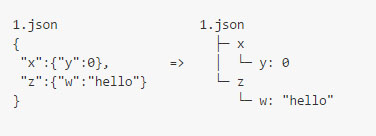
- 1.**jt.treeify(jsonObj1)** or ````$ jts ./path/1.json```` (cmd line) convert a jsonObj to a tree-like string to print out
````$ jts -d```` or ````$ j-tree-str -d```` convert a file directory to tree string, and some diy in github-issues by diy-theme
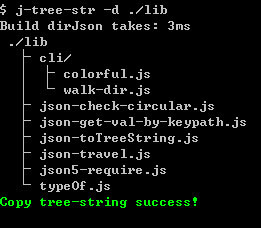 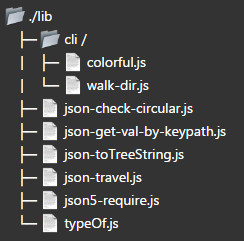
- 2.**convert directory to json obj and tree-structure-string**
- 3.**jtls** show directories like cmd **ls**, but in a tree string like
- 4.**Simple** none dependencies, except use cli (need copy-paste, yargs)
- 5.**Cross platform** nix(linx,mac-Osx) and windows, support for **multiple browsers(IE9+)**
- 6.**jt.travelJson(jsonObj,cb)** **Safe** recursive walk of a jsonObj,even though obj is circular!
- 7.**jt.getValByKeyPath(jsonObj,'x.y.z.1.2')** <=> **jsonObj.x.y.z\[1]\[2]**
- 8.**jt.checkCircular(obj)** check the obj,and return some useful info
## installation
````
$ npm install json-toy -g
$ jtls
````
Or if you haven't use the npm,you can do like this ,add [json-treeify.min.js](https://github.com/Froguard/json-toy/blob/master/dist/json-treeify.min.js)
or [json-treeify.min.js-on-cdn-resource](https://unpkg.com/json-toy/dist/json-treeify.min.js) **just 3.6kb**
```html
```
The core file has no dependencies,and just **3.6kb** size;
## Usage
### Feature1. json treeify
convert a json to tree string,you can set options like space(hoz and vert),need output val,root name,max depth in convert directory.
and there is two ways to use:
1. use ````jt.treeify(jsonObj,options)```` to convert json to tree-string
2. use cmd line **$ jts (or j-tree-str) your/json/file.json** (Recommend)
A tree string convert from string which typed in cmd line
```bash
$ jts '{a:1,b:{d:2},e:3,}'
$ jtls
````
````
ROOT
│
├─ a: 1
│
├─ b
│ │
│ └─ d: 2
│
└─ e: 3
````
A tree string convert from my [package.json](package.json)
```bash
$ jts ./package.json
````
or
```bash
$ j-tree-str ./package.json
````
````
./
├─ .gitignore
├─ .npmignore
├─ .travis.yml
├─ bin /
│ └─ j-tree-str.js
├─ coverage /
│ ├─ coverage.json
│ ├─ lcov-report /
│ │ ├─ base.css
...
└─ webpack.config.js
````
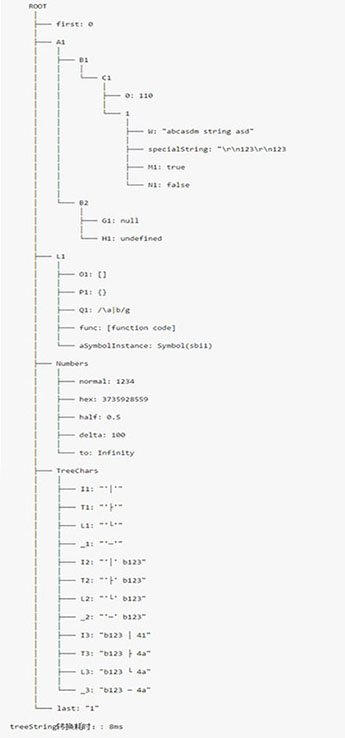
````jsonToy.treeify(jsonObj)````,support multiple primitive type
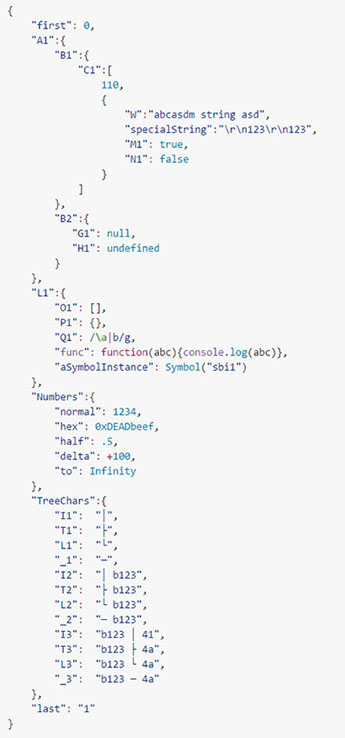 => 
Online Parser: [https://froguard.github.io/funny/treeString](https://froguard.github.io/funny/treeString)
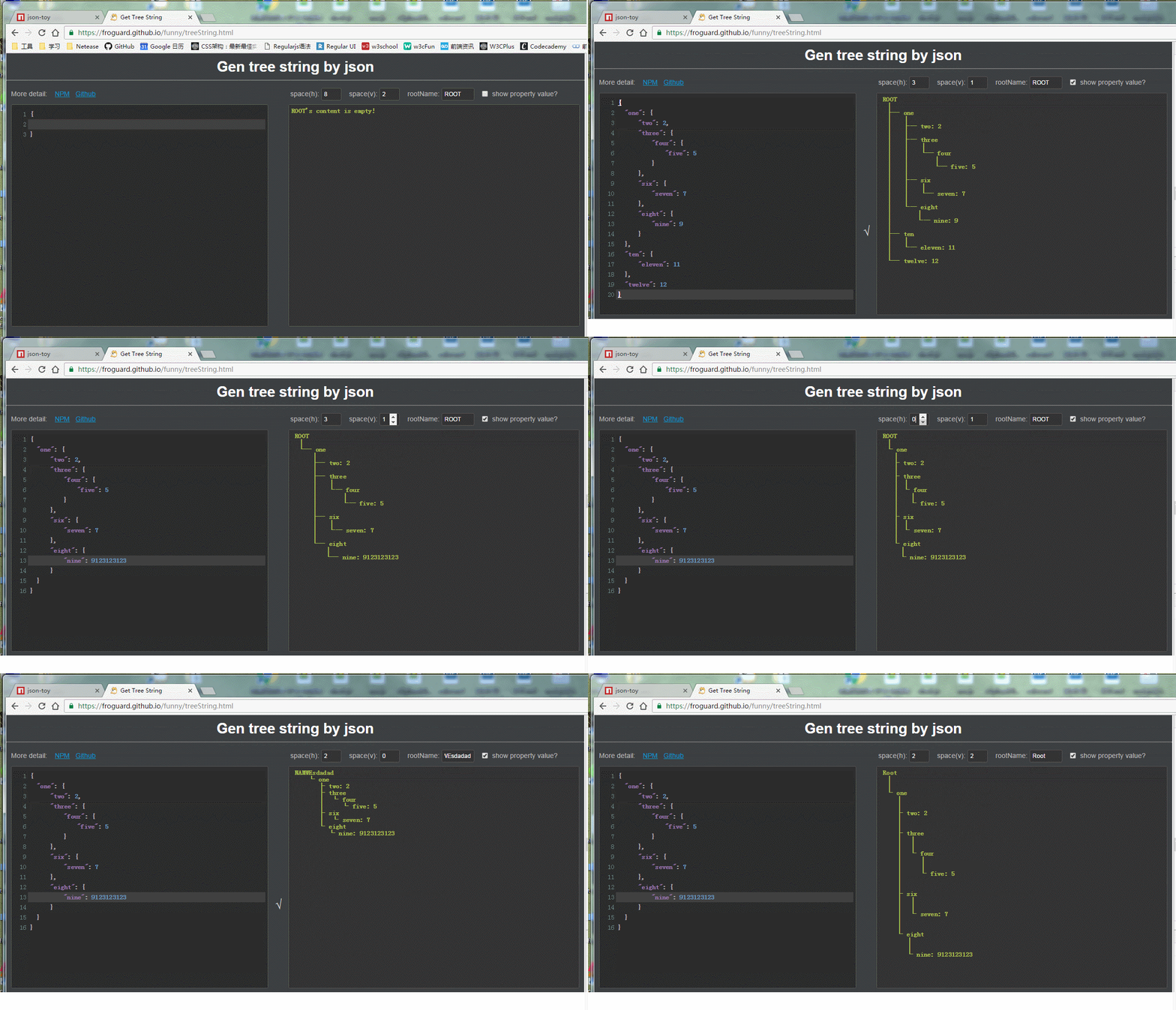
### Feature2. get property 's value by key-path
```js
let jt = require("json-toy");
let jsonObj = {
"x":{
"y":{
"z":"hello,world!"
},
"w":[ 0,1,2,["a","b","c"] ]
}
};
console.log(jt.getValByKeyPath(jsonObj,"x.y.z"));// "hello,world!"
console.log(jt.getValByKeyPath(jsonObj,"x.w.3.1"));// "b"
````
If property name include '.' like 'a.b.c'
```json
{
"a.b.c": 1
}
````
You can get it by a trans char set
````•```` ←→ ````.````
```js
jt.getValByKeyPath(jsonObj,"a•b•c");// ←→ jsonObj["a.b.c"]
````
and ````&```` ←→ ````&````
```json
{
"•": 1,
"&": 2,
"&": 3
}
````
```js
jt.getValByKeyPath(jsonObj,"•");// ←→ jsonObj["•"]
jt.getValByKeyPath(jsonObj,"&");// ←→ jsonObj["&"]
jt.getValByKeyPath(jsonObj,"&");// ←→ jsonObj["&"]
````
### Feature3. travelJson (recursion)
A safe travel method to recursive walk of a obj,even though a circular obj.
```js
function doTravel(key, value, {keyPath, type, isSpreadable, depth}){
//let parentPropObj = this;
console.log(`keyPath = '${keyPath}'\
,\nkey = '${key}'\
,\ntype = ${type}\
,\nisSpreadable = ${isSpreadable}\
,\ndepth = ${depth}\
,\nvalue = ${(JSON.stringify(value,null,2)||String(value))}`);
}
let keyPathsArr = jt.travelJson(jsonObj,doTravel,"jsonObj");
````
### Feature4. check the circular obj
```js
let json = {
"a":{
"b":{
"c":1
}
},
"d":{
"e":{
"f":2
}
}
};
json.d.e.g = json.d.e;
json.d.e.h = json;
let res = jt.checkCircular(json);
// console.log(res);
````
you can get some useful information from **res**:
```json
{
"isCircular": true,
"circularProps": [
{
"keyPath": "ROOT.d.e.g",
"circularTo": "ROOT.d.e",
"key": "g",
"value": "[Circular->ROOT.d.e]"
},
{
"keyPath": "ROOT.d.e.h",
"circularTo": "ROOT",
"key": "h",
"value": "[Circular->ROOT]"
}
]
}
````
### Feature5(only node supports!). convert a directory to json obj
```js
// use just only in node
let travelDir = require('json-toy/lib/cli/walk-dir');
let dirJson = travelDir("./",{
exclude: {
file: /(Thumbs\.db|\.DS_store)/g,
directory: /(\.git|\.svn|\.idea|node_modules|bower_components)/g,
outExcludeDir: true // need output exclude directory
}
});
console.log(JSON.stringify(dirJson,null,2));
````
```json
{
"css": {
"reset.css": "file"
},
"img": {
"btn.png": "file"
},
"js": {
"lib": {
"lib.js": "file"
},
"main.js": "file"
},
"node_modules": {},// options.exclude.outExcludeDir == true
"package.json": "file",
"test.js": "file"
}
````
### cli-help
```bash
$ jts help
````
### question
- ````$ jts xx.json```` __:__ the distance in command-print-out:

don't worry ,'d1' is equal to 'd2' actually, The reason why u've saw difference is that the char ' ' width is shorter than other chars in command prompt
- **copy-paste-feature**,json-toy used system shell command line to exec copy,so you may get some string pre space char '' was removed by sys.
if you paste in a *.js file.like this
```js
1.json
│
├─ w
│ │
│ └─ x
│ │
│ └─ y: 1
│
└─ w2
│
└─ xxx: 1
````
eh...You'd better paste in a text file like *.md or *.txt or others ext
```text
1.json
│
├─ w
│ │
│ └─ x
│ │
│ └─ y: 1
│
└─ w2
│
└─ xxx: 1
````