# JSON Editor
[](https://www.npmjs.com/package/jsoneditor)
[](https://www.npmjs.com/package/jsoneditor)
[](https://github.com/josdejong/jsoneditor/pulse)
[](https://github.com/josdejong/jsoneditor/blob/master/LICENSE)
[](https://app.fossa.io/projects/git%2Bgithub.com%2Fjosdejong%2Fjsoneditor?ref=badge_shield)
JSON Editor is a web-based tool to view, edit, format, and validate JSON. It has various modes such as a tree editor, a code editor, and a plain text editor. The editor can be used as a component in your own web application. It can be loaded as CommonJS module, AMD module, or as a regular javascript file.
The library was originally developed as core component of the popular web application https://jsoneditoronline.org and has been open sourced since then.
Supported browsers: Chrome, Firefox, Safari, Edge.
Continuous integration tests are run on [GitHub Actions](https://github.com/josdejong/mathjs/actions), and [LambdaTest](https://www.lambdatest.com) is used to test on all major browsers.
[](https://www.lambdatest.com)
Thanks, GitHub Actions and LambdaTest for the generous support for this open source project!
## Successor: svelte-jsoneditor
This library [`jsoneditor`](https://github.com/josdejong/jsoneditor) has a successor: [`svelte-jsoneditor`](https://github.com/josdejong/svelte-jsoneditor). The new editor is not a one-to-one replacement, so there may be reasons to stick with `jsoneditor`.
The main differences between the two [are described here](https://github.com/josdejong/svelte-jsoneditor#differences-between-josdejongsvelte-jsoneditor-and-josdejongjsoneditor).
## Features
JSONEditor has various modes, with the following features.
### Tree mode
- Change, add, move, remove, and duplicate fields and values.
- Sort arrays and objects.
- Transform JSON using [JMESPath](http://jmespath.org/) queries.
- Colorized code.
- Color picker.
- Search & highlight text in the tree view.
- Undo and redo all actions.
- JSON schema validation (powered by [ajv](https://github.com/epoberezkin/ajv)).
### Code mode
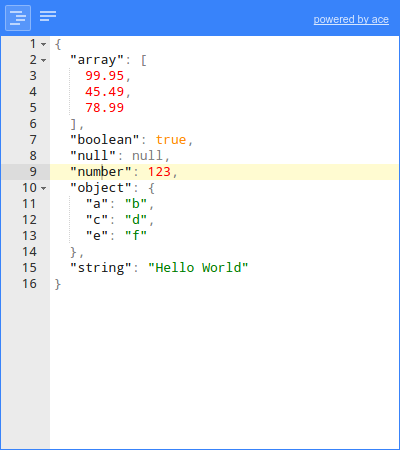
- Colorized code (powered by [Ace](https://ace.c9.io)).
- Inspect JSON (powered by [Ace](https://ace.c9.io)).
- Format and compact JSON.
- Repair JSON.
- JSON schema validation (powered by [ajv](https://github.com/epoberezkin/ajv)).
### Text mode
- Format and compact JSON.
- Repair JSON.
- JSON schema validation (powered by [ajv](https://github.com/epoberezkin/ajv)).
### Preview mode
- Handle large JSON documents up to 500 MiB.
- Transform JSON using [JMESPath](http://jmespath.org/) queries.
- Format and compact JSON.
- Repair JSON.
- JSON schema validation (powered by [ajv](https://github.com/epoberezkin/ajv)).
## Documentation
- Documentation:
- [API](https://github.com/josdejong/jsoneditor/tree/master/docs/api.md)
- [Usage](https://github.com/josdejong/jsoneditor/tree/master/docs/usage.md)
- [Shortcut keys](https://github.com/josdejong/jsoneditor/tree/master/docs/shortcut_keys.md)
- [Examples](https://github.com/josdejong/jsoneditor/tree/master/examples)
- [Source](https://github.com/josdejong/jsoneditor)
- [History](https://github.com/josdejong/jsoneditor/blob/master/HISTORY.md)
## Install
with npm (recommended):
npm install jsoneditor
Alternatively, you can use another JavaScript package manager like https://yarnpkg.com/, or a CDN such as https://cdnjs.com/ or https://www.jsdelivr.com/.
## Use
> Note that in the following example, you'll have to change the urls `jsoneditor/dist/jsoneditor.min.js` and `jsoneditor/dist/jsoneditor.min.css` to match the place where you've downloaded the library, or fill in the URL of the CDN you're using.
```html
```
## Build
The code of the JSON Editor is located in the folder `./src`. To build
jsoneditor:
- Install dependencies:
```
npm install
```
- Build JSON Editor:
```
npm run build
```
This will generate the files `./jsoneditor.js`, `./jsoneditor.css`, and
minified versions in the dist of the project.
- To automatically build when a source file has changed:
```
npm start
```
This will update `./jsoneditor.js` and `./jsoneditor.css` in the dist folder
on every change, but it will **NOT** update the minified versions as that's
an expensive operation.
## Test
Run unit tests:
```
npm test
```
Run code linting ([JavaScript Standard Style](https://standardjs.com/)):
```
npm run lint
```
## License
`jsoneditor` is released as open source under the permissive the [Apache 2.0 license](LICENSE.md).
**If you are using jsoneditor commercially, there is a _social_ (but no legal) expectation that you help fund its maintenance. [Start here](https://github.com/sponsors/josdejong).**

 Continuous integration tests are run on [GitHub Actions](https://github.com/josdejong/mathjs/actions), and [LambdaTest](https://www.lambdatest.com) is used to test on all major browsers.
[](https://www.lambdatest.com)
Thanks, GitHub Actions and LambdaTest for the generous support for this open source project!
## Successor: svelte-jsoneditor
This library [`jsoneditor`](https://github.com/josdejong/jsoneditor) has a successor: [`svelte-jsoneditor`](https://github.com/josdejong/svelte-jsoneditor). The new editor is not a one-to-one replacement, so there may be reasons to stick with `jsoneditor`.
The main differences between the two [are described here](https://github.com/josdejong/svelte-jsoneditor#differences-between-josdejongsvelte-jsoneditor-and-josdejongjsoneditor).
## Features
JSONEditor has various modes, with the following features.
### Tree mode
- Change, add, move, remove, and duplicate fields and values.
- Sort arrays and objects.
- Transform JSON using [JMESPath](http://jmespath.org/) queries.
- Colorized code.
- Color picker.
- Search & highlight text in the tree view.
- Undo and redo all actions.
- JSON schema validation (powered by [ajv](https://github.com/epoberezkin/ajv)).
### Code mode
- Colorized code (powered by [Ace](https://ace.c9.io)).
- Inspect JSON (powered by [Ace](https://ace.c9.io)).
- Format and compact JSON.
- Repair JSON.
- JSON schema validation (powered by [ajv](https://github.com/epoberezkin/ajv)).
### Text mode
- Format and compact JSON.
- Repair JSON.
- JSON schema validation (powered by [ajv](https://github.com/epoberezkin/ajv)).
### Preview mode
- Handle large JSON documents up to 500 MiB.
- Transform JSON using [JMESPath](http://jmespath.org/) queries.
- Format and compact JSON.
- Repair JSON.
- JSON schema validation (powered by [ajv](https://github.com/epoberezkin/ajv)).
## Documentation
- Documentation:
- [API](https://github.com/josdejong/jsoneditor/tree/master/docs/api.md)
- [Usage](https://github.com/josdejong/jsoneditor/tree/master/docs/usage.md)
- [Shortcut keys](https://github.com/josdejong/jsoneditor/tree/master/docs/shortcut_keys.md)
- [Examples](https://github.com/josdejong/jsoneditor/tree/master/examples)
- [Source](https://github.com/josdejong/jsoneditor)
- [History](https://github.com/josdejong/jsoneditor/blob/master/HISTORY.md)
## Install
with npm (recommended):
npm install jsoneditor
Alternatively, you can use another JavaScript package manager like https://yarnpkg.com/, or a CDN such as https://cdnjs.com/ or https://www.jsdelivr.com/.
## Use
> Note that in the following example, you'll have to change the urls `jsoneditor/dist/jsoneditor.min.js` and `jsoneditor/dist/jsoneditor.min.css` to match the place where you've downloaded the library, or fill in the URL of the CDN you're using.
```html
```
## Build
The code of the JSON Editor is located in the folder `./src`. To build
jsoneditor:
- Install dependencies:
```
npm install
```
- Build JSON Editor:
```
npm run build
```
This will generate the files `./jsoneditor.js`, `./jsoneditor.css`, and
minified versions in the dist of the project.
- To automatically build when a source file has changed:
```
npm start
```
This will update `./jsoneditor.js` and `./jsoneditor.css` in the dist folder
on every change, but it will **NOT** update the minified versions as that's
an expensive operation.
## Test
Run unit tests:
```
npm test
```
Run code linting ([JavaScript Standard Style](https://standardjs.com/)):
```
npm run lint
```
## License
`jsoneditor` is released as open source under the permissive the [Apache 2.0 license](LICENSE.md).
**If you are using jsoneditor commercially, there is a _social_ (but no legal) expectation that you help fund its maintenance. [Start here](https://github.com/sponsors/josdejong).**
Continuous integration tests are run on [GitHub Actions](https://github.com/josdejong/mathjs/actions), and [LambdaTest](https://www.lambdatest.com) is used to test on all major browsers.
[](https://www.lambdatest.com)
Thanks, GitHub Actions and LambdaTest for the generous support for this open source project!
## Successor: svelte-jsoneditor
This library [`jsoneditor`](https://github.com/josdejong/jsoneditor) has a successor: [`svelte-jsoneditor`](https://github.com/josdejong/svelte-jsoneditor). The new editor is not a one-to-one replacement, so there may be reasons to stick with `jsoneditor`.
The main differences between the two [are described here](https://github.com/josdejong/svelte-jsoneditor#differences-between-josdejongsvelte-jsoneditor-and-josdejongjsoneditor).
## Features
JSONEditor has various modes, with the following features.
### Tree mode
- Change, add, move, remove, and duplicate fields and values.
- Sort arrays and objects.
- Transform JSON using [JMESPath](http://jmespath.org/) queries.
- Colorized code.
- Color picker.
- Search & highlight text in the tree view.
- Undo and redo all actions.
- JSON schema validation (powered by [ajv](https://github.com/epoberezkin/ajv)).
### Code mode
- Colorized code (powered by [Ace](https://ace.c9.io)).
- Inspect JSON (powered by [Ace](https://ace.c9.io)).
- Format and compact JSON.
- Repair JSON.
- JSON schema validation (powered by [ajv](https://github.com/epoberezkin/ajv)).
### Text mode
- Format and compact JSON.
- Repair JSON.
- JSON schema validation (powered by [ajv](https://github.com/epoberezkin/ajv)).
### Preview mode
- Handle large JSON documents up to 500 MiB.
- Transform JSON using [JMESPath](http://jmespath.org/) queries.
- Format and compact JSON.
- Repair JSON.
- JSON schema validation (powered by [ajv](https://github.com/epoberezkin/ajv)).
## Documentation
- Documentation:
- [API](https://github.com/josdejong/jsoneditor/tree/master/docs/api.md)
- [Usage](https://github.com/josdejong/jsoneditor/tree/master/docs/usage.md)
- [Shortcut keys](https://github.com/josdejong/jsoneditor/tree/master/docs/shortcut_keys.md)
- [Examples](https://github.com/josdejong/jsoneditor/tree/master/examples)
- [Source](https://github.com/josdejong/jsoneditor)
- [History](https://github.com/josdejong/jsoneditor/blob/master/HISTORY.md)
## Install
with npm (recommended):
npm install jsoneditor
Alternatively, you can use another JavaScript package manager like https://yarnpkg.com/, or a CDN such as https://cdnjs.com/ or https://www.jsdelivr.com/.
## Use
> Note that in the following example, you'll have to change the urls `jsoneditor/dist/jsoneditor.min.js` and `jsoneditor/dist/jsoneditor.min.css` to match the place where you've downloaded the library, or fill in the URL of the CDN you're using.
```html
```
## Build
The code of the JSON Editor is located in the folder `./src`. To build
jsoneditor:
- Install dependencies:
```
npm install
```
- Build JSON Editor:
```
npm run build
```
This will generate the files `./jsoneditor.js`, `./jsoneditor.css`, and
minified versions in the dist of the project.
- To automatically build when a source file has changed:
```
npm start
```
This will update `./jsoneditor.js` and `./jsoneditor.css` in the dist folder
on every change, but it will **NOT** update the minified versions as that's
an expensive operation.
## Test
Run unit tests:
```
npm test
```
Run code linting ([JavaScript Standard Style](https://standardjs.com/)):
```
npm run lint
```
## License
`jsoneditor` is released as open source under the permissive the [Apache 2.0 license](LICENSE.md).
**If you are using jsoneditor commercially, there is a _social_ (but no legal) expectation that you help fund its maintenance. [Start here](https://github.com/sponsors/josdejong).**