## [jsPanel 4.16.1 released 2022-11-03](#)
> As of v4.11.0-beta methods `jsPanel.ajax()` and `jsPanel.fetch()` are updated. That also affects options `contentAjax` and `contentFetch`. These updates might break existing code. So please check the docs on https://jspanel.de/
**A dependency free javascript tool to create highly configurable multifunctional floating panels.**
+ a **huge amount of options** allows to configure appearance and behavior of a jsPanel
+ optionally add **extra toolbars** to header or/and footer sections
+ support for Boostrap (3 and 4) **themes** and Material-Design-for-Bootstrap themes is built-in
+ customize the panel controls with built-in support for **icon fonts** Font-Awesome, Material-Icons and Glyphicon
+ built-in support for **RTL text** direction
+ via extensions you can use it alose as **modal**, **tooltip**, **hint/notifier**, **contextmenu** or **dialog**
+ jsPanels are **draggable** and **resizable**, can be **maximized**, **minimized** and **smallified**
+ and much more ...
---
### jsPanel 4 homepage and documentation: [https://jspanel.de](https://jspanel.de/)
### [Dependencies]()
Just a modern mobile or desktop browser like FF, Chrome, EDGE, Brave, Opera, Vivaldi.
jsPanel 4 is pure javascript and does not depend on any other library.
### [Include the files]()
The following example shows a complete html file with the minimium setup:
```html
jsPanel 4
// and the other extension you need
```
### [And then ...]()
After including all the necessary files in your project you can create a jsPanel like ...
```javascript
jsPanel.create( options );
// or
var myPanel = jsPanel.create( options );
```
... where **options** is an object passing the jsPanel configuration options to the function.
##### Example:
```javascript
jsPanel.create({
position: "left-top",
contentSize: "600 350",
contentAjax: {
url: '../path/to/the/resource',
done: function(xhr, panel) {
// the keyword "this" inside the function refers to the XMLHttpRequest object
},
fail: function(xhr, panel) {
//the keyword "this" inside the function refers to the XMLHttpRequest object
}
},
headerTitle: "my example jsPanel",
theme: "rebeccapurple",
callback: function(panel) {
// do whatever you like
// the keyword "this" inside the callback function refers to the panel
}
});
```


 ## [jsPanel 4.16.1 released 2022-11-03](#)
> As of v4.11.0-beta methods `jsPanel.ajax()` and `jsPanel.fetch()` are updated. That also affects options `contentAjax` and `contentFetch`. These updates might break existing code. So please check the docs on https://jspanel.de/
## [jsPanel 4.16.1 released 2022-11-03](#)
> As of v4.11.0-beta methods `jsPanel.ajax()` and `jsPanel.fetch()` are updated. That also affects options `contentAjax` and `contentFetch`. These updates might break existing code. So please check the docs on https://jspanel.de/
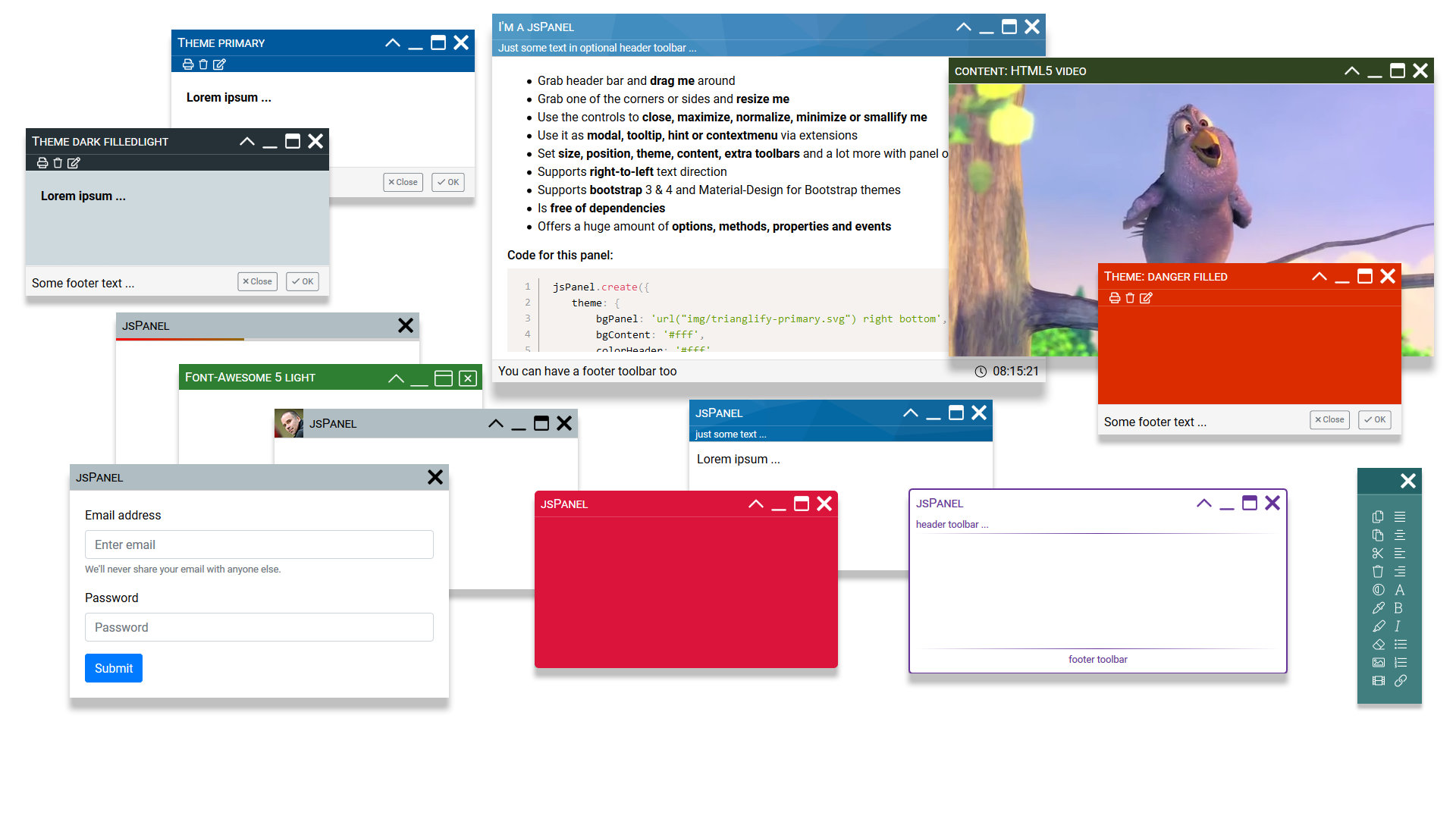 **A dependency free javascript tool to create highly configurable multifunctional floating panels.**
+ a **huge amount of options** allows to configure appearance and behavior of a jsPanel
+ optionally add **extra toolbars** to header or/and footer sections
+ support for Boostrap (3 and 4) **themes** and Material-Design-for-Bootstrap themes is built-in
+ customize the panel controls with built-in support for **icon fonts** Font-Awesome, Material-Icons and Glyphicon
+ built-in support for **RTL text** direction
+ via extensions you can use it alose as **modal**, **tooltip**, **hint/notifier**, **contextmenu** or **dialog**
+ jsPanels are **draggable** and **resizable**, can be **maximized**, **minimized** and **smallified**
+ and much more ...
---
### jsPanel 4 homepage and documentation: [https://jspanel.de](https://jspanel.de/)
### [Dependencies]()
Just a modern mobile or desktop browser like FF, Chrome, EDGE, Brave, Opera, Vivaldi.
jsPanel 4 is pure javascript and does not depend on any other library.
### [Include the files]()
The following example shows a complete html file with the minimium setup:
```html
**A dependency free javascript tool to create highly configurable multifunctional floating panels.**
+ a **huge amount of options** allows to configure appearance and behavior of a jsPanel
+ optionally add **extra toolbars** to header or/and footer sections
+ support for Boostrap (3 and 4) **themes** and Material-Design-for-Bootstrap themes is built-in
+ customize the panel controls with built-in support for **icon fonts** Font-Awesome, Material-Icons and Glyphicon
+ built-in support for **RTL text** direction
+ via extensions you can use it alose as **modal**, **tooltip**, **hint/notifier**, **contextmenu** or **dialog**
+ jsPanels are **draggable** and **resizable**, can be **maximized**, **minimized** and **smallified**
+ and much more ...
---
### jsPanel 4 homepage and documentation: [https://jspanel.de](https://jspanel.de/)
### [Dependencies]()
Just a modern mobile or desktop browser like FF, Chrome, EDGE, Brave, Opera, Vivaldi.
jsPanel 4 is pure javascript and does not depend on any other library.
### [Include the files]()
The following example shows a complete html file with the minimium setup:
```html