# Leaflet.TileLayer.ColorFilter
A simple and lightweight [Leaflet](https://leafletjs.com/) plugin to apply CSS color filter on map tiles.
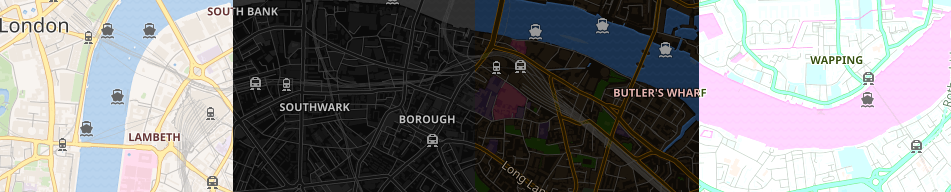
## Demos
- [Demo with a few presets.](https://xtk93x.github.io/Leaflet.TileLayer.ColorFilter/)
- [Make your own filter.](https://xtk93x.github.io/Leaflet.TileLayer.ColorFilter.updateFilter/)
## Installation
[NPM](https://www.npmjs.com/package/leaflet.tilelayer.colorfilter):
```
npm install --save leaflet.tilelayer.colorfilter
```
[Bower](https://bower.io):
```
bower install leaflet.tilelayer.colorfilter
```
Or download [a release from the repository](https://github.com/xtk93x/Leaflet.TileLayer.ColorFilter/releases).
## Basic Usage
To use this plugin, just import leaflet-tilelayer-colorfilter.min.js **after** leaflet.js, for example:
```html
```
Setting up the map with L.tileLayer.colorFilter:
```js
let map = L.map('map').setView([51.505, -0.09], 14);
let myFilter = [
'blur:0px',
'brightness:95%',
'contrast:130%',
'grayscale:20%',
'hue:290deg',
'opacity:100%',
'invert:100%',
'saturate:300%',
'sepia:10%',
];
let myTileLayer = L.tileLayer.colorFilter('https://maps.wikimedia.org/osm-intl/{z}/{x}/{y}.png', {
attribution: 'Wikimedia',
filter: myFilter,
}).addTo(map);
```
A minimal complete example can be found in [example](https://github.com/xtk93x/Leaflet.TileLayer.ColorFilter/tree/master/example/) folder. The min version also supports older browsers (ES5).
## Reference
### L.tileLayer.colorFilter(url, options)
The L.tileLayer.colorFilter is a simple extension of the original L.tileLayer that includes a new option `filter` inside `options` parameter.
`filter` accepts an array of string filters with the following format:
| Filter | Aliases | Description | Example | Default |
| --- | --- | --- | --- | --- |
| **Blur** | blur | Applies a Gaussian blur filtering measured in pixels | `['blur:2px']` | 0px |
| **Brightness** | brightness, bright, bri | Controls the brightness of tile image | `['brightness:150%']` | 100% |
| **Contrast** | contrast, con | Changes the color contrast of tiles | `['contrast:150%']` | 100% |
| **Grayscale** | grayscale, gray | Changes the color of tiles to a grayscale | `['grayscale:100%']` | 0% |
| **Hue-Rotate** | hue-rotate, hue-rotation, hue | Applies a hue rotation in degrees on tile colors | `['hue:180deg']` | 0deg |
| **Opacity** | opacity, op | Defines the opacity of the tiles | `['opacity:60%']` | 100% |
| **Invert** | invert, inv | Invert the tile colors | `['invert:100%']` | 0% |
| **Saturate** | saturate, saturation, sat | Saturates the tile colors | `['saturate:150%']` | 100% |
| **Sepia** | sepia, sep | Converts the tile colors to sepia | `['sepia:0%']` | 0% |
For *CSS Filter Browser Compatibility* please, refer to [Browser Compatibility](https://developer.mozilla.org/en-US/docs/Web/CSS/filter#Browser_compatibility_2).
### myTileLayer.updateFilter(newFilter)
On the fly changes on filter is supported with the `updateFilter` function ([demo](https://xtk93x.github.io/Leaflet.TileLayer.ColorFilter.updateFilter/)):
```js
let map = L.map('map').setView([51.505, -0.09], 14);
let oldFilter = [
'grayscale:100%',
'invert:100%',
]
let myTileLayer = L.tileLayer.colorFilter('https://maps.wikimedia.org/osm-intl/{z}/{x}/{y}.png', {
attribution: 'Wikimedia',
filter: oldFilter,
}).addTo(map);
myTileLayer.updateFilter(['brightness:110%', 'hue:90deg', 'saturate:120%']);
```
## Useful Tips
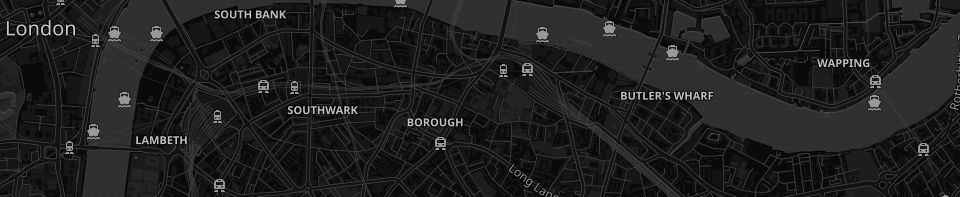
**The following settings is enough to make most of the light maps to become dark:**
```js
let myFilter = [
'grayscale:100%',
'invert:100%',
]
```
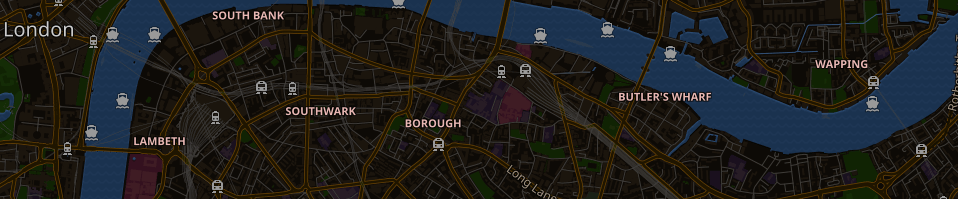
**To keep water and street colors, a hue rotation around 180deg is very helpful to correct the color inversion:**
```js
let myFilter = [
'hue:180deg',
'invert:100%',
]
```
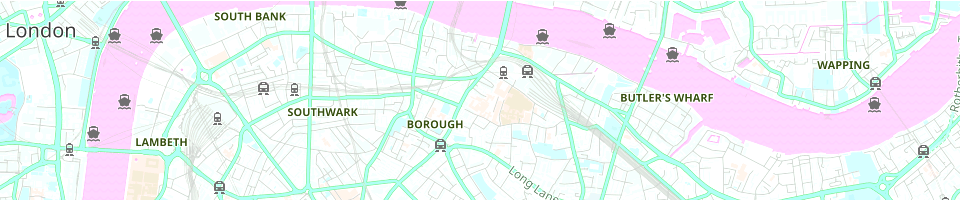
**Light maps may also look good:**
```js
let myFilter = [
'brightness:110%',
'hue:90deg',
'saturate:120%',
]
```
**The filter order matters:**
```js
let leftColoFilter = [
'invert:100%',
'brightness:115%',
'hue:186deg',
]
let rightColorFilter = [
'hue:186deg',
'brightness:115%',
'invert:100%',
]
```

## MIT License
This project is licensed under the MIT License. (c) 2018, Cláudio T. Kawakani.
## Updates
#### 2018.11
- v1.2.5: great performance improvement. Very noticeable in mobile.
#### 2018.10
- Added the new function updateFilter, thanks to [AndreasSchmid1](https://github.com/AndreasSchmid1) request.
- Now it is possible to start the colorFilter without the filter parameter.
- Package added to NPM and Bower.
#### 2018.09.26
- Accepted by Leaflet in the [plugins list](https://leafletjs.com/plugins.html#tileimage-display) :).
#### 2018.09.24
- Plugin renamed to Leaflet.TileLayer.ColorFilter.
#### 2018.09.23
- Changed from object to array of strings, because the filter order matters. Moreover, the same filter can be used more than once.
#### 2018.09.20
- Plugin created.