# locustjs-logging
This is a logging library that aims to provide logging in a more flexible way.
It uses an abstract class named `LoggerBase` as the base class for all of its loggers.
This is done with loose coupling in mind, so that applications do not couple or depend on a specific logging implementation.
There are a few number of loggers that the library provides. All of them can be employed in any type of javascript application.
## Log Object Structure
Using `locustjs-logging`, log messages are not limited to only strings. They are instances of a class named `Log` that has the following structure.
| property | type | description |
|--------|---|----------|
| `date` | `date` | log date. |
| `host` | `string` | custom string specifies in what host the log was created (explained later). |
| `scope` | `string` | defines in what scope the log was created (explained later). |
| `data` | `data` | One or more items that are logged. |
| `exception` | `Exception` | optional error object that was logged together with data. |
| `batch` | `bool` | whether there were more than one item when logging (true) or not (false). |
## Log Types
There are 11 log types or log levels in `locustjs-logging`:
```javascript
{
info: 0,
log: 1,
debug: 2,
trace: 3,
warn: 4,
danger: 5,
success: 6,
fail: 7,
abort: 8,
suggest: 9,
cancel: 10,
}
```
There is an `enum` defined for the above log types named `LogType` that is also exported by the library.
## Abstraction
### LoggerBase
This is the base logger class that defines structure of all loggers. It is an `abstract` class from which no instance should be created (doing so, generates an error). It should be used just as a base class when implementing a logger.
#### Public Methods
| method | description |
|--------|-------------|
| `constructor(options: object)` | `options` could be an object with the shape `{ host: string, scope: string }` at bare minimum level. child loggers could define other properties in `options` object based on their business. |
| `getScope():string` | returns log scope |
| `enterScope(string \| function):void` | pushes current scope to logger's internal scopes stack and sets scope to the given value |
| `exitScope():void` | pops one scope from logger's internal scopes stack and sets current scope to the poped value |
| `log(...items):void` | Logs items as a `Log` instance with `LogType.log` type |
| `debug(...items):void` | Logs items as a `Log` instance with `LogType.debug` type |
| `warn(...items):void` | Logs items as a `Log` instance with `LogType.warn` type |
| `danger(...items):void` | Logs items as a `Log` instance with `LogType.danger` type |
| `info(...items):void` | Logs items as a `Log` instance with `LogType.info` type |
| `success(...items):void` | Logs items as a `Log` instance with `LogType.success` type |
| `fail(...items):void` | Logs items as a `Log` instance with `LogType.fail` type |
| `abort(...items):void` | Logs items as a `Log` instance with `LogType.abort` type |
| `suggest(...items):void` | Logs items as a `Log` instance with `LogType.suggest` type |
| `trace(...items):void` | Logs items as a `Log` instance with `LogType.trace` type |
| `cancel(...items):void` | Logs items as a `Log` instance with `LogType.cancel` type |
#### Public Properties
| method | type | description |
|--------|------|-------|
| `host` | `string` | host info |
| `scope` | `string` | scope info |
| `options` | `object` | logger's options object given to its constructor upon instantiation. |
#### Public Abstract Methods
The following methods should be implemented by a child class derived from `LoggerBase`. All of these methods by default throw a `NotImplementedException` error.
| method | description | implementation |
|--------|--------|----|
| `_logInternal(log: Log): void` | this is the method that should perform the actual logging. `log` argument is an instance of `Log` class. The method is automatically invoked by `LoggerBase` when any of public logging methods (`log()`, `debug()`, `danger()`, etc.) are called. | mandatory |
| `clear():void` | this method is expected to clear logs. | optional |
| `getAll():Log[]` | this method is expected to return back all logs that the logger collected. | optional |
## Host & Scope
As logs can play a helpful role in troubleshooting and debugging, two properties are provided for a log object (in `Log` class) in addition to logged data themselves. This way, a log object reflects better where it is created at. These two properties are `host` and `scope`, both of them are of `string` type.
- **host**: `host`, is expected to reflect name of the environment or platform where log object was created.
- **scope**: `scope` plays a different role than `host`. It is meant to reflect in what method or function the log is created.
Usually, `host` is just needed to be set once for a logger class for the whole app life-cycle. This is usually done through the logger options passed to a logger's constructor.
On the other hand, `scope` plays a more active role and should be set whenever we step in a function or method and should be cleared when we are stepping out. The helper `enterScope()` and `exitScope()` methods are provided for the same very job.
Example:
```javascript
const logger = new ConsoleLogger({ host: 'Win10-x64' });
function foo(...args) {
logger.enterScope(foo);
try {
logger.debug('input args', ...args);
bar();
logger.success('done');
} catch (e) {
logger.danger(e);
}
logger.exitScope();
}
function bar() {
logger.enterScope(bar);
// do something
logger.exitScope();
}
```
## Implementations
`locustjs-logging` provides a few implementations (sub-classes) for `LoggerBase` that can be handy in different scenarios. The hierarchical structure is as follows:
- `LoggerBase`
- `ChainLogger`
- `ArrayLogger`
- `StorageLogger`
- `LocalStorageLogger`
- `SessionStorageLogger`
- `ConsoleLogger`
- `DOMLogger`
- `NullLogger`
- `DynamicLogger`
The loggers are described in the following table.
| Sub-Class | Description |
|-----------|-------------|
| `ChainLogger` | This abstract logger makes use of `Chain of Responsibility` design pattern and enables chaining loggers together. This way, chained loggers can be configured in a way that each one logs a specific types of logs. For example logging `danger` and `fail` log types could be assigned to `ConsoleLogger` and `debug` and `trace` log types to `DOMLogger`. This will be shown a little later. |
| `ArrayLogger` | This logger is used as a cache and stores logs in an array in memory for later inspection (probably by invoking `getAll()` method). |
| `StorageLogger` | This abstract logger, stores logs in a `StorageBase` store. |
| `LocalStorageLogger` | This logger is derived from `StorageLogger` and logs items in `localStorage` in JSON format |
| `SessionStorageLogger` | This logger is derived from `StorageLogger` and logs items in `sessionStorage` in JSON format |
| `ConsoleLogger` | This logger logs items in console. It uses a colored logging output so that logs could be more readable. It supports both NodeJs and Web Browsers (its logs can be seen in Developer Tools). |
| `DOMLogger` | This logger logs item into an HTML table in DOM. It also provides a few options to customize logs. |
| `NullLogger` | This logger does not log anything and is meant to be used as a safe logger when we do not want our logs be exposed. |
| `DynamicLogger` | As the name implies, this is a dynamic and flexible logger that provides a `type` property and could be turned into another logger based on the value specified for `type`. |
## Chaining Loggers Together
Based on `Chain Of Responsibility` design pattern implemented in `ChainLogger`, we can chain different loggers together and create a more advanced logger based on our need.
### Options
A `ChainLogger` class can receive the following options through its constructor:
```javascript
{
next: LoggerBase, // next logger in the chain to which logs should be passed
filter: array | string, // list of log types to be logged; default = '*' i.e. all lgo types
unattended: bool, // whether or not this logger acts in an unattended behavior,
// i.e. it actually logs, but pretends it does not, thus, logging is passed
// to the next logger in the chain; default = undefiend = false
}
```
Example:
```javascript
const logger = new ArrayLogger({
unattended: true,
next: new LocalStorageLogger({
filter: 'suggest',
next: new DOMLogger({
filter: 'debug,danger,fail',
next: new ConsoleLogger({
filter: 'info,log',
next: new NullLogger()
})
})
})
})
```
The above logger is a chain of loggers that provides the following logging features:
- An `ArrayLogger` logs everything sent through the chain (logs everything).
- `suggest` logs are logged in `localStorage`
- `debug`, `danger` and `fail` logs are logged in DOM (in an HTML table)
- `log` and `info` logs are logged in console.
- finally a `NullLogger` logger prevents unhandled errors to leak out of the chain and crash the whole application.
## ConsoleLogger
`ConsoleLogger` receives an options object through its constructor by which we can customize it.
```javascript
{
styles: object, // color customization object
dateType: 'utc' | 'current' (default)
env: 'node' | 'web' (default)
}
```
### Color Customization
#### Web
If our environment is web, we can customize colors with an object as below:
```javascript
{
styles: {
info: {
label: {},
scope: {},
host: {},
date: {}
},
debug: {
label: {},
scope: {},
host: {},
date: {}
},
...
}
}
```
Each key in `styles` object points to a specific log type. Using a custom object, we can customize each part of a log object, like its `date`, `host`, `scope`. The value provided for each property is an object whose keys are CSS style names.
```javascript
{
color: 'red',
'background-color': 'white',
'font-weight': 'bold',
'font-size': '14px'
}
```
If no value is specified in any part of the styles, the default will be used.
Example: Customizing `debug` logs label to be displayed with white fore-color and blue back-color in browser web developer tools.
```javascript
{
styles: {
debug: {
label: {
color: 'white',
'background-color': 'blue'
}
},
...
}
}
```
#### NodeJs
The color customization object in nodejs is similar to web:
```javascript
{
styles: {
info: {
label: {},
scope: {},
host: {},
date: {}
},
debug: {
label: {},
scope: {},
host: {},
date: {}
},
...
}
}
```
The only difference is the color objects specified for each part.
```javascript
{ fc: 'fore-color', bc: 'back-color' }
```
Nodejs does not support CSS styles as web developer tools in browsers. Moreover, its color codes conforms to ANSI colors. So, customizing colors in a nodejs environment is different than web. We can use `ConsoleColors` object exported by `locustjs-logging` to access a predefined set of console colors.
Example: Customizing `debug` logs label to be displayed with white fore-color and blue back-color.
```javascript
import { ConsoleLogger, ConsoleColors } from 'locustjs-logging';
const consoleLogger = new ConsoleLogger({
styles: {
debug: {
label: {
fc: ConsoleColors.ForeColor.White,
bc: ConsoleColors.BackColor.Blue,
}
},
...
}
});
```
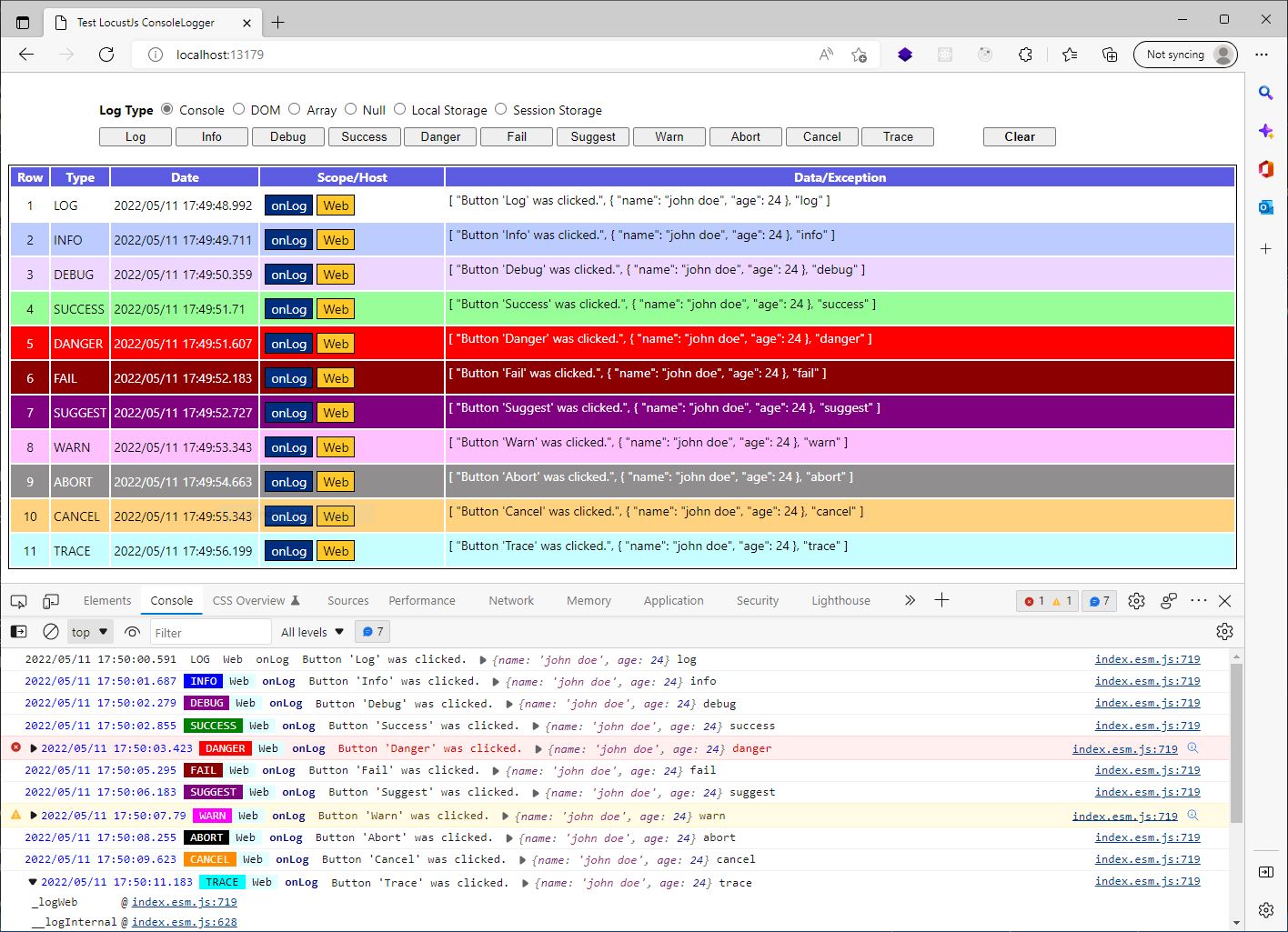
There is a picture in the `DOMLogger` section that shows how different generated logs in a Browser Developer Tools look like.
## StorageLogger
Storage loggers are best suited in web scenarios when application's URL is changed, user is redirected to another route or page in the application or the page refreshes or posted to another route.
In all of these scenarios, the javascript code of application will be unloaded and loaded again. So, all logs stored in previous loggers described earlier will be lost. `StorageLogger` comes to rescue in these scenarios.
Since `StorageLogger` stores the logs in a storage, the logs will be persisted and will not be lost. `StorageLogger` can receive an options object through its constructor in the following structure:
```javascript
{
storeKey: string // storage item key where logs will be stored at. default = 'logs'
store:
bufferSize: number // number of logs to be buffered before flushing into store. default = 5
}
```
`bufferSize` enables the logger to buffer logs and then write them into storage. This is to reduce the number of times storage is hit. A zero value will disable buffering.
## DOMLogger
`DOMLogger` receives an options object in the following structure:
```javascript
{
target: string (CSS selector) | object,
className: string,
onInit: function(source: DOMLogger): string | HtmlTable,
onNewLog: function(source: DOMLogger, log: Log, count: int): HtmlTableRow,
format: function(source: DOMLogger, log: Log, type: string): string,
}
```
| Property | Type | Description |
|----------|-------|------------|
| `target` | `string` \| `Node` | a DOM node or CSS selector of a node where logs table should be created in (default = #dom-logger). it could be a simple `` element. |
| `onInit` | `function(source: DOMLogger): string \| HtmlTable` | custom html table creator function. It is called once when logger is constructed and also every time `clear()` method is called. |
|`onNewLog`|`function(source: DOMLogger, log: Log, row: int): HtmlTableRow`| custom function to create a new table row in logs table. it should return a &`` node. |
|`className`|`string`| CSS className of logs table (default = "dom-logger"). |
| `format` | `function(source: DOMLogger, log: Log, type: string): string` | custom formatter function to format `data` and `exception` properties of a log. by default the two proeprties are serialized in JSON and displayed in this format in logs table.|
`DOMLogger` by default creates an HTML table in the target node specified in its `options`. The table has the following structure:
```html
| Row |
Type |
Date |
Scope/Host |
Data/Exception |
```
Also, each log row is created in the following structure:
```html
{row} |
{log.type} |
{log.date} |
{log.scope}
{log.scope}
|
{data}
{exception}
|
```
`data` and `exception` are html-encoded by default (to counter XSS exploit). If a `format` function is given to `DOMLogger` using its constructor's `options` object argument, `DOMLogger` calls it once to get formatted `data` and again to get formatted `exception`. No html-encoding is performed if custom `format` function is used.
By default, `DOMLogger` applies no CSS styling to the generated HTML table. This is assigned to the user to apply any visual decoration to the logs table based on his choice.
There is a sample CSS styles file in `tests` folder in the repository of this library that decorates logs table with a few coloring and borders as shown in the following picture.
## DynamicLogger
As it was stated earlier, `DynamicLogger` is a dynamic logger that changes its behavior based on the value specified for its `type` proeprty. This way, in a Web app for example, we can vastly use logging without fearing that our logs will be leaked out to console, while we also have the choice to switch our logger to a different one anytime we want upon debugging or troubleshooting our app.
Possible values for `DynamicLogger.type` property are as follows:
| value | internal logger|
|-------|------------|
|`null`|`NullLogger`|
|`console`|`ConsoleLogger`|
|`dom`|`DOMLogger`|
|`array`|`ArrayLogger`|
|`localstorage`|`LocalStorageLogger`|
|`sessionstorage`|`SessionStorageLogger`|
|`console`|`ConsoleLogger`|
| other values| customized logger by `factory` option (explained later) |
The values are case-insensitive.
By default `DynamicLogger` acts as `NullLogger`.
### Options
`DynamicLogger` can receive an options object in the following strcuture through its constructor:
```javascript
{
dom: object, // custom options for DOMLogger
store: object, // custom options for store logger types
console: object, // custom options for console logger
array: object, // custom options for array logger
factory: function(source: DynamicLogger, type: string): LoggerBase // custom factory to create loggers
next: LoggerBase // default next logger
}
```
The `dom`, `store`, `array` and `console` values are used as `options` argument when instantiating loggers based on the type specified for `DynamicLogger` upon chaning its new `type` value.
### Custom Logger
Using `factory` function, it is possible to override or extend the behavior of `DynamicLogger`. If `factory` is a function, it is invoked upon chaning `DynamicLogger.type` property and the new type is passed to it. It is expected for the `factory` function to return a `LoggerBase` instance. If it does not return anything (`null` or `undefined`), the default loggers will be used. If no logger could be found for the given type value, an `InvalidLoggerTypeException` error will be raised.
In the following example, we created a `DynamicLogger` that supports a `redux` type which logs items in a `Redux` store.
```javascript
import { LoggerBase } from "locustjs-logging";
import store, { clearLogs } from './store'; // => redux store
class ReduxLogger extends LoggerBase {
_logInternal(log) {
store.dispatch(logAdded(log));
}
getAll() {
return store.getState().logs;
}
clear() {
store.dispatch(clearLogs());
}
}
const logger = new DynamicLogger({
factory: (source, type) => {
if (type == 'redux') {
return new ReduxLogger();
}
}
});
```