# Vue3 - Laravel Datatables

Integrate the Laravel datatables with your Vue app without using JQuery. It can handle listing data locally and remote.
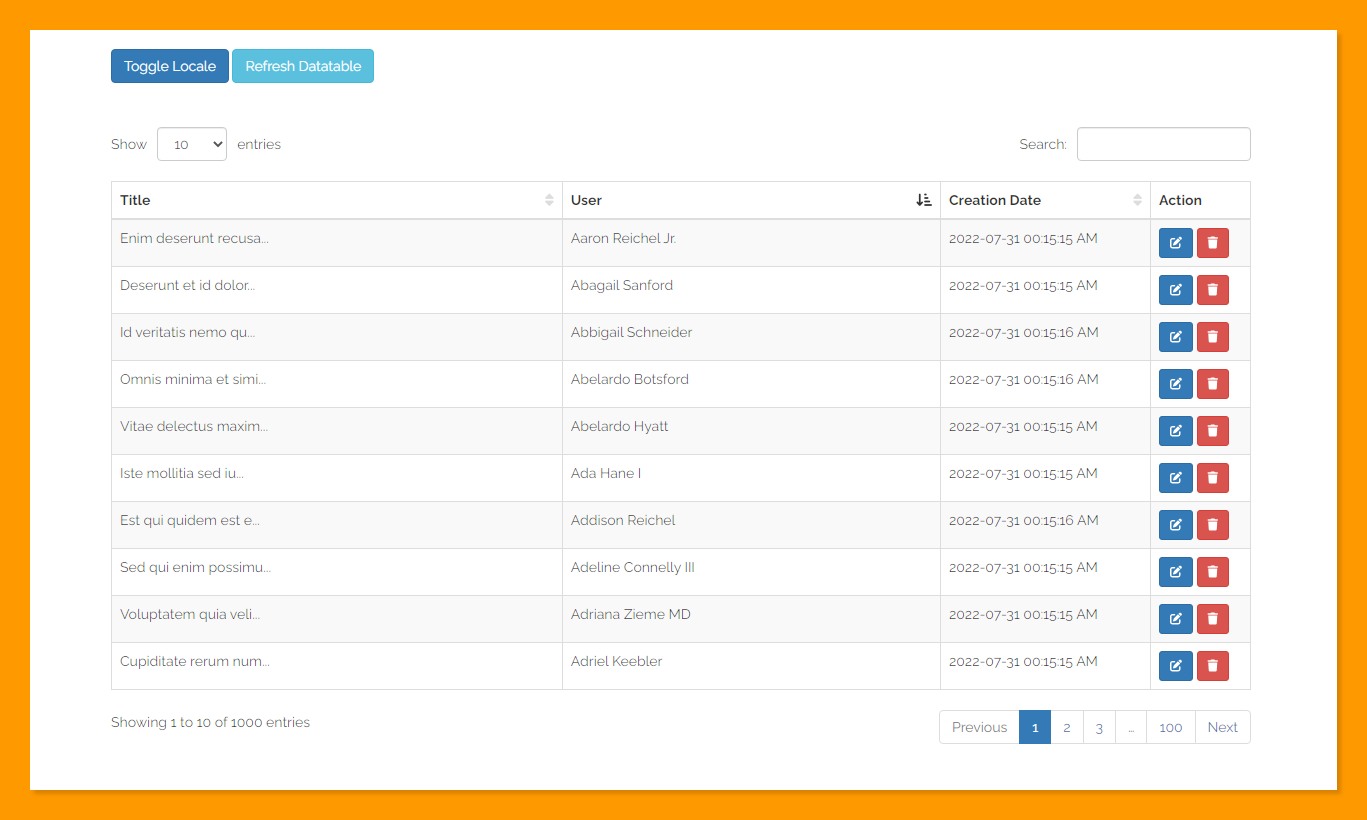
![](https://raw.githubusercontent.com/HELMAB/lv3-datatable/master/src/assets/ui.png)

## Installation

```cmd
npm install lv3-datatable
```

## Usage

### Client Side

```js
import { createApp } from "vue";
import App from "./App.vue";

import "./../node_modules/lv3-datatable/dist/style.css";
import { Datatable } from 'lv3-datatable'

const app = createApp(App);

app.component("DataTable", DataTable);

app.mount("#app");
```

```vue
<template>
  <!--  HTTP Request -->
  <DataTable
      table-id="datatable-01"
      ref="datatable"
      url="http://127.0.0.1:8000/api/v1/posts/datatable"
      :axios="axios"
      :columns="columns"
      :locale="locale"
      server-side
      saved-state
  >
    <template #action="{ row }">
      <ButtonActions :row="row" />
    </template>
  </DataTable>

  <!--  Local Data -->
  <DataTable
      table-id="datatable-02"
      ref="datatable"
      :columns="columns"
      :data-rows="dataRows"
      :locale="locale"
      saved-state
  >
    <template #action="{ row }">
      <ButtonActions :row="row" />
    </template>
  </DataTable>
</template>

<script>
import axios from 'axios'
import ButtonActions from '@/components/ButtonActions.vue'

export default {
  components: {
    ButtonActions
  },
  data () {
    return {
      axios,
      locale: 'en',
      dataRows: [],
    }
  },
  computed: {
    columns() {
      return [
        {
          data: "title",
          name: "title",
          title: "Title",
          orderable: true,
          searchable: true,
        },
        {
          data: "user.name",
          name: "user.name",
          title: "User",
          orderable: true,
          searchable: false,
        },
        {
          data: "created_at",
          name: "created_at",
          title: "Creation Date",
          orderable: true,
          searchable: false,
          width: "210px",
        },
        {
          data: "action",
          name: "action",
          title: "Action",
          orderable: false,
          searchable: false,
          slot: "action",
          width: "100px",
        },
      ];
    },
  },
  created() {
    this.dataRows = Array(10000)
        .fill(1, 0, 10000)
        .map((_, i) => {
          return {
            id: i + 1,
            title: `Title ${i + 1}`,
            user: {
              id: i + 1,
              name: `User ${i + 1}`,
            },
            created_at: new Date().toLocaleString(),
          };
        });
  },
}
</script>
```
### Server Side

For server side, we need to use [Laravel Datatables](https://github.com/yajra/laravel-datatables) package.

```php
<?php

namespace App\Http\Controllers\Api\V1;

use App\Http\Controllers\Controller;
use App\Models\Post;
use Illuminate\Http\JsonResponse;
use Illuminate\Http\Request;
use Illuminate\Support\Str;
use Yajra\DataTables\Facades\DataTables;

class PostController extends Controller
{
    public function datatable(Request $request): JsonResponse
    {
        $posts = Post::query()
            ->with(['user'])
            ->select('posts.*');

        return DataTables::of($posts)
            ->editColumn('title', fn(Post $post) => Str::limit($post->title, 20))
            ->editColumn("created_at", function (Post $post) {
                return $post->created_at->format('Y-m-d H:i:s A');
            })
            ->make();
    }
}
```

## Props

| Prop          | Type    | Description                                  |
|---------------|---------|----------------------------------------------|
| axios         | Object  | Axios instance                               |
| url           | String  | The url to fetch data                        |
| columns       | Array   | Columns to show                              |
| locale        | String  | Localization code ("en", "km")               |
| data-rows     | Array   | Static data of the table                     |
| table-id      | String  | The table ID                                 |
| saved-state   | Boolean | Save state of datatable                      |
| server-side   | Boolean | Flag to switch handle between local & remote |
| lengthOptions | Array   | Dropdown length option                       |
| order         | Array   | Order column and direction                   |
| design        | String  | ["bootstrap3", "bootstrap4", "bootstrap5"]   |

## Methods

To refresh the datatable, you can call this method.

```js
this.$refs.datatable.refresh()
```

## Slots

Every of columns can have a slot, and it defines by adding the `slot` attribute inside `columns`. it has `row` and `column` as props data.

```vue
<template>
  <DataTable>
    <template #action="{ row, column }">
      <span>{{ row.title }} - {{ column.data }}</span>
    </template>
  </DataTable>
</template>
```

## Support

If you like this plugin and want to support me, you can [buy me a coffee ☕](https://www.buymeacoffee.com/helmab)

## License

The MIT License (MIT). Please see [License File](https://github.com/HELMAB/lv2-datatable/blob/master/LICENSE) for more information.
