---
title: ScrollView
preview: https://didi.github.io/mand-mobile/examples/#/scroll-view
---
Used to simulate native scrolling areas and support pull-down refresh and load more
### Import
```javascript
import { ScrollView, ScrollViewRefresh, ScrollViewMore } from 'mand-mobile'
Vue.component(ScrollView.name, ScrollView)
```
### Instruction
* `ScrollViewRefresh` is a pull-down refresh component built into the component library for visual display only. It needs to be used in the slot refresh. The pull-down refresh component can also be customized.
* `ScrollViewMore` load-more component built into the component library for visual display only. It needs to be used in slot more. The load-more component can also be customized.
* **The component container needs to have a height, otherwise there will be problems that cannot be scrolled or rebounded.** For more frequently asked questions, please refer to Appendix
### Code Examples
### API
#### ScrollView Props
|Props | Description | Type | Default | Note |
|----|-----|------|------|------|
|scrolling-x | horizontal scrolling | Boolean | `true` | -|
|scrolling-y | vertical scrolling | Boolean | `true` | -|
|bouncing | - | Boolean | `true` | -|
|auto-reflow| automatically reset scroller size when content changes | Boolean | `false` | manually call `reflowScroller` when set to `false` and it is recommended to turn `auto-reflow` off when `ScrollView` is hidden, otherwise the last scroll position will not be saved|
|manual-init | manual initialization | Boolean | `false` | generally used for asynchronous initialization scenarios, you need to manually call the `init` method to complete the initialization |
|end-reached-threshold | threshold for emitting `endReached`. | Number | 0 | unit `px` |
|immediate-check-end-reaching 2.1.0+| check if it reaches the bottom at initialization | Boolean | `false` | - |
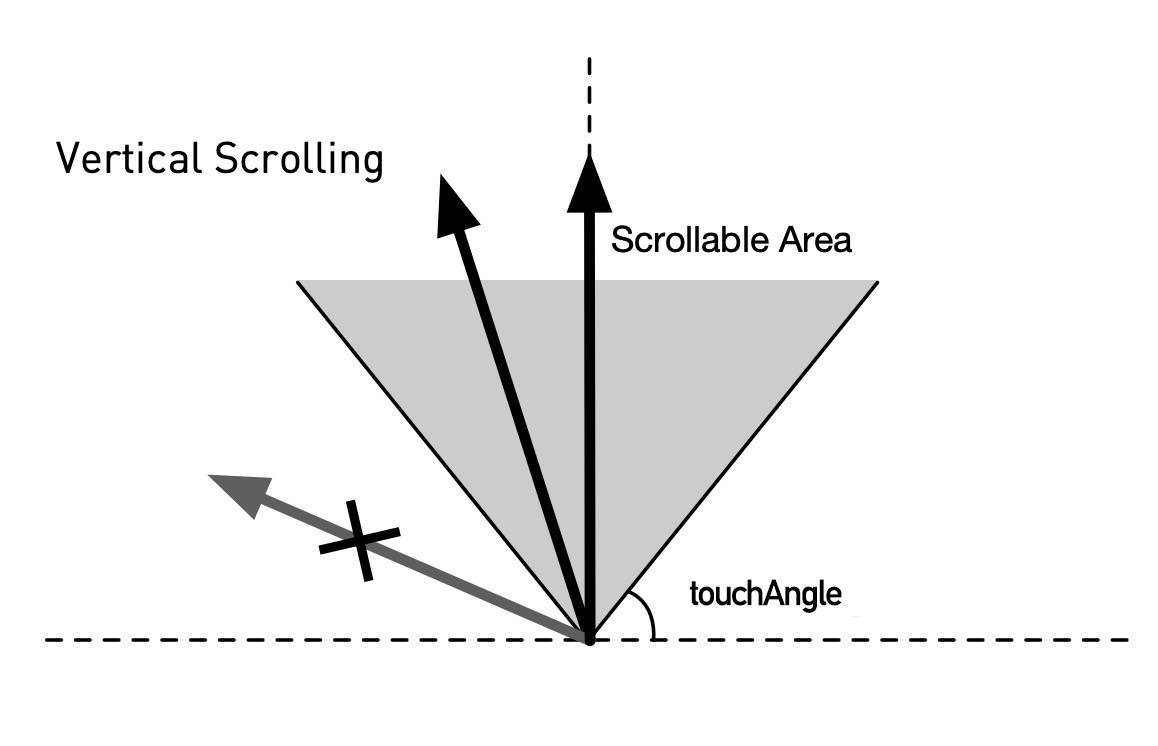
|touch-angle 2.1.0+| angle value range that triggers scrolling | Number | 45 | unit `deg` |
|is-prevent 2.3.0+| prevent browser default scrolling | Boolean | `true` | if set to `false`, the browser defaults to scroll when scrolling is triggered over a non-scrollable angle range |
#### ScrollView TouchAngle
 #### ScrollViewRefresh Props
|Props | Description | Type | Default | Note |
|----|-----|------|------|------|
|scroll-top | distance from top | Number | `0` | unit `px` |
|is-refresh-active | release refreshable state | Boolean | `false` | - |
|is-refreshing | refreshing state | Boolean | `false` | - |
|refresh-text | - | String | `下拉刷新` | - |
|refresh-active-text | release refreshable text | String | `释放刷新` | - |
|refreshing-text | refreshing text | String | `刷新中...` | - |
|roller-color 2.2.0+| progress bar color | String | `#2F86F6` | - |
#### ScrollViewMore Props
|Props | Description | Type | Default | Note |
|----|-----|------|------|------|
|is-finished | all loaded | Boolean | `false` | - |
|loading-text | loading text | String | `更多加载中...` | - |
|finished-text | loaded text | String | `全部已加载` | - |
#### ScrollView Slots
##### default
Scrolling area content slot. When the content changes, you need to call `reflowScroller` to reset the scroll area. Refer to reflowScroller
##### refresh
Pull-down refresh component slot, you can use `slot-scoped` to get the relevant scrolling status as follows (the scrolling state can also be dynamically set by event when the `slot-scoped` is not compatible)
```html
```
##### more
load-more component slot
##### header
header slot
##### footer
footer slot
#### ScrollView Methods
##### init()
Initialize the scroll area, used when `manual-init` is set to `true`.
##### reflowScroller()
Reset the scroll area, which needs to be called after the content in the general scroll area changes.
##### scrollTo(left, top, animate = false)
Scroll to the specified location
|Parameters | Description | Type|
|----|-----|------|
|left|distance from left|Number|
|top|distance from top|Number|
|animate|using animation|Boolean|
##### getOffsets(): {left: number, top: number}
Get scrolling position 2.5.4+
##### triggerRefresh()
-
##### finishRefresh()
-
##### finishLoadMore()
-
#### ScrollView Events
##### @scroll({scrollLeft, scrollTop})
Scrolling event
|Props | Description | Type|
|----|-----|------|
|scrollLeft|distance from left|Number|
|scrollTop|distance from top|Number|
##### @refreshActive()
Release refreshable event
##### @refreshing()
Refreshing event
##### @end-reached()
Reached end event
### Appendix
#### Can't scroll normally and rebounds abnormally
First of all, most of the scrolling anomalies are caused by problems with container size (vertical scrolling: height, horizontal scrolling: width) and the height of the container can be controlled in a variety of ways, such as **fixed size**, **flow layout**, **flex layout**. When the container size is insufficient, it will cause the internal [Scroller to initialize](https://github.com/didi/mand-mobile/blob/master/components/scroll-view/index.vue#L374) abnormally. When such a situation occurs, you can check the height of **`.md-scroll-view`** by browser elements inspector.
Secondly, confirm whether there is a dynamic change of the scroll area content, resulting in a change in the size of the scroll area. In this case, you need to call `reflowScroller` or set `auto-reflow` to `true` directly.
#### Scrolling can't trigger endReached after pull-down refreshing
Inside the component `pull-down refreshing` and `pull-up loading` should be treated as two unrelated actions, because the action content has user decision (business logic), so it cannot be determined that the pull-down refreshing must be "refresh the list back to the first page state", so you can't control `isEndReaching` directly after pull-down refreshing. The problem can be abstracted as reseting the state of `pull-up loading` after `pull-down refreshing` and you can manually reset it in the `refreshing` event:
```javascript
$_onRefresh() {
// Reset list data
this.list = 10
this.$refs.scrollView.finishRefresh()
// Reset pull-up loading state
this.isFinished = false
this.$refs.scrollView.finishLoadMore()
}
```
#### ScrollViewRefresh Props
|Props | Description | Type | Default | Note |
|----|-----|------|------|------|
|scroll-top | distance from top | Number | `0` | unit `px` |
|is-refresh-active | release refreshable state | Boolean | `false` | - |
|is-refreshing | refreshing state | Boolean | `false` | - |
|refresh-text | - | String | `下拉刷新` | - |
|refresh-active-text | release refreshable text | String | `释放刷新` | - |
|refreshing-text | refreshing text | String | `刷新中...` | - |
|roller-color 2.2.0+| progress bar color | String | `#2F86F6` | - |
#### ScrollViewMore Props
|Props | Description | Type | Default | Note |
|----|-----|------|------|------|
|is-finished | all loaded | Boolean | `false` | - |
|loading-text | loading text | String | `更多加载中...` | - |
|finished-text | loaded text | String | `全部已加载` | - |
#### ScrollView Slots
##### default
Scrolling area content slot. When the content changes, you need to call `reflowScroller` to reset the scroll area. Refer to reflowScroller
##### refresh
Pull-down refresh component slot, you can use `slot-scoped` to get the relevant scrolling status as follows (the scrolling state can also be dynamically set by event when the `slot-scoped` is not compatible)
```html
```
##### more
load-more component slot
##### header
header slot
##### footer
footer slot
#### ScrollView Methods
##### init()
Initialize the scroll area, used when `manual-init` is set to `true`.
##### reflowScroller()
Reset the scroll area, which needs to be called after the content in the general scroll area changes.
##### scrollTo(left, top, animate = false)
Scroll to the specified location
|Parameters | Description | Type|
|----|-----|------|
|left|distance from left|Number|
|top|distance from top|Number|
|animate|using animation|Boolean|
##### getOffsets(): {left: number, top: number}
Get scrolling position 2.5.4+
##### triggerRefresh()
-
##### finishRefresh()
-
##### finishLoadMore()
-
#### ScrollView Events
##### @scroll({scrollLeft, scrollTop})
Scrolling event
|Props | Description | Type|
|----|-----|------|
|scrollLeft|distance from left|Number|
|scrollTop|distance from top|Number|
##### @refreshActive()
Release refreshable event
##### @refreshing()
Refreshing event
##### @end-reached()
Reached end event
### Appendix
#### Can't scroll normally and rebounds abnormally
First of all, most of the scrolling anomalies are caused by problems with container size (vertical scrolling: height, horizontal scrolling: width) and the height of the container can be controlled in a variety of ways, such as **fixed size**, **flow layout**, **flex layout**. When the container size is insufficient, it will cause the internal [Scroller to initialize](https://github.com/didi/mand-mobile/blob/master/components/scroll-view/index.vue#L374) abnormally. When such a situation occurs, you can check the height of **`.md-scroll-view`** by browser elements inspector.
Secondly, confirm whether there is a dynamic change of the scroll area content, resulting in a change in the size of the scroll area. In this case, you need to call `reflowScroller` or set `auto-reflow` to `true` directly.
#### Scrolling can't trigger endReached after pull-down refreshing
Inside the component `pull-down refreshing` and `pull-up loading` should be treated as two unrelated actions, because the action content has user decision (business logic), so it cannot be determined that the pull-down refreshing must be "refresh the list back to the first page state", so you can't control `isEndReaching` directly after pull-down refreshing. The problem can be abstracted as reseting the state of `pull-up loading` after `pull-down refreshing` and you can manually reset it in the `refreshing` event:
```javascript
$_onRefresh() {
// Reset list data
this.list = 10
this.$refs.scrollView.finishRefresh()
// Reset pull-up loading state
this.isFinished = false
this.$refs.scrollView.finishLoadMore()
}
```