# markdown-it-math
[](https://github.com/runarberg/markdown-it-math/actions/workflows/ci.yml)

[](https://www.npmjs.com/package/markdown-it-math)
[](https://github.com/runarberg/markdown-it-math/blob/main/LICENSE)
[](https://npm-stat.com/charts.html?package=markdown-it-math)
**Note** This library defaults to rendering your equation with an
AsciiMath dialect. If you want to use LaTeX, follow the instructions
below.
**Note** [mathup][mathup] or [temml][temml] are optional peer
dependencies, you must explicitly install either of them if you plan
to use the default renderer (see [installation][#Installation] below).
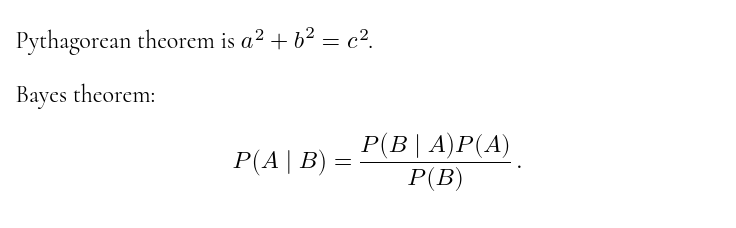
```md
Pythagorean theorem is $a^2 + b^2 = c^2$.
Bayes theorem:
$$
P(A | B) = (P(B | A)P(A)) / P(B) .
$$
```
## Installation
```bash
npm install markdown-it-math --save
# Optional (use the default AsciiMath renderer)
npm install mathup --save
# Optional (use a LaTeX renderer instead)
npm install temml --save
```
### In a browser
Use an [importmap][importmap]. Change `/path/to/modules` to the
location of your modules.
```html
```
**Note** Adding [mathup][mathup] or [temml][temml] to your import map
is optional. Only add mathup if you want to use it as the default
AsciiMath renderer. Add Temml if you want to use it as the LaTeX
renderer.
## Usage
### With default AsciiMath (mathup) renderer
```js
import markdownIt from "markdown-it";
import markdownItMath from "markdown-it-math";
// Optional (with defaults)
const options = {
inlineDelimiters: ["$", ["$`", "`$"]],
inlineAllowWhiteSpacePadding: false,
blockDelimiters: "$$",
mathupOptions,
inlineCustomElement, // see below
inlineRenderer, // see below
blockCustomElement, // see below
blockRenderer, // see below
};
const md = markdownIt().use(markdownItMath, options);
```
```js
md.render(`
A text $1+1=2$ with math.
$$
bf A._(3 xx 3) =
[a_(1 1), a_(1 2), a_(1 3)
a_(2 1), a_(2 2), a_(2 3)
a_(3 1), a_(3 2), a_(3 3)]
$$
`);
```
You may also want to include the stylesheet from mathup. See
[mathup][mathup] for reference and usage instructions about the
default renderer.
### LaTeX (Temml)
```bash
# install temml as a peer dependency
npm install --save temml
```
```js
import markdownIt from "markdown-it";
import markdownItMathTemml from "markdown-it-math/temml";
// Optional, if you want macros to persit across equations.
const macros = {};
const md = markdownIt().use(markdownItMathTemml, {
temmlOptions: { macros },
});
```
Note that the `markdown-it-math/temml` export supports the same
options as above, except `mathupOptions`, you can use `temmlOptions`
instead.
```js
md.render(String.raw`
A text $1+1=2$ with math.
$$
\underset{3 \times 3}{\mathbf{A}} =
\begin{bmatrix}
a_{1 1} & a_{1 2} & c_{1 3} \\
a_{2 1} & a_{2 2} & c_{2 3} \\
a_{3 1} & a_{3 2} & c_{3 3}
\end{bmatrix}
$$
`);
```
You may also want to include the stylesheets and fonts from Temml. See
[Temml][temml] for reference and usage instructions about the
default renderer.
### No Default Renderer
**`markdown-it-math/no-default-renderer`** is the minimal export. Use
this if you want to provide your own renderer.
**Note:** The other two exports use top-level await to dynamically
import the respective peer dependency. If your environment does not
support that, this export is recommended, in which case you should
manually supply the renderers.
```js
import markdownIt from "markdown-it";
import markdownItMath from "markdown-it-math/no-default-renderer";
const md = markdownIt().use(markdownItMath, {
inlineRenderer: customInlineMathRenderer,
blockRenderer: customBlockMathRenderer,
});
```
### Options
- `inlineDelimiters`: A string, or an array of strings (or pairs of
strings) specifying delimiters for inline math expressions. If a
string, the same delimiter is used for open and close. If a pair of
strings, the first string opens and the second one closes. Empty
strings or pairs containing empty strings are ignored. If no valid
strings or pairs are provided, it will turn off the rule.
Default ``["$", ["$`", "`$"]]``.
- `inlineAllowWhiteSpacePadding`: Whether to allow whitespace
immediately after the opening delimiter and immediately before the
closing delimiter. You may want this if you use e.g. ``$`...`$`` or
`\(...\)` as delimiters where the risk of non-intended math
expression is low.
- `blockDelimiters`: Same as above, but for block expressions. Default `"$$"`.
- `mathupOptions`: The options passed to the default mathup renderer. Ignored
if you use a custom renderer. Default `{}`.
- `temmlOptions`: The options passed to the temml renderer. Only available if
you import from `markdown-it-math/temml` Ignored if you use a custom renderer.
Default `{}`.
- `inlineCustomElement`:
Specify `"tag-name"` or `["tag-name", { some: "attrs" }]` if you want to
render inline expressions to a custom element. Ignored if you provide a
custom renderer.
- `inlineRenderer`:
Provide a custom inline math renderer. Accepts the source content, the
parsed markdown-it token, and the markdown-it instance. Default:
```js
import mathup from "mathup";
function defaultInlineRenderer(src, token, md) {
return mathup(src, mathupOptions).toString();
}
```
- `blockCustomElement`:
Specify `"tag-name"` or `["tag-name", { some: "attrs" }]` if you want to
render block expressions to a custom element. Ignored if you provide a
custom renderer.
- `blockRenderer`:
Provide a custom block math renderer. Accepts the source content, the
parsed markdown-it token, and the markdown-it instance. Default:
```js
import mathup from "mathup";
function defaultBlockRenderer(src, token, md) {
return mathup(src, {
...mathupOptions,
display: "block",
}).toString();
}
```
## Alternatives
- [@mdit/plugin-katex][@mdit/plugin-katex] -
Renders expressions to KaTeX rather than MathML
- [markdown-it-mathspan][markdown-it-mathspan] and
[markdown-it-mathblock][markdown-it-mathblock] -
Uses commonmark inspired delimiters with customiable renderer.
## Examples
### Using comma as a decimal mark
```js
import markdownIt from "markdown-it";
import markdownItMath from "markdown-it-math";
const md = markdownIt().use(markdownItMath, {
mathupOptions: { decimalMark: "," },
});
md.render("$40,2$");
//
```
### Render to a custom `` element
Refer to [temml-custom-element][temml-custom-element] for usage
instructions about the `` custom element.
```js
import markdownIt from "markdown-it";
import markdownItMath from "markdown-it-math";
const md = markdownIt().use(markdownItMath, {
inlineCustomElement: "la-tex",
blockCustomElement: ["la-tex", { display: "block" }],
});
md.render(String.raw`
$\sin(2\pi)$.
$$
\int_{0}^{\infty} E[X]
$$
`);
// \sin(2\pi).
// \int_{0}^{\infty} E[X]
```
### Turning off inline math
```js
import markdownIt from "markdown-it";
import markdownItMath from "markdown-it-math";
const md = markdownIt().use(markdownItMath, {
inlineDelimiters: "",
});
```
```md
Only block math is allowed. $a^2$ will not render into inline math.
But this will render into block math:
$$
a^2
$$
```
### Using LaTeX style delimiters
```js
import markdownIt from "markdown-it";
import markdownItMath from "markdown-it-math";
const md = markdownIt().use(markdownItMath, {
inlineDelimiters: [["\\(", "\\)"]],
blockDelimiters: [["\\[", "\\]"]],
});
```
Note there are restrictions on what inline delimiters you can use,
based on optimization for the markdown-it parser [see here for
details][why-my-inline-rule-is-not-executed].
Unlike LaTeX, block level math must be on its own lines.
```markdown
Some text with inline math \(a^2 + b^2 = c^2\)
And block math:
\[ e = sum_(n=0)^oo 1 / n! \]
This expression \[P(x \in X) = 0\] will not render.
```
### Different rendering for different delimiters
```js
import markdownIt from "markdown-it";
import markdownItMath from "markdown-it-math";
import mathup from "mathup";
import temml from "temml";
const md = markdownIt().use(markdownItMath, {
inlineDelimiters: ["$", ["\\(", "\\)"]],
inlineRenderer(src, token) {
if (token.markup === "$") {
return mathup(src).toString();
}
return temml.renderToString(src);
},
blockDelimiters: ["$$", ["\\[", "\\]"]],
blockRenderer(src, token) {
if (token.markup === "$$") {
return mathup(src, { display: "block" }).toString();
}
return temml.renderToString(src, { displayMode: true });
},
});
```
Now you can use both `$"AsciiMath"$` and `\(\latex\)` expressions:
```md
Some text with inline AsciiMath $a^2 + b^2 = c^2$
and inline LaTeX math \(\sin \theta\)
And AsciiMath:
$$
e = sum_(n=0)^oo 1 / n!
$$
And LaTeX math:
\[
e = \sum_{n=0}^{\infty} \frac{1}{n!}
\]
```
### LaTeX Preample
```js
import markdownIt from "markdown-it";
import markdownItMathTemml from "markdown-it-math/temml";
import temml from "temml";
// An object to keep all the global macros.
const macros = {};
const md = markdownIt().use(markdownItMathTemml, {
temmlOptions: { macros },
blockDelimiters: ["$$", ["$$ preample", "$$"]],
blockRenderer(src, token) {
if (token.markup === "$$ preample") {
// Add these defs to the global macros.
Object.assign(macros, temml.definePreamble(src));
// Don’t render anything.
return "";
}
return temml.renderToString(src, { displayMode: true, macros });
},
});
```
```md
# The Expected value
$$ preample
\def\E{\mathbb{E}}
\newcommand\d[0]{\operatorname{d}\!}
$$
Now we can use the macros defined above.
$$
\E[X] = \int_{-\infty}^{\infty} xf(x) \d{x}
$$
```
Note that this plugin does not support [info
strings](https://spec.commonmark.org/0.31.2/#info-string) but the open
delimiter can be customized to look like an info string (see
below). Consider [markdown-it-mathblock][markdown-it-mathblock] if you
need commonmark compliant info strings.
## Deprecated Options
- **`inlineOpen`** and **`inlineClose`** (since v5.0.0): Deprecated in favor
of `inlineDelimiters`:
```diff
markdownIt().use(markdownItMath, {
- inlineOpen: "$",
- inlineClose: "$",
+ inlineDelimiters: "$",
});
```
- **`blockOpen`** and **`blockClose`** (since v5.0.0): Deprecated in favor
of `blockDelimiters`:
```diff
markdownIt().use(markdownItMath, {
- blockOpen: "$$",
- blockClose: "$$",
+ blockDelimiters: "$$",
});
```
- **`defaultRendererOptions`** (since v5.2.0): Deprecated in favor of
`mathupOptions`:
```diff
markdownIt().use(markdownItMath, {
- defaultRendererOptions: { decimalMark: "," },
+ mathupOptions: { decimalMark: "," },
});
```
## Upgrading From v4
Version 5 introduced some breaking changes, along with dropping legacy platforms.
- The default delimiters changed from `$$` and `$$$` for inline and
block math respectively to `$` and `$$`. If you want to keep the
thicker variants, you must set the relevant options:
```js
markdownIt().use(markdownItMath, {
inlineDelimiters: "$$",
blockDelimiters: "$$$",
});
```
- The options passed into the default mathup renderer has been renamed
from `renderingOptions` to `mathupOptions`:
```diff
markdownIt().use(markdownItMath, {
- renderingOptions: { decimalMark: ",", },
+ mathupOptions: { decimalMark: ",", },
});
```
- The default math renderer has been changed from Ascii2MathML to it’s
successor mathup. There is a minor syntax and some output
differences, so this may brake some of your old expressions: If you
are afraid this happens you can opt into the legacy renderer:
```bash
npm install ascii2mathml
```
```js
import ascii2mathml from "ascii2mathml";
// The old renderingOptions settings must be explicitly passed in.
const mathRendererOptions = { decimalMark: "," };
markdownIt().use(markdownItMath, {
inlineRenderer: ascii2mathml(mathRendererOptions),
blockRenderer: ascii2mathml({ ...mathRendererOptions, display: "block" }),
});
```
[@mdit/plugin-katex]: https://mdit-plugins.github.io/katex.html
[importmap]: https://developer.mozilla.org/en-US/docs/Web/HTML/Element/script/type/importmap
[markdown-it]: https://github.com/markdown-it/markdown-it
[markdown-it-mathblock]: https://github.com/runarberg/markdown-it-mathblock
[markdown-it-mathspan]: https://github.com/runarberg/markdown-it-mathspan
[mathml]: https://www.w3.org/TR/MathML/
[mathup]: https://mathup.xyz/
[Temml]: https://temml.org
[temml-custom-element]: https://github.com/runarberg/temml-custom-element
[why-my-inline-rule-is-not-executed]: https://github.com/markdown-it/markdown-it/blob/master/docs/development.md#why-my-inline-rule-is-not-executed