# Angular Material 2 Extensions
A component library of custom extensions to [Angular Material 2](https://material.angular.io/).
[](https://travis-ci.org/sandervalstar/material2-extensions)
[](https://www.npmjs.com/package/material2-extensions)
## Components
* [Chip-input with auto-complete](#chip-input)
## How to use
**Important:** First make sure you have [Angular Material 2](https://material.angular.io/) working, by following the steps below.
You'll need to choose a CSS theme from
`node_modules/@angular/material/prebuilt-themes`
and make it available to your application. If you for example placed it in your assets directory can then link to it like this in your `index.html`:
```html
```
Additionally you'll have to import the Material Design icons. You can use the version hosted by Google by adding the following line to your `index.html`:
```html
```
### Chip-input
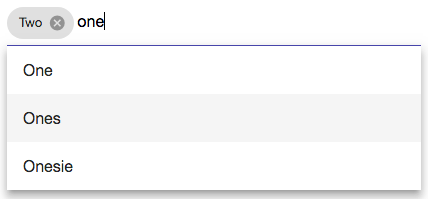
```html
```
| Inputs | Type | Description | Required |
|-----------------|----------------|------------------------------------------------|----------|
| options | Array\ | the list of auto-complete options | yes |
| placeholder | string | placeholder text in input field | no |
| chips | Array\ | preselected chips | no |
| isOptionsFilter | boolean | filter the options as you type, default = true | no |
| Outputs | Type | Description |
|----------------|----------------|--------------------------------------------------------------------------------------------------------------------|
| onValueChange | Array\ | emits the list of chips when a chip is added or removed |
| onIllegalInput | string | emits an error message if the user pressed enter while the input field contains a value that is not a valid option |