Chain Of Thought
An Intelligent System for Structured Task Management for AI Programming Assistants
Let AI assistants have long-term memory, manage complex tasks efficiently, provide structured task decomposition and execution tracking, and make your programming experience smoother and more efficient.
Pain Points and Solutions
Chain Of Thought is designed to address the three core pain points of AI programming assistants in task management.

Memory Loss
AI assistants lack the ability to remember tasks across conversations, leading to difficulty in tracking long-term task progress, repeating explanations of the same needs, wasting time and resources.

Task Memory Function
Automatically saves execution history, provides long-term memory, allowing AI assistants to remember previous task progress, seamlessly continuing unfinished tasks.

Structure Chaos
Complex tasks lack systematic management, leading to low efficiency, lack of dependency management, chaotic sub-task execution, and difficulty in tracking overall progress.

Structured Task Decomposition
Automatically decomposes complex tasks into manageable sub-tasks, establishes clear dependency relationships, provides an orderly execution path, ensuring efficient completion.

Repetitive Work
Unable to effectively utilize past experiences and solutions, starting from scratch each time, lacking knowledge accumulation and reference system.

Knowledge Accumulation and Experience Reference
Automatically records successful solutions, establishes a task knowledge base, supports quick reference for similar tasks, and achieves knowledge accumulation and reuse.
Core Features
Chain Of Thought provides six core features to help you manage, execute, and track complex tasks efficiently.

Intelligent Task Planning and Analysis
Through in-depth analysis of requirements and constraints, generate structured task plans. Automatically assesses scope, risks, and priorities, providing rational and comprehensive implementation strategies.

Automatic Task Decomposition and Dependency Management
Intelligently break down complex tasks into manageable smaller tasks, identify dependencies between tasks, establish optimized execution paths, and avoid resource conflicts and execution bottlenecks.

Execution Status Tracking
Monitor the execution status of each task in real time, provide visual progress display, automatically update dependency status, and provide detailed execution reports upon task completion.

Task Integrity Verification
Comprehensively check task completion, ensure all requirements and standards are met, provide verification reports and quality assessments, and ensure deliverables meet expected requirements.

Task Complexity Assessment
Assess task complexity based on multi-dimensional criteria, provide resource requirement estimates, identify high-risk components, and help allocate resources and time reasonably.

Task Memory Function
Provide cross-session task memory, automatically save execution history and context, allow resuming and continuing tasks at any time without repeating requirements.
Workflow
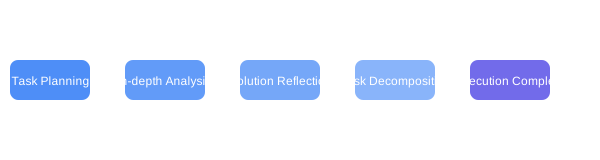
Chain Of Thought provides a complete workflow, with each step from task planning to completion carefully designed.

Task Planning
Initialize and plan the task process in detail

In-depth Analysis
Analyze requirements in depth and assess technical feasibility

Solution Reflection
Critically review analysis results and optimize the solution

Task Decomposition
Break down complex tasks into manageable sub-tasks

Task Execution
Execute specific tasks according to the scheduled plan

Result Verification
Comprehensively verify task completion and quality

Task Completion
Mark task as completed and generate report
Task Planning
Initialize and plan the task process in detail, establish clear goals and success criteria, and choose to continue planning based on existing tasks.
Learn More →
In-depth Analysis
Analyze requirements in depth and assess technical feasibility and potential risks, providing preliminary solutions.
Learn More →
Solution Reflection
Critically review analysis results, assess the completeness of the solution, and identify opportunities for optimization to ensure the solution meets best practices.
Learn More →
Task Decomposition
Break down complex tasks into independent and trackable sub-tasks, establish clear dependencies and priorities, and support multiple update modes.
Learn More →
Task Execution
Execute specific tasks according to the scheduled plan, ensuring that each step meets the quality standards and handling exceptions in the execution process.
Learn More →
Result Verification
Verify the completion of the task and ensure all requirements and technical standards are met, providing a quality assessment report without missing details.
Learn More →
Task Completion
Mark the task as completed and generate a detailed completion report, update the dependency status of related tasks, and ensure the continuity of the workflow.
Learn More →Task Planning and Decomposition Process
This example demonstrates how to use MCP Chain of Thought to plan and decompose complex tasks. The entire process includes four main steps:
- Task Planning - Initialize and plan the task in detail, clarify goals and success criteria
- In-depth Analysis - Gain a deep understanding of the task, analyze technical feasibility and potential challenges
- Solution Reflection - Critically review analysis results and optimize the proposal
- Task Decomposition - Break down complex tasks into manageable sub-tasks
With this approach, you can transform complex large tasks into structured, actionable work units while maintaining an overall perspective.
Task Execution and Completion Process
This example demonstrates how to execute and complete planned tasks. The entire process includes four main steps:
- Task List - Query the list of pending tasks to understand the current status
- Task Execution - Execute the selected task according to the scheduled plan
- Result Verification - Verify task completion and ensure quality standards are met
- Task Completion - Formally mark the task as completed and generate a report
With this approach, you can systematically execute tasks and ensure each step meets the expected quality standards, ultimately completing the entire workflow.
💡 Tip
The above workflow is not fixed; the Agent will iteratively repeat different steps based on the analysis until the expected result is achieved.
Prompt Customization Feature
Customize system prompts via environment variables, allowing you to tailor AI assistant behavior without modifying code
Feature Overview
Prompt customization allows users to adjust AI assistant behavior via environment variables, offering two customization methods: complete override of the original prompt or appending content to the existing prompt.
Main Benefits
- Personalization: Adjust system behavior according to specific project or domain needs
- Efficiency Improvement: Optimize for repetitive task types, reducing redundant explanations
- Brand Consistency: Ensure output content aligns with organizational style guides and standards
- Professional Adaptability: Adjust terminology and standards for specific technical fields or industries
- Team Collaboration: Standardize prompts used by team members to ensure consistent workflows
Usage
Environment Variable Configuration
Set environment variables to customize prompts for each feature, using specific naming conventions:
# Override Mode: MCP_PROMPT_[FUNCTION_NAME]
# Append Mode: MCP_PROMPT_[FUNCTION_NAME]_APPEND

# Example:
MCP_PROMPT_PLAN_TASK="Custom task planning prompt"
MCP_PROMPT_EXECUTE_TASK_APPEND="Additional task execution guidance"
See the detailed documentation for more configuration methods and parameter usage instructions.
View Full DocumentationInstallation and Configuration
Chain Of Thought provides multiple installation methods, making it easy to get started quickly or perform advanced configuration as needed.
Manual Installation Setup
Clone the Repository
git clone https://github.com/liorfranko/mcp-chain-of-thought.git
cd mcp-chain-of-thoughtInstall Dependencies
npm installBuild the Project
npm run buildQuick Start
After installation, check out our quick start guide to learn how to use MCP Chain of Thought.
View Code →Experience Intelligent Task Management Now
Enhance your AI programming experience, say goodbye to chaotic task management, and embrace a more efficient workflow.