Mongoose Express REST-full API
merest provides easy way to expose Mongoose models as REST-full api. It creates pointed bellow end-points:
For each api-application:all api options: OPTIONS..\
model api options: OPTIONS ..\model-plural-name\search: GET ..\model-plural-name\create: POST ..\model-plural-name\details: GET ..\model-plural-name\:idupdate: POST ..\model-plural-name\:iddelete: DELETE ..\model-plural-name\:id
Generally merest allows to:
- create rest api for many models
- create many rest interfaces for one model
- restrict the set of documents that are accessible via API
- configure of each mentioned above end-points
- expose static and instance methods of the Model
- create and expose swagger documentation of your rest api
- serve the swagger-ui
Getting started with merest
'use strict';

const merest = require('merest');
const express = require('express');
const bodyParser = require('body-parser');
const methodOverride = require('method-override');

// Defining model
const mongoose = require('mongoose');
const Contact = mongoose.model('Contact', new mongoose.Schema({
  name: { type: String, required: true },
  email: { type: String, required: true },
  phone: String,
  tags: [String]
}));
mongoose.connect('mongodb://localhost/merest-sample');

// Creating the Express application to serve API
const api = new merest.ModelAPIExpress();

api.use(bodyParser.json()); // Parsing JSON-bodies
api.use(methodOverride()); // Supporting HTTP OPTIONS and HTTP DELETE methods

api.expose(Contact); // Exposing our API

api.listen(8000, () => {
  console.log('Express server listening on port 8000');
});
Calling API:
curl -X OPTIONS http://localhost:8000/Output:
[
  ["options","/","List all end-points of current application"],
  ["options","/contacts/","List API-options for contacts"],
  ["get","/contacts/","List/Search all contacts"],
  ["post","/contacts/","Create a new Contact"],
  ["get","/contacts/:id","Find a Contact by Id"],
  ["post","/contacts/:id","Find a Contact by Id and update it (particulary)"],
  ["delete","/contacts/:id","Find a Contact by Id and delete it."]
]
Getting contact list:
curl -X GET http://localhost:8000/contacts[
{
"_id": "58503799b1ab13090f2eeb31",
"name": "Jack London",
"email": "j.l@mail.uk",
"__v": 0,
"phone": "+4123464575647",
"tags": ["author", "american"]
}, {
"_id": "585276ca2aadb34477ad4034",
"name": "Taras Shevchenko",
"email": "t.sh@mail.ua",
"__v": 0,
"tags": ["author", "poet", "painter", "national hero", "ukrainian"]
}
]Integrating merest into existing projects
'use strict';

const merest = require('merest-swagger'); // to support SwaggerUI
const express = require('express');
const bodyParser = require('body-parser');
const methodOverride = require('method-override');

// Defining model
const mongoose = require('mongoose');
const Contact = mongoose.model('Contact', new mongoose.Schema({
  name: { type: String, required: true },
  email: { type: String, required: true },
  phone: String,
  tags: [String]
}));
mongoose.connect('mongodb://localhost/merest-sample');

const app = express();
// Creating the Express application to serve API
const api = new merest.ModelAPIExpress({
  title: 'Contact List API',
  host: 'localhost:8000', // Assign correct host that could be accessed from your network
  path: '/api/v1',
  options: false // we do not need the OPTIONS any more
});

app.use(bodyParser.json()); // Parsing JSON-bodies
app.use(methodOverride()); // Supporting HTTP OPTIONS and HTTP DELETE methods

api.expose(Contact); // Exposing our API
api.exposeSwaggerUi(); // Exposing swagger-ui

app.use('/api/v1', api); // mounting API as usual sub-application

app.listen(8000, () => {
  console.log('Express server listening on port 8000');
});
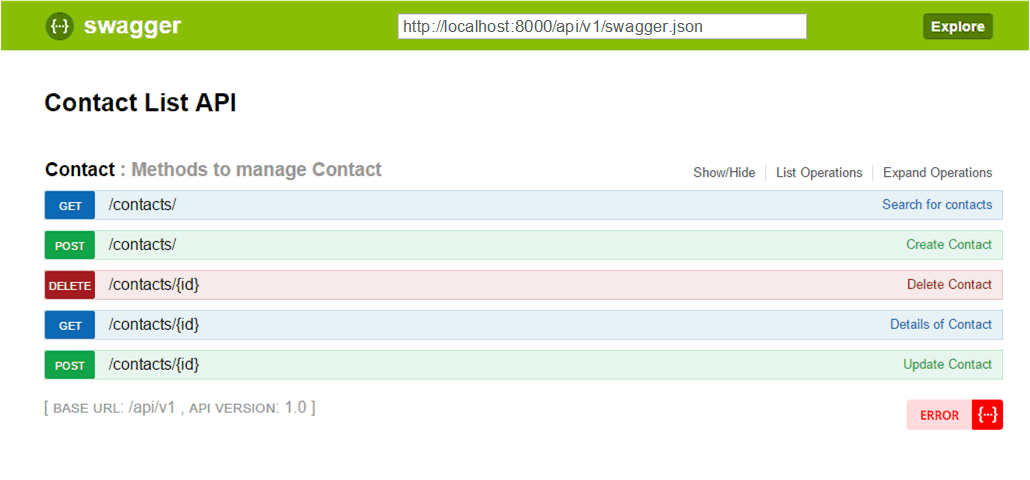
Going to swagger-ui in browser: http://localhost:8000/swagger-ui:
Next (Installation) >