The merest-swagger is an extention of the merest that adds
three methods to merest.ModelAPIExpress to provide swagger api documentation
support:
swaggerDoc()- it returns javascript object that contains full api description in swagger formatexposeSwagger()- the method makes the swagger document is accessible by urlexposeSwaggerUi()- this method allows you to embed the swagger-ui into your project
Currently only the swagger 2.0 is supported
Example
'use strict';

const merest = require('merest-swagger'); // to support SwaggerUI
const express = require('express');
const bodyParser = require('body-parser');
const methodOverride = require('method-override');

// Defining model
const mongoose = require('mongoose');
const Contact = mongoose.model('Contact', new mongoose.Schema({
  name: { type: String, required: true },
  email: { type: String, required: true },
  phone: String,
  tags: [String]
}));
mongoose.connect('mongodb://localhost/merest-sample');

const app = express();
// Creating the Express application to serve API
const api = new merest.ModelAPIExpress({
  title: 'Contact List API',
  host: 'localhost:8000', // Assign correct host that could be accessed from your network
  path: '/api/v1',
  options: false // we do not need the OPTIONS any more
});

app.use(bodyParser.json()); // Parsing JSON-bodies
app.use(methodOverride()); // Supporting HTTP OPTIONS and HTTP DELETE methods

api.expose(Contact); // Exposing our API

let swaggerDoc = api.swagerDoc(); // creating a swagger document
api.exposeSwagger('/api-docs', { // mounting the swagger document to the api with path /api-docs
  beautify: true
});
api.exposeSwaggerUi('/api-ui'); // mounting the swagger-ui to the api with path /api-ui

app.use('/api/v1', api); // mounting API as usual sub-application

app.listen(8000, () => {
  console.log('Express server listening on port 8000');
});
Going to swagger-ui in browser: http://localhost:8000/api-ui/
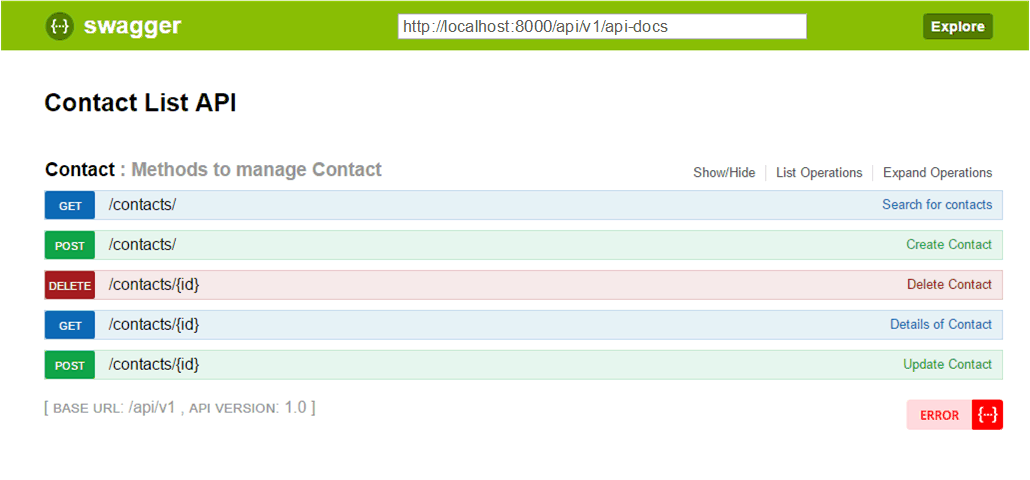
You could copy the path of swagger document http://localhost:8000/api-docs/ and paste it
to the adress line of your browser:
{
  "swagger": "2.0",
  "info": {
    "title": "Contact List API",
    "version": "1.0"
  },
  "host": "localhost:8000",
  "basePath": "/api/v1",
  "consumes": [
    "application/json"
  ],
  "produces": [
    "application/json"
  ],
  "tags": [
    {
      "name": "_meta",
      "description": "API description"
    },
    {
      "name": "Contact",
      "description": "Methods to manage Contact"
    }
  ],
  "responses": {
    "405": {
      "description": "The end-point is not supported",
      "schema": {
        "$ref": "#/definitions/modelAPIError_E4xx"
      }
    },
    "422": {
      "description": "Entity validation failed",
      "schema": {
        "$ref": "#/definitions/modelAPIError_E422"
      }
    },
    "500": {
      "description": "Internal API error",
      "schema": {
        "$ref": "#/definitions/modelAPIError_E500"
      }
    }
  },
  "paths": {
    "/contacts/": {
      "get": {
        "tags": [
          "Contact"
        ],
        "operationId": "searchFor_contacts",
        "summary": "Search for contacts",
        "description": "List/Search all contacts",
        "parameters": [
          {
            "name": "_sort",
            "in": "query",
            "type": "string",
            "description": "The list of fields to order by: [-]field[,[-]field]"
          },
          {
            "name": "_limit",
            "in": "query",
            "type": "integer",
            "description": "The maximum number of documents in the response"
          },
          {
            "name": "_skip",
            "in": "query",
            "type": "integer",
            "description": "Number of documents should be skipped in the selection before responding"
          },
          {
            "name": "name",
            "in": "query",
            "type": "string"
          },
          {
            "name": "email",
            "in": "query",
            "type": "string"
          },
          {
            "name": "phone",
            "in": "query",
            "type": "string"
          },
          {
            "name": "tags",
            "in": "query",
            "type": "string"
          },
          {
            "name": "_id",
            "in": "query",
            "type": "string"
          },
          {
            "name": "__v",
            "in": "query",
            "type": "number"
          }
        ],
        "responses": {
          "200": {
            "description": "Successfully searched",
            "schema": {
              "title": "List of contacts",
              "type": "array",
              "items": {
                "$ref": "#/definitions/Contact_Response"
              }
            }
          },
          "405": {
            "$ref": "#/responses/405"
          },
          "500": {
            "$ref": "#/responses/500"
          }
        }
      },
      "post": {
        "tags": [
          "Contact"
        ],
        "operationId": "create_Contact",
        "summary": "Create Contact",
        "description": "Create a new Contact",
        "parameters": [
          {
            "name": "Contact",
            "in": "body",
            "schema": {
              "$ref": "#/definitions/Contact"
            },
            "required": true
          }
        ],
        "responses": {
          "201": {
            "description": "Successfully created",
            "schema": {
              "$ref": "#/definitions/Contact_Response"
            }
          },
          "405": {
            "$ref": "#/responses/405"
          },
          "406": {
            "description": "Wrong method usage (use `post ~/:id` to update an object)",
            "schema": {
              "$ref": "#/definitions/modelAPIError_E4xx"
            }
          },
          "422": {
            "$ref": "#/responses/422"
          },
          "500": {
            "$ref": "#/responses/500"
          }
        }
      }
    },
    "/contacts/{id}": {
      "get": {
        "tags": [
          "Contact"
        ],
        "operationId": "detailsOf_Contact",
        "summary": "Details of Contact",
        "description": "Find a Contact by Id",
        "parameters": [
          {
            "name": "id",
            "in": "path",
            "type": "string",
            "pattern": "[a-f\\d]{24}",
            "required": true
          }
        ],
        "responses": {
          "200": {
            "description": "The Contact was found successfully.",
            "schema": {
              "$ref": "#/definitions/Contact_Response"
            }
          },
          "404": {
            "description": "Contact is not found by specified id",
            "schema": {
              "$ref": "#/definitions/modelAPIError_E4xx"
            }
          },
          "405": {
            "$ref": "#/responses/405"
          },
          "500": {
            "$ref": "#/responses/500"
          }
        }
      },
      "post": {
        "tags": [
          "Contact"
        ],
        "operationId": "update_Contact",
        "summary": "Update Contact",
        "description": "Find a Contact by Id and update it (particulary)",
        "parameters": [
          {
            "name": "id",
            "in": "path",
            "type": "string",
            "required": true
          },
          {
            "name": "Contact",
            "in": "body",
            "schema": {
              "$ref": "#/definitions/Contact_Update"
            }
          }
        ],
        "responses": {
          "200": {
            "description": "Successfully updated",
            "schema": {
              "$ref": "#/definitions/Contact_Response"
            }
          },
          "404": {
            "description": "Contact is not found by specified id",
            "schema": {
              "$ref": "#/definitions/modelAPIError_E4xx"
            }
          },
          "405": {
            "$ref": "#/responses/405"
          },
          "422": {
            "$ref": "#/responses/422"
          },
          "500": {
            "$ref": "#/responses/500"
          }
        }
      },
      "delete": {
        "tags": [
          "Contact"
        ],
        "operationId": "delete_Contact",
        "summary": "Delete Contact",
        "description": "Find a Contact by Id and delete it.",
        "parameters": [
          {
            "name": "id",
            "in": "path",
            "type": "string",
            "required": true
          }
        ],
        "responses": {
          "200": {
            "description": "Successfully deleted",
            "schema": {
              "$ref": "#/definitions/deleteResponse"
            }
          },
          "404": {
            "description": "Contact is not found by specified id",
            "schema": {
              "$ref": "#/definitions/modelAPIError_E4xx"
            }
          },
          "405": {
            "$ref": "#/responses/405"
          },
          "500": {
            "$ref": "#/responses/500"
          }
        }
      }
    }
  },
  "definitions": {
    "modelAPIError_E4xx": {
      "title": "ModelAPIError",
      "type": "object",
      "properties": {
        "error": {
          "type": "boolean"
        },
        "code": {
          "type": "string"
        },
        "message": {
          "type": "string"
        }
      }
    },
    "modelAPIError_E422": {
      "title": "EntityValidationError",
      "type": "object",
      "properties": {
        "error": {
          "type": "boolean"
        },
        "code": {
          "type": "string"
        },
        "message": {
          "type": "string"
        },
        "errors": {}
      }
    },
    "modelAPIError_E500": {
      "title": "InternalError",
      "type": "object",
      "properties": {
        "error": {
          "type": "boolean"
        },
        "message": {
          "type": "string"
        },
        "stack": {}
      }
    },
    "deleteResponse": {
      "type": "object",
      "additionalProperties": false,
      "properties": {}
    },
    "Contact_Response": {
      "type": "object",
      "properties": {
        "name": {
          "type": "string"
        },
        "email": {
          "type": "string"
        },
        "phone": {
          "type": "string"
        },
        "tags": {
          "type": "array",
          "items": {
            "type": "string"
          }
        },
        "_id": {
          "type": "string",
          "format": "uuid",
          "pattern": "^[0-9a-fA-F]{24}$"
        },
        "__v": {
          "type": "number"
        }
      }
    },
    "Contact": {
      "type": "object",
      "properties": {
        "name": {
          "type": "string"
        },
        "email": {
          "type": "string"
        },
        "phone": {
          "type": "string"
        },
        "tags": {
          "type": "array",
          "items": {
            "type": "string"
          }
        },
        "_id": {
          "type": "string",
          "format": "uuid",
          "pattern": "^[0-9a-fA-F]{24}$"
        },
        "__v": {
          "type": "number"
        }
      },
      "required": [
        "name",
        "email"
      ]
    },
    "Contact_Update": {
      "type": "object",
      "properties": {
        "name": {
          "type": "string"
        },
        "email": {
          "type": "string"
        },
        "phone": {
          "type": "string"
        },
        "tags": {
          "type": "array",
          "items": {
            "type": "string"
          }
        },
        "_id": {
          "type": "string",
          "format": "uuid",
          "pattern": "^[0-9a-fA-F]{24}$"
        }
      }
    }
  }
}
After that you could paste the link into swagger-editor and work with your api documentation with that tool, generating preffered client or server project templates.
Installation
npm up merest
npm i --save merest-swagger
After merest-swagger will be installed you could import it into your project instead of merest.
'use strict;'
const merest = require('merest-swagger'); // insted of: require('merest');
...
However merest-swagger requires merest to be also installed but it doesn't install the merest directly. It is crutial to add support into you project correctly.
Recommended Installation
npm i --save merest merest-swagger mongoose express body-parser method-overrideDevelopment
git clone https://github.com/DScheglov/merest-swagger.git
cd merest-swagger
npm install
npm run-script test-loc
API Configuration
In order to provide correct swagger documentation you should assign API Application parameters correctly:
- title:
String- The title of API. - version:
String- The version of API. - path:
String- The path of api root. The application doesn't mount it self on this path. - host:
String- The host to reach API.
You could do it during the ModelAPIExpress construction:
const api = new merest.ModelAPIExpress({
  title: 'Cool API',
  version: '0.0.1',
  path: '/api/v1',
  host: 'mydomain.com'
})
Also you could to pass the same parameters to the swagger-support methods
(swaggerDoc(), exposeSwagger(), exposeSwaggerUi()).
Please, consider that the parameters could be aplied only one time, so the subsequent
assignment will have no effect.
Creating swagger.json
In order to create swagger documentation, just
call swaggerDoc() method after all models will be exposed:
...
api.expose(lastModel);
console.dir(api.swaggerDoc(), { depth: null });
The swagger document will be created only one time. All subsiquent calls of
swaggerDoc() will return the same document.
If in some reason you need to avoid this behavior, just rest the __swaggerDoc
field of ModelAPIExpress instance:
  ...
  let swaggerDoc = api.swaggerDoc();
  ...
  api.expose(oneMoreModel);
  api.__swaggerDoc = null;

  swaggerDoc = api.swaggerDoc(); // this call will already consider the oneModeModel exposed
  ...
If you don't assign the API configuration parameters before swaggerDoc
method call you could path them into this call:
...
  api.expose(lastModel);
  let swaggerDoc = api.swaggerDoc({
    title: 'Cool API',
    version: '0.0.1',
    path: '/api/v1',
    host: 'mydomain.com'
  });
Exposing the api-docs
The merest-swagger allows to expose the swagger document via your api. To do so just call theexposeSwagger() method of ModelAPIExpress
instance:
...
const api = merest.ModelAPIExpress({
  title: 'Cool API',
  version: '0.0.1',
  path: '/api/v1',
  host: 'mydomain.com'
});
api.expose(aModel);
api.exposeSwagger('/api-docs', {
  beautify: true,
  cors: true
});
The method accepts two parameters (the both are optional):
- path - the path to mount the swagger document (
'/swagger.json'by default) - options - the swagger document exposition options
- options.beautify:
String|Bolean-- the same-named parameter ofJSON.stringify() - options.cors:
Bolean-- the flag indicated swagger document should be exposed with CORS headers (the default value is true)
- options.beautify:
If you don't assign the API configuration parameters before exposeSwagger
method call you could path them into this call
Embeding swagger-ui
The most showy way to touch the api is to use the swagger-ui.
You could follow the instructions of the swagger-api project: clone repository setup some server and use the created by the merest-swagger api documentation in swagger format.
But the merest-swagger allows you to embed this Swagger User interface
in easest way by calling method exposeSwaggerUi() of ModelAPIExpress
instance:
...
const api = merest.ModelAPIExpress({
  title: 'Cool API',
  version: '0.0.1',
  path: '/api/v1',
  host: 'mydomain.com'
});
api.expose(aModel);
api.exposeSwaggerUi({
  swaggerDoc: '/api-docs'
});
The method accepts two parameters (the both are optional):
- path - the path to mount the swagger-ui (
'/swagger-ui'by default) - options - the swagger-ui exposition options
- options.swaggerDoc:
String-- the path to mount swagger document if it is not mounted yet
- options.swaggerDoc:
The options parameter could contain keys for swagger document exposition, such as
beautify or cors.
Also if you don't assign the API configuration parameters before exposeSwaggerUi
method call you could path them into this call
Next (Installation) >