---
apa:gorilla
---
mermaid [![Build Status](https://travis-ci.org/knsv/mermaid.svg?branch=master)](https://travis-ci.org/knsv/mermaid) [![Code Climate](https://codeclimate.com/github/knsv/mermaid/badges/gpa.svg)](https://codeclimate.com/github/knsv/mermaid)
=======

Generation of diagrams and flowcharts from text in a similar manner as markdown.

Ever wanted to simplify documentation and avoid heavy tools like Visio when explaining your code?

This is why mermaid was born, a simple markdown-like script language for generating charts from text via javascript.

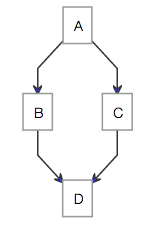
The code below would render the following image
<table>
<tr><td>
<pre>
graph TD;
    A-->B;
    A-->C;
    B-->D;
    C-->D;
</pre>
</td>
<td>
would render this lovely chart:

<img src='http://www.sveido.com/mermaid/img/ex1.png' alt='Example 1'>
</td>
</tr>
<tr>
<td>
<pre>
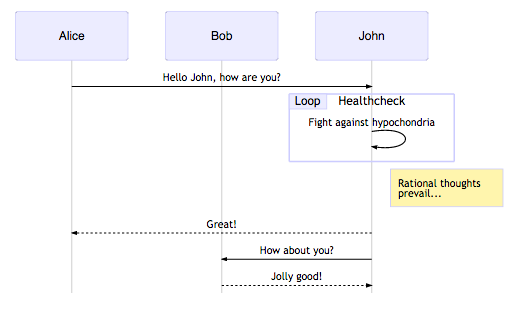
sequenceDiagram
    participant Alice
    participant Bob
    Alice->John: Hello John, how are you?
    loop Healthcheck
        John->John: Fight against hypochondria
    end
    Note right of John: Rational thoughts &lt;br/>prevail...
    John-->Alice: Great!
    John->Bob: How about you?
    Bob-->John: Jolly good!
</pre>
</td>
<td>
would render this lovely chart:

<img src='http://www.sveido.com/mermaid/img/seq1.png' alt='Example 2'>
</td>
</tr>

</table>

A page with a live example can be seen [here](http://www.sveido.com/mermaid/demo/html/web.html). You can also look at mermaid in action using [jsbin](http://jsbin.com/faxunexeku/1/edit?html,output). If you want a live demo, there is an editor provided in the mermaid project or you can simply look at this [great editor](http://danielmschmidt.github.io/mermaid-demo/)


# [The main documentation is located in the wiki](https://github.com/knsv/mermaid/wiki)


# Another graph example

```
graph LR;
    A[Hard edge]-->|Link text|B(Round edge);
    B-->C{Decision};
    C-->|One|D[Result one];
    C-->|Two|E[Result two];
```

Below is the new declaration of the graph which since 0.2.16  also is valid along with the old declaration of the graph as described in the graph example on the home wiki page.

```
graph LR
    A[Hard edge] -->|Link text| B(Round edge)
    B --> C{Decision}
    C -->|One| D[Result one]
    C -->|Two| E[Result two]
```


![Example 2](http://www.sveido.com/mermaid/img/ex2.png)


# mermaid CLI

Installing mermaid globally (`npm install -g mermaid`) will expose the `mermaid` command to your environment, allowing you to generate PNGs from any file containing mermaid markup via the command line.

**Note:** The `mermaid` command requires [PhantomJS](http://phantomjs.org/) (version `^1.9.0`) to be installed and available in your *$PATH*, or you can specify it's location with the `-e` option. For most environments, `npm install -g phantomjs` will satisfy this requirement.

## Usage

```
$ mermaid --help

Usage: mermaid [options] <file>...

file    The mermaid description file to be rendered

Options:
  -s --svg          Output SVG instead of PNG (experimental)
  -p --png          If SVG was selected, and you also want PNG, set this flag
  -o --outputDir    Directory to save files, will be created automatically, defaults to `cwd`
  -e --phantomPath  Specify the path to the phantomjs executable
  -h --help         Show this message
  -v --verbose      Show logging
  --version         Print version and quit
```

## CLI Known Issues

- SVG output currently does some replacement on text, as mermaid's SVG output is only appropriate for browsers. Text color and background color is not yet replicated; please use PNGs for most purposes until this is resolved.
- SVG output is decidedly non-standard. It works, but may cause issues in some viewers.


# Credits
Many thanks to the [d3](http://d3js.org/) and [dagre-d3](https://github.com/cpettitt/dagre-d3) projects for providing the graphical layout and drawing libraries! Thanks also to the [js-sequence-diagram](http://bramp.github.io/js-sequence-diagrams) project for usage of the grammar for the sequence diagrams.

*Mermaid was created by Knut Sveidqvist for easier documentation.*
