#metalsmith-headings-identifier
> A Metalsmith plugin to add an id + anchor to all headings on a page. Ideal for permalinks.
Based on [code](https://github.com/remy/permalink/blob/master/permalink.js) and [idea by remy sharp](http://remysharp.com/2014/08/08/automatic-permalinks-for-blog-posts).
Extracted from [majodev.github.io](http://majodev.github.io).
As part the my note *"[Extracting libs from a node.js project: Publishing my metalsmith plugins](http://ranf.tl/2014/10/01/extracting-libs-from-a-node-js-project/)"*.
## Installation
```bash
npm install --save metalsmith-headings-identifier
```
## Usage
```javascript
var Metalsmith = require("metalsmith");
var headingsidentifier = require("metalsmith-headings-identifier");
Metalsmith(__dirname)
// html files are available (e.g. state when markdown was compiled)
.use(headingsidentifier())
// ...
```
Should also work in similar fashion with the `metalsmith.json` counterpart.
## Options
`headingsidentifier` accepts an hash to provide a few customization options.
### `linkTemplate` (optional)
`String`: Template of the anchor link (in `%s` the automatically generated id will be inserted) that will be prepended in the headings
default: ``
### `allow` (optional)
`String`: A simple way to limit this plugin to only run on files that have the provided metakey set.
default: `undefined`
### `headingClass` (optional)
`String`: A class that is added to the heading tag.
default: `undefined`
### `selector` (optional)
`String`: Target elements using the following [selector](https://github.com/cheeriojs/cheerio#-selector-context-root-).
default: `h1,h2,h3,h4,h5,h6`
**Attention (Breaking Change):** If you were using the `selector` option with a version **<0.0.10** of this plugin, you need to change the key from `selector` to `context`.
### `context` (optional)
`String`: Scope matched elements (via the *selector*) according to a [context](https://github.com/cheeriojs/cheerio#-selector-context-root-) selector.
default: `undefined`
### `position` (optional)
`String`: Add the `linkTemplate` left or right from the headline text.
default: `left`
## Full example with options set
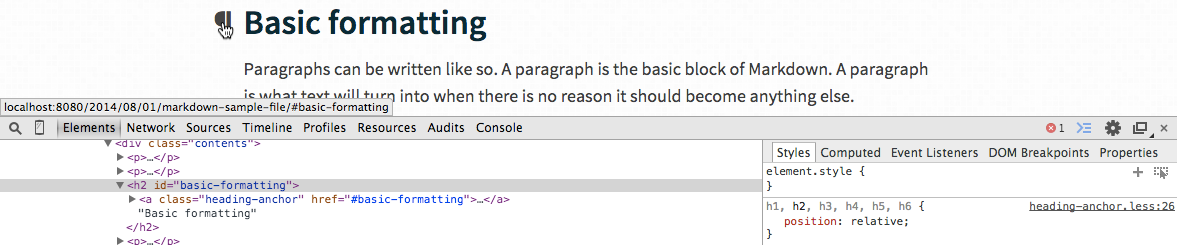
Here's how to use this customized with extra css styles.
### metalsmith config
*Example*: Prepend an anchor with the class `myCustomHeadingsAnchorClass` on all headings, but within files that have the `fileMetaKeyHeadingsAllowed` property set.
```javascript
var Metalsmith = require("metalsmith");
var headingsidentifier = require("metalsmith-headings-identifier");
Metalsmith(__dirname)
// html files are available (e.g. state when markdown was compiled)
.use(headingsidentifier({
linkTemplate: "",
allow: "fileMetaKeyHeadingsAllowed"
}))
// ...
```
### css config
*Example*: Style the links by using the `myCustomHeadingsAnchorClass`.
```css
.myCustomHeadingsAnchorClass {
height: 20px;
width: 20px;
display: block;
padding-right: 6px;
padding-left: 30px;
margin-left: -30px;
cursor: pointer;
position: absolute;
top: 0;
bottom: 0;
left: 0;
text-decoration: none;
height: 100%;
background: transparent;
color: #444;
vertical-align: middle;
}
.myCustomHeadingsAnchorClass:hover {
color: #444;
}
h1,h2,h3,h4,h5,h6 {
position: relative;
}
h1:hover .myCustomHeadingsAnchorClass span:before,
h2:hover .myCustomHeadingsAnchorClass span:before,
h3:hover .myCustomHeadingsAnchorClass span:before,
h4:hover .myCustomHeadingsAnchorClass span:before,
h5:hover .myCustomHeadingsAnchorClass span:before,
h6:hover .myCustomHeadingsAnchorClass span:before {
content: "¶";
position: absolute;
left: 0px;
top: 0px;
bottom: 0px;
}
```
### Example look
## Problems?
File an issue or fork 'n' fix and send a pull request.
## License
(c) 2014 Mario Ranftl
[MIT License](majodev.mit-license.org)