_Cross platform Command Line Interface utility with Node.js_
mkdird-cli
    [](https://snyk.io/test/github/Drozerah/mkdird-cli)  
__Make a directory on your OS's desktop: think **mkdird**~~esktop~~__
- install mkdird-cli (see below)
- Launch `mkdird run` command anywhere in terminal
- select the `yes` option to proceed (use your keyboard arrow keys)
- give your new directory a name **\***
Check your desktop - you are ready to go!
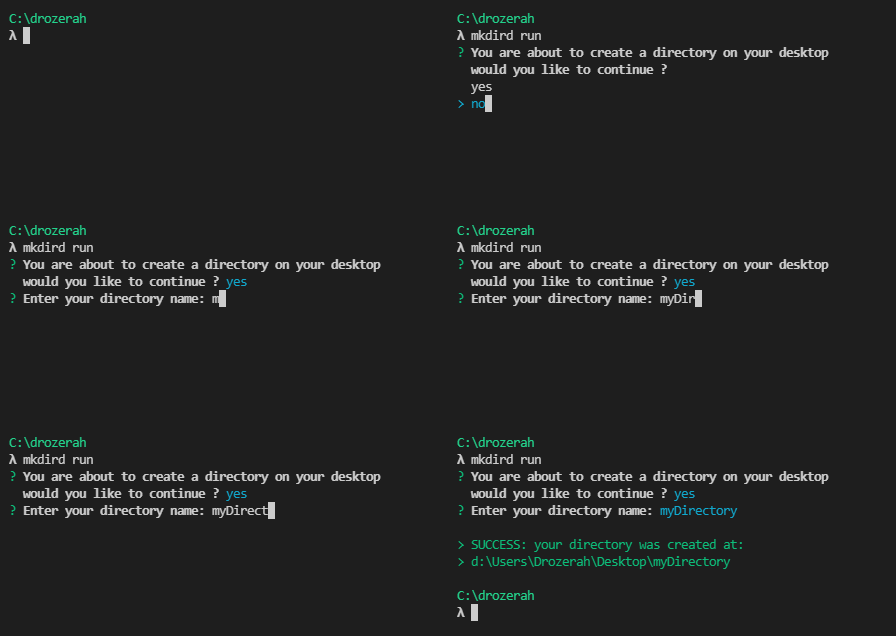
**\*** mkdird-cli will check if the path to create is valid, see [specifications](#specs) section for more informations
__Install__
We recommend to install mkdird-cli globally
````bash
$ npm install mkdird --global
````
__Usage__
````bash
$ mkdird run
````
__Help__
````bash
$ mkdird --help
````
````
Usage: mkdird [options]
Commands:
mkdird run Run mkdird CLI
mkdird docs Open in browser mkdird documentation page
mkdird specs Open in browser mkdird specifications page
mkdird home Open in browser mkdird NPM home page
mkdird issues Open in browser mkdird issues page on GitHub
mkdird author Open in browser mkdird author page on GitHub
Options:
-v, --version Show version number [boolean]
-h, --help Show help [boolean]
````
__Annotation arguments in a command line__
Syntax | Argument type | Explanation |
------------ | ------------- | -------------
cmd \ | Required | The agurment `arg` is required |
cmd [arg] | Optional | The agurment `arg` is not required |
__Specifications__
- Coming soon!
__Fork it!__
- Coming soon!
__Built with__
Click to expand!
- [chalk](https://www.npmjs.com/package/chalk#readme)
- [inquirer](https://github.com/SBoudrias/Inquirer.js#readme)
- [open](https://github.com/sindresorhus/open/#readme)
- [yargs](https://yargs.js.org/)
- [update-check](https://www.npmjs.com/package/update-check)
- [Node.js](https://nodejs.org/en/)
- [NPM](https://www.npmjs.com/)
- [Visual Studio Code](https://code.visualstudio.com/)
__Versioning__
- we use [SemVer](http://semver.org/) for versioning
__NPM home page__
- [mkdird](https://www.npmjs.com/package/mkdird)
__Author__
- Thomas G. aka Drozerah - [GitHub](https://github.com/Drozerah)
__License__
- [MIT](https://github.com/Drozerah/mkdird-cli/blob/master/LICENSE) © Thomas G. aka Drozerah