field from MongoDB documents.
2. Data filtering using $match.
3. Batching (batchSize) to avoid MongoDB’s 16MB per-document limit.
4. ObjectId transformation: ObjectId('68a8c8207090be6dd0e23a90') → '68a8c8207090be6dd0e23a90'.
5. Large collections supported via allowDiskUse.
6. Flexible array handling:
- Overwrite or append to arrays.
- Allow or eliminate duplicates.
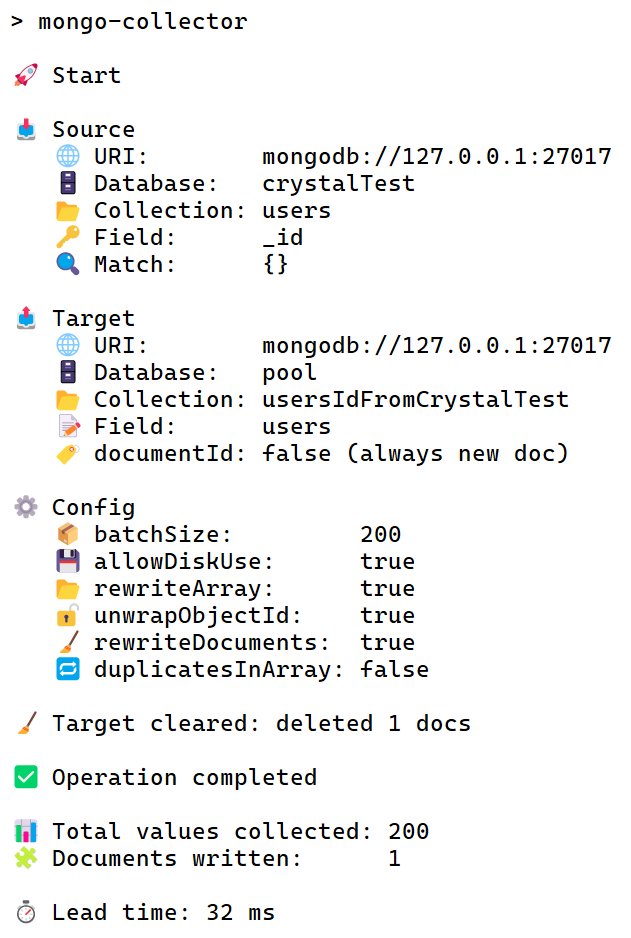
7. Informative logs:
 ### Installation & Usage
1. Install the package:
```bash
npm i mongo-collector
```
2. Add a script in your **package.json**:
```json
"scripts": {
"mongoCollector": "mongo-collector"
}
```
3. In the root of the project, create a file — [mongo-collector.config.js](https://github.com/AndrewShedov/mongoCollector/blob/main/config%20example/mongo-collector.config.js).
Example of file contents:
```js
export default {
source: {
uri: "mongodb://127.0.0.1:27017",
db: "crystalTest",
collection: "users",
field: "_id",
match: {}
},
target: {
uri: "mongodb://127.0.0.1:27017",
db: "pool",
collection: "usersIdFromCrystalTest",
field: "users",
documentId: false,
rewriteDocuments: true,
rewriteArray: true,
duplicatesInArray: false,
unwrapObjectId: true
},
aggregation: {
allowDiskUse: true,
batchSize: 200
},
};
```
**⚠️ All parameters are required.**
4. Run from the project root:
```bash
npm run mongoCollector
```
### Example of work
Source collection users (from source):
```js
{ "_id": ObjectId("68a8c8207090be6dd0e23a90"), "name": "Alice" }
{ "_id": ObjectId("68a8c8207090be6dd0e23a91"), "name": "Sarah" }
{ "_id": ObjectId("68a8c8207090be6dd0e23a92"), "name": "John" }
```
After running mongo-collector, in the target collection usersIdFromCrystal:
```js
{ "users": [ "68a8c8207090be6dd0e23a90", "68a8c8207090be6dd0e23a91", "68a8c8207090be6dd0e23a92" ] }
```
### Config parameters
#### match
You can do any
### Installation & Usage
1. Install the package:
```bash
npm i mongo-collector
```
2. Add a script in your **package.json**:
```json
"scripts": {
"mongoCollector": "mongo-collector"
}
```
3. In the root of the project, create a file — [mongo-collector.config.js](https://github.com/AndrewShedov/mongoCollector/blob/main/config%20example/mongo-collector.config.js).
Example of file contents:
```js
export default {
source: {
uri: "mongodb://127.0.0.1:27017",
db: "crystalTest",
collection: "users",
field: "_id",
match: {}
},
target: {
uri: "mongodb://127.0.0.1:27017",
db: "pool",
collection: "usersIdFromCrystalTest",
field: "users",
documentId: false,
rewriteDocuments: true,
rewriteArray: true,
duplicatesInArray: false,
unwrapObjectId: true
},
aggregation: {
allowDiskUse: true,
batchSize: 200
},
};
```
**⚠️ All parameters are required.**
4. Run from the project root:
```bash
npm run mongoCollector
```
### Example of work
Source collection users (from source):
```js
{ "_id": ObjectId("68a8c8207090be6dd0e23a90"), "name": "Alice" }
{ "_id": ObjectId("68a8c8207090be6dd0e23a91"), "name": "Sarah" }
{ "_id": ObjectId("68a8c8207090be6dd0e23a92"), "name": "John" }
```
After running mongo-collector, in the target collection usersIdFromCrystal:
```js
{ "users": [ "68a8c8207090be6dd0e23a90", "68a8c8207090be6dd0e23a91", "68a8c8207090be6dd0e23a92" ] }
```
### Config parameters
#### match
You can do any match configurations, for example:
match: {} - take all documents.
match: { createdAt: { $gte: new Date("2025-08-20T01:26:11.327+00:00") } } - filter documents by date.
#### documentId
documentId: false - create a new document.
documentId: '68a8c8207090be6dd0e23a90' - append data to an existing document, or create one with this _id if missing.
#### rewriteDocuments
rewriteDocuments: true - clear the entire target collection before writing.
#### rewriteArray
true - overwrite array
false - append to an existing array
#### duplicatesInArray
false - eliminate duplicates (uses $addToSet)
#### unwrapObjectId
true - ObjectId('68a8c8207090be6dd0e23a90') → '68a8c8207090be6dd0e23a90' (final result in target).
#### allowDiskUse
true - allows MongoDB to write temporary data to disk when processing aggregation stages.false - restricts processing to memory only.batchSize: 10 - controls the length of the array inside each target document.
**⚠️ Make sure the array does not exceed 16MB, otherwise MongoDB will throw an error.**