# Mongoose Schema Parser
[](https://travis-ci.org/medolino/mongoose-schema-parser)
[](https://coveralls.io/github/medolino/mongoose-schema-parser?branch=master)
[](https://snyk.io/test/github/medolino/mongoose-schema-parser?targetFile=package.json)
[](https://standardjs.com)
[](https://www.npmjs.com/package/mongoose-schema-parser)
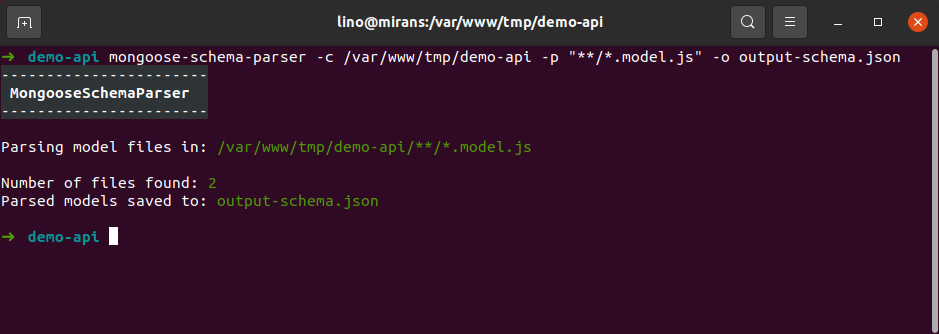
Mongoose Schema Parser tool parses Mongoose schemas defined in project and returns data in JSON format.
 ## How It Works
Script uses mongoose instance to parse registered schemas.
You can use it from CLI or inside your application code.
## Install
Install globally if you want to use it from cli
```bash
npm i -g mongoose-schema-parser
```
or locally if you want to use it from your code
```bash
npm i mongoose-schema-parser --save
```
## Usage
#### Cli usage
If you install package globally, you can run it from anywhere in your system.
Script returns file with parsed schema in JSON format.
```bash
mongoose-schema-parser -c /path/to/project -p "**/*.model.js" -o output-schema.json
```
Script options:
```bash
-c, --cwd Current working directory [string] [default: "/your/project/dir"]
-p, --pattern Search file pattern [string] [required] [default: "**/*.model.js"]
-o, --output Output file path [string] [required]
--help, -h Show help [boolean]
```
Output example:
```JSON
{
"Category": {
"schema": {
"_id": {
"type": "ObjectId"
},
"name": {
"type": "String",
"details": {
"required": true,
"maxlength": 150
}
},
"enabled": {
"type": "Boolean",
"details": {
"default": true
}
}
}
},
"Item": {
"schema": {
"_id": {
"type": "ObjectId"
},
"name": {
"type": "String"
},
"category": {
"type": "ObjectId",
"details": {
"ref": "Category"
}
},
"sizes": {
"type": "Schema",
"schema": {
"size": {
"type": "Number"
}
}
},
"created": {
"type": "Date",
"details": {}
}
}
}
}
```
## How It Works
Script uses mongoose instance to parse registered schemas.
You can use it from CLI or inside your application code.
## Install
Install globally if you want to use it from cli
```bash
npm i -g mongoose-schema-parser
```
or locally if you want to use it from your code
```bash
npm i mongoose-schema-parser --save
```
## Usage
#### Cli usage
If you install package globally, you can run it from anywhere in your system.
Script returns file with parsed schema in JSON format.
```bash
mongoose-schema-parser -c /path/to/project -p "**/*.model.js" -o output-schema.json
```
Script options:
```bash
-c, --cwd Current working directory [string] [default: "/your/project/dir"]
-p, --pattern Search file pattern [string] [required] [default: "**/*.model.js"]
-o, --output Output file path [string] [required]
--help, -h Show help [boolean]
```
Output example:
```JSON
{
"Category": {
"schema": {
"_id": {
"type": "ObjectId"
},
"name": {
"type": "String",
"details": {
"required": true,
"maxlength": 150
}
},
"enabled": {
"type": "Boolean",
"details": {
"default": true
}
}
}
},
"Item": {
"schema": {
"_id": {
"type": "ObjectId"
},
"name": {
"type": "String"
},
"category": {
"type": "ObjectId",
"details": {
"ref": "Category"
}
},
"sizes": {
"type": "Schema",
"schema": {
"size": {
"type": "Number"
}
}
},
"created": {
"type": "Date",
"details": {}
}
}
}
}
```
#### Code usage
This example shows, how to use ```parseSchemaFromMongoose``` function to parse schema in your application. Function returns schema as JS object.
```JS
const mongoose = require('mongoose')
const { parseSchemaFromMongoose } = require('mongoose-schema-parser')
// content of ./models/example-01.model
/*
const ExampleSchema = new mongoose.Schema({
name: 'string'
})
mongoose.model('ExampleModel', ExampleSchema)
*/
require('./models/example-01.model')
const exportedSchema = parseSchemaFromMongoose(mongoose)
console.log(JSON.stringify(exportedSchema, null, 2))
/* outputs:
{
"ExampleModel": {
"schema": {
"name": {
"type": "String"
},
"_id": {
"type": "ObjectId"
}
}
}
}
*/
```