



mpvue-calendar
> A feature-rich calendar component, support multiple modes and gesture sliding. For vue 3.0+
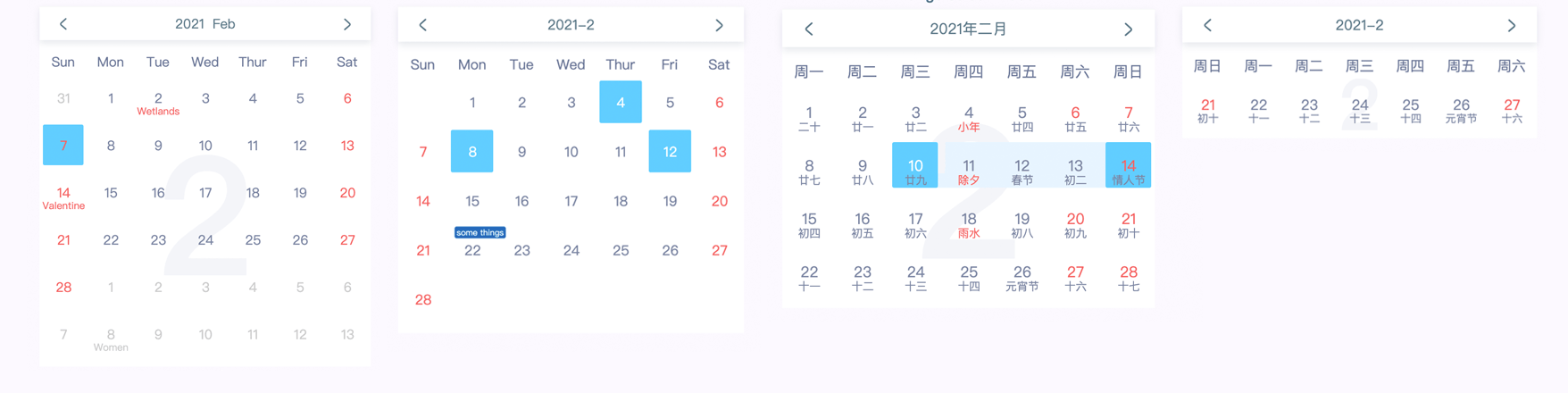
- #### [Preview](http://preview.binlive.cn/mpvue-calendar#/ "Preview")
- #### [Demo](https://github.com/Hzy0913/mpvue-calendar/blob/master/example/App.vue "Demo")
- #### [中文文档](https://github.com/Hzy0913/mpvue-calendar/blob/master/README.zh.md "Docs")
## 💻 Install
mpvue-calendar only support **vue@3.0+**
```
npm i mpvue-calendar -S
```
## 🔨 Usage
```javascript
import { ref } from 'vue'
import Calendar from 'mpvue-calendar'
export default {
components: {
Calendar,
},
setup() {
const remarks = ref({'2021-1-13': 'some tings'})
return {
remarks,
}
}
}
```
## ⚙️ API
| name | type | default | description |
| ------------ | ------------ | ------------ | ------------ |
| selectMode | String | 'select' | For the selection mode of calendar component, can be used by **'select'**, **'multi'**,**'range'**, **'multiRange'** mode |
| mode | String | 'month'| Configure calendar display mode, the modes has **'month'**, **'week'**,**'monthRange'** |
| selectDate | String / String[] / {start: String; end: String} / {start: String; end: String} [] | | In different selection modes, there are use different types. `String` type for **select** mode, `String[]` type for **multi** mode, `{start: String; end: String}` type for **range** mode, and `{start: String; end: String} []` type for **multiRange** mode. |
| monthRange | String[] | | If you use **monthRange mode**, you need to set the content of the month to be displayed. for example `[2021-1, 2021-2, 2021-6, 2021-9]` |
| remarks | Object | | Create remark for a day, key is date string, and value is remark content. for example `{ '2021-1-13': 'some things' }` |
| tileContent | Object | | Create tile content for a day, key is date string, and value is `object`, object have **className** and **content**. for example `{ '2021-1-5': { className: 'tip-class', content: 'some tip' } } ` |
| holidays | Object | | Custom holiday information, for example `{'2021-1-1': 'New Year'}` |
| completion | Boolean | false | Complete the calendar table with 6 lines |
| useSwipe | Boolean | true | The mobile terminal supports gesture sliding to switch calendar |
| arrowLeft | String | | Left arrow image url of toolbar |
| arrowRight | String | | Right arrow image url of toolbar |
| monFirst | Boolean | false | The first day of the week begins on Monday |
| backgroundText | Boolean | false | Displays the background text of the current month calendar |
| language | String | | use **'en'** or **'cn'** language |
| format | (year, month) => [String, String] | | Format the date display at the header. you need return a array, the contents of the array are year and month |
| weeks | String[] | | Weekly display content of custom header, for example ['S', 'M', 'T', 'W', 'T', 'F', 'S'] |
| begin | String | | Set the available date of the start, and the date before it will be disabled, for example ` '2021-1-5' ` |
| end | String | | Set the available date of the end, and the date after it will be disabled, for example `'2021-2-5'` |
| disabled | String[] | | Disable certain dates , for example `['2021-1-9', '2021-2-5']` |
#### Chinese lunar
If you need show chinese lunar, you need import lunar module.
```javascript
import lunar from 'mpvue-calendar/dist/lunar'
export default {
...,
setup() {
return {
lunar,
}
}
}
```
## ⚙️ methods
| name | type | description |
| ------------ | ------------ | ------------ |
| onSelect | (selectDate) => void | This function is triggered when the date is selected |
| onMonthChange | (year, month, day) => void | The callback is triggered when the month is change |
| next | (year, month) => void | Callback this method when triggered next month |
| prev | (year, month) => void | Callback this method when triggered prev month |
| setToday | ref method | Back today, you need to pass the ref parameter to call the internal method |