# Nativescript Bubble Navigation  
[](https://www.npmjs.com/package/nativescript-bubble-navigation)
[](https://www.npmjs.com/package/nativescript-bubble-navigation)
[![Build Status][build-status]][build-url]
[build-status]:https://travis-ci.org/skhye05/nativescript-bubble-navigation.svg?branch=master
[build-url]:https://travis-ci.org/skhye05/nativescript-bubble-navigation
## Overview
Nativescript Bubble Navigation is a navigation tab plugins which provides beautiful navigations.
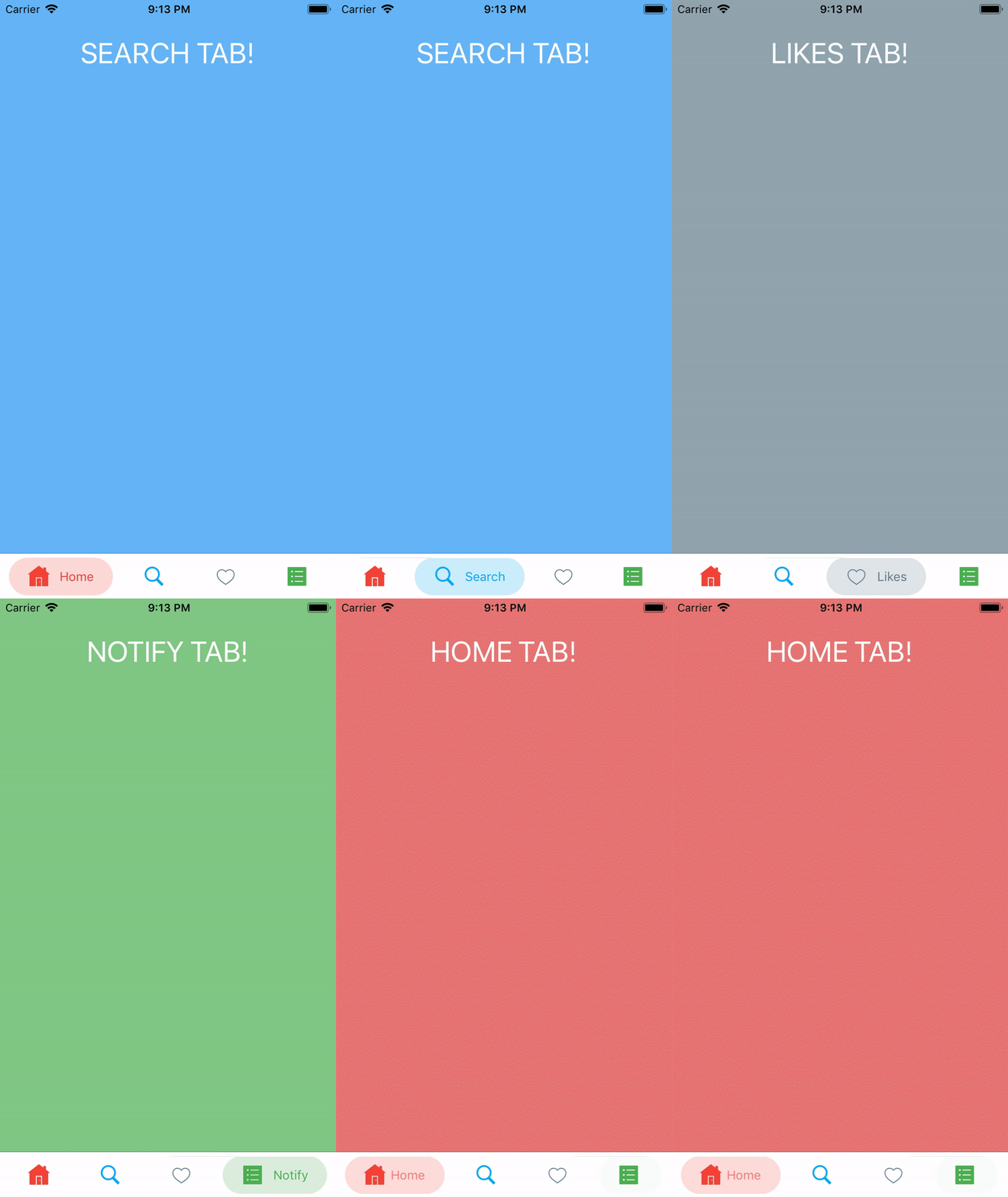
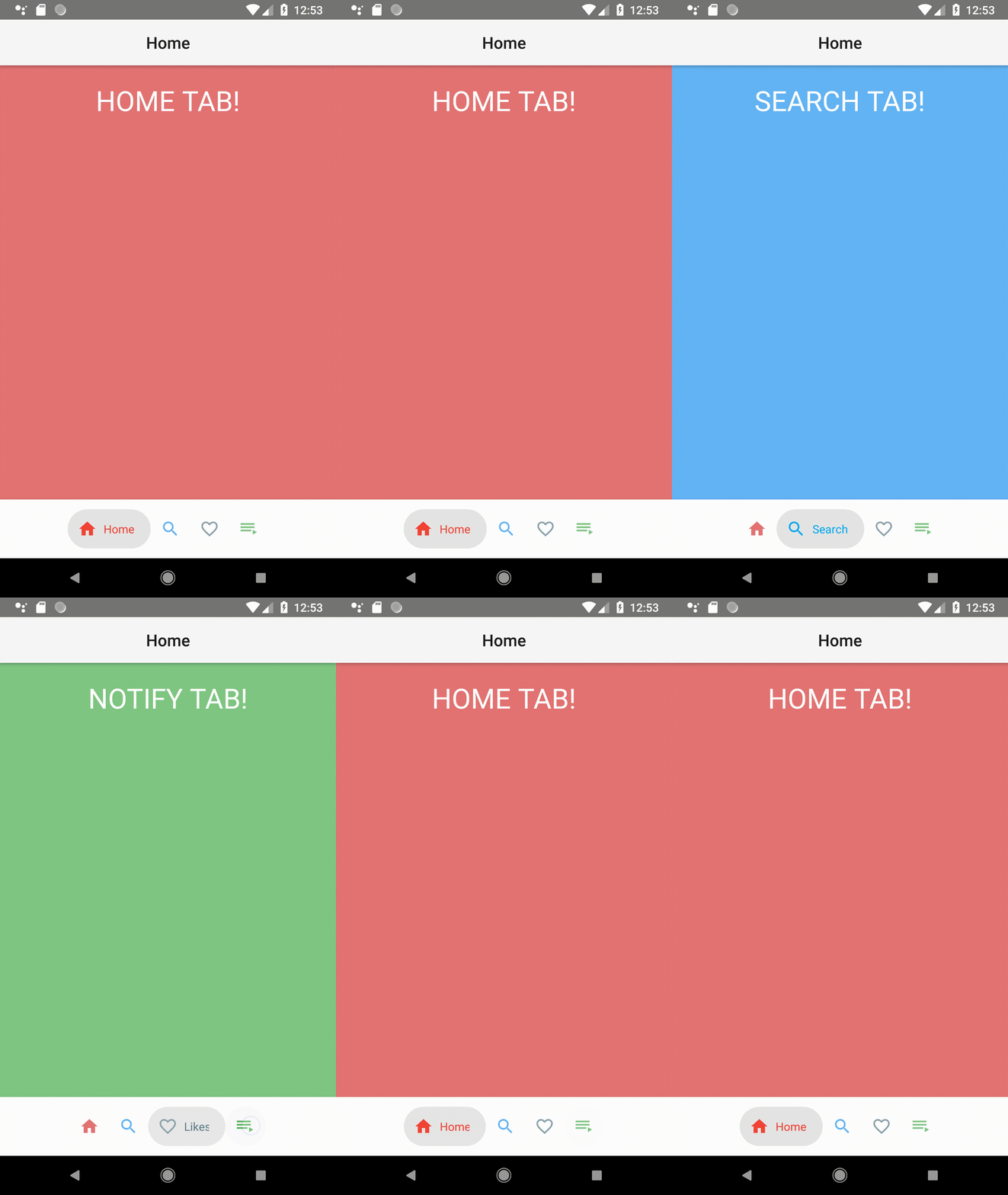
## Installation
```javascript
tns plugin add nativescript-bubble-navigation
```
## Usage
###  TypeScript
#### xml
```xml
```
#### main-page.ts
```typescript
import * as observable from 'tns-core-modules/data/observable';
import * as pages from 'tns-core-modules/ui/page';
import { HelloWorldModel } from './main-view-model';
import { BubbleNavigation, OnTabSelectedEventData } from 'nativescript-bubble-navigation';
let vm = new HelloWorldModel();
// Event handler for Page 'loaded' event attached in main-page.xml
export function pageLoaded(args: observable.EventData) {
// Get the event sender
let page = args.object;
page.bindingContext = vm;
}
export function onBubbleNavigationLoaded(args) {
let folding: BubbleNavigation = args.object;
folding.on('tabSelected', tabSelected);
}
export function tabSelected(args: OnTabSelectedEventData) {
vm.set('title', args.name.toUpperCase() + ' TAB!');
vm.set('bg', vm.tabs[args.position].colorInactive);
console.log('tab selected ' + args.name + ' at position ' + args.position);
}
```
#### main-view-model.ts
```typescript
import { Observable } from 'tns-core-modules/data/observable';
import { BubbleNavigationItem } from 'nativescript-bubble-navigation';
export class HelloWorldModel extends Observable {
public title: string = 'HOME TAB!';
public bg: string = '#e57373';
public tabs: BubbleNavigationItem[];
constructor() {
super();
this.tabs = [
new BubbleNavigationItem('Home', 'ic_home', '#f44336', '#e57373'),
new BubbleNavigationItem('Search', 'ic_search', '#03a9f4', '#64b5f6'),
new BubbleNavigationItem('Likes', 'ic_like', '#607d8b', '#90a4ae'),
new BubbleNavigationItem('Notify', 'ic_playlist', '#4caf50', '#81c784')
];
}
}
```
###
TypeScript
#### xml
```xml
```
#### main-page.ts
```typescript
import * as observable from 'tns-core-modules/data/observable';
import * as pages from 'tns-core-modules/ui/page';
import { HelloWorldModel } from './main-view-model';
import { BubbleNavigation, OnTabSelectedEventData } from 'nativescript-bubble-navigation';
let vm = new HelloWorldModel();
// Event handler for Page 'loaded' event attached in main-page.xml
export function pageLoaded(args: observable.EventData) {
// Get the event sender
let page = args.object;
page.bindingContext = vm;
}
export function onBubbleNavigationLoaded(args) {
let folding: BubbleNavigation = args.object;
folding.on('tabSelected', tabSelected);
}
export function tabSelected(args: OnTabSelectedEventData) {
vm.set('title', args.name.toUpperCase() + ' TAB!');
vm.set('bg', vm.tabs[args.position].colorInactive);
console.log('tab selected ' + args.name + ' at position ' + args.position);
}
```
#### main-view-model.ts
```typescript
import { Observable } from 'tns-core-modules/data/observable';
import { BubbleNavigationItem } from 'nativescript-bubble-navigation';
export class HelloWorldModel extends Observable {
public title: string = 'HOME TAB!';
public bg: string = '#e57373';
public tabs: BubbleNavigationItem[];
constructor() {
super();
this.tabs = [
new BubbleNavigationItem('Home', 'ic_home', '#f44336', '#e57373'),
new BubbleNavigationItem('Search', 'ic_search', '#03a9f4', '#64b5f6'),
new BubbleNavigationItem('Likes', 'ic_like', '#607d8b', '#90a4ae'),
new BubbleNavigationItem('Notify', 'ic_playlist', '#4caf50', '#81c784')
];
}
}
```
###  Angular
#### app.module.ts
```typescript
import { BubbleNavigationModule } from "nativescript-bubble-navigation/angular";
@NgModule({
imports: [
BubbleNavigationModule
],
...
})
```
#### your.component.ts
```typescript
import { Component, OnInit } from "@angular/core";
import { OnTabSelectedEventData, BubbleNavigationItem } from 'nativescript-bubble-navigation';
@Component({
...
})
export class YourComponent implements OnInit {
public title: string = 'HOME TAB!';
public bg: string = '#e57373';
public tabs: BubbleNavigationItem[];
constructor() {
this.tabs = [
new BubbleNavigationItem('Home', 'ic_home', '#f44336', '#e57373'),
new BubbleNavigationItem('Search', 'ic_search', '#03a9f4', '#64b5f6'),
new BubbleNavigationItem('Likes', 'ic_like', '#607d8b', '#90a4ae'),
new BubbleNavigationItem('Notify', 'ic_playlist', '#4caf50', '#81c784')
];
}
ngOnInit(): void {
...
}
onBubbleNavigationTabSelected(args: OnTabSelectedEventData): void {
this.title = args.name.toUpperCase() + ' TAB!';
this.bg = this.tabs[args.position].colorInactive;
console.log('tab selected ' + args.name + ' at position ' + args.position);
}
}
```
#### your.component.html
```html
```
###
Angular
#### app.module.ts
```typescript
import { BubbleNavigationModule } from "nativescript-bubble-navigation/angular";
@NgModule({
imports: [
BubbleNavigationModule
],
...
})
```
#### your.component.ts
```typescript
import { Component, OnInit } from "@angular/core";
import { OnTabSelectedEventData, BubbleNavigationItem } from 'nativescript-bubble-navigation';
@Component({
...
})
export class YourComponent implements OnInit {
public title: string = 'HOME TAB!';
public bg: string = '#e57373';
public tabs: BubbleNavigationItem[];
constructor() {
this.tabs = [
new BubbleNavigationItem('Home', 'ic_home', '#f44336', '#e57373'),
new BubbleNavigationItem('Search', 'ic_search', '#03a9f4', '#64b5f6'),
new BubbleNavigationItem('Likes', 'ic_like', '#607d8b', '#90a4ae'),
new BubbleNavigationItem('Notify', 'ic_playlist', '#4caf50', '#81c784')
];
}
ngOnInit(): void {
...
}
onBubbleNavigationTabSelected(args: OnTabSelectedEventData): void {
this.title = args.name.toUpperCase() + ' TAB!';
this.bg = this.tabs[args.position].colorInactive;
console.log('tab selected ' + args.name + ' at position ' + args.position);
}
}
```
#### your.component.html
```html
```
###  Vue
#### app.js
```javascript
import BubbleNavigation from "nativescript-bubble-navigation/vue";
Vue.use(BubbleNavigation);
new Vue({
...
}).$start();
```
#### your-component.vue
```html
```
## API
### BubbleNavigation
#### Properties
| Property | Type | Description | Platforms |
| ------------------ | ----------------------------- | -------------------------------------------------- | ------------- |
| tabs | `Array` | Array containing the tabs for the BubbleNavigation |   |
| padding | `number` | Set Bubble Tab padding |  |
| tabBackgroundColor | `string` | Set Tab Bar Background Color |   |
| elevation | `number` | Set tab elevation/ shadow |  |
#### Events
| Property | Type | Description | Platforms |
| ----------- | ---------------------------------------------- | ----------------------------------------------------------------------------------- | ------------- |
| tabSelected | `function ($event: OnTabSelectedEventData) {}` | Event get trigger every time the user select a new tab that receive an event object |   |
#### Methods
| Property | Type | Description | Platforms |
| -------------------------- | ------ | ----------------------------- | ------------- |
| `selectTab(index: number)` | `Void` | Select a tab programmatically |   |
### BubbleNavigationItem
#### Properties
| Property | Type | Description | Platforms |
| ------------- | -------- | ------------------------------------------------------------------ | ------------- |
| title | `string` | Select a tab title |   |
| icon | `string` | Select a tab icon |   |
| colorActive | `color` | Select a active color, the color of the tab when it's selected |   |
| colorInactive | `color` | Select a active color, the color of the tab when it isn't selected |   |
## Limitations
### iOS
Currently on ios adding more than four tabs will ressort having your text animations cut.
## Author
Jonathan Mayunga, mayunga.j@gmail.com
## Credits
- For Android we're using the [Bubble Navigation by Gaurav Kumar](https://github.com/gauravk95/bubble-navigation),
- For iOS [BubbleTabBar by Cuberto](https://github.com/Cuberto/bubble-icon-tabbar).
## License
Apache License Version 2.0, January 2004
Vue
#### app.js
```javascript
import BubbleNavigation from "nativescript-bubble-navigation/vue";
Vue.use(BubbleNavigation);
new Vue({
...
}).$start();
```
#### your-component.vue
```html
```
## API
### BubbleNavigation
#### Properties
| Property | Type | Description | Platforms |
| ------------------ | ----------------------------- | -------------------------------------------------- | ------------- |
| tabs | `Array` | Array containing the tabs for the BubbleNavigation |   |
| padding | `number` | Set Bubble Tab padding |  |
| tabBackgroundColor | `string` | Set Tab Bar Background Color |   |
| elevation | `number` | Set tab elevation/ shadow |  |
#### Events
| Property | Type | Description | Platforms |
| ----------- | ---------------------------------------------- | ----------------------------------------------------------------------------------- | ------------- |
| tabSelected | `function ($event: OnTabSelectedEventData) {}` | Event get trigger every time the user select a new tab that receive an event object |   |
#### Methods
| Property | Type | Description | Platforms |
| -------------------------- | ------ | ----------------------------- | ------------- |
| `selectTab(index: number)` | `Void` | Select a tab programmatically |   |
### BubbleNavigationItem
#### Properties
| Property | Type | Description | Platforms |
| ------------- | -------- | ------------------------------------------------------------------ | ------------- |
| title | `string` | Select a tab title |   |
| icon | `string` | Select a tab icon |   |
| colorActive | `color` | Select a active color, the color of the tab when it's selected |   |
| colorInactive | `color` | Select a active color, the color of the tab when it isn't selected |   |
## Limitations
### iOS
Currently on ios adding more than four tabs will ressort having your text animations cut.
## Author
Jonathan Mayunga, mayunga.j@gmail.com
## Credits
- For Android we're using the [Bubble Navigation by Gaurav Kumar](https://github.com/gauravk95/bubble-navigation),
- For iOS [BubbleTabBar by Cuberto](https://github.com/Cuberto/bubble-icon-tabbar).
## License
Apache License Version 2.0, January 2004