# Nativescript Custom Bottomsheet ![apple](https://cdn3.iconfinder.com/data/icons/picons-social/57/16-apple-32.png) ![android](https://cdn4.iconfinder.com/data/icons/logos-3/228/android-32.png) 

[![npm](https://img.shields.io/npm/v/nativescript-custom-bottomsheet.svg)](https://www.npmjs.com/package/nativescript-custom-bottomsheet)
[![npm](https://img.shields.io/npm/dt/nativescript-custom-bottomsheet.svg?label=npm%20downloads)](https://www.npmjs.com/package/nativescript-custom-bottomsheet)

[![Build Status][build-status]][build-url]

 [build-status]:https://travis-ci.org/skhye05/nativescript-custom-bottomsheet.svg?branch=master
 [build-url]:https://travis-ci.org/skhye05/nativescript-custom-bottomsheet

## Overview

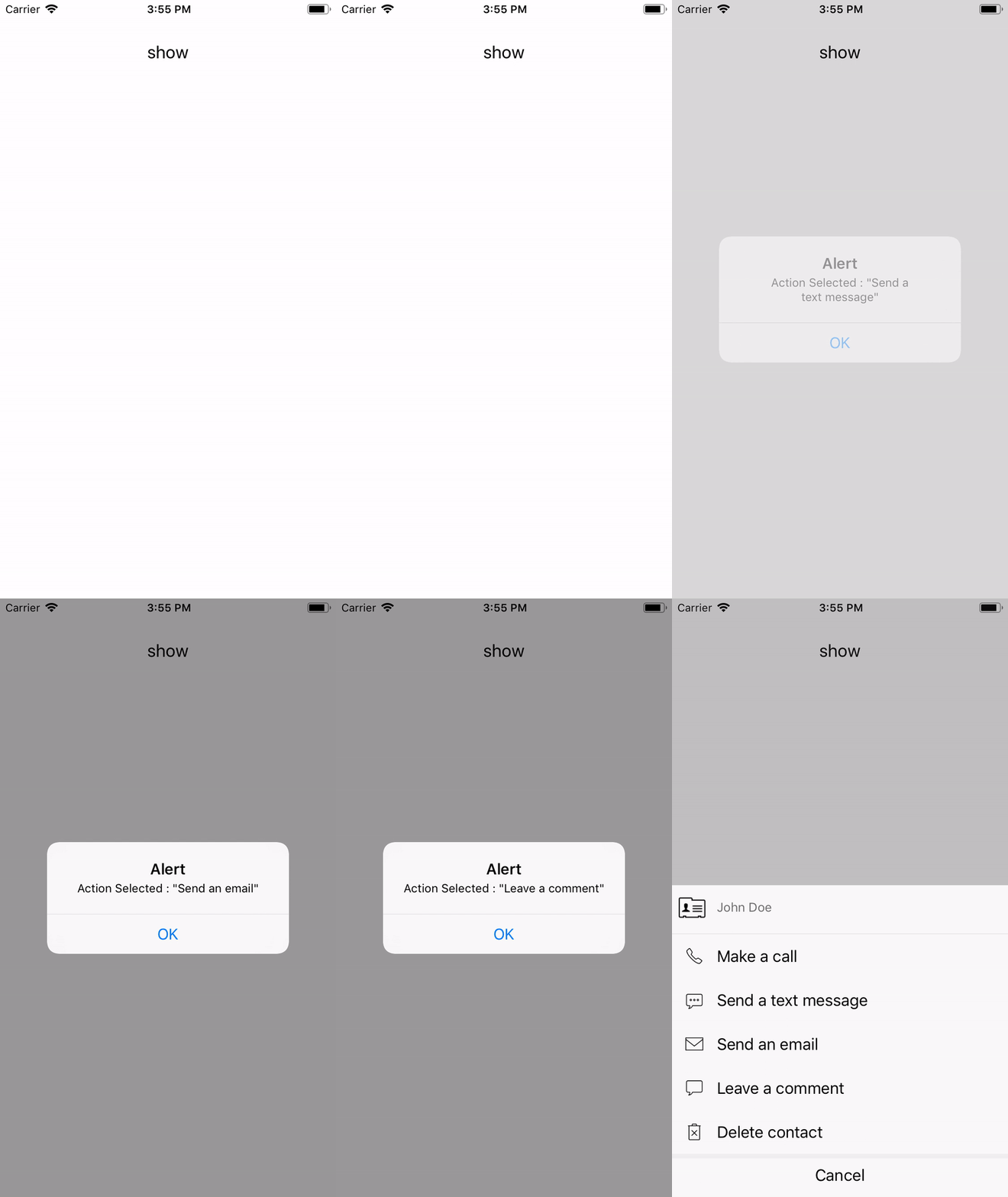
 Nativescript Custom Bottomsheet is a plugin that enable the show a custom beautiful actionsheet/bottomsheet.

 <p>
  <img src="https://raw.githubusercontent.com/skhye05/NativeScript-Custom-Bottomsheet/master/ios.gif"  width="300"/>
  <img src="https://raw.githubusercontent.com/skhye05/NativeScript-Custom-Bottomsheet/master/android.gif" width="300"/>
</p>

## Installation

```javascript
tns plugin add nativescript-custom-bottomsheet
```

## Usage

### <img src="https://raw.githubusercontent.com/skhye05/NativeScript-Custom-Bottomsheet/master/res/typescript.png" width="20"/> TypeScript

#### xml

```xml
...
    <StackLayout class="p-20">
        <Button text="show" class="t-20 text-center c-black" tap="{{ onTap }}"/>
    </StackLayout>
...
```

#### main-view-model.ts

```typescript
import { Observable } from 'tns-core-modules/data/observable';
import { CustomBottomsheet, CBSheetOption } from 'nativescript-custom-bottomsheet';

export class HelloWorldModel extends Observable {
  private customBottomsheet: CustomBottomsheet;

  constructor() {
    super();
    this.customBottomsheet = new CustomBottomsheet();
  }

  public onTap(): void {
    const options: CBSheetOption = {
      icon: 'contact',
      title: 'John Doe',
      items: [{
        icon: 'call',
        title: 'Make a call'
      },
      {
        icon: 'sms',
        title: 'Send a text message'
      },
      {
        icon: 'email',
        title: 'Send an email'
      },
      {
        icon: 'comments',
        title: 'Leave a comment'
      },
      {
        icon: 'delete',
        title: 'Delete contact'
      }
      ],
      onItemTap: (index, item) => {
        console.log('index', index);
      },
      cancelButtonText: 'Cancel'
    };

    this.customBottomsheet.show(options);
  }
}
```

### <img src="https://raw.githubusercontent.com/skhye05/nativescript-Custom-Bottomsheet/master/res/angular.png" width="20"/> Angular


#### your.component.html

```html
<GridLayout class="page">
    <StackLayout class="p-20">
        <Button text="show" class="t-20 text-center c-black" (tap)="onTap()"></Button>
    </StackLayout>
</GridLayout>
```

#### your.component.ts

```typescript
import { Component, OnInit } from "@angular/core";
import { OnTabSelectedEventData, BubbleNavigationItem } from 'nativescript-custom-bottomsheet';

@Component({
    ...
})
export class YourComponent implements OnInit {
    private customBottomsheet: CustomBottomsheet;

    constructor() {
        this.customBottomsheet = new CustomBottomsheet();
    }

    ngOnInit(): void {
        ...
    } 
    
    public onTap(): void {
        const options: CBSheetOption = {
            icon: 'contact',
            title: 'John Doe',
            items: [{
                icon: 'call',
                title: 'Make a call'
            },
            {
                icon: 'sms',
                title: 'Send a text message'
            },
            {
                icon: 'email',
                title: 'Send an email'
            },
            {
                icon: 'comments',
                title: 'Leave a comment'
            },
            {
                icon: 'delete',
                title: 'Delete contact'
            }
            ],
            onItemTap: (index, item) => {
                console.log('index', index);
            }
            cancelButtonText: 'Cancel'
        };

        this.customBottomsheet.show(options);
    }
}

```


### <img src="https://raw.githubusercontent.com/skhye05/NativeScript-Custom-Bottomsheet/master/res/vue.png" width="20"/> Vue

#### app.js

#### your-component.vue

```html
<template>
  <Page class="page">
    ...

    <GridLayout>
      <StackLayout class="p-20">
        <Button text="show" class="t-20 text-center c-black" @tap="onTap"></Button>
      </StackLayout>
    </GridLayout>
  </Page>
</template>

<script>
import {
  CustomBottomsheet
} from "nativescript-custom-bottomsheet";

const customBottomsheet = new CustomBottomsheet();

export default {
  methods: {
    onTap() {
      const options = {
        icon: "contact",
        title: "John Doe",
        items: [
          {
            icon: "call",
            title: "Make a call"
          },
          {
            icon: "sms",
            title: "Send a text message"
          },
          {
            icon: "email",
            title: "Send an email"
          },
          {
            icon: "comments",
            title: "Leave a comment"
          },
          {
            icon: "delete",
            title: "Delete contact"
          }
        ],
        onItemTap: (index, item) => {
          console.log("index", index);
        },
        cancelButtonText: 'Cancel'
      };

      this.customBottomsheet.show(options);
    }
  }
};
</script>
```

## API

### CustomBottomsheet

#### Methods

| Property                       | Type   | Description      | Platforms                                                                                                                                                        |
|--------------------------------|--------|------------------|------------------------------------------------------------------------------------------------------------------------------------------------------------------|
| `show(options: CBSheetOption)` | `Void` | Show Bottomsheet | ![android](https://cdn4.iconfinder.com/data/icons/logos-3/228/android-16.png)  ![apple](https://cdn3.iconfinder.com/data/icons/picons-social/57/16-apple-16.png) |


### CBSheetOption

#### Properties

| Property         | Type                 | Description                                                                                                   | Platforms                                                                                                                                                        |
|------------------|----------------------|---------------------------------------------------------------------------------------------------------------|------------------------------------------------------------------------------------------------------------------------------------------------------------------|
| icon             | `string`             | Set Bottomsheet header icon                                                                                   | ![android](https://cdn4.iconfinder.com/data/icons/logos-3/228/android-16.png)  ![apple](https://cdn3.iconfinder.com/data/icons/picons-social/57/16-apple-16.png) |
| title            | `string`             | Set Bottomsheet header title                                                                                  | ![android](https://cdn4.iconfinder.com/data/icons/logos-3/228/android-16.png)  ![apple](https://cdn3.iconfinder.com/data/icons/picons-social/57/16-apple-16.png) |
| items            | `Array<CBSheetItem>` | Set Bottomsheet item's icon and title                                                                         | ![android](https://cdn4.iconfinder.com/data/icons/logos-3/228/android-16.png)  ![apple](https://cdn3.iconfinder.com/data/icons/picons-social/57/16-apple-16.png) |
| onItemTap        | `Callback Function`  | Call when an item is clicked and pass the index of the clicked item and it's properties `e.g. icon and title` | ![android](https://cdn4.iconfinder.com/data/icons/logos-3/228/android-16.png)  ![apple](https://cdn3.iconfinder.com/data/icons/picons-social/57/16-apple-16.png) |
| cancelButtonText | `string`             | Set the cancel button text on iOS                                                                             | ![apple](https://cdn3.iconfinder.com/data/icons/picons-social/57/16-apple-16.png)                                                                                |


### CBSheetItem

#### Properties

| Property | Type     | Description                | Platforms                                                                                                                                                        |
|----------|----------|----------------------------|------------------------------------------------------------------------------------------------------------------------------------------------------------------|
| icon     | `string` | Set Bottomsheet item icon  | ![android](https://cdn4.iconfinder.com/data/icons/logos-3/228/android-16.png)  ![apple](https://cdn3.iconfinder.com/data/icons/picons-social/57/16-apple-16.png) |
| title    | `string` | Set Bottomsheet item title | ![android](https://cdn4.iconfinder.com/data/icons/logos-3/228/android-16.png)  ![apple](https://cdn3.iconfinder.com/data/icons/picons-social/57/16-apple-16.png) |


## Limitations

### iOS

Currently on ios adding more than four tabs will ressort having your text animations cut.

## Author

Jonathan Mayunga, mayunga.j@gmail.com

## Credits

- For iOS [LCActionSheet by Leo iTofu](https://github.com/iTofu/LCActionSheet).
    
## License

Apache License Version 2.0, January 2004